|
Help! Drive not reading media!!
|
|
|
corsican
Newbie

|
23. February 2005 @ 11:53 |
Link to this message

|
|
Hello everyone,
My DVD +/- drive is not behaving at all and it is making me go mad! When I put a CD/DVD (anything) in the drive the little green light goes on for two minutes and then stops...but then when I try to open the drive by clicking on the icon it tells me to insert a cd..even when one already is in. This is a problem that has progressed from being an occasional occurence to being a total everytime thing. My PC is only 4 months old.
I have tried uninstalling the driver and installing it again (win XP) but the same problem. The diagnostic tool tells me that it should be working...but it isn't. I have spent hours on forums trying to find some help but to no avail....please help me. Cheers, Phil
|
|
Advertisement

|
 |
|
|
|
sox2k4
Junior Member
|
23. February 2005 @ 12:02 |
Link to this message
|
|
is it an internal drive or external USB connected drive? what brand/model drive? using Windows XP i assume?
Athlon 64 3000+ @ 1.79ghz - Compaq notebook
512mb ddr-sdram (pc2700)
100gb Seagate internal (5400rpm)
160gb AcomData external (7200rpm)
Plextor PX-716UF burner
19" Dell Ultra Sharp 1905fp flat panel
|
|
corsican
Newbie
|
23. February 2005 @ 12:14 |
Link to this message
|
|
It is an internal drive. It is a Samsung writemaster. (TSSTcopr CD/DVDW TS-H552B)
Cheers
|
|
sox2k4
Junior Member
|
23. February 2005 @ 12:19 |
Link to this message
|
|
ok if you have done all of that i would highly suggest trying it on another computer. that will let you know if it is a configuration snafu of some sorts or an actual hardware failing.
Athlon 64 3000+ @ 1.79ghz - Compaq notebook
512mb ddr-sdram (pc2700)
100gb Seagate internal (5400rpm)
160gb AcomData external (7200rpm)
Plextor PX-716UF burner
19" Dell Ultra Sharp 1905fp flat panel
|
|
corsican
Newbie
|
23. February 2005 @ 12:22 |
Link to this message

|
|
I would love to be able to do that but I cannot. May be hard to believe, but I do not know anyone with a desktop other than me. Cheers for the tip though. Phil
|
|
sox2k4
Junior Member
|
23. February 2005 @ 12:26 |
Link to this message
|
|
unfortunately in that case you may have to take it to a computer shop or a CompUSA to get it looked at.....honestly it would be cheaper (cuz they will charge you and it won't be $15 bucks either)to grab a new drive if you have to keep wasting your time with it and can't try it out elsewhere.
lots of new very good drives are around $50 on NewEgg.com.....very good site to peruse before buying. it will always save you some money.
Athlon 64 3000+ @ 1.79ghz - Compaq notebook
512mb ddr-sdram (pc2700)
100gb Seagate internal (5400rpm)
160gb AcomData external (7200rpm)
Plextor PX-716UF burner
19" Dell Ultra Sharp 1905fp flat panel
|
|
corsican
Newbie
|
23. February 2005 @ 12:28 |
Link to this message
|
|
Hmmmm. It may have to come to that but I am a little reluctant as it is only a few months old. Would you recomend formatting my PC and starting agin? Phil
|
|
sox2k4
Junior Member
|
23. February 2005 @ 12:32 |
Link to this message
|
|
definitely....i do this every 6 months or so anyways even if nothing is wrong. keeping Windows fresh is unfortunately a must. almost all problems tie back to that usually.
Athlon 64 3000+ @ 1.79ghz - Compaq notebook
512mb ddr-sdram (pc2700)
100gb Seagate internal (5400rpm)
160gb AcomData external (7200rpm)
Plextor PX-716UF burner
19" Dell Ultra Sharp 1905fp flat panel
|
|
ScubaBud
AfterDawn Addict
|
23. February 2005 @ 12:35 |
Link to this message
|
|
corsican
In your device manager, it should show your optical drive. What does it say under both, the secondary channel and also DVD/CD rom drives? Be very specific with your findings here!!!
|
|
corsican
Newbie
|
23. February 2005 @ 12:39 |
Link to this message
|
|
Sorry to sound dumb..but what is my optical drive? I cannot find any optical drive in my device manager...
|
|
corsican
Newbie
|
23. February 2005 @ 12:42 |
Link to this message
|
|
PS thanks for all of your help sox2k4.
|
|
ScubaBud
AfterDawn Addict
|
23. February 2005 @ 12:47 |
Link to this message

|
Quote:
What does it say under both, the secondary channel and also DVD/CD rom drives?
Your optical drive is your DVD or CD drive. :)
Do you know how to access your device manager?
|
|
corsican
Newbie
|
23. February 2005 @ 12:55 |
Link to this message
|
|
Ok cheers.
I double clicked on the ' DVD/CD-Rom Drives ' section and it expanded to show me a secondary option called ' TSSTcopr CD/DVDW TS-H552B '. That is all it showed. I hope that is what you wanted to know. Phil
|
|
ScubaBud
AfterDawn Addict
|
23. February 2005 @ 13:07 |
Link to this message
|
Not quite yet. Part one was "the secondary channel". Once you double click on IDE ATA Controllers you will see a primary and a secondary. I want to know what it says under the secondary controller under advanced tab.
|
|
corsican
Newbie
|
23. February 2005 @ 13:13 |
Link to this message
|
|
Ok I sort of get you.
First box
Device 0
Device Type: auto-detection
Transfer Mode: DMA if available
Current Transfer mode: Ultra DMA mode 2
Second Box
Device 1
Device Type: auto-detection
Transfer Mode: DMA if available
Current Transfer mode: not applicable
Hope that is what you want :)
|
|
ScubaBud
AfterDawn Addict
|
23. February 2005 @ 13:30 |
Link to this message
|
|
That's what I want. Based on what you have stated and shown your Burner shows correctly.
Is this the burner that came with your PC? Does it have a jumper on the back of the burner set to Master? (Should be the far right position when you are looking at the rear of the burner.
If the answer is yes to both, then try one more thing and that is to go back to device manager and when you select the secondary controller, select uninstall and remove it from your system and then reboot so that your system reinstalls it for you. Try it again and also try a commercial DVD to see what happens in the drive.
|
|
corsican
Newbie
|
23. February 2005 @ 13:50 |
Link to this message
|
|
Hi there.
Yes it is the burner that came with the PC and the lead is attatched (as far as my novice eyes can tell) in the manner you have described.
I then deleted the secondary channel and rebooted. There has been some improvement and my drive now reads commercial and backed up DVD's with no problem and it even auto-plays them which it never did.
It does not, however, read CD data disks (such as programmes or games for example) or music cd's.
Hmmmmm. Phil
|
|
ScubaBud
AfterDawn Addict
|
23. February 2005 @ 14:00 |
Link to this message
|
|
corsican
It now sounds like a software issue and not a hardware issue.
When you put in a commercial music CD, and nothing happens, what does ?My Computer? show for a title in your D: drive or which ever letter was assigned to your Burner?
|
|
corsican
Newbie
|
23. February 2005 @ 14:13 |
Link to this message
|
|
How curious...
I have not rebooted since my last post and the has been a development.
The drive now reads all commercial CD's (DVD, audio and data) but fails to recognise audio CDs that are copies (for backing up the originals) and blank CD-Rs. It does, however, recognise blank DVD-Rs.
This is very odd indeed.
Phil
|
|
corsican
Newbie
|
23. February 2005 @ 14:15 |
Link to this message
|
|
PS
To answer your question, when going to my computer and there is a CD that the drive does not seem to recognise...it simply says DVD-R Drive (D:)
Phil
|
|
orestnt
Newbie
|
4. March 2005 @ 08:19 |
Link to this message
|
hi guys!!
I have the same problem with the same burner, but now only not read cd-rw's.
All starts when I was trying to format a cd-rw from Nero Burning Rom, when it ends, it give an error (I don't remember wich tipe of error, because I don't let it importance). When the error appears I click on OK and I try to get out the cd-rw, but when I push the eject button none happens, from My Computer either, and I had to restart the computer to get the cd-rw, and then when I insert a cd-rw the burner is trying to read it all the time.
What can happen?
The computer is only 1 month old and the burners comes whith it.
Bye, and sorry for my english (I'm from Spain)
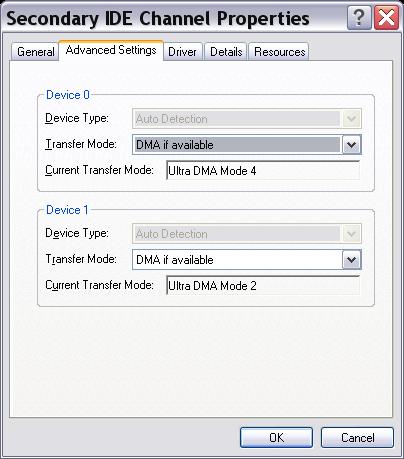
EDITED:
My secondary IDE channel properities:

This message has been edited since posting. Last time this message was edited on 4. March 2005 @ 08:29
|
|
corsican
Newbie
|
5. March 2005 @ 00:24 |
Link to this message
|
|
Hi there,
Yeah sound a little like how my problem started originally. I still have not fixed my driver yet...but following all the advice above has certainly helped...so I suggest you give it a go.
Goodl luck and let me know if it works.
Phil
|
|
Advertisement
|
|
|
|
orestnt
Newbie
|
5. March 2005 @ 02:17 |
Link to this message
|
|
Bad news, now either reads CD-R.
On monday I will change it for a new drive, but I will try to get another model of drive, I think that samsung H552B isn't a good drive.
Bye!
|


