User User name Password  
   
Saturday 14.3.2026 / 02:24
Search AfterDawn Forums:        In English   Suomeksi   Pĺ svenska
afterdawn.com > forums > dvd±r discussion > dvd±r for newbies > dvd with widescreen and full
Show topics
 
Forums
Forums
dvd with widescreen and full
  Jump to:
 
Posted Message
shedt
Newbie
_
26. February 2005 @ 07:31 _ Link to this message    Send private message to this user   
hi how would i go about removing one of these ?
Advertisement
_
__
Member
_
26. February 2005 @ 07:49 _ Link to this message    Send private message to this user   
In DVD Shrink it can be done very easily--Just go to re-author and only drag the format that you want to the left side--

Whitfield
Junior Member
_
26. February 2005 @ 07:53 _ Link to this message    Send private message to this user   
Also in DVD Shrink, you can locate the two file under the main movie folder and un-tick the one that DO NOT want to keep...

Carl

This message has been edited since posting. Last time this message was edited on 26. February 2005 @ 08:13

shedt
Newbie
_
26. February 2005 @ 08:09 _ Link to this message    Send private message to this user   
thanks, i tried that but it did not work, i'll fiddle with it some more :)
Junior Member
_
26. February 2005 @ 08:12 _ Link to this message    Send private message to this user   
I just re-read my post and besides the obvious grammer errors, I think I should have been more specific...

Using DVD Shrink in full backup mode, you can click on the "plus" sign next to the folder that says main movie which will open the drop down screen... From there you can un-tick the version (wide or full screen)that you do not want on you backup copy...

Carl

This message has been edited since posting. Last time this message was edited on 26. February 2005 @ 08:13

Advertisement
_
__
 
_
Senior Member

1 product review
_
26. February 2005 @ 09:14 _ Link to this message    Send private message to this user   
ok here's how you do it.......
in full disc mode in the folder that says main movie click and highlight the one you do not wish to keep.(you can play each one in the previewer to decide. it plays whichever is highlighed)
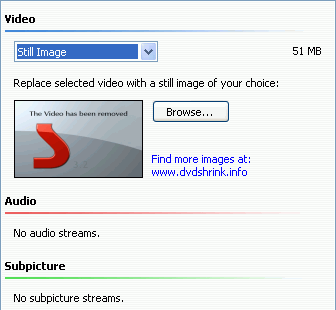
now over where it says compression automatic, select the dropdown menu and select still image.

that's it, done. only one version will be kept when you click backup. when you play your backup, if you select the version you removed, you will see the image that you inserted.
for a larger selection of available images go here.....
http://www.dvdshrink.info/title_replacements.php


This message has been edited since posting. Last time this message was edited on 26. February 2005 @ 09:15

afterdawn.com > forums > dvd±r discussion > dvd±r for newbies > dvd with widescreen and full
 

Digital video: AfterDawn.com | AfterDawn Forums
Music: MP3Lizard.com
Gaming: Blasteroids.com | Blasteroids Forums | Compare game prices
Software: Software downloads
Blogs: User profile pages
RSS feeds: AfterDawn.com News | Software updates | AfterDawn Forums
International: AfterDawn in Finnish | AfterDawn in Swedish | AfterDawn in Norwegian | download.fi
Navigate: Search | Site map
About us: About AfterDawn Ltd | Advertise on our sites | Rules, Restrictions, Legal disclaimer & Privacy policy
Contact us: Send feedback | Contact our media sales team
 
  © 1999-2026 by AfterDawn Ltd.

  IDG TechNetwork