|
Problem Backing Up Long Movies?
|
|
|
djlen
Member

|
27. February 2005 @ 15:34 |
 Link to this message

|
|
I tried backing up a copy of 'Patton'(171 mins.) using DVD Shrink to rip and DVD Decoder to burn. I have been using Scuba Pete's instructions and have had perfect results up until now, but with shorter movies.
I set the Shrink for 'Custom' and typed in 4350 in the box as I've done for all the other movies.
I only wanted the main movie on the disc and selected that and started the application. It burned the movie successfully, but the movie stopped before it was complete when I tried to play it back on the player. According to the timekeeper on my player it had a running time of 2'52, and usually the credits start to roll a couple of minutes before the end time indicated arrives.
It got to 2'52 and continued playing for about another 30 seconds and froze with the movie still unfinished. The box it comes in says the running time is 171 mins. or 2'51.
Can someone tell me what I might have done wrong or not done to cause this to happen?
Would it be better to set at, say 4320 or even smaller to alleviate the chance of getting too close to the edge of the disc? Or is there some other option for longer movies that I'm unaware of?
I use Fuji Film blanks and they burn and play well in my player.
Len
|
|
Advertisement

|
|
|
|
AfterDawn Addict
|
27. February 2005 @ 17:59 |
Link to this message
|
|
Some members suggest setting Shrink at 4300 mb if using media that is questionable as to quality. This is for the exact reason you stated to keep from burning all the way to the edge. You may want to try the burn on a RW disc first time to see how the compression affects the playback. If it plays good then just recopy the RW to a Blank R disc with any disc copy program so you don't have to decrypt it again.
Jerry
|
Moderator
3 product reviews
|
27. February 2005 @ 18:03 |
Link to this message

|
|
|
djlen
Member
|
28. February 2005 @ 04:00 |
Link to this message

|
|
Thanks for the replies guys.
I guess from your responses that I pretty much identified the problem. On longer movies I'll just use a lower compression number and hopefully this will
keep the material farther from the edge of the disc.
Len
|
AfterDawn Addict
|
28. February 2005 @ 04:05 |
Link to this message
|
If you buy the fuji's that are made in Japan,there media code is taiyo yuden.
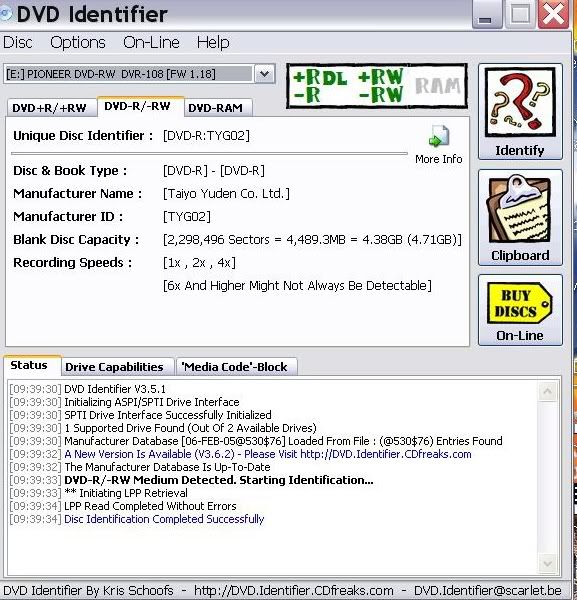
These are Fuji's -r 8x marked made in Japan
This message has been edited since posting. Last time this message was edited on 28. February 2005 @ 06:18
|
AfterDawn Addict
|
28. February 2005 @ 04:27 |
Link to this message
|
|
When the movie is a large one I would reccomend putting the movie on 2 disk's so you can keep a very good quality backup it's only an extra .30c or so, and in the end you end up with a much cleaner copy. The is a guide at my website (link in my signature) showing you how to make a long movie into 2 disk's using Shrink. Give it a try and you will see that those large movies come out much nicer this way. Some people don't like to change to a second disk while watching there movie, but hey thats why we have kids :-)
 My Guides--------->http://webpages.charter.net/bacitup/
Newbies------------>http://forums.afterdawn.com/thread_view.cfm/183136
Software ------->http://webpages.charter.net/bacitup/software.htm |
|
djlen
Member
|
28. February 2005 @ 05:22 |
Link to this message
|
|
bb - I wondered whether that would be the way to go and still save a nice copy. I will give the 1:1 app. a shot. I'm getting more and more familiar with both Decrypter and Shrink.....scary isn't it!!??!!
BTW, my kids are grown, but maybe the dogs will switch discs for me......nah, they'll slobber them up even worse than the kids used to.
Jim Dandy - I have no idea if my Fuji's were made in Japan and have no idea how to read the demo you posted. Can't I just look somewhere on the disc or the spindle?
Len
|
AfterDawn Addict
|
28. February 2005 @ 06:19 |
Link to this message
|
|
This message has been edited since posting. Last time this message was edited on 28. February 2005 @ 06:26
|
Moderator
3 product reviews
|
28. February 2005 @ 06:25 |
Link to this message
|
|
@ Jim
Where does it state in DVD Identifier that you've got a Fuji disc on analysis ? (not that I don't believe you of course)
Only Fuji DVD-Rs on sale in the U.K are normally coded as Fujifilm03 or similar.
|
AfterDawn Addict
|
28. February 2005 @ 06:57 |
Link to this message
|
|
Well they are branded fuji I was just showing you guys what the japanese fuji's I.D as.
I wouldnt lie about it,what would I have to gain by lying?It doesnt matter to me, if you believe me or not.
This message has been edited since posting. Last time this message was edited on 28. February 2005 @ 07:01
|
Moderator
3 product reviews
|
28. February 2005 @ 07:02 |
Link to this message
|
|
Yeah , like I say I totally believe you mate , it's just that we tend to get a lot of different types of media on sale here (UK) but never in all my days sdeen Fuji coded up as Taiyo Yudens.
I use Verbatim DataLife Plus x8 DVD-Rs at the moment that are TYG02 coded aswell , there are magnificent discs.
The branded Taiyo Yudens on sale [the only two trusted TYs I'd buy , as you know there are some fake ID TYs about ... yeah?] are so expensive I haven't bought any to date.
Expensive being 100 spindle for £50 :-(
/me does love Taiyo Yuden disc tho
|
AfterDawn Addict
|
28. February 2005 @ 07:15 |
Link to this message
|
|
Well the fuji's made in Japan here in the states I.D. at taiyo yuden and the fuji's made in Taiwan,I.D. as ricoh...I havent bought any taiwan made fuji's, but I read that on another forum, from Brobear.Ricoh is what some riteks I.D. as if im not mistaken.
I didnt believe at first either till I went to bestbuy and bought a cake of 50 of them.I got my fuji's for 40 cents a pc
This message has been edited since posting. Last time this message was edited on 28. February 2005 @ 07:18
|
|
djlen
Member
|
28. February 2005 @ 07:52 |
Link to this message
|
|
That's what they're selling for now at Best Buy.
I bought a 100pc. spindle for $39.95 yesterday.
I'll try the Identifier and see if I can figure out what I got.
I just used bb's 1:1 method and they came out beautiful!!! He's the man!!!:)
Len
|
AfterDawn Addict
|
28. February 2005 @ 07:54 |
Link to this message
|
|
Just put the disc in and click identify.
|
Moderator
3 product reviews
|
28. February 2005 @ 07:56 |
Link to this message
|
If you open DVD Decrypter in ISO Write mode (no need to burn anything) , on the right it'll show you disc code etc :-)
|
AfterDawn Addict
|
28. February 2005 @ 07:59 |
Link to this message
|
|
You dont have to burn anything with dvd identifier either.
|
|
djlen
Member
|
28. February 2005 @ 08:10 |
Link to this message
|
|
I just did and it says: Prodisc Technology Inc.
Manufacturer ID.: ProdiscFO1
OK, what in the world does that tell you?
Len
|
AfterDawn Addict
|
28. February 2005 @ 08:35 |
Link to this message
|
|
It tells me that they are not the ones made in Japan.Prodisc is so, so, media not as bad as memorex, but not as good as taiyo yuden, or verbatim.Ive got some fuji's, I bought several months ago, that are prodisc,but lately theyve been taiyo yudens.
|
|
djlen
Member
|
28. February 2005 @ 10:54 |
Link to this message
|
|
Is there an on line list of the best discs down to the worst anywhere, or is that a fluid thing that can change from time to time?
And what makes these taiyo yuden discs so great? Not being a smart ass....just would really like to know.
I'm actually very happy with the Fuji's. I guess I just don't know any better.
Len
|
|
sox2k4
Junior Member
|
28. February 2005 @ 11:47 |
Link to this message
|
|
in my opinion the best way to backup long movies is to use CCE Basic/Rebuilder. its unbelievable what this app can do.... i am backing up 3 hour movies onto a dvd5 that are completely undistinguishable from the original. its going to run you about $58 for CCE Basic, but it is oh so worth every penny. takes time to do it, but the end product is worth the tradeoff for me.
see the guide for Rebuilder - very easy to setup and use.
Athlon 64 3000+ @ 1.79ghz - Compaq notebook
512mb ddr-sdram (pc2700)
100gb Seagate internal (5400rpm)
160gb AcomData external (7200rpm)
Plextor PX-716UF burner
19" Dell Ultra Sharp 1905fp flat panel
|
|
sox2k4
Junior Member
|
28. February 2005 @ 11:50 |
Link to this message
|
Athlon 64 3000+ @ 1.79ghz - Compaq notebook
512mb ddr-sdram (pc2700)
100gb Seagate internal (5400rpm)
160gb AcomData external (7200rpm)
Plextor PX-716UF burner
19" Dell Ultra Sharp 1905fp flat panel
|
|
brobear
Suspended permanently
|
28. February 2005 @ 15:12 |
Link to this message
|
|
Media code/Manufacturer ID YUDEN000T02
Above is the ID I got for the last batch of Fuji 8X +R I purchased. They were the branded Fuji with made in Japan on the branded label. These were purchased from BestBuy.com on sale and are not normally the cheapest media. I got these on a 100 count spindle. At the same time I got a 100 count spindle of the Fuji 4X +R. The 4X are coded RICOHJPNR01 and are manufactured in Taiwan. Ricoh is a top supplier of +R/RW media for many of the top brands. Verbatim, TDK, Maxell, Sony and Ritek-Ridata to name just a few. I don't know what Fuji may be sending to other markets, but currently, they are sending the good "stuff" to the NA market.
I noticed the code Jim_Dandy supplied was for the 8X -R media. It appears they're shipping TY for both the 8X +R and -R offerings. The Ricoh media has been a long time favorite of mine. I'd heard of the TY media being excellent quality, just hadn't found a good sale for it at the time I was purchasing before. With the Fuji-TY media, I found it to be an excellent media and I would definitely buy it again.
I usually check the databases to get an idea of what media is being sold by which brands. The database info has been invaluable for my online purchases. It allows me to have some idea of the particular manufacturer's media I'm purchasing under the various brands. As the database is located in Germany, I'd imagine it to be representative of the rest of the EU market as well. Since the brands are international, I would suspect Fuji is just as good in Europe as it is in the US.
When speaking of Fuji, I am speaking of the items I am familiar with personally, the TY and Ricoh manufactured media. Fuji also sells media by Prodisc in the 4X -R as well as Pioneer (which I've heard good reports about). The 4X +R has been predominately Ricoh in the recent past with the 8X +/-R being TY. Fuji -RW is a Mitsubishi product (a top name) and the +RW is by Ricoh (another top name). So over all, the Fuji line is made by some of the more respectable (big name) manufacturers. For those in the know, even Verbatim has a black sheep in their CMC offering, the media that has made Memorex look bad.
So, in the end a brand depends pretty much on the manufacturer's media they sell. Those suppliers can vary over time and that is the problem the consumer has to face. I found out the brand you buy one day may not be the same for the next purchase. Some brands, as pointed out with the Fuji, can even sell more than one manufacturer's media for a single format offering. Memorex used to sell quality media and now are offering CMC. I used to buy memorex when they were selling Ricoh +R media. So the media market has come to a situation where caveat emptor applies, buyer beware.
|
|
sadsac
Suspended due to non-functional email address
|
28. February 2005 @ 15:46 |
Link to this message
|
|
I bought a pack of 50 Fuji 8x media a few weeks ago and they checked out as the same....Yuden000-T02's.
Be absolutely sure that the package label under the bar code says "made in Japan". They'll likely be Yuden disks. I know the 50 pack I bought were. Maybe the 100 packs are something different.
I don't know if it helps, but the bar code product number on my pack of 50 is 0-74101-75059-1.
|
|
brobear
Suspended permanently
|
28. February 2005 @ 16:08 |
Link to this message
|
|
Looking for Made in Japan isn't a prerequisite for getting quality media. (If you see Made in Japan, it's not a bad idea to buy that Fuji.) As I pointed out, the Ricoh media made in Taiwan is also a good media. Many of the trades and websites that do media reviews give Ricoh honorable mention, so it isn't just my personal opinion there. It appears the Prodisc (which is the question in many people's mind) is a 4X -R offering. ProdiscS03 if I remember correctly. djlen mentioned the ProdiscF01, I don't know where that one fits in. Which means one is only taking a gamble of getting a lesser quality media with some of the 4X -R (and wherever the F01 fits in). So, with Fuji, it's more a matter of knowing which manufacturer supplied which formats.
For the bar code readers, the 4X +R Ricoh media in Fuji was 0 74101 75002 7 for a 100 spindle. The label for the 8X got disappeared some time back. It appears the 0 7401 is a common part of the codes (at least for the big spindles).
This message has been edited since posting. Last time this message was edited on 1. March 2005 @ 00:57
|
|
Advertisement
|
|
|
|
brobear
Suspended permanently
|
28. February 2005 @ 16:20 |
Link to this message
|
|
djlen
What was the speed and format of the Fuji-ProdiscF01 media you purchased. The databases I'm using don't have everything listed. I'm not familiar with that one.
This message has been edited since posting. Last time this message was edited on 1. March 2005 @ 00:56
|






