User User name Password  
   
Sunday 15.3.2026 / 19:04
Search AfterDawn Forums:        In English   Suomeksi   Pĺ svenska
afterdawn.com > forums > dvd±r discussion > dvd±r for newbies > problem backing up long movies?
Show topics
 
Forums
Forums
Problem Backing Up Long Movies?
  Jump to:
 
Posted Message
AfterDawn Addict
_
28. February 2005 @ 16:31 _ Link to this message    Send private message to this user   
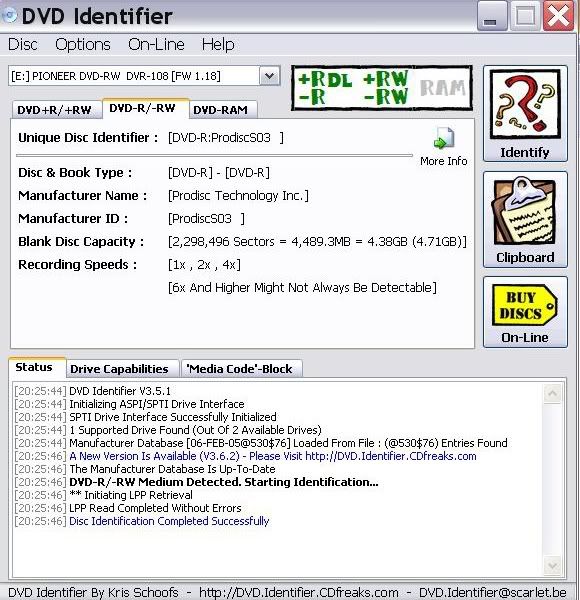
Here's the Fuji -r 4x that I bought several months ago.


need help? read this thread first-->http://forums.afterdawn.com/thread_view.cfm/183136
Advertisement
_
__
brobear
Suspended permanently
_
28. February 2005 @ 16:43 _ Link to this message    Send private message to this user   
Now if we can find where the ProdiscF01 fits in, we'll have a better picture of what to watch for in Fuji media. As I pointed out before, Fuji sells quite a bit of top line media and is on the same level in my opinion as several of the other top brands. By far better than Memorex, they started selling way too much of the CMC in most of their formats.

Speaking of CMC, some of the top brands have some offerings by the manufacturer. Verbatim, Imation, Samsung, Sunstar, Memorex, Speer, and Philips are among some of the brands selling CMC Magnetics media. However, Memorex is the brand that offers more CMC across the various formats.

Prodisc, besides selling under the Prodisc brand, also sells under the Fuji, Memorex and Medianca brand names.

'Brobear'


I was an earth-rim walker, a lurker at the threshold of the abyss. - Grendel -

This message has been edited since posting. Last time this message was edited on 28. February 2005 @ 16:51

djlen
Member
_
1. March 2005 @ 01:45 _ Link to this message    Send private message to this user   
They are Prodisc FO1, 8x, -R discs sold as FujiFilm discs. Somebody gave me a link to a data base that sort of categorizes DVD media and they are listed in the second tier for quality. "Very good and reliable", but a bit below those in the top tier. There are a bunch of manufacturers listed below them in the 3rd and 4th tiers.
I have had no problems at all with them, but as I've said previously, I'm so new at this I wouldn't know the difference if it bit me in the butt.

Len
brobear
Suspended permanently
_
1. March 2005 @ 02:48 _ Link to this message    Send private message to this user   
Our little discussion on media may have gotten slightly off track, though media is an important aspect of recording DVD video.

You said you were successful with the same media, but with shorter movies. What was the size of the movie only that you were recording? What was the compression level listed in Shrink under the compression settings? Also, did you use the quality settings when doing this backup?
Forgot to mention, another thing you can do is record to "Hard Disk Folder". That way you can view the files before you burn them. That takes the burner and media out of the picture entirely until you do the burn. That way you know if the problem is with the files or with the burner and media.

As far as those settings making the file smaller. I've never felt the need to do it. The default Shrink settings are well within the media capacity. I believe the last movie I did was 4.35 GB and the capacity of a disc is 4.37GB. That's giving you about 20MB of space from the edge of the disc. Just notice the burn circle on a disc following a burn at default and you'll notice an unused ring at the outer edge. It would be some pretty shabby media that requires going below the default settings, in which case you shouldn't be using it anyway.

This message has been edited since posting. Last time this message was edited on 1. March 2005 @ 14:40

djlen
Member
_
1. March 2005 @ 05:34 _ Link to this message    Send private message to this user   
The movie was 9 minutes short of 3 hours(171mins.) and was the first to lock up on me on replay.
I subsequently burned the movie in two parts and it burned and played very nicely on two disc's.
I don't know what the settings were on the first burn I tried, or the compression levels. I'm guessing that for that length, I was down in the low 60's, maybe 62% when burned.
I have backed up movies since then that were up to 2'30 in length with no problem, all on the same media.

Len
brobear
Suspended permanently
_
2. March 2005 @ 06:27 _ Link to this message    Send private message to this user   
djlen
The data requested was size, usually expressed in GB. When reading a disc in a drive, open my computer and check properties and it will give the size. Shrink also gives the size of files on a DVD. You gave me the length. 62% compression isn't too bad if you use the quality settings in Shrink. That's about the point I would start using an encoder setup though; something like DVD Rebuilder and CCE. From what you said about the backup working by splitting the movie; that shows your problem was from compression.

'Brobear'


I was an earth-rim walker, a lurker at the threshold of the abyss. - Grendel -

This message has been edited since posting. Last time this message was edited on 2. March 2005 @ 06:33

djlen
Member
_
2. March 2005 @ 11:24 _ Link to this message    Send private message to this user   
Thanks brobear.
BTW, I always use the quality settings if there is any compression at all. I want the best finished product I can get, and although it takes a bit longer, it's worth it to me.

Len
Advertisement
_
__
 
_
brobear
Suspended permanently
_
2. March 2005 @ 19:57 _ Link to this message    Send private message to this user   
Well at least now you know where the problem lies. As I mentioned before, if your current transcoder isn't doing a good job, you might consider changing apps. RB/CCE is an excellent setup for doing large movies and with CCE Basic, does 1 or 2 passes, it doesn't take that much longer than Shrink using the quality settings.

BTW, you're welcome.

'Brobear'


I was an earth-rim walker, a lurker at the threshold of the abyss. - Grendel -
 
afterdawn.com > forums > dvd±r discussion > dvd±r for newbies > problem backing up long movies?
 

Digital video: AfterDawn.com | AfterDawn Forums
Music: MP3Lizard.com
Gaming: Blasteroids.com | Blasteroids Forums | Compare game prices
Software: Software downloads
Blogs: User profile pages
RSS feeds: AfterDawn.com News | Software updates | AfterDawn Forums
International: AfterDawn in Finnish | AfterDawn in Swedish | AfterDawn in Norwegian | download.fi
Navigate: Search | Site map
About us: About AfterDawn Ltd | Advertise on our sites | Rules, Restrictions, Legal disclaimer & Privacy policy
Contact us: Send feedback | Contact our media sales team
 
  © 1999-2026 by AfterDawn Ltd.

  IDG TechNetwork