|
Movie skipping?
|
|
AfterDawn Addict
6 product reviews

|
23. April 2005 @ 21:31 |
Link to this message

|
Hi breddick,
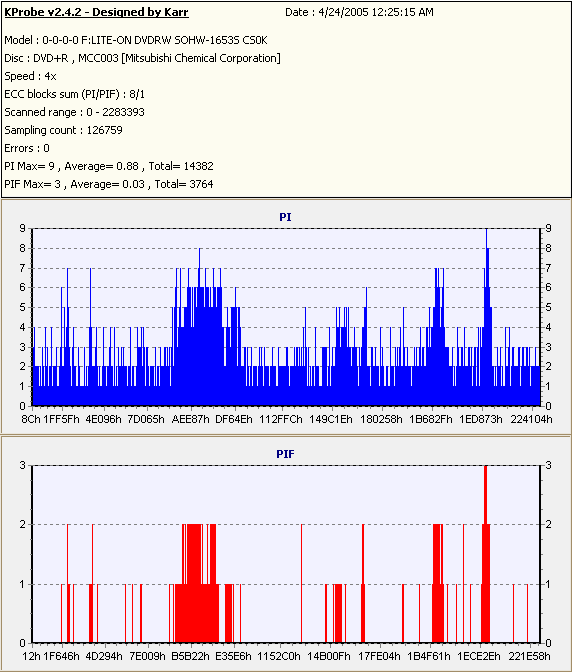
Your PIF spikes are way to high. Anything under 4 is considered good. Don't worry about the PI spikes unless they get in the mid to upper 100's There's a couple things we can try. First update your dvdrw with the latest f/w update. look here. http://www.liteonamericas.com/us/download.htm If there is no improvement you can try resetting the eeprom (I had to do this to my litey and now the burns are the best they've ever been) but we'll try this last. Here's a scan I just made. Not one of my best but still ok.
Rig #1 Asus Rampage Formula Mobo, Intel Core2Quad Q9450 CPU @ 3.55ghz, 2gb Corsair DDR2 1066 Dominator Ram @ 5-5-5-15, TR Ultra 120 Extreme w/ Scythe 9 blade 110 cfm 120mm Fan HSF, HIS Radeon 512mb HD3850 IceQ TurboX GPU, Corsair 620HX P/S, CM Stacker 830 Evo Case, Rig #2 Asus P5W DH Deluxe Mobo, Intel C2D E6600 CPU @ 3.6ghz, 2gb Corsair XMS2 DDR2 800 Ram @ 4-4-4-12-2t, Zalman CNPS9500LED HSF, Sapphire Radeon X850XT PE GPU, Corsair 620HX P/S, Cooler Master Mystique Case, Viewsonic 20.1" Widescreen Digital LCD Monitor, Klipsch Promedia Ultra 5.1 THX Desktop Speakers, http://valid.x86-secret.com/show_oc.php?id=348351 http://valid.x86-secret.com/show_oc.php?id=236435This message has been edited since posting. Last time this message was edited on 23. April 2005 @ 21:32
|
|
Advertisement
|
 |
|
|
|
breddick
Newbie

|
24. April 2005 @ 05:49 |
Link to this message
|
|
Mort81,
I updated the F/W from the link that you gave me. I'll give it another shot and see if its any better.
I should have mentioned that I am using the booktype utility which takes away any incompatability issues.
BTW how do you attach your kprobe graph to your message... Do I have to somehow save it and host it to my own webspace and then link to it??? or is is simpler than that? I figure theres a guide on here that will explain it all... does anyone know where to find it?
Thanks!
Dell Dimension 4500
WinXP
1.8 GHZ P4
768 RAM
40 gig HD (main system)
80 gig HD (for movie editing)
LITE-ON DVD+/-RW SOHW-1673
NEC-CD/RW
|
|
Brodey
Newbie
|
24. April 2005 @ 06:20 |
Link to this message

|
|
Someone help me understand something Im not getting. I can rip and burn movies and have been using DVDShrink and occasionally when I have an issue, I use dvd decrypter then Shrink that file. I use TDK+R dvds and have never had trouble, But the last two movies, Meet The Fockers and House of Flying Daggers once ripped and burned, Skip and give digital pixels when I play them on my dvd player, although they play well on the pc, they dont on the dvd player. What is causing that, anyone know? I wanted to add that this also happens on other dvd players if I share them with others to watch so I dont believe its an outdated dvd player
This message has been edited since posting. Last time this message was edited on 24. April 2005 @ 06:29
|
|
breddick
Newbie
|
24. April 2005 @ 06:26 |
Link to this message
|
|
Brody,
exactly the problem I'm having. I've updated my firmware and I'm going to try again. I think I'm going to try to take out the extended version to also lessen my compression by a bunch. I'm using a good burner and good media so I don't think those things are an issue. Good luck and if you figure it out feel free to repost your findings!
Dell Dimension 4500
WinXP
1.8 GHZ P4
768 RAM
40 gig HD (main system)
80 gig HD (for movie editing)
LITE-ON DVD+/-RW SOHW-1673
NEC-CD/RW
|
AfterDawn Addict
|
24. April 2005 @ 06:27 |
Link to this message
|
|
Skips, freezing, and pixelation are usually caused by subpar media, or you are burning to fast. Use media such as TY, Verbatim, Sony, Maxell. Try burning at 2x or 4x. Also make sure your firmware is up to date on your burner.
|
|
Brodey
Newbie
|
24. April 2005 @ 08:14 |
Link to this message

|
|
I tried burning them at 4x and 2x and the results were the same. I tried finding out how to update the firmware but could not see where there was an option to do so on XP. I went to the HP website but my media center does not have what is described on the site that directs me to the firmware update, is there another generic way to update the firmware?
I found the FIRMWARE update online and updated it that way, it worked and my copies are perfect. Gracias Arnie
This message has been edited since posting. Last time this message was edited on 24. April 2005 @ 08:50
|
AfterDawn Addict
6 product reviews
|
24. April 2005 @ 09:57 |
Link to this message
|
|
breddick,
You need to use an image hosting website to post your scan results. I use photo bucket. I also booktype all my +r media dvd-rom. Like I stated earlier, your PIF errors are too high.
Rig #1 Asus Rampage Formula Mobo, Intel Core2Quad Q9450 CPU @ 3.55ghz, 2gb Corsair DDR2 1066 Dominator Ram @ 5-5-5-15, TR Ultra 120 Extreme w/ Scythe 9 blade 110 cfm 120mm Fan HSF, HIS Radeon 512mb HD3850 IceQ TurboX GPU, Corsair 620HX P/S, CM Stacker 830 Evo Case, Rig #2 Asus P5W DH Deluxe Mobo, Intel C2D E6600 CPU @ 3.6ghz, 2gb Corsair XMS2 DDR2 800 Ram @ 4-4-4-12-2t, Zalman CNPS9500LED HSF, Sapphire Radeon X850XT PE GPU, Corsair 620HX P/S, Cooler Master Mystique Case, Viewsonic 20.1" Widescreen Digital LCD Monitor, Klipsch Promedia Ultra 5.1 THX Desktop Speakers, http://valid.x86-secret.com/show_oc.php?id=348351 http://valid.x86-secret.com/show_oc.php?id=236435 |
|
breddick
Newbie
|
24. April 2005 @ 18:24 |
Link to this message
|
|
Mort81,
I did as you said and did the burn again. I also did the deep analysis on shrink before encoding. Here's what I got from K-probe on the second attempt. I haven't tried it in my dvd player yet but the scan shows to be a major improvement... Again, I'd put the graphs on here but I haven't figured that out yet.
Date : 4/24/2005 9:17:09 PM
Model : 1-0-0-0 LITE-ON DVDRW SOHW-1673S JS05
Disc : DVD+R , MCC004 [Mitsubishi Chemical Corporation]
Speed : Max
ECC blocks sum (PI/PIF) : 8/1
Scanned range : 0 - 2286154
Sampling count : 117871
Errors : 3
PI Max : 10
PI Average : 0.75
PI Total : 12579
PIF Max : 2
PIF Average : 0.04
PIF Total : 710
Thanks!!!
Dell Dimension 4500
WinXP
1.8 GHZ P4
768 RAM
40 gig HD (main system)
80 gig HD (for movie editing)
LITE-ON DVD+/-RW SOHW-1673
NEC-CD/RW
|
AfterDawn Addict
6 product reviews
|
24. April 2005 @ 18:31 |
Link to this message
|
|
breddick,
You are welcome. That looks a whole bunch better. That disc should play without any problems. Glad to see the improvement. Let me know if I can help in the future.
Mort
|
|
breddick
Newbie
|
25. April 2005 @ 06:05 |
Link to this message
|
Dell Dimension 4500
WinXP
1.8 GHZ P4
768 RAM
40 gig HD (main system)
80 gig HD (for movie editing)
LITE-ON DVD+/-RW SOHW-1673
NEC-CD/RW
|
|
breddick
Newbie
|
25. April 2005 @ 06:35 |
Link to this message
|
|
Could someone tell me what is wrong with my image tag in the above post. I copied it directly from photo-bucket and thats the way it showed up. I could just keep trying but I don't want to clutter up the board just to figure it out.
Thanks
Dell Dimension 4500
WinXP
1.8 GHZ P4
768 RAM
40 gig HD (main system)
80 gig HD (for movie editing)
LITE-ON DVD+/-RW SOHW-1673
NEC-CD/RW
|
|
squizzle
AfterDawn Addict
|
25. April 2005 @ 07:03 |
Link to this message
|
|
try to change the img tags to lower-case. That's the only thing I can think of, unless you put the wrong URL in there.
Convert PAL to NTSC or NTSC to PAL------>http://forums.afterdawn.com/thread_view.cfm/167922
ScubaPete's guides------>http://www.dvdplusvideo.com/tutorial007.html
Bbmayo's guides------>http://home.comcast.net/~bbmayo/index.html
My ever-growing movie collection------>http://www.intervocative.com/dvdcollection.aspx/squizzle
|
AfterDawn Addict
6 product reviews
|
25. April 2005 @ 09:00 |
Link to this message
|
|
breddick,
You have to browse < find the folder with your pic < submit < then copy the IMG < paste it in your thread.
|
|
JJenn74
Junior Member
|
25. April 2005 @ 09:24 |
Link to this message
|
|
Hey guys! Glad to see my original post take off! I see you guys talking about graphs and levels being too high or just right. How do I get those reading for my discs? I've switched my media from DVD+R to DVD-R and that cleared up alot of my problems. But, I just burned "Ocean's 12" and tried to watch it on my Playstation 2 and it skipped. I also copied "ET" and tried to play it on my standalone and it played fine until 3/4 of the way through then skipped. What am I doing wrong? I'm burning at 4x on good media using Decryter and Shrink. Should I change the bookmark? Would that clear up any problems or is it something else?
|
AfterDawn Addict
6 product reviews
|
25. April 2005 @ 09:32 |
Link to this message
|
|
Hi JJenn74,
What is the brand and media code of the media you are useing now? Also setting booktype to dvd-rom can only be done with dvd+r/rw media and your burner has to be capable of doing this. Some aren't. Pioner is one example.
|
|
Advertisement
|
|
|
|
breddick
Newbie
|
25. April 2005 @ 10:58 |
Link to this message
|
One more try...

Dell Dimension 4500
WinXP
1.8 GHZ P4
768 RAM
40 gig HD (main system)
80 gig HD (for movie editing)
LITE-ON DVD+/-RW SOHW-1673
NEC-CD/RW
|



