|
To label o not to label ?
|
|
|
darkcast
Junior Member

|
26. April 2005 @ 09:48 |
 Link to this message

|
|
Do DVD labels affect the DVD compatibility in DVD players? And if it does why ?
|
|
Advertisement
|
 |
|
|
AfterDawn Addict
|
26. April 2005 @ 09:51 |
Link to this message
|
|
hi
most would say not! as it spins it out of true!
but you could use printable discs?
Nothing here to see, move along folks.
 |
|
OU812Ono
Member
|
26. April 2005 @ 22:00 |
Link to this message

|
|
Never heard anything good about labels myself. I always stick with the trusty old Sharpie.
|
|
deadcat
Senior Member
|
27. April 2005 @ 02:02 |
Link to this message
|
|
yep, definitly sharpie or printer, not stick on labels
Antec Plus View Case w 5 fans, Asus A8N Sli, Athlon 64 3500, 2gig PC3200, 7600GS x 2 graphics, 2x 120gb Sata2 Raid0, 2x 320gb Sata 2, 2x 250gb USB External, Aopen Com4824,Pioneer A08, Polyview 17' lcd x2
|
|
camstuf
Suspended permanently
|
27. April 2005 @ 02:25 |
Link to this message
|

Emachines: T2865/AMD Athlon? XP 2800+ Processor (2.083 GHz)
NVIDIA® nForce?2/160 GB HDD/512 MB DDR (PC 2700)
DVD +/- RW Drive CD-ROM Drive; 3.5" 1.44MB FDD;
8-in-1 Media Reader/ This message has been edited since posting. Last time this message was edited on 1. May 2005 @ 03:45
|
AfterDawn Addict
|
27. April 2005 @ 02:39 |
Link to this message
|
|
Sharpies work fine for me, labels will make your DVD reader, writer or player spin off balance not only that but you risk them getting jammed up inside if they come loose.
|
AfterDawn Addict
|
27. April 2005 @ 07:19 |
Link to this message
|
|
hi
whats a SHARPIE ?
Nothing here to see, move along folks.
|
Senior Member
|
27. April 2005 @ 08:35 |
Link to this message
|
|
labels affect the tint of the ink on the disc more than any thing else.making some disc hard to read.i put labels on verb dvd+r and they play most of the time but can cause problems sometimes.i use on my sony dvd+r and have no problems at all.the difference being,the verbs have a lite purple tint while the sonys have a blue-purple tint.making the lite purple tint darker by putting on the label can make the disc harder to read while the blue-purple tint is already dark to begin with,so labels dont affect them.if you copied to the dvdr properly and apply the label properly there should be minimal problems if any.i use memorex labels and havent had one even remotely peel off or jam in player or had a dvd spin off balance(dont know what those guys are talking about).
dont forget to clean your lens too.labels do make discs harder to read but they work alot of the times anyway.
|
|
OU812Ono
Member
|
27. April 2005 @ 11:27 |
Link to this message

|
If your serious Rotary

|
AfterDawn Addict
|
27. April 2005 @ 11:48 |
Link to this message
|
|
hi
yes indeed, most of the time i talk poo...........
and a sharpie is a pen! thx OU812Ono,
i never write on discs either, they may spontaneously combust....
Nothing here to see, move along folks.
This message has been edited since posting. Last time this message was edited on 27. April 2005 @ 11:49
|
|
forkndave
Member
|
27. April 2005 @ 12:33 |
Link to this message
|
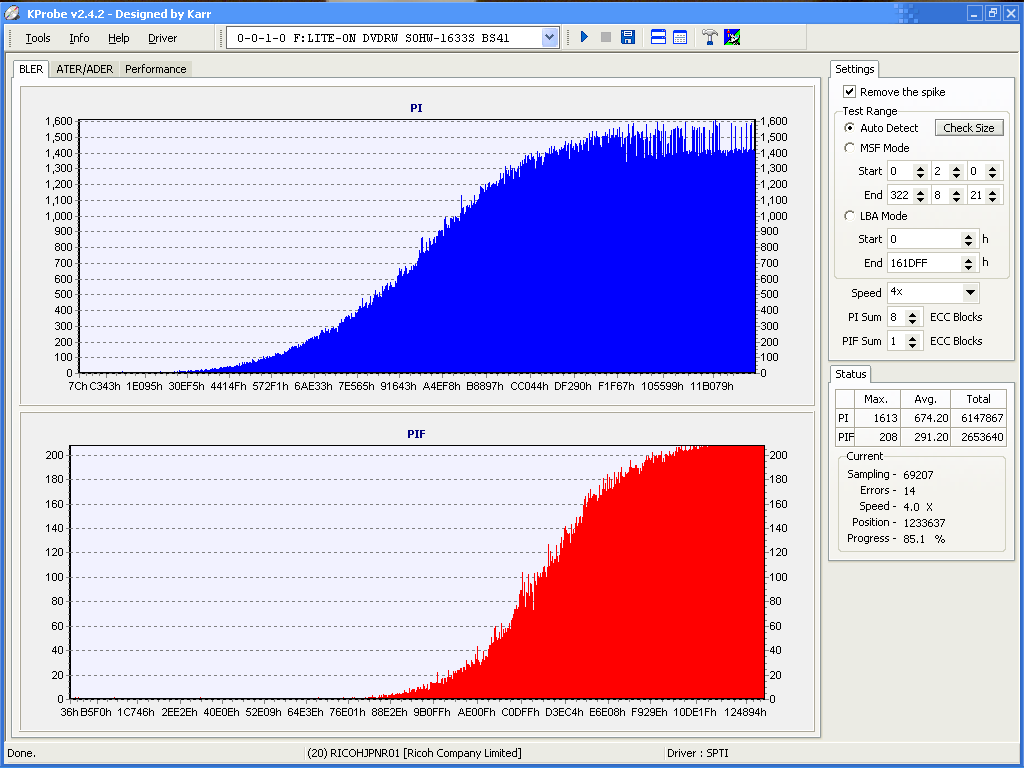
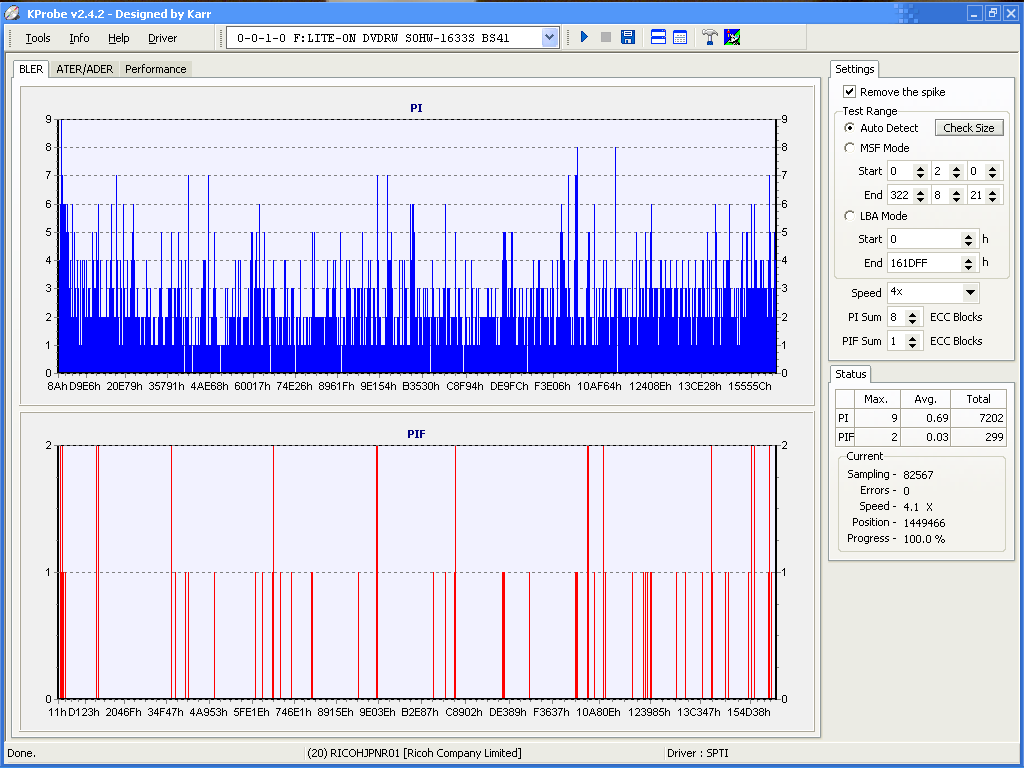
This is what labels do. The absolutely horrible scan is with a Memorex label that was put on with an applicator. It played fine initially. This is after the disc was several mponths old. The other scan is rhe same disc after the label was removed. I don't believe the color of the dye has anything to do with it. It is the microscopic wobble that the label causes.The laser has a problem with a target that moves around.
This message has been edited since posting. Last time this message was edited on 27. April 2005 @ 12:38
|
|
baabaa
AfterDawn Addict
|
27. April 2005 @ 12:45 |
Link to this message
|
|
I wonder whether there is a gadget available that can re-balance a disc...........like the machine that balances wheels on cars, add a weight to a certain spot and bingo..................
That would increase label sales I would presume.......LOL
...............PIO is no go, DMA all the way...............
Beware of the Pixies - they move in over night and turn your life upside down

|
AfterDawn Addict
|
27. April 2005 @ 12:51 |
Link to this message
|
|
@forkndave
Thank you for the graphic disk scan, I thought I was going crazy, with my post after reading sui-cyco's. My library puts these clear sticky labels on their disks and they are always pealing at the edges, and my dvd player has a whole lot of trouble with them.
|
|
movies27
Senior Member
|
27. April 2005 @ 13:24 |
Link to this message
|
|
I wish there was something we could use besides a sharpie or wobbly labels...my handwriting isnt all that good..
|
Senior Member
|
27. April 2005 @ 15:34 |
Link to this message
|
|
you probanly have cheap labels or dont know how to put a label on properly.im not lying to you i havent had not one even remotely peel.now the question remains how long have you had the labels on before they started to peel.
and how exactly does that graph prove that it is the BALANCE of the disc that causes the read errors.does that program actually test the BALANCE of a disc?i think you would need sensors installed on your drive to test something like that.correct me if im wrong
yes labels can cause reading problems period.but some dvdr can handle the infringment is what im saying and its not the freaking balance.if your dvd is wobbling you need to check the bearings on your dvd player spindle.unless you are claiming that one side of a label is so much heavier than the other side to cause it to be off balance enough to cause it to wobble.its just a thin peice of paper that is suppose to be affixed to the disc proportionatly.
|
|
movies27
Senior Member
|
27. April 2005 @ 16:44 |
Link to this message
|
|
Well i used to use cd stomper but after i heard all of the problems associated with labels i decided to use a sharpie..it's not professional but it works.My player will play the 1's with labels its just some of my friend players cant read them to well so thats why i just dont bother with them.
|
|
forkndave
Member
|
27. April 2005 @ 16:49 |
Link to this message
|
|
The labels were Memorex, which is the brand that you say you use. They were put on with a Memorex applicator. They were not peeling off. The K Probe scans are just to illustrate what a label can do. These are both the same disc. I used to label all of my DVDs. I threw tons of them away not realising what the problem was. Every DVD that I had that skipped or wouldn't play was good after I removed the label. Incidenrally, they aren't easy ro get off without damaging the disc. It's time consuming. You go ahead and use all the labels that you want, but experience over the last couple of years has told me not to. If they work for you, fine. I have since gone to printable DVDs and no more of those problems.
Dave
|
AfterDawn Addict
|
27. April 2005 @ 17:28 |
Link to this message
|
Nice article on the care of dvds, it discusses the use of labels.
http://www.backupcritic.com/faq/dvd-care.html
From the article
Quote:
DVD Care: Labeling
You can buy any number of products for creating beautiful labels for your recordable DVD. If you want to avoid as much risk of data damage as possible, most of them are a bad idea.
Putting adhesive labels on recordable CDs is a bad idea because they have a metal layer on that side that is prone to damage from the chemicals in the adhesive. The sensitive layers are in the middle of recordable DVDs, not on the surface, so they should be less sensitive to such problems. However, DVD drives are still susceptible balance problems caused by a DVD that has a label that is not equally distributed around the disc. The safest bet is to not use adhesive layers on DVDs.
Various printing technologies are also capable of causing balance problems for recordable DVDs. However, there are some printing solutions that involve adding no material to the disc. In particular, HP's "LightScribe" technology lets you burn your recordable DVD, then flip the disc over and burn a silkscreen image on the label side, using the same laser that was used to burn data. However, this requires purchasing special DVD discs whose label side is coated in a special material designed for this process.
In the end, the safest labeling solution for ordinary recordable DVDs is the same as for recordable CDs. Use a pen specially designed for labelling recordable media, write on the label side of the disc, and only write on the clear portion of the hub of the disc.
This message has been edited since posting. Last time this message was edited on 28. April 2005 @ 02:36
|
|
cimerron
Suspended due to non-functional email address
|
27. April 2005 @ 17:47 |
Link to this message
|
|
Ive never had a problem with a sharpie. never skips.
3.4 Ghz Dell Dimension 8400
320 Gig HDD
1 Gig SDRAM
Windows XP Pro
|
Senior Member
|
27. April 2005 @ 17:50 |
Link to this message
|
|
like i said labels cause difficulty reading,period.but if you fine tune your burn settings to accomodate the labels and apply them properly you can get them to work for you.and some dvds handle labels better than others.and i do agree that is a pain in the ass when a dvd messes up because it has a label on them.thats why i only put labels on certain brands of dvds.
well some people were saying it was the balance of the disc with the labels on that caused the problems.thats why i asked if your program could prove the balance caused the problems.i dont think the disc balance is the problem with labels.
|
|
forkndave
Member
|
27. April 2005 @ 18:38 |
Link to this message
|
|
I can't prove it, but the general consensus is that's what causes the problems. I believe I have read it on some web site, but I don't remember where. It's not important anyway. I believe I'm done now.
Dave
|
|
baabaa
AfterDawn Addict
|
27. April 2005 @ 22:05 |
Link to this message
|
Quote:
i dont think the disc balance is the problem with labels.
It is obvious that just because you don't think it is the labels then it isn't - period.
So what is the problem then if it isn't the labels?
...............PIO is no go, DMA all the way...............
Beware of the Pixies - they move in over night and turn your life upside down
|
|
deadcat
Senior Member
|
28. April 2005 @ 01:55 |
Link to this message
|
|
yes labels can cause reading problems period....so why use them??? personally anything that affects my viewing pleasure isnt going to hang around long
unless you are claiming that one side of a label is so much heavier than the other side to cause it to be off balance enough to cause it to wobble....it doesnt have to be greatly larger, even slightly off centre will throw the balance out. Remember that dvd/cd's spin at a heap of rpm, it doesnt take much for them to get out of whack, splinter, and stuff your drive (and thats not a myth it does happen)
but if you fine tune your burn settings to accomodate the labels....????please explain????
Antec Plus View Case w 5 fans, Asus A8N Sli, Athlon 64 3500, 2gig PC3200, 7600GS x 2 graphics, 2x 120gb Sata2 Raid0, 2x 320gb Sata 2, 2x 250gb USB External, Aopen Com4824,Pioneer A08, Polyview 17' lcd x2
|
Senior Member
|
28. April 2005 @ 11:06 |
Link to this message
|
what im saying is putting labels on a disc requires you to use very low speeds to get the copy to work right.i burned movies that worked fine at 4x and 2x then put a label on them and got skippy in certain parts of the movie.i then started burning at 1x then put labels on and no longer had problems.so without labels i could burn from 1x-4x with the labels i could only burn at 1x to get them to work right.
Quote:
It is obvious that just because you don't think it is the labels then it isn't - period.
man,have youve been reading my post right?i was talking about the balance of the disc with labels on, not being the problems with LABELS.labels cause difficulty reading but not for that reason.i wouldnt suggest anyone using labels unless you know how to use them propperly.i get labels to work for me after having extensive use of them and seeing where they would work and wouldnt.most people dont like the hassle of trying to make them work.but im the kind of person that tries to get things that dont work and try and make them work.
and by the way i tested this balance theory out.i got a disc that didnt work with a label.took the label off(and it worked)then put 6(six) pieces of scotch tape on one side of the disc(on top side of course). then put that disc in player and started it.the machine was humming and vibrating like it was going to take off or something.so it is safe to say that disc was totally off balance,and the disc worked still,but didnt with the label on.
|
|
Advertisement
|
|
|
|
bardie
Senior Member
|
28. April 2005 @ 14:15 |
Link to this message
|
|
I stopped using stick on labels as I encounted some discs not playing correctly so now I buy printable discs and that has solved the issue plus it makes your back up look very professional as well.

THE LAND DOWN UNDER |



