|
everything I burn skips and pixels near the end of dvd!
|
|
|
boom38
Junior Member

|
1. May 2005 @ 22:34 |
Link to this message

|
|
I am new to the burning thing, I have done a few and everything that I burn skips, pixels and freezes near the end of the DVD.
I have tried every speed as recommended with no change. I am using Ridata 8X printable DVD-R's that I was told where good quality.
Can anyone help me with some ideas to try? Let me know.
Thanks
|
|
Advertisement

|
 |
|
|
|
baabaa
AfterDawn Addict
|
2. May 2005 @ 00:14 |
Link to this message
|
|
Reduce the overall file size to around 4300Mb.
Alot of readers have trouble reading the outer circumference of the disc, therefore by reducing the overall filesize, reduces the chance of burning to the outer circumference.
This is a common issue.......try to not burn to the full capacity of the disc...............
...............PIO is no go, DMA all the way...............
Beware of the Pixies - they move in over night and turn your life upside down

|
AfterDawn Addict
|
2. May 2005 @ 00:33 |
Link to this message

|
|
hi
i would also try 4x burning!
Nothing here to see, move along folks.
 |
|
aabbccdd
Suspended permanently
|
2. May 2005 @ 01:09 |
Link to this message
|
|
also just do the movie ONLY with no trailers or previews at 4x max
|
|
baabaa
AfterDawn Addict
|
2. May 2005 @ 06:32 |
Link to this message
|
|
LMAO.............rotary could you please make a decision on your sig gif's, you're driving me nuts..............LOL
Cool as always though..............Do I detect more Symantec?????
...............PIO is no go, DMA all the way...............
Beware of the Pixies - they move in over night and turn your life upside down
|
|
boom38
Junior Member
|
2. May 2005 @ 11:37 |
Link to this message
|
|
I have tried all speeds so that doesn't seem to matter.
|
|
baabaa
AfterDawn Addict
|
2. May 2005 @ 11:48 |
Link to this message
|
Quote:
Reduce the overall file size to around 4300Mb.
...............PIO is no go, DMA all the way...............
Beware of the Pixies - they move in over night and turn your life upside down
|
|
squizzle
AfterDawn Addict
|
2. May 2005 @ 14:45 |
Link to this message
|
|
do they play fine on other players? Sometimes I've noticed that certain players get goofy with certain media towards the end, but that doesn't necessarily mean it's bad media or a bad burn. Try to play the movie on your computer using the burner drive. If the pixellation still happens, try different media.
Convert PAL to NTSC or NTSC to PAL------>http://forums.afterdawn.com/thread_view.cfm/167922
ScubaPete's guides------>http://www.dvdplusvideo.com/tutorial007.html
Bbmayo's guides------>http://home.comcast.net/~bbmayo/index.html
My ever-growing movie collection------>http://www.intervocative.com/dvdcollection.aspx/squizzle
|
|
boom38
Junior Member
|
2. May 2005 @ 18:33 |
Link to this message
|
Okay, I put the DVD Collateral in the dvd rw, opend DVD Shrink. Hit the re author button, drag just the movie over and it shows it is 4464mb and the green status bar is full. Can I make this smaller to be the 4300mb that you suggested?
Let me know.
Thanks
|
|
squizzle
AfterDawn Addict
|
2. May 2005 @ 19:01 |
Link to this message
|
click Edit/Preferences, then change to Custom and type in 4300:
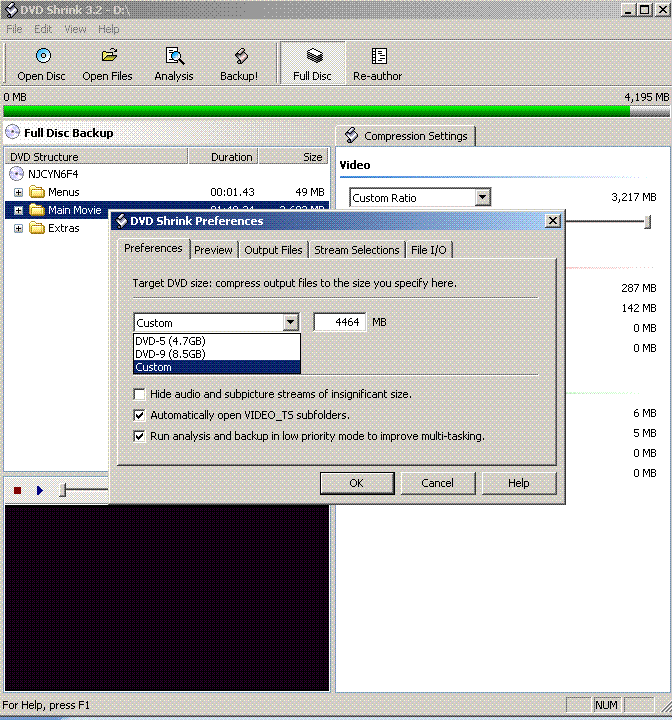
Convert PAL to NTSC or NTSC to PAL------>http://forums.afterdawn.com/thread_view.cfm/167922
ScubaPete's guides------>http://www.dvdplusvideo.com/tutorial007.html
Bbmayo's guides------>http://home.comcast.net/~bbmayo/index.html
My ever-growing movie collection------>http://www.intervocative.com/dvdcollection.aspx/squizzle
|
|
jhs1886
Suspended permanently
|
2. May 2005 @ 22:11 |
Link to this message

|
I have the same problem. Some dvd players will not play at all but most just give me the stopping and skipping towards the end. I use dvd-shrink and AnyDVD. I have it set at 4300 and usually do movie only to reduce shrinkage but every dvd I burn does it. I've tried everything mentioned except name brand blank media. Any more suggestions would be greatly appreciated.
|
|
baabaa
AfterDawn Addict
|
2. May 2005 @ 22:20 |
Link to this message
|
Quote:
I've tried everything mentioned except name brand blank media
Maybe it's time to try the named media..............
...............PIO is no go, DMA all the way...............
Beware of the Pixies - they move in over night and turn your life upside down
|
|
boom38
Junior Member
|
3. May 2005 @ 07:34 |
Link to this message
|
|
does it matter how much you compress, like if I want the full disc and compress it to 4300mb does it affect the quality?
|
|
Potisgood
Newbie
|
3. May 2005 @ 07:42 |
Link to this message
|
Yeah I have a problem with the skipping and stuff also. But mine screws up anywhere in the movie. I've burned a few dvds that play the whole movie fine but most screw up. I burned Without A Paddle and when I played it in my dvd player most of the movie is screwed. But when I play it on my computer most of the movie is fine with a little skipping during the movie but alot more toward the end. I use DVD Shrink, DVD Decrypter, and an old version of Nero. And I use this cheap burner I bought at Wal Mart. Would making the overall size whatever smaller help my problem too or am I doing something wrong?
|
AfterDawn Addict
|
3. May 2005 @ 07:46 |
Link to this message
|
hi
YES YES YES el cheapo crappeo discs!
BUY DECENT!!!
your troubles will 99.9% be gone, like it was all a dream!!!
=========================
' baabaa
Quote:
Cool as always though..............Do I detect more Symantec?????
yes how did you guess? hehehe...
Nothing here to see, move along folks.
This message has been edited since posting. Last time this message was edited on 3. May 2005 @ 07:48
|
|
Potisgood
Newbie
|
3. May 2005 @ 07:47 |
Link to this message
|
|
Buy a new burner? Great...What would you recommend?
|
|
squizzle
AfterDawn Addict
|
3. May 2005 @ 08:53 |
Link to this message
|
|
I think he was recommending better media, not a different burner. It'd be logical to try a media fix before buying a new burner anyway.
Convert PAL to NTSC or NTSC to PAL------>http://forums.afterdawn.com/thread_view.cfm/167922
ScubaPete's guides------>http://www.dvdplusvideo.com/tutorial007.html
Bbmayo's guides------>http://home.comcast.net/~bbmayo/index.html
My ever-growing movie collection------>http://www.intervocative.com/dvdcollection.aspx/squizzle
|
|
Potisgood
Newbie
|
3. May 2005 @ 09:00 |
Link to this message
|
|
Oh I see
This message has been edited since posting. Last time this message was edited on 3. May 2005 @ 09:03
|
AfterDawn Addict
|
3. May 2005 @ 09:00 |
Link to this message
|
|
hi
yes my post was to say get some good branded media i use ritek go5
not get a new burner!
Nothing here to see, move along folks.
|
|
baabaa
AfterDawn Addict
|
3. May 2005 @ 09:26 |
Link to this message
|
|
@rotary, it looks like you are trying to hack the planet according to your gif.......Lovely...........
Yes, go down the media route, then if that fails, have a look at updating the firmware.........
...............PIO is no go, DMA all the way...............
Beware of the Pixies - they move in over night and turn your life upside down
|
|
bill1996
Junior Member
|
3. May 2005 @ 13:22 |
Link to this message
|
|
as baabaa says do this.
Reduce the overall file size to around 4300Mb.
Alot of readers have trouble reading the outer circumference of the disc, therefore by reducing the overall filesize, reduces the chance of burning to the outer circumference.
This is a common issue.......try to not burn to the full capacity of the disc........
Since doing this over a year ago i havent had any glitches at the end of the movies............from cheapo media to top grade.
2zbar
|
|
jhs1886
Suspended permanently
|
4. May 2005 @ 03:27 |
Link to this message
|
|
Which is best and why? My recorder will do + or -. You guys who know everything about dvds are a__h_l_es. We don't all know as much as you. You don't have to be sarcastic with us know nothings.
|
AfterDawn Addict
|
4. May 2005 @ 07:51 |
Link to this message
|
Quote:
a__h_l_es
? i thought people here were helping?
Nothing here to see, move along folks.
|
|
squizzle
AfterDawn Addict
|
4. May 2005 @ 07:55 |
Link to this message
|
|
why should anyone help you if you're gonna insult them?
We suggested trying different media. Did you? If you want more detail as far as "Tell me what to buy and I'll buy it" there are tons of threads around here discussing media. And there is a whole forum here just on media. Try searching around.
Convert PAL to NTSC or NTSC to PAL------>http://forums.afterdawn.com/thread_view.cfm/167922
ScubaPete's guides------>http://www.dvdplusvideo.com/tutorial007.html
Bbmayo's guides------>http://home.comcast.net/~bbmayo/index.html
My ever-growing movie collection------>http://www.intervocative.com/dvdcollection.aspx/squizzle
|
|
Advertisement
|
|
|
Moderator
|
4. May 2005 @ 08:47 |
Link to this message
|
|
@ jhs1886
You need to chill out. These people are trying to help you and insulting them will not only get you no more more help it'll also get you in trouble with the Mods ;)

My killer sig came courtesy of bb "El Jefe" mayo.
The Forum Rules You Agreed To! http://forums.afterdawn.com/thread_view.cfm/2487
"And there we saw the giants, and we were in our own sight as grasshoppers, and so we were in their sight" - Numbers 13:33 |


