|
dvd's skipping
|
|
|
timeisup
Suspended due to non-functional email address

|
3. June 2005 @ 22:54 |
Link to this message

|
|
I have been backing up my dvd's for a few months now. When I first started doing it I used 4 speed dvd's and had no problem. Now all I can find is 8x and the backup dvd's freeze and the picture scrambles up all through the movie. Is there any way to use the 8x dvd's to get a good backup or do I need to find 4x.
|
|
Advertisement

|
 |
|
|
Moderator
|
3. June 2005 @ 23:18 |
Link to this message

|
|
*moved from DVD-R for Advanced users*
Just cause you buy 8x media doesn't mean you have to burn at 8x. Just control the burn speed. Most burning programs allow you to choose the burn speed.
I've got 3 burners ... all rated as 8x or higher. I only burn at 8x with my PX 716. I burn at 4x with my NEC 2510 and TDK 880N.
I wish I could tell you more, but ya left out some important info.
which burner your using? the media your using? what program your burning with? is your burners firmware up to date?
|
|
timeisup
Suspended due to non-functional email address
|
4. June 2005 @ 05:41 |
Link to this message
|
|
The burner I am using is a sony 8x, I am using dvd xcopy (platinum). I'm not sure what you mean by "what media I am using". How do you check to see if burner firmware is up to date.
Forgive me for being dumb, but I am new to this. Thank you.
|
Moderator
|
4. June 2005 @ 05:44 |
Link to this message

|
@timeisup - let's try something -
download Nero info-tool from here - http://www.snapfiles.com/get/neroinfo.html
Run it, note down the following, and paste here. Here's what mine shows -
click on the drive tab, note down the firmware version
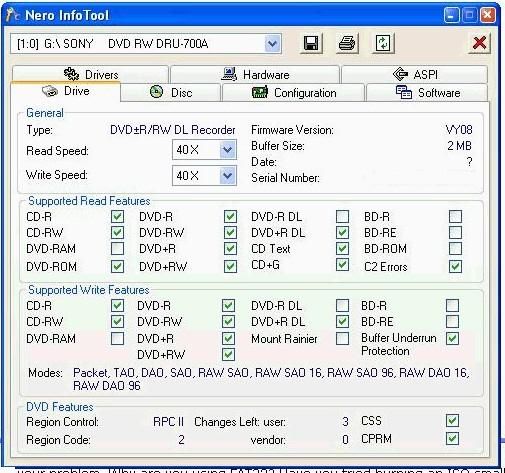
click on configuration tab, note down the DMA fields, ie on or off
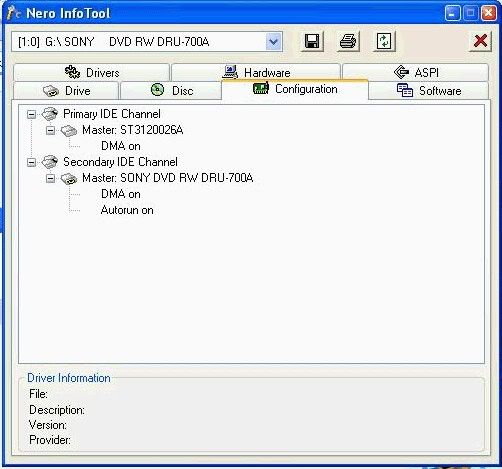
it may be worth clicking on the aspi tab, and note down anything that might be missing
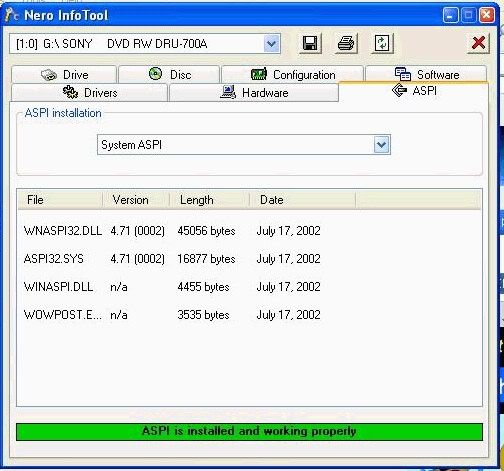

Main PC ~ Intel C2Q Q6600 (G0 Stepping)/Gigabyte GA-EP45-DS3/2GB Crucial Ballistix PC2-8500/Zalman CNPS9700/Antec 900/Corsair HX 620W
Network ~ DD-WRT ~ 2node WDS-WPA2/AES ~ Buffalo WHR-G54S. 3node WPA2/AES ~ WRT54GS v6 (inc. WEP BSSID), WRT54G v2, WRT54G2 v1. *** Forum Rules ***This message has been edited since posting. Last time this message was edited on 6. June 2005 @ 10:34
|
Moderator
|
4. June 2005 @ 05:54 |
Link to this message
|
Quote:
The burner I am using is a sony 8x, I am using dvd xcopy (platinum)
hmmmmmmmm .... where to start?
1) Not to many burners burn well at 8x. I've got 3 burners and I only burn at 8x with one of them. Not to say you cannot use 8x media .... you just have to slow the burn speed down to 4x.
2) The brand of media makes a difference. Not all media are made the same. If you do a search you'll find which are the best brands. I prefer the Verbatim brand.
3) Your biggest problem ... Your using XCopy Platinum. You cannot control the burn speed with XCopy Platinum, so if your going to continue to use Platinum you need to find 4x media. Even then that might not help. Since some newer burners will burn 4x media at 8x with updated firmware. Best chance w/ XCopy is to use 2.4x media :)
Now your solution .....
Try a different program. Try the combination of DVD Shrink and DVD Decrypter first. Why? casue they're free.
also, if you want to use XCopy and still have problems you need to post in aD's XCopy forum: http://dvdxcopy.afterdawn.com
|
|
laddyboy
AfterDawn Addict
|
4. June 2005 @ 05:59 |
Link to this message
|
But which model number of Sony? Type of media is -R +R -RW +RW; media brand e.g., Verbatim; media manufacturer, e.g., Ricoh, CMC, etc. As suggested by Creaky you can use the Nero Info Tool to get this information.
|
Moderator
|
4. June 2005 @ 06:11 |
Link to this message
|
Quote:
But which model number of Sony? Type of media is -R +R -RW +RW; media brand e.g., Verbatim; media manufacturer, e.g., Ricoh, CMC, etc. As suggested by Creaky you can use the Nero Info Tool to get this information.
It won't matter if timeisup continues to use XCopy Platinum. XCopy was really designed to work with 2.4x but would work w/ 4x. You will always get skipping if you burn at 8x. Doesn't matter the brand of burner or media.
|
AfterDawn Addict
|
4. June 2005 @ 06:22 |
Link to this message
|
Quote:
It won't matter if timeisup continues to use XCopy Platinum. XCopy was really designed to work with 2.4x but would work w/ 4x. You will always get skipping if you burn at 8x. Doesn't matter the brand of burner or media
True, true, true. This program gives no burn speed control, better to get the suggested programs of DVDShrink and DVDDecrypter. Decrypter is at least updated where Xcopy is not. I stopped using this long ago for the reasons stated above :~)
|
|
laddyboy
AfterDawn Addict
|
4. June 2005 @ 10:53 |
Link to this message
|
|
Thanks, nice to know that about xCopy. I don't use the proggy but can pass that on to others as needed.
|
Moderator
|
4. June 2005 @ 11:02 |
Link to this message
|
|
me too..
Main PC ~ Intel C2Q Q6600 (G0 Stepping)/Gigabyte GA-EP45-DS3/2GB Crucial Ballistix PC2-8500/Zalman CNPS9700/Antec 900/Corsair HX 620W
Network ~ DD-WRT ~ 2node WDS-WPA2/AES ~ Buffalo WHR-G54S. 3node WPA2/AES ~ WRT54GS v6 (inc. WEP BSSID), WRT54G v2, WRT54G2 v1. *** Forum Rules ***
|
Moderator
|
4. June 2005 @ 11:13 |
Link to this message
|
there is a updated version very very similar to 321studios XCopy.
Called XPlatinum, buy XSoftware. XPlatinum offers dual layer support.
I've heard it is better than the old XCopy Platinum.
I've tried Video Vault ... and didn't like it :)
http://www.dvdxsoftware.com/default.asp?la=off
|
|
timeisup
Suspended due to non-functional email address
|
5. June 2005 @ 06:57 |
Link to this message
|
|
Thanks everyone, I will try some of your suggestions. I'll keep you informed on how I am doing.
|
Moderator
|
5. June 2005 @ 07:02 |
Link to this message
|
|
cool, it sounds like you want to ditch xcopy platinum and move to dvd shrink and decrypter for now ..
and keep us informed.
those are my 2 fave programs, along with Nero6, so will be waiting for updates...
Main PC ~ Intel C2Q Q6600 (G0 Stepping)/Gigabyte GA-EP45-DS3/2GB Crucial Ballistix PC2-8500/Zalman CNPS9700/Antec 900/Corsair HX 620W
Network ~ DD-WRT ~ 2node WDS-WPA2/AES ~ Buffalo WHR-G54S. 3node WPA2/AES ~ WRT54GS v6 (inc. WEP BSSID), WRT54G v2, WRT54G2 v1. *** Forum Rules ***
This message has been edited since posting. Last time this message was edited on 5. June 2005 @ 07:04
|
|
timeisup
Suspended due to non-functional email address
|
6. June 2005 @ 06:20 |
Link to this message
|
|
Have used decrypter a few times and it works great. Thanks everyone, I'll probabally get rid of xcopy and use this program.
Even the picture seems to be better quality.
Thanks again.
|
|
Advertisement
|
|
|
AfterDawn Addict
|
6. June 2005 @ 06:23 |
Link to this message
|
Glad this worked for you, enjoy Decrypter however in case you have not read the newstory about the program being shutdown, just letting you know the version you have will be the last update. If you experience any difficulties with new protection in the future you can always try AnyDVD :~)
|



