|
|
|
external burner problem
|
|
|
gavin999
Newbie

|
4. June 2005 @ 08:42 |
 Link to this message

|
|
Hi guys, I was hoping one of the members could help me with these errors
while attempting to burn with Maxell DVD+RW errors i keep getting. I consider myself an apt user who can usually solve this of my own accord, but for the life of me I can't solve this. I seem to get about a 60% strike rate at burning movies on to dvd+R, I am able to burn an unbranded DVD+RW with movies or data about 75% of the time. cds are my only constisent in these troubling times. Im assuming all you need is my nero burning log error. If its any help, I sometimes get a burn succesful message from nero, only to discover that the dvd is still blank on re-insert.
Other times it burns ok, only to fail on the data verification.
Ive checked for firmware updates, (not needed) automatically installed apharently?)
ASPI OK. Reads purley randomly just as well as it burns? Sometimes reads fine, other times not at all...........?......?..........?
Any advice or suggestions would be heart-felt apreciated, respect. Thank you.
Windows XP 5.1
IA32
WinAspi: File 'Wnaspi32.dll': Ver=4.71 (0002), size=45056 bytes, created 12/04/2005 09:51:06
ahead WinASPI: File 'C:\Program Files\Ahead\nero\Wnaspi32.dll': Ver=2.0.1.59, size=160016 bytes, created 16/12/2003 20:18:06
Nero version: 6.3.0.2 (Nero Express)
Recorder: <QSI DVDRW SDW-041> Version: DX43 - HA 2 TA 0 - 6.3.0.2
Adapter driver: <atapi> HA 2
Drive buffer : 2048kB
Bus Type : default (0) -> ATAPI, detected: ATAPI
CD-ROM: <QSI DVDRW SDW-041 >Version: DX43 - HA 2 TA 0 - 6.3.0.2
Adapter driver: <atapi> HA 2
=== Scsi-Device-Map ===
DiskPeripheral : IC25N040ATMR04-0 atapi Port 1 ID 0 DMA: On
CdRomPeripheral : QSI DVDRW SDW-041 atapi Port 2 ID 0 DMA: On
=== CDRom-Device-Map ===
QSI DVDRW SDW-041 D: CDRom0
=======================
AutoRun : 0
Excluded drive IDs:
CmdQueuing : 1
CmdNotification: 2
WriteBufferSize: 36700160 (0) Byte
ShowDrvBufStat : 0
EraseSpeed : 0
BUFE : 0
Physical memory : 222MB (227824kB)
Free physical memory: 72MB (74548kB)
Memory in use : 67 %
Uncached PFiles: 0x0
Use Static Write Speed Table: 0
Use Inquiry : 1
Global Bus Type: default (0)
Check supported media : Disabled (0)
4.6.2005
ISO compilation
12:32:17 #1 Text 0 File Isodoc.cpp, Line 6029
Iso document burn settings
------------------------------------------
Determine maximum speed : FALSE
Simulate : FALSE
Write : TRUE
Finalize CD : FALSE
Multisession : TRUE
Multisession type: : Start multisession
Burning mode : DAO
Mode : 1
ISO Level : 1 (Max. of 11 = 8 + 3 char)
Character set : ISO 9660
Joliet : TRUE
Allow pathdepth more than 8 directories : TRUE
Allow more than 255 characters in path : TRUE
Write ISO9660 ;1 file extensions : TRUE
12:32:17 #2 Text 0 File Reader.cpp, Line 118
Reader running
12:32:17 #3 Text 0 File Writer.cpp, Line 124
Writer QSI DVDRW SDW-041 running
12:32:17 #4 ISO9660GEN -11 File geniso.cpp, Line 3882
First writeable address = 0 (0x00000000)
12:32:18 #5 Text 0 File Burncd.cpp, Line 3101
Turn on Disc-at-once, using DVD media
12:32:18 #6 Text 0 File DlgWaitCD.cpp, Line 240
Last possible write address on media: 2295103 (510:01.28, 4482MB)
Last address to be written: 51439 ( 11:25.64, 100MB)
12:32:18 #7 Text 0 File DlgWaitCD.cpp, Line 245
Write in overburning mode: FALSE
12:32:18 #8 Text 0 File DlgWaitCD.cpp, Line 2085
Recorder: QSI DVDRW SDW-041, Media type: DVD+RW
12:32:18 #9 Text 0 File DlgWaitCD.cpp, Line 406
>>> Protocol of DlgWaitCD activities: <<<
=========================================
12:32:18 #10 Text 0 File ThreadedTransferInterface.cpp, Line 779
Setup items (after recorder preparation)
0: TRM_DATA_MODE1 (CTransferItem)
2 indices, index0 (150) not provided
original disc pos #0 + 51440 (51440) = #51440/11:25.65
relocatable, disc pos for caching/writing not required/required, no patch infos
-> TRM_DATA_MODE1, 2048, config 0, wanted index0 0 blocks, length 51440 blocks [QSI DVDRW SDW-041 ]
--------------------------------------------------------------
12:32:18 #11 Text 0 File ThreadedTransferInterface.cpp, Line 948
Prepare recorder [QSI DVDRW SDW-041 ] for write in CUE-sheet-DAO
DAO infos:
==========
MCN: ""
TOCType: 0x00; Session Closed, disc not fixated
Tracks 1 to 1:
1: TRM_DATA_MODE1, 2048/0x00, FilePos 0 0 105349120, ISRC ""
DAO layout:
===========
__Start_|____Track_|_Idx_|_RecDep_|_CtrlAdr_
0 | lead-in | 0 | 0x00 | 0x41
0 | 1 | 0 | 0x00 | 0x41
0 | 1 | 1 | 0x00 | 0x41
51440 | lead-out | 1 | 0x00 | 0x41
12:32:18 #12 Phase 36 File dlgbrnst.cpp, Line 1800
Burn process started at 2.4x (3,312 KB/s)
12:32:19 #13 Text 0 File ThreadedTransferInterface.cpp, Line 2264
Verifying disc position of item 0 (relocatable, disc pos, no patch infos, orig at #0): write at #0
12:32:19 #14 SCSI -1066 File Cdrdrv.cpp, Line 1171
SCSI Exec, HA 2, TA 0, LUN 0, buffer 0x02EC5000
Status: 0x04 (0x01, SCSI_ERR)
HA-Status 0x00 (0x00, OK)
TA-Status 0x02 (0x01, SCSI_TASTATUS_CHKCOND)
Sense Key: 0x05 (KEY_ILLEGAL_REQUEST)
Sense Code: 0x24
Sense Qual: 0x00
CDB Data: 0xAD 0x00 0x00 0x00 0x00 0x00 0x00 0x00 0x08 0x04 0x00 0x00
Sense Data: 0x70 0x00 0x05 0x00 0x00 0x00 0x00 0x12
0x00 0x00 0x00 0x00 0x24 0x00
12:32:19 #15 Text 0 File dlgbrnst.cpp, Line 1658
Set remaining time: 1:24,043 (84043ms) -> OK
12:32:19 #16 Phase 98 File dlgbrnst.cpp, Line 1800
Start formatting disc before burning
12:33:03 #17 Phase 100 File dlgbrnst.cpp, Line 1800
Formatting disc was successful
12:33:03 #18 Phase 65 File dlgbrnst.cpp, Line 1800
Burn process started
12:33:03 #19 Text 0 File DVDPlusRW.cpp, Line 564
Start write address at LBA 0
DVD high compatibility mode: No
12:33:41 #20 Text 0 File WriterStatus.cpp, Line 115
<QSI DVDRW SDW-041 > start writing Lead-Out at LBA 51440 (C8F0h), lenght 0 blocks
12:33:41 #21 Text 0 File ThreadedTransfer.cpp, Line 229
all writers idle, stopping conversion
12:33:42 #22 Text 0 File DVDPlusRW.cpp, Line 718
Media-Format will be stopped after burning
12:33:53 #23 Text 0 File DVDPlusRW.cpp, Line 796
Media-Format is stopped successfully
12:33:53 #24 Text 0 File dlgbrnst.cpp, Line 1658
Set remaining time: 0:00,000 (0ms) -> OK
12:33:53 #25 Text 0 File dlgbrnst.cpp, Line 1658
Set remaining time: 0:00,000 (0ms) -> OK
12:33:53 #26 Phase 37 File dlgbrnst.cpp, Line 1800
Burn process completed successfully at 2.4x (3,312 KB/s)
12:33:53 #27 Phase 78 File dlgbrnst.cpp, Line 1800
Data verification started
12:34:18 #28 Text 0 File DlgWaitCD.cpp, Line 245
Write in overburning mode: FALSE
12:34:18 #29 Text 0 File DlgWaitCD.cpp, Line 406
>>> Protocol of DlgWaitCD activities: <<<
=========================================
Recorder needs eject between burn and verify. Auto reload.
(Medium in drive: Unknown. Medium required by compilation: DVD.)
12:34:18 #30 VERIFYERR 10 File UDFCompilationImpl.cpp, Line 1306
Cannot mount the written CD
"QSI DVDRW SDW-041 " (H:2, T:0)
12:34:18 #31 VERIFYERR 13 File UDFCompilationImpl.cpp, Line 1360
Status summary
Total files=0, identical=0, different=0, inaccessible=0, skipped=0.
12:34:18 #32 Phase 81 File dlgbrnst.cpp, Line 1800
Data verification failed
Existing drivers:
File 'Drivers\ADPU160M.SYS': Ver=v3.60a (Lab01_N(johnstra).010529-2218), size=101888 bytes, created 17/08/2001 15:07:32
File 'Drivers\atapi.sys': Ver=5.1.2600.1133 (xpsp2.020921-0842), size=87040 bytes, created 16/10/2002 18:31:10 (Adapter driver for rec)
Registry Keys:
HKLM\Software\Microsoft\Windows NT\CurrentVersion\WinLogon\AllocateCDROMs : 0 (Security Option)
|
|
Advertisement

|
|
|
|
|
laddyboy
AfterDawn Addict
|
4. June 2005 @ 14:45 |
Link to this message

|
Does your computer only have 256K memory? Have you tried using DVD Shrink to output an iso image file and then use DVD Decrypter to burn that image file? How are you generating the files you are attempting to burn? What brand and model number is your burner? Is your burner's firmware updated?
|
|
baabaa
AfterDawn Addict
|
4. June 2005 @ 23:37 |
Link to this message
|
Hmmm,several issues here that need to be addressed.
Quote:
Physical memory : 222MB (227824kB)
Free physical memory: 72MB (74548kB)
Memory in use : 67 %
As Laddyboy stated, your memory is VERY low, I would recommend another 256Mb to be added, this will improve your efficiency and allow for smoother data transferral.
Quote:
Finalize CD : FALSE
Multisession : TRUE
Multisession type: : Start multisession
Your setup is to create multisession and no finalising, you should alter this to 'no multisession' and finalise, this will probably cure the fact that your burning and appear to have no data there.
Quote:
12:32:19 #14 SCSI -1066 File Cdrdrv.cpp, Line 1171
SCSI Exec, HA 2, TA 0, LUN 0, buffer 0x02EC5000
Status: 0x04 (0x01, SCSI_ERR)
HA-Status 0x00 (0x00, OK)
TA-Status 0x02 (0x01, SCSI_TASTATUS_CHKCOND)
Sense Key: 0x05 (KEY_ILLEGAL_REQUEST)
Sense Code: 0x24
Sense Qual: 0x00
CDB Data: 0xAD 0x00 0x00 0x00 0x00 0x00 0x00 0x00 0x08 0x04 0x00 0x00
Sense Data: 0x70 0x00 0x05 0x00 0x00 0x00 0x00 0x12
0x00 0x00 0x00 0x00 0x24 0x00
Nero is unable to correctly indentify your chosen media, this maybe down to older firmware or a low quality discs.
What brand of media are you using, can you try an alternative brand?
Failing that, as Laddyboy suggested, a firmware up date maybe required for your burner.............
Let us know how you get on...............
...............PIO is no go, DMA all the way...............
Beware of the Pixies - they move in over night and turn your life upside down

|
|
pez_05
Newbie
|
5. June 2005 @ 04:37 |
Link to this message

|
hey i tryed to burn a dvd with DVD Decrypter and i got a weird error msg and i have been unable to burn with any program and i just got my burner and its really frustrating
in the log the msg said
I 22:04:04 Writing Image...
W 22:04:04 Failed to Write Sectors 2207424 - 2207455 - The semaphore timeout period has expired.
and it went on for ages.........
please help
Nick
|
|
Car.Mike
AfterDawn Addict
|
5. June 2005 @ 06:02 |
Link to this message
|
gavin999,
Update your Nero to 6.6 as you are using 6.3. As the others have stated the burner is not recognizing the blank media: " (Medium in drive: Unknown. Medium required by compilation: DVD.) "
pez_05 ,
Your problem is that the computer and burner are not talking to each other. You are somehow having conflicts there. What burning programs are on your computer? Suggest you d/l a registry cleaner and clean the registry. Google for free registry cleaners and you will find some. We will start there and also when you reply please include the computers specs and include amout of ram, OS, burner name and model #
|
|
gavin999
Newbie
|
5. June 2005 @ 06:51 |
Link to this message
|
Thanks for your speedy response guys,
Yes I am using 256k memory, I have given Nero exclusive rights being the only running app, several times? If that helps?
Specifications
32mb intbuilt graphics card. SIS 740
256K MEM
Model
* QSI SDW-041
Interface
* ATAPI/E-IDE
Access time
* CD-ROM: 150 ms
* DVD-ROM: 150 ms
Read
* DVD-ROM: 8x
* CD-ROM: 24x
Write
* DVD+R: 4x
* CD-R: 16x
Rewrite
* DVD+RW: 2.4x
* CD-RW: 10
Ive also tried dvd shrink/decrypter, and many more burning apps?
Im using a Packard Bell Easy Note(CL) its bearly 8 months old. Ive checked the site for updates or any relevant info to no avail.
From what i can gather when I try to update the drivers, it states that no driver is needed, for this device.
It concerns me that I can watch my personal movies on my restricted playstation 2, which is very fussy on what it plays. Yet I cant on my laptop with power dvd? and many more customisation tools to utilise. I must stress that had I known DVD+RWs were this problematic, i may have choosen a diff spec!
I tried again earlier, got a write error? Im seriously considering cashing in my warranty while I still can. Im thinking it maybe a drive fault...........? Unless im told by yourselves otherwise of course.
Any further suggesstions on firmware updates?
Once again guys I apreciate your time and hope I can give back some time too.
Thanks.
|
|
laddyboy
AfterDawn Addict
|
5. June 2005 @ 07:57 |
Link to this message
|
|
I use notebooks most of the time but I use both an external burner and an external hard drive. Laptop dvd burners in the past haven't been very good. You definitely need some more memory. Try different media. Your burner doesn't want to feed on what you're serving it.:)
OK, I've visited some other forums. The consensus is that the QSI notebook burners are not very good and extremely picky about media. You'll have to try different brands until you find some that work for your burner.
|
AfterDawn Addict
|
5. June 2005 @ 08:05 |
Link to this message
|
|
I agree with laddyboy, burning on a notebook is very touchy, and especially with 222 of memory. I too use an external burner with mine, because it will at times overheat using the internal. If you really want to do this you will as suggested have to try different media, as your is really not liking what you are giving it.
|
|
pez_05
Newbie
|
6. June 2005 @ 03:09 |
Link to this message
|
thanks yeah i am using Nero 6 and DVD Decrypter
My burner type is Pioneer dvr-109 external
16x max - + r
48x Max cd-r
6x max dvd-+ dual layer
i am using microsoft xp home
i think i have 256 ram
is that all i need to give..
im not sure sorry
thanks nick
Nick
|
Moderator
|
6. June 2005 @ 03:18 |
Link to this message
|
@pez_05, i see you'd added some info, maybe try this too -
download Nero info-tool from here - http://www.snapfiles.com/get/neroinfo.html
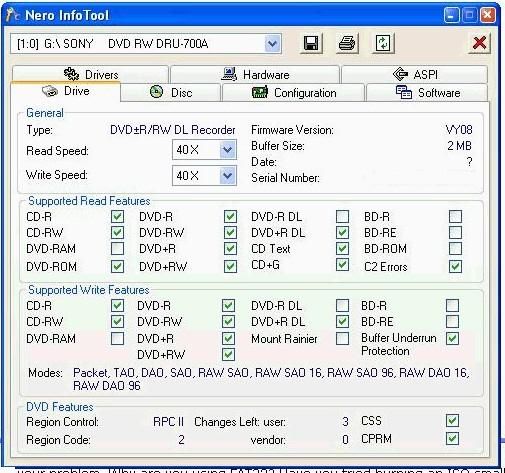
Run it, note down the following, and paste here. Here's what mine shows -
click on the drive tab, note down the firmware version
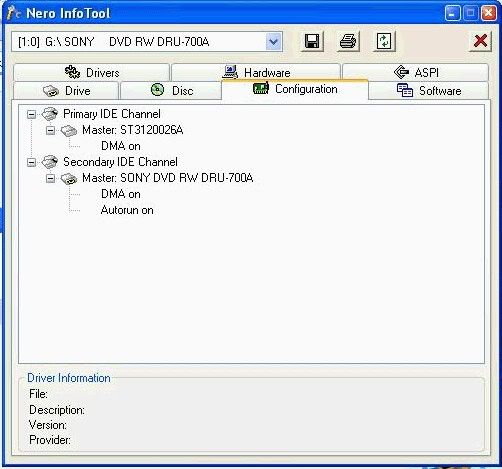
click on configuration tab, note down the DMA fields, ie on or off
it may be worth clicking on the aspi tab, and note down anything that might be missing
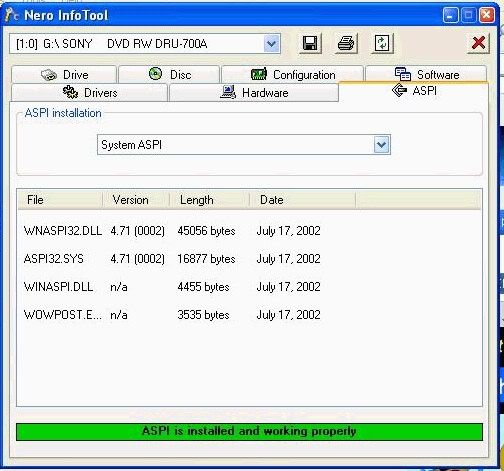
if ASPI is listed as not installed, download ASPI 4.71 from here - http://www.afterdawn.com/software/cdr_software/cdr_tools/aspi.cfm - then run it to install it
you could post your own pictures like this - (i do this the same way, but i copy/pasted this from one of the moderators' posts) -
Step 1: push ctrl + PrintScreen (above the insert button)
Step 2: Open paint .. click start -> programs -> accessories -> paint
Step 3: push ctrl + v
Step 4: crop your image. I crop what I want to show -> cut it -> open new -> paste it. Crop only what you want to keep
Step 5: save as jpeg
Step 6: Host the jpeg here: http://imageshack.us/
Also download dvdinfopro (free) and run a media info check on one of your discs you're burning with and post here

Main PC ~ Intel C2Q Q6600 (G0 Stepping)/Gigabyte GA-EP45-DS3/2GB Crucial Ballistix PC2-8500/Zalman CNPS9700/Antec 900/Corsair HX 620W
Network ~ DD-WRT ~ 2node WDS-WPA2/AES ~ Buffalo WHR-G54S. 3node WPA2/AES ~ WRT54GS v6 (inc. WEP BSSID), WRT54G v2, WRT54G2 v1. *** Forum Rules ***This message has been edited since posting. Last time this message was edited on 6. June 2005 @ 10:27
|
|
pez_05
Newbie
|
6. June 2005 @ 03:32 |
Link to this message
|
|
now my computer cant even read my drive
nuthings coming up
Nick
|
Moderator
|
6. June 2005 @ 03:39 |
Link to this message
|
Main PC ~ Intel C2Q Q6600 (G0 Stepping)/Gigabyte GA-EP45-DS3/2GB Crucial Ballistix PC2-8500/Zalman CNPS9700/Antec 900/Corsair HX 620W
Network ~ DD-WRT ~ 2node WDS-WPA2/AES ~ Buffalo WHR-G54S. 3node WPA2/AES ~ WRT54GS v6 (inc. WEP BSSID), WRT54G v2, WRT54G2 v1. *** Forum Rules ***
|
AfterDawn Addict
|
6. June 2005 @ 03:41 |
Link to this message
|
|
If it is an external drive DMA settings are not used. The drive and the computer are having communication problems, somewhere in the driver.
|
Moderator
|
6. June 2005 @ 03:42 |
Link to this message
|
|
good point well made, i blame the hangover :)
Main PC ~ Intel C2Q Q6600 (G0 Stepping)/Gigabyte GA-EP45-DS3/2GB Crucial Ballistix PC2-8500/Zalman CNPS9700/Antec 900/Corsair HX 620W
Network ~ DD-WRT ~ 2node WDS-WPA2/AES ~ Buffalo WHR-G54S. 3node WPA2/AES ~ WRT54GS v6 (inc. WEP BSSID), WRT54G v2, WRT54G2 v1. *** Forum Rules ***
|
AfterDawn Addict
|
6. June 2005 @ 03:47 |
Link to this message
|
|
Give more computer specs, name of computer, how old, which service pack, do you have USB 2 or 1.1. Do you have the latest firmware, did you just plug the drive in or was there software. Can you try plugging the drive into another computer to see if it works.
|
|
pez_05
Newbie
|
6. June 2005 @ 03:52 |
Link to this message
|
|
so do i uninstall both primary and second ide channel or what
or do i uninstall just 1 ?
Nick
|
Moderator
|
6. June 2005 @ 03:53 |
Link to this message
|
|
no, sorry, don't do the DMA thing, i got that bit wrong. But do the other stuff..
Main PC ~ Intel C2Q Q6600 (G0 Stepping)/Gigabyte GA-EP45-DS3/2GB Crucial Ballistix PC2-8500/Zalman CNPS9700/Antec 900/Corsair HX 620W
Network ~ DD-WRT ~ 2node WDS-WPA2/AES ~ Buffalo WHR-G54S. 3node WPA2/AES ~ WRT54GS v6 (inc. WEP BSSID), WRT54G v2, WRT54G2 v1. *** Forum Rules ***
|
|
pez_05
Newbie
|
6. June 2005 @ 03:55 |
Link to this message
|
|
i cant because it wont read the drive
Nick
|
|
pez_05
Newbie
|
6. June 2005 @ 04:21 |
Link to this message
|
Nick
|
AfterDawn Addict
|
6. June 2005 @ 04:44 |
Link to this message
|
|
What kind of disks are you using to burn?
|
|
pez_05
Newbie
|
6. June 2005 @ 04:46 |
Link to this message
|
|
base 8x dvd-r
Nick
|
AfterDawn Addict
|
6. June 2005 @ 04:51 |
Link to this message
|
|
I do not think your burner likes your media, the only time I got a Semaphore error is if the firmware was not up to date, which yours is, or if I had bad media. Try something better like Sony, Verbatim or Maxell and see what happens. From you image your computer is recognizing that your drive is there. Rule out media before we see if it is something else. What media is recommended by Pioneer, because from what I see Base is kind of crappy it is from same mfr as Imation another iffy brand.
This message has been edited since posting. Last time this message was edited on 6. June 2005 @ 04:53
|
|
Car.Mike
AfterDawn Addict
|
6. June 2005 @ 05:17 |
Link to this message
|
|
|
Moderator
|
6. June 2005 @ 08:54 |
Link to this message
|
|
i broke my email so am still catching up on posts. Looks like the other guys have the clues..
Main PC ~ Intel C2Q Q6600 (G0 Stepping)/Gigabyte GA-EP45-DS3/2GB Crucial Ballistix PC2-8500/Zalman CNPS9700/Antec 900/Corsair HX 620W
Network ~ DD-WRT ~ 2node WDS-WPA2/AES ~ Buffalo WHR-G54S. 3node WPA2/AES ~ WRT54GS v6 (inc. WEP BSSID), WRT54G v2, WRT54G2 v1. *** Forum Rules ***
|
|
Advertisement
|
|
|
|
baabaa
AfterDawn Addict
|
6. June 2005 @ 10:19 |
Link to this message
|
Quote:
i broke my email
Post us your log, maybe we can help.............LOL
BTW:Remember to remove the serial number before posting.
...............PIO is no go, DMA all the way...............
Beware of the Pixies - they move in over night and turn your life upside down
|
|



