|
I dont have a clue really!!!!!!!!
|
|
Junior Member

|
4. June 2005 @ 12:29 |
 Link to this message

|
|
I have a film file on my comp that i would really like to burn to DVD. Here is the info summary:
Audio - audio format MPEG layer 3
bit rate 56 kbps
duration 03.09.27
Image - width 352 pix
height 240 pix
Video - frame rate 14/frames/second
data rate 77kbps
video sample size 24bit
video compression DIVXMPG4V3
When i try to burn it my DVD player says 'Unknown Disc'.
Ive had a go at the reading the guides but cant seem to work it out.
Ive got all the usual programmes including:
VirtualDub-1.5.10
AVIcodec_1.2_b109
DVD Shrink 3.2
DVD Decrypter
ffdshow-20050527
Can anyone please advise bearing in mind that im a novice
regards
shivermc
|
|
Advertisement
|
|
|
|
Member
|
4. June 2005 @ 14:39 |
 Link to this message
|
have you tried VSO's DivXtoDVD? the guide is here if you fancy a look-
http://www.afterdawn.com/guides/archive/vso_divxtodvd_guide.cfm
i used this recently with a downloaded .AVI movie, no problems..
also, it might be a blank media problem, what discs are you using to burn your movie to?
..you seem a bit more advanced than the average noob, given all the programs youve tried using, i wish i knew what they all did :)
|
|
baabaa
AfterDawn Addict
|
4. June 2005 @ 23:42 |
Link to this message

|
|
If your player doesn't support divx, and your conversion is a little off, then try what BigPantz suggested, that program should do the business for you................
...............PIO is no go, DMA all the way...............
Beware of the Pixies - they move in over night and turn your life upside down

|
Junior Member
|
5. June 2005 @ 10:17 |
Link to this message

|
|
Cheers for the quick replies. i downloaded 'VSO's DivXtoDVD'and really thought this was gona do the job. Used CopytoDVD to burn it , tried it in player but still didnt work. Its wierd, the disks used are ok to burn exact copies and it managed it before with another downloaded file! Fickle or wot!!!
Anyway thanks again for the replies any more suggestions would be appreciated ;)
shivermc
|
|
OU812Ono
Member
|
5. June 2005 @ 10:20 |
Link to this message
|
|
What type of media are you using?
|
Junior Member
|
5. June 2005 @ 11:29 |
Link to this message
|
|
Hey somethin happened!! I tried the disk in my other DVD player and guess what...It played!!! Well it played for a while then stopped so i tried it again with the 'VSO's DivXtoDVD' thing and have realised that it keeps crashing on me and thats why it couldnt burn the whole film to disk. The furthest the counter on it has gone to is 14015. Anyone know why this is happening cos if i can get this program to stop crashin then i may be able to finally burn this film. Disks are Tesco DVD+R 8x 4.7GB. and seem to be workin ok.
Regards (again)
shivermc
|
Moderator
|
6. June 2005 @ 04:06 |
Link to this message
|
|
did i just see Tesco are branding discs now. well i never.
Download dvdinfopro (free) and run a media info check, and paste the info here

Main PC ~ Intel C2Q Q6600 (G0 Stepping)/Gigabyte GA-EP45-DS3/2GB Crucial Ballistix PC2-8500/Zalman CNPS9700/Antec 900/Corsair HX 620W
Network ~ DD-WRT ~ 2node WDS-WPA2/AES ~ Buffalo WHR-G54S. 3node WPA2/AES ~ WRT54GS v6 (inc. WEP BSSID), WRT54G v2, WRT54G2 v1. *** Forum Rules *** |
Junior Member
|
6. June 2005 @ 13:02 |
Link to this message
|
|
Hi,
Thanks for getting back. Iv downloaded that program you told me to but guess what i need some help using it (i know i know silly newbies)and please can you tell me how to post it here (doesnt get any better, sorry)
Regards
|
Moderator
|
6. June 2005 @ 13:04 |
Link to this message
|
|
just pop your disc in, then click on 2nd icon from left at top left of the program..
Main PC ~ Intel C2Q Q6600 (G0 Stepping)/Gigabyte GA-EP45-DS3/2GB Crucial Ballistix PC2-8500/Zalman CNPS9700/Antec 900/Corsair HX 620W
Network ~ DD-WRT ~ 2node WDS-WPA2/AES ~ Buffalo WHR-G54S. 3node WPA2/AES ~ WRT54GS v6 (inc. WEP BSSID), WRT54G v2, WRT54G2 v1. *** Forum Rules ***
|
Moderator
|
6. June 2005 @ 13:05 |
Link to this message
|
|
nothing silly about it. it wasn't so long ago that i'd heard of dvdinfopro myself, and i've still only used a couple of it's options
Main PC ~ Intel C2Q Q6600 (G0 Stepping)/Gigabyte GA-EP45-DS3/2GB Crucial Ballistix PC2-8500/Zalman CNPS9700/Antec 900/Corsair HX 620W
Network ~ DD-WRT ~ 2node WDS-WPA2/AES ~ Buffalo WHR-G54S. 3node WPA2/AES ~ WRT54GS v6 (inc. WEP BSSID), WRT54G v2, WRT54G2 v1. *** Forum Rules ***
This message has been edited since posting. Last time this message was edited on 6. June 2005 @ 13:05
|
Junior Member
|
6. June 2005 @ 13:19 |
Link to this message
|
|
Media Information
Region information N/A not a DVD-VIDEO
Media code/Manufacturer ID CMC MAG E01
Media Product Revision Number 00h
Format Type UDF 1.02
Volume Name 050529_2216
Application id Prassi
Implementation id Prassi
Recording Date/Time (mm/dd/yyyy) 5/29/2005 22:16:26
Format Capacity 0.84GB(0.90GB)
Book Type DVD-ROM
Media Type DVD+R
Manufacturer Rated Speed 8.0x 11080KBps
Data area starting sector 30000h
Data area end sector 6BACFh
Linear Density 0.267um/bit
Track Density 0.74um/track
Number of Layers 1
Complete Media Code
00000000 08 02 00 00 01 0F 02 00 00 03 00 00 00 09 BA CF ................
00000010 00 00 00 00 00 00 03 43 4D 43 20 4D 41 47 00 45 .......CMC MAG.E
00000020 30 31 00 38 23 54 37 10 02 38 6A 02 88 67 15 15 01.8#T7..8j..g..
00000030 0B 0B 08 08 01 19 1B 0C 0C 0C 0D 01 00 00 00 00 ................
Thanx again. Here is the info from the burned disk. i thought the program might tell why VSO DivxToDVD makes my comp crash. The bit it encoded before it crashed works ok on my DVD player.
|
Moderator
|
6. June 2005 @ 13:39 |
Link to this message
|
|
see next reply. you really need to get some quality media, especially as it doesn't cost more than (shudders!) CMC crappy media
Main PC ~ Intel C2Q Q6600 (G0 Stepping)/Gigabyte GA-EP45-DS3/2GB Crucial Ballistix PC2-8500/Zalman CNPS9700/Antec 900/Corsair HX 620W
Network ~ DD-WRT ~ 2node WDS-WPA2/AES ~ Buffalo WHR-G54S. 3node WPA2/AES ~ WRT54GS v6 (inc. WEP BSSID), WRT54G v2, WRT54G2 v1. *** Forum Rules ***
This message has been edited since posting. Last time this message was edited on 6. June 2005 @ 13:42
|
Moderator
|
6. June 2005 @ 13:39 |
Link to this message
|
@shivermc - Quote:
Media code/Manufacturer ID CMC MAG E01
- the bad disc fairy has visited you, well via Tesco's anyway. This is considered by most to be the most appalling manufacturer of media to grace the earth i'm afraid. See the first 2 links in my signature for more horror stories. Plus try this so we can get some of the basics ironed out in your setup -
download Nero info-tool from here - http://www.snapfiles.com/get/neroinfo.html
Run it, note down the following, and paste here. Here's what mine shows -
click on the drive tab, note down the firmware version
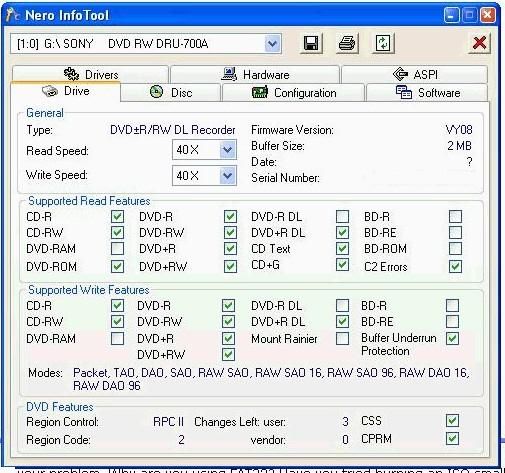
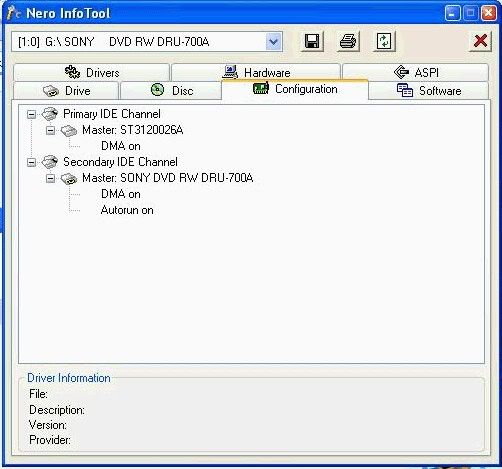
click on configuration tab, note down the DMA fields, ie on or off
it may be worth clicking on the aspi tab, and note down anything that might be missing
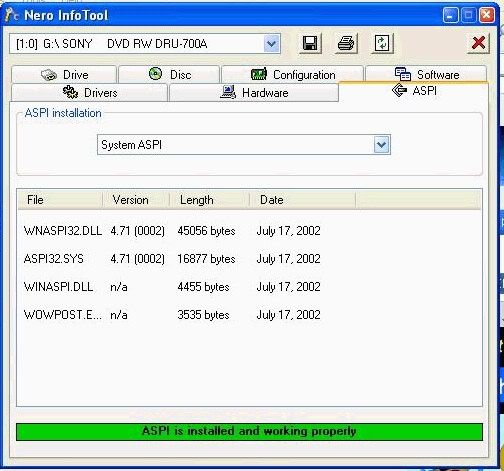
As to ASPI, i'm still not 100% whether it's needed in XP, no matter how many times i read up on it, i'm still none the wiser.
I've always installed it and it doesn't make things worse, plus i never read about installing it making problems so that's good enough for me.
you could post your own pictures - i do this the same way, but i copy/pasted this from one of the moderators' posts -
Step 1: push ctrl + PrintScreen (above the insert button)
Step 2: Open paint .. click start -> programs -> accessories -> paint
Step 3: push ctrl + v
Step 4: crop your image. I crop what I want to show -> cut it -> open new -> paste it. Crop only what you want to keep
Step 5: save as jpeg
Step 6: Host the jpeg here: http://imageshack.us/
Main PC ~ Intel C2Q Q6600 (G0 Stepping)/Gigabyte GA-EP45-DS3/2GB Crucial Ballistix PC2-8500/Zalman CNPS9700/Antec 900/Corsair HX 620W
Network ~ DD-WRT ~ 2node WDS-WPA2/AES ~ Buffalo WHR-G54S. 3node WPA2/AES ~ WRT54GS v6 (inc. WEP BSSID), WRT54G v2, WRT54G2 v1. *** Forum Rules ***
|
Member
|
6. June 2005 @ 14:14 |
Link to this message
|
|
ahh.. the dreaded C-Mag fairy strikes again... bad luck dude..
CMC MAGS are the nemesis of most people here... im lucky enough not have stumbled across them myself..
I think tesco are probably best sticking to cut-price chicken tikka masala & leave the blank media to the professionals.. :)
|
Junior Member
|
6. June 2005 @ 15:08 |
Link to this message
|
oh man im soooo fed up now i really hate it when i cant do things!!! Ive got the Nero thing and got my set up to look like the pictures you supplied but guess wot for some reason this piece of nonsense doesnt have paint (dont ask me where its gone i dont know iv checked everywhere)so i pasted it to word doc but it wont let me save it as jpeg. i feel im going round in circles not getting anywhere. all i wanted to do was copy a film file to dvd thats all not too much to ask but now it seems iv opened this big can of worms and i dont think little ole me can work it out.
Right thats me moaned enough i might come back to it thats the thing though i dont like not understanding things!! Sorry again rant over promise.
thanx for all the help
Regards
shivermc
|
|
OU812Ono
Member
|
6. June 2005 @ 15:39 |
Link to this message
|
Don't lose faith bud, we all had problems starting out. Even the most experienced users still come across a gremlin in the machine every now and then. If your looking for a program to paste/save your pics give this App a try "free"
http://www.irfanview.com/
I'd keep the mags for data and get some "quality" media for the video. You should have alot less problems after a switch.
|
Moderator
|
6. June 2005 @ 21:19 |
Link to this message
|
|
..plus paint is as standard as microsoft gets, it's there, in accessories or nearby
Main PC ~ Intel C2Q Q6600 (G0 Stepping)/Gigabyte GA-EP45-DS3/2GB Crucial Ballistix PC2-8500/Zalman CNPS9700/Antec 900/Corsair HX 620W
Network ~ DD-WRT ~ 2node WDS-WPA2/AES ~ Buffalo WHR-G54S. 3node WPA2/AES ~ WRT54GS v6 (inc. WEP BSSID), WRT54G v2, WRT54G2 v1. *** Forum Rules ***
|
Junior Member
|
7. June 2005 @ 01:49 |
Link to this message
|
|
|
Junior Member
|
7. June 2005 @ 01:55 |
Link to this message
|
|
|
Moderator
|
7. June 2005 @ 02:10 |
Link to this message
|
|
nearly!. edit your last reply, then look above the reply box that pops up, and you'll see how to format the links so they show correctly....
Main PC ~ Intel C2Q Q6600 (G0 Stepping)/Gigabyte GA-EP45-DS3/2GB Crucial Ballistix PC2-8500/Zalman CNPS9700/Antec 900/Corsair HX 620W
Network ~ DD-WRT ~ 2node WDS-WPA2/AES ~ Buffalo WHR-G54S. 3node WPA2/AES ~ WRT54GS v6 (inc. WEP BSSID), WRT54G v2, WRT54G2 v1. *** Forum Rules ***
|
Moderator
|
7. June 2005 @ 02:18 |
Link to this message
|
tell you what, see your picture of your drive -
 - -
click on dropdown box at top left of info-tool and select your other drive (your burner), so we get your firmware version. i managed to see the other 2 pics by copy/pasting part of the links you supoplied, into internet explorer..
EDIT- Doh!, it didnt work for me. Hopefully you got the gist and can post a new pic of the dvd burner
Main PC ~ Intel C2Q Q6600 (G0 Stepping)/Gigabyte GA-EP45-DS3/2GB Crucial Ballistix PC2-8500/Zalman CNPS9700/Antec 900/Corsair HX 620W
Network ~ DD-WRT ~ 2node WDS-WPA2/AES ~ Buffalo WHR-G54S. 3node WPA2/AES ~ WRT54GS v6 (inc. WEP BSSID), WRT54G v2, WRT54G2 v1. *** Forum Rules ***
This message has been edited since posting. Last time this message was edited on 7. June 2005 @ 02:20
|
Moderator
|
7. June 2005 @ 02:21 |
Link to this message
|
|
i'm having a look on the internet to see what make your drive is, and what media is best...
Main PC ~ Intel C2Q Q6600 (G0 Stepping)/Gigabyte GA-EP45-DS3/2GB Crucial Ballistix PC2-8500/Zalman CNPS9700/Antec 900/Corsair HX 620W
Network ~ DD-WRT ~ 2node WDS-WPA2/AES ~ Buffalo WHR-G54S. 3node WPA2/AES ~ WRT54GS v6 (inc. WEP BSSID), WRT54G v2, WRT54G2 v1. *** Forum Rules ***
|
Moderator
|
7. June 2005 @ 03:54 |
Link to this message
|
http://club.cdfreaks.com/showthread.php?t=138100 - "ATAPI DVD DD 2X16X4X16" is the device name for BenQ bulk/OEM drives, so looks like this drive is a bulk/OEM version of the Benq 1620
http://www.cdrinfo.com/Forum/tm.asp?m=108078&mpage=1&key= - this says this same sort of thing
http://www.cdrinfo.com/forum/tm.asp?m=108971&mpage=1&key= - good things being said about your drive, and more info re firmware changing/crossflashing (to morph the drive into a Benq)
http://dvdpro.club.st/firmware/BENQ_FW.htm - If you wanted to make this drive (from now on) appear as a Benq drive instead of what's i guess an anonymous sort of drive (only downside to this would be that it might void your warranty)
....so all that we need to figure out is whether your dvd burner's firmware is out of date, and whether there's any benefit in morphing your drive to become a Benq 1620 (i would have thought this is a good idea).
....plus the question of what media to recommend. I am pretty sure Verbatim is a good bet. It seems this drive can use both - and + formats, and i think it may be a Dual Layer burner. Your photo should confirm.
Sorry i'm not more specific on some of this, i haven't used one of these drives, but am searching out as much info for you instead..
Main PC ~ Intel C2Q Q6600 (G0 Stepping)/Gigabyte GA-EP45-DS3/2GB Crucial Ballistix PC2-8500/Zalman CNPS9700/Antec 900/Corsair HX 620W
Network ~ DD-WRT ~ 2node WDS-WPA2/AES ~ Buffalo WHR-G54S. 3node WPA2/AES ~ WRT54GS v6 (inc. WEP BSSID), WRT54G v2, WRT54G2 v1. *** Forum Rules ***
|
Junior Member
|
7. June 2005 @ 12:46 |
Link to this message
|
|
|
|
Advertisement
|
|
|
Moderator
|
7. June 2005 @ 13:09 |
Link to this message
|
|
almost !. the img has to be in lowercase...
the format of the other lines should be like the first, but the 'IMG' has to be lowercase i mean..
:)
Main PC ~ Intel C2Q Q6600 (G0 Stepping)/Gigabyte GA-EP45-DS3/2GB Crucial Ballistix PC2-8500/Zalman CNPS9700/Antec 900/Corsair HX 620W
Network ~ DD-WRT ~ 2node WDS-WPA2/AES ~ Buffalo WHR-G54S. 3node WPA2/AES ~ WRT54GS v6 (inc. WEP BSSID), WRT54G v2, WRT54G2 v1. *** Forum Rules ***
This message has been edited since posting. Last time this message was edited on 7. June 2005 @ 13:10
|


