|
New to backing up ps2 games
|
|
|
jennyk14
Member

|
5. June 2005 @ 09:33 |
 Link to this message

|
|
Hi I have just started burning. I am trying max payne to test. But when I use decrypter it gets 46% done and then says something about an error.
This is what my decrtyer lag says:
I 01:32:04 Remove Macrovision Protection: Yes
I 01:32:04 Extracting Sectors... (LBA: 0 - 2135839)
I 01:40:58 Abort Request Acknowledged
E 01:41:03 Failed to read Sector 986656 - No Seek Complete
E 01:41:04 Failed to Extract Sectors!
E 01:41:04 Operation Aborted! - Duration: 00:08:59
E 01:41:04 Average Read Rate: 3,661 KB/s (2.6x) - Maximum Read Rate: 11,927 KB/s (8.6x)
I have it on ISO read mode can someone please help.
I tried cleaning it and it still didnt work. I tried several other disks that were in good shape and the I/O error thing kept coming up. Also Am I going to need a mod chips if I can get these things backed up.
|
|
Advertisement
|
 |
|
|
|
jennyk14
Member
|
5. June 2005 @ 09:56 |
Link to this message

|
|
Ok, I got decrypter to do the image for GTA san andreas but when i tried to use decrypter to burn it i got an error message when i started. Is it really hard to back up and play games. Is it worth it and do i need a mod chip or something to be able to play them. Anyone who can help I would greatly appreciate it
|
AfterDawn Addict
|
5. June 2005 @ 10:16 |
Link to this message
|
it shouldn't be giving you all these problems. Do you have the latest DVD Decrypter version? Also, YES, your going to need some kind of mod to play burnt games in your ps2.

V9 PS2, flip top, SMD, DVDLoader
Pioneer 107, ritek g05
DVD Shrink, DVD Decrypter, Nero |
|
jennyk14
Member
|
5. June 2005 @ 10:18 |
Link to this message
|
|
thanks do you have any leads where i can get a mod or would swap magic work
|
AfterDawn Addict
|
5. June 2005 @ 10:21 |
Link to this message

|
|
swap magic works (thats what i have)
V9 PS2, flip top, SMD, DVDLoader
Pioneer 107, ritek g05
DVD Shrink, DVD Decrypter, Nero
|
|
jpp01uk
Senior Member
|
5. June 2005 @ 10:23 |
Link to this message
|
|
if you dont want to put a mod chip in then swap magic and a fliptop or slide card would be your best solution
it will still boot most of the games you want it too, i think the only ones it wont boot currently are DL (Dual Layer) discs, which are few and far between
latest swap magic is version 3.6, but you have to buy it you cant just burn a downloaded copy because that would be a backup, and as you know ps2s wont play backups otherwise we wouldnt need to mod them!
anything else just ask
oh and which country are you in because that will help you with a shop from which to buy a mod chip or swap magic whichever you decide
:)
|
|
jennyk14
Member
|
5. June 2005 @ 10:23 |
Link to this message
|
|
do you know where i can get it
|
|
jpp01uk
Senior Member
|
5. June 2005 @ 10:26 |
Link to this message
|
|
www.theconsoleshop.com if your in the UK, if not then i dunno coz im from the UK
|
|
jennyk14
Member
|
5. June 2005 @ 10:26 |
Link to this message
|
|
is swap magic a disc that you insert before you insert your back ups
its not something you can go get at best buy is it
|
|
jennyk14
Member
|
5. June 2005 @ 10:27 |
Link to this message
|
|
yeah I am from the us
|
|
jpp01uk
Senior Member
|
5. June 2005 @ 10:33 |
Link to this message
|
|
lol i dunno what best buy is! i presume its a shop in the US
yeah a swap magic disc is inserted before the backup of a game and it boots the backup for you
PS2 games are actually pressed DVD/CD discs, they are not burned. PS2 games use the Burst Cutting Area (BCA) of the disc to identify themselves to the PS2 unit. The BCA is not part of a disc that you can burn on, it is only replicated on pressed discs.
So, the only way to play backups is to get boot-discs or a mod-chip.
With the boot-discs (swap magic) you need a 'tool' to open
the tray without pressing eject for the backups to work.
the best way is a fliptop or a slidecard, but it depends upon the version of your ps2, it tells you on the back SCPH-XXXX and so on
|
AfterDawn Addict
|
5. June 2005 @ 11:38 |
Link to this message
|
V9 PS2, flip top, SMD, DVDLoader
Pioneer 107, ritek g05
DVD Shrink, DVD Decrypter, Nero
This message has been edited since posting. Last time this message was edited on 5. June 2005 @ 11:39
|
|
jpp01uk
Senior Member
|
5. June 2005 @ 11:42 |
Link to this message
|
|
can someone just clear up for me what is best buy?! everyone mentions it and i dunno what it is
|
AfterDawn Addict
|
5. June 2005 @ 12:42 |
Link to this message
|
|
best buy is a electronics/computer/music store here in the states.
V9 PS2, flip top, SMD, DVDLoader
Pioneer 107, ritek g05
DVD Shrink, DVD Decrypter, Nero
|
|
jennyk14
Member
|
5. June 2005 @ 13:08 |
Link to this message
|
|
yeah i have been looking this seem like its gonna be hard to do
|
AfterDawn Addict
|
5. June 2005 @ 13:16 |
Link to this message
|
|
its not hard at all. you load the swap magic disc, open the fliptop, put in backup, play backup.
V9 PS2, flip top, SMD, DVDLoader
Pioneer 107, ritek g05
DVD Shrink, DVD Decrypter, Nero
|
|
jennyk14
Member
|
5. June 2005 @ 14:05 |
Link to this message
|
|
is the flip top a alternate game casing or something
|
AfterDawn Addict
|
5. June 2005 @ 14:28 |
Link to this message
|
yes, http://www.ps2cover.com explains it and has pics (don't buy it from here though). Once you use the swap magic boot disc, you have to have a way to put in your burnt game without the ps2 knowing.
V9 PS2, flip top, SMD, DVDLoader
Pioneer 107, ritek g05
DVD Shrink, DVD Decrypter, Nero
This message has been edited since posting. Last time this message was edited on 5. June 2005 @ 14:28
|
|
jennyk14
Member
|
5. June 2005 @ 15:55 |
Link to this message
|
|
is the flip top hard to put on does anyone know
|
AfterDawn Addict
|
5. June 2005 @ 18:22 |
Link to this message
|
|
its very easy, unless you cant use a screwdriver :)
V9 PS2, flip top, SMD, DVDLoader
Pioneer 107, ritek g05
DVD Shrink, DVD Decrypter, Nero
|
AfterDawn Addict
|
5. June 2005 @ 18:29 |
Link to this message
|
I got my flip-top from http://www.clearxbox.com
The are in California.
It only costed 12 dollars, It came on time (3 days),
Exactly when they said it would.
Everything works great.
(Dont forget the swapmagic disks youll need those too.)



Possunt Quia Posse Videntur. |
|
jennyk14
Member
|
5. June 2005 @ 19:00 |
Link to this message
|
|
Thats nice jiz thanks. I ordered mine with swap magig 3.6 for 43 with overnight delivery. Was the installation easy. Also, what buring program do you use I have decrypter but I am willing to try anything that will make it easier on me because I am so new at doing this
|
AfterDawn Addict
|
5. June 2005 @ 19:06 |
Link to this message
|
Its not hard to install.
Just take your time and everything will be okay.
I use DVD Decrypter for my ps2 dvd backups.
More importantly you want to use good media.
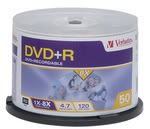
http://www.digitalfaq.com/media/dvdmedia.htm
The following list is in preference order.
MXLRG01, MXLRG02 = Maxell = (-R) ... be aware of unbranded fakes
MCC = Mitsubishi Chemicals = (-R)<-----------------VERBATIM MY CHOICE #1
TDKG02 = TDK Corp = (-R) ... be aware of unbranded fakes
TAIYOYUDEN or YUDEN = Taiyo Yuden = (-R)<--------------FUJIFILM (made in japan) MY CHOICE #2
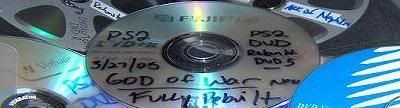
Start DVD Decrypter right click your rw drive.
First check for firmware updates.
After that is complete.
Put a quality blank media into your drive.
Goto mode iso write (using dvd decrypter).
IN THE BOX ON THE RIGHT YOU WILL SEE "SUPPORTED WRITE SPEEDS".
These are the speeds that you can Correctly burn (USING THE MEDIA THAT IS INSERTED.)
It will vary from one media maufacturer to another.
(Go with the SLOWEST SUPPORTED SPEED)
1. Take the ps2 game put it in the dvd rom or dvd burner, your choice.
2. open the dvd decryptor program then go to to tool bar and hit MODE>ISO>READ. Then choose the correct dvd drive that the game is in as the "source". Also choose where you want the files to be stored on the pc hdd. THEN CLICK DECRYPT , or the huge graphical picture at the bottom of the program which makes it run. The game is now copying to your HDD. Take the game out when finished (it might take a while).
3. Go to the same tab in dvd decryptor and choose MODE>ISO>WRITE. This will then let you look for the files you just created in step 2. Select the file that you just created. (There is only 2 files created so pick the .mds) (The smaller file)Then click WRITE, make sure there is blank DVD in the drive.
Thats all there is too it.
If you have any questions or problems,
Just PM me and/or we can chat using AIM.
you shouldnt run into any trouble.
Good luck :)
Possunt Quia Posse Videntur.
|
|
Advertisement
|
|
|
|
jennyk14
Member
|
5. June 2005 @ 20:35 |
Link to this message
|
|
Thanks
|


