|
|
|
Can't find the correct tutorial.
|
|
Moderator

|
10. June 2005 @ 12:44 |
Link to this message

|
i think you're saying you're using decrypter to create an ISO file. I don't think i've done that before (only cus i never need to and hardly use Decrypter as Shrink does 99.5% of my rips, then i use Nero to burn). The few times i've needed to use Decrypter i've only used File mode, but i'm gonna try creating an ISO now so i can visualise how it works, meanwhile i'm sure someone will chip in.

Main PC ~ Intel C2Q Q6600 (G0 Stepping)/Gigabyte GA-EP45-DS3/2GB Crucial Ballistix PC2-8500/Zalman CNPS9700/Antec 900/Corsair HX 620W
Network ~ DD-WRT ~ 2node WDS-WPA2/AES ~ Buffalo WHR-G54S. 3node WPA2/AES ~ WRT54GS v6 (inc. WEP BSSID), WRT54G v2, WRT54G2 v1. *** Forum Rules *** |
|
Advertisement

|
|
|
|
Moderator
|
10. June 2005 @ 13:00 |
Link to this message
|
@tommyo54 - i think i'm catching up with you now. I've started Decrypter doing an ISO Read (to hard disc folder for now) -
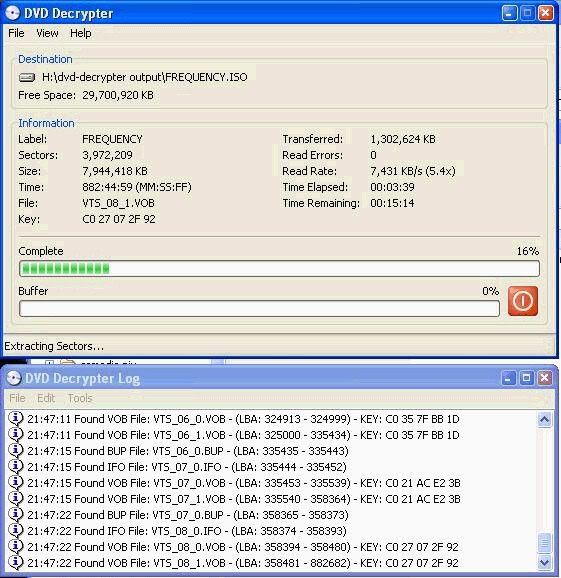
is that what you mean so far ?.
Which now leads me to ask whether you're using FAT32 or NTFS file system. Purely because FAT32 can only create single files of up to 2GB (so far my ISO is nearly 6GB as i'm on NTFS) -
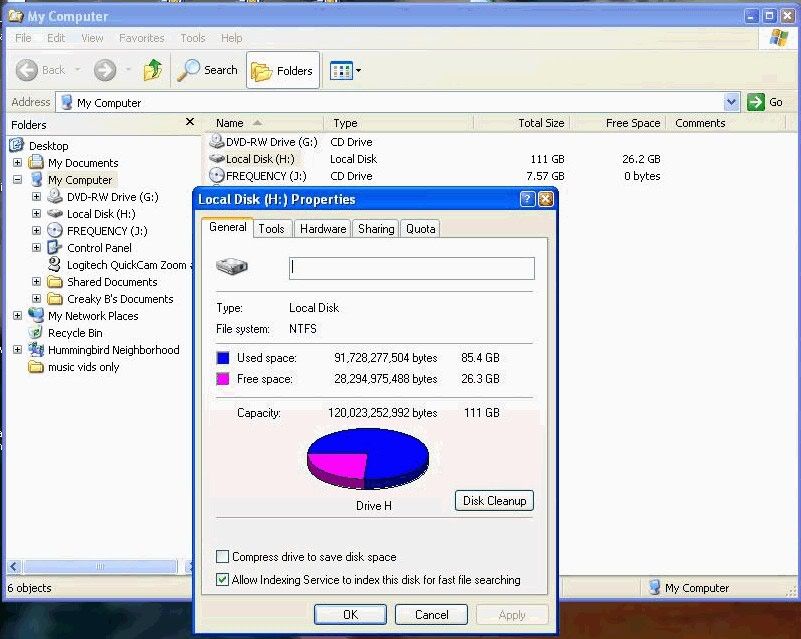
- (i simply right clicked on my hard drive in Windows Explorer and did 'properties' - you can then see if it's FAT32 or NTFS or whatever..)
Apologies to anyone else if i'm 'out there' as i'm playing catchup with this ISO lark (have only dealt with ISOs with *cough* downloaded *cough* stuff or Linux distribution downloads etc)
Main PC ~ Intel C2Q Q6600 (G0 Stepping)/Gigabyte GA-EP45-DS3/2GB Crucial Ballistix PC2-8500/Zalman CNPS9700/Antec 900/Corsair HX 620W
Network ~ DD-WRT ~ 2node WDS-WPA2/AES ~ Buffalo WHR-G54S. 3node WPA2/AES ~ WRT54GS v6 (inc. WEP BSSID), WRT54G v2, WRT54G2 v1. *** Forum Rules ***
This message has been edited since posting. Last time this message was edited on 10. June 2005 @ 13:03
|
Moderator
|
10. June 2005 @ 13:14 |
Link to this message

|
Right, i'm almost caught up -
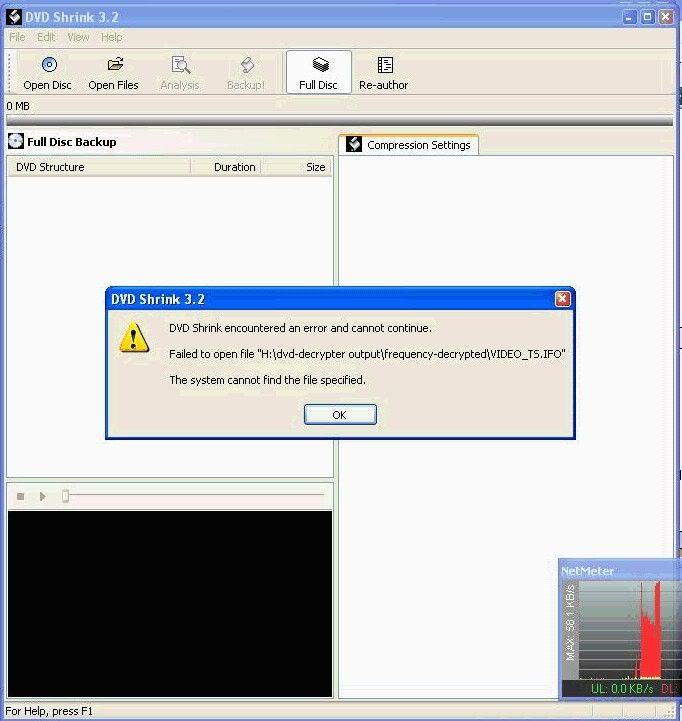
- that directory i pointed Shrink to, has 2 files in it, the huge ISO file from decrypter, and a tiny MDS file. However Shrink went splat..... Processing......
Main PC ~ Intel C2Q Q6600 (G0 Stepping)/Gigabyte GA-EP45-DS3/2GB Crucial Ballistix PC2-8500/Zalman CNPS9700/Antec 900/Corsair HX 620W
Network ~ DD-WRT ~ 2node WDS-WPA2/AES ~ Buffalo WHR-G54S. 3node WPA2/AES ~ WRT54GS v6 (inc. WEP BSSID), WRT54G v2, WRT54G2 v1. *** Forum Rules ***
This message has been edited since posting. Last time this message was edited on 10. June 2005 @ 13:14
|
AfterDawn Addict
6 product reviews

|
10. June 2005 @ 13:16 |
Link to this message
|
tommy,
There is no need to make a folder as DVD Decrypter and DVD Shrink will make their own folder by default. You can make a folder but I wouldn't put it on your desktop.
Rig #1 Asus Rampage Formula Mobo, Intel Core2Quad Q9450 CPU @ 3.55ghz, 2gb Corsair DDR2 1066 Dominator Ram @ 5-5-5-15, TR Ultra 120 Extreme w/ Scythe 9 blade 110 cfm 120mm Fan HSF, HIS Radeon 512mb HD3850 IceQ TurboX GPU, Corsair 620HX P/S, CM Stacker 830 Evo Case, Rig #2 Asus P5W DH Deluxe Mobo, Intel C2D E6600 CPU @ 3.6ghz, 2gb Corsair XMS2 DDR2 800 Ram @ 4-4-4-12-2t, Zalman CNPS9500LED HSF, Sapphire Radeon X850XT PE GPU, Corsair 620HX P/S, Cooler Master Mystique Case, Viewsonic 20.1" Widescreen Digital LCD Monitor, Klipsch Promedia Ultra 5.1 THX Desktop Speakers, http://valid.x86-secret.com/show_oc.php?id=348351 http://valid.x86-secret.com/show_oc.php?id=236435 |
Moderator
|
10. June 2005 @ 13:21 |
Link to this message
|
|
....plus what has me puzzled, is that i've now got a huge ISO file for Shrink to try to go thru. It obviously can't find the VIDEO_TS.IFO file, which it would have done if i'd have decrypted using FILE mode....hmmm.....processing..
Main PC ~ Intel C2Q Q6600 (G0 Stepping)/Gigabyte GA-EP45-DS3/2GB Crucial Ballistix PC2-8500/Zalman CNPS9700/Antec 900/Corsair HX 620W
Network ~ DD-WRT ~ 2node WDS-WPA2/AES ~ Buffalo WHR-G54S. 3node WPA2/AES ~ WRT54GS v6 (inc. WEP BSSID), WRT54G v2, WRT54G2 v1. *** Forum Rules ***
|
Moderator
|
10. June 2005 @ 13:23 |
Link to this message

|
|
....got it......
In Shrink, do File/Open Disc Image, then it can find the ISO and knows what to do with it....
..now i selected movie only and am 'Shrinking' to another folder. The bit i don't fully understand is where burning to DVD comes into it as i only use Nero for that.
Sorry again guys for using this as personal training, but we're getting there....at least i'll know how to fix this another time for someone :)
Main PC ~ Intel C2Q Q6600 (G0 Stepping)/Gigabyte GA-EP45-DS3/2GB Crucial Ballistix PC2-8500/Zalman CNPS9700/Antec 900/Corsair HX 620W
Network ~ DD-WRT ~ 2node WDS-WPA2/AES ~ Buffalo WHR-G54S. 3node WPA2/AES ~ WRT54GS v6 (inc. WEP BSSID), WRT54G v2, WRT54G2 v1. *** Forum Rules ***
This message has been edited since posting. Last time this message was edited on 10. June 2005 @ 13:30
|
|
tommyo54
Junior Member
|
10. June 2005 @ 14:42 |
Link to this message
|
|
Well, I did it! I made a flawless backup with no errors at all. now I must remember how exactly I did this, lol... I somehow used Shrink first, then sent it to Decrypter. In Shrink, I used "automatic" mode instead of me trying to custom compress anything. I figured I better learn some more things first instead of adjusting compressions. I kept the green status bar to just below that maximum point (hope I'm explaining that correctly..)
I didn't need the folder neither; that must be what you were telling me earlier. Shrink somehow sent it right off to Decrypter to burn.
I sure hope I can remember how the heck I did this, lol.. as the backup came out flawless for me. It played perfect in the computer; I don't have a stand alone dvd player here, so I can't confirm the playability on that yet.
After dinner tonight, I'll try backing up disc one of this two-disc boxed set. I did disc two first, as that is the one where my nephew is visible. He will be psyched that I made him a backup!
Thank you all so much for all your responses, and taking the time to help out a new guy here.... you're the best!
Tonight I'll try disc two; I hope I can remember exactly how I did disc one, lol!! I will keep you posted as to my progress....thanks again so much my friends!
Oh, the burn took me around 7 minutes to burn the backup, and I used Maxell 8X dvd+R media (Plextor recommended media). I'll post again tonight.
Tommy
|
|
tommyo54
Junior Member
|
12. June 2005 @ 10:58 |
Link to this message
|
|
Hello friends... Well, I thought I'd give you a brief update as to how I'm making out. Since my last post I've made four successful backups, and all went fine. I did have one that I think I compressed too much as it didn't come out quite as good as I would have liked. But I'm learning slowly.
I have another question that I can't find the answer to... Do you happen to know if the audio track is always present in the main movie track? In other words, I wouldn't want to burn a disc without audio if I were to delete any of those extras that are imbedded in the original disk.
The very first burn I did with this Plextor 716A wrote at 10x; but my burns that I did after that burned at 4x. I didn't make any changes to settings, so I'm not sure why; just curious. I realize too that a slower burn will produce the better quality.
I haven't changed any settings inside this PlexTools utility that came with the burner. Do any of you have this same Plextor model, and have you changed any settings to enhance your burns? All my Plextor settings are in the default mode as I didn't want to screw anything up by changing the wrong things.
The media that I used was the Plextor recommended Maxell 8x DVD+R media. There were no write errors and the burns went fine with this media. I'm not sure if it would help at all in regards to any setting adjustments, but I thought I'd list some brief specs in case it would help.
This pc is a new Dell 4700; 3.2GHz; 1 GB RAM; 80 GB hard drive. I also didn't do any other actions when the actual burn was going on.
If anyone has any tips or suggestions, I'd be very interested as I'm curious to know if I should alter any settings with this PlexTool program.
Thanks everyone very much for your help; I can't tell you how appreciative I am to all of you!
Tommy
|
Moderator
|
12. June 2005 @ 11:33 |
Link to this message
|
i'll try and answer the question about audio -
The audio tracks are separate to the movie - see here, well in DVD Shrink anyway -
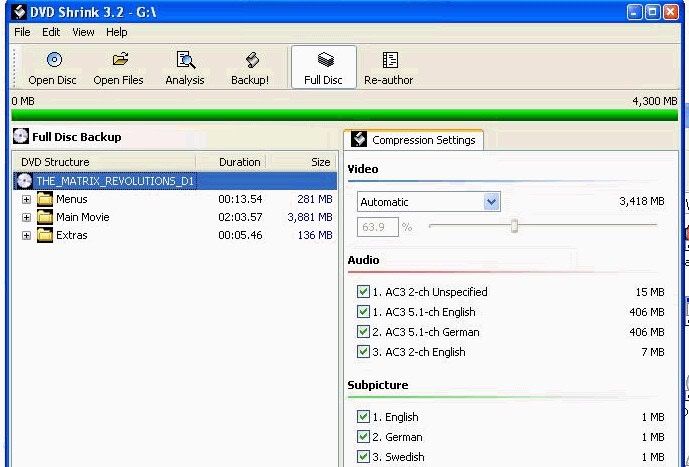
- for instance here i would only select the AC3 5.1-ch English soundtrack, i deselect all others. If 5.1 wasn't there and the best track available on a disc was AC3 2-ch English i'd use that, etc etc
Some more info about 5.1 downmixing thru a TV etc -->
from - http://forums.afterdawn.com/thread_view.cfm/195009 -
someone asked - 'I use Shrink, when I de-select stereo and only select 5.1, (to reduce compression), I still get stereo in the movie. I get stereo through my tv, or 5.1 through my sound system.
I've noticed this on several burns. Somehow stereo is available even though it doesn't show up on my dvd player as an audio option (only 3.2.1)'
i replied - 'your tv is downmixing the 5.1 audio into stereo quite happily by default; ie if, say your tv is just normal stereo audio, then it will just play in stereo thru the tv's speakers and if your dvd player is 5.1capable, it will play the audio in 5.1 (well obviously if the dvd player is setup correctly anyway)'
and a couple more -
http://forums.afterdawn.com/thread_view.cfm/192966
http://forums.afterdawn.com/thread_view.cfm/181405
Is that the kind of thing you were after ??..
Main PC ~ Intel C2Q Q6600 (G0 Stepping)/Gigabyte GA-EP45-DS3/2GB Crucial Ballistix PC2-8500/Zalman CNPS9700/Antec 900/Corsair HX 620W
Network ~ DD-WRT ~ 2node WDS-WPA2/AES ~ Buffalo WHR-G54S. 3node WPA2/AES ~ WRT54GS v6 (inc. WEP BSSID), WRT54G v2, WRT54G2 v1. *** Forum Rules ***
This message has been edited since posting. Last time this message was edited on 12. June 2005 @ 11:35
|
|
tommyo54
Junior Member
|
12. June 2005 @ 11:50 |
Link to this message
|
|
Hi creaky; yes, perfect.. Thank you very much for explaining that to me. I was so confused about all the audio options that were there.
Last night I made a backup of Finding Nemo, and I guess I compressed it too much; just didn't come out like my previous burns. But I left everything in because I was not sure about deleting extra audio tracks. I'll probably re-do that one.
And my nephew is grinning from ear to ear as I made his backup of that concert he attended in N.Y.C. Central Park. In fact, I think I'm going to make an extra backup for Uncle Tom also....
I've still got a ways to go here, but I learned quite a bit. My next procedure will be to learn this PlexTools thing. It must be set o.k. by default, as I didn't alter any settings yet. That is my next project; to learn PlexTools thoroughly.
Thanks so much my friend for helping me! I will keep you posted as I progress here. Take care creaky..\
Tommy
|
|
Advertisement
|
|
|
Moderator
|
12. June 2005 @ 11:55 |
Link to this message
|
|
oh good, you're more than welcome, i'm glad it helps; i wasn't sure if that was quite what you wanted. good stuff. I haven't got a Plex drive but i'm sure the other guys can help with that. Have a good one.
Main PC ~ Intel C2Q Q6600 (G0 Stepping)/Gigabyte GA-EP45-DS3/2GB Crucial Ballistix PC2-8500/Zalman CNPS9700/Antec 900/Corsair HX 620W
Network ~ DD-WRT ~ 2node WDS-WPA2/AES ~ Buffalo WHR-G54S. 3node WPA2/AES ~ WRT54GS v6 (inc. WEP BSSID), WRT54G v2, WRT54G2 v1. *** Forum Rules ***
|
|


