|
|
|
Dvd burner problem
|
|
|
A_Derer
Suspended due to non-functional email address

|
14. June 2005 @ 06:18 |
 Link to this message

|
|
Hi im new so sorry if you have heard this question before
I installed a dvd burner to my laptop today and i trying to burn a dvd it goes really fast up to 20% but now all of a sudden its going as slow as anything in like 30 mins in gone up by 1% now on 21% anyone know what i coudl do?
Hello
|
|
Advertisement
|
 |
|
|
AfterDawn Addict
|
14. June 2005 @ 07:28 |
Link to this message

|
|
hi
have you ripped and burnt many dvds before? what aps are you useing?
Nothing here to see, move along folks.
 |
|
A_Derer
Suspended due to non-functional email address
|
14. June 2005 @ 07:31 |
Link to this message
|
|
Umm nope this is my first time burning anything its now on 22%.. so slow estimate time finnish it says 6 hours... sorry what is Apps?
Hello
|
AfterDawn Addict
|
14. June 2005 @ 07:36 |
Link to this message
|
|
apps = software programs used...
is the burner an external USB type?
Nothing here to see, move along folks.
|
|
A_Derer
Suspended due to non-functional email address
|
14. June 2005 @ 07:40 |
Link to this message

|
Yes its a Usb link that goes into the Laptop and Burner im also using Nero and AnyDVD program
Hello
|
AfterDawn Addict
|
14. June 2005 @ 07:50 |
Link to this message
|
Nothing here to see, move along folks.
|
|
A_Derer
Suspended due to non-functional email address
|
14. June 2005 @ 07:58 |
Link to this message
|
hi
what settings in Nero burning rom?
but i would rip with DVD Decrypter and shrink it in DVD Shrink both apps free...
dvd shrink can use Nero engine to burn or DVD Decrypter (use decrypter) change the settings in DVD Shrink not to burn with Nero
How do i check the settings in Nero?
Ok i will do that now and repost when its done
im getting alot of Non responsive progrems from Nero and the Burner in general also having to exit it
Hello
|
AfterDawn Addict
|
14. June 2005 @ 08:03 |
Link to this message
|
hi
yes Nero can be a bit picky where the 2 apps i mentioned are tuned for dvd stuff!
but if you want to go Nero burn route look at this?!


Nothing here to see, move along folks.
|
Senior Member
|
14. June 2005 @ 08:55 |
Link to this message
|
Hi there,
I never used a USB burner, but I assume if your USB port is v1.1 ONLY I can just assume the speed will be pretty slow.
v1.1 is 12 mbits MAX
If it's USB v2.0 there must be a problem, since USB2 is 480 mbits if I recall.
Post us a failed and/or succesful Nero Logs, maybe we can see what's going on in there !
VSO Software Golden Membership Proud Owner / VSO Software Beta Tester

|
|
A_Derer
Suspended due to non-functional email address
|
15. June 2005 @ 10:42 |
Link to this message
|
I have Decrypt it i have Shrunk it but when i go to Nero to try burn it like you sayed instead of having D: Pioneer Dvd-RW DRW Etc Mine has Matshida Ujda76 Dvd/Cdwr so when i do all that it doesnt come like the layout u have got it comes out different
Hello
|
Moderator
|
15. June 2005 @ 10:43 |
Link to this message
|
|
edited out post due to my stupid internet connection hanging and not showing the whole thread. Grrr...!

Main PC ~ Intel C2Q Q6600 (G0 Stepping)/Gigabyte GA-EP45-DS3/2GB Crucial Ballistix PC2-8500/Zalman CNPS9700/Antec 900/Corsair HX 620W
Network ~ DD-WRT ~ 2node WDS-WPA2/AES ~ Buffalo WHR-G54S. 3node WPA2/AES ~ WRT54GS v6 (inc. WEP BSSID), WRT54G v2, WRT54G2 v1. *** Forum Rules ***This message has been edited since posting. Last time this message was edited on 15. June 2005 @ 10:46
|
Moderator
|
15. June 2005 @ 10:44 |
Link to this message
|
|
bloody internet connection !
i only saw the first 2 posts when i replied. sorry guys i will look thru and edit out the last post if it confused things.
yup, edited out. As you were.
Main PC ~ Intel C2Q Q6600 (G0 Stepping)/Gigabyte GA-EP45-DS3/2GB Crucial Ballistix PC2-8500/Zalman CNPS9700/Antec 900/Corsair HX 620W
Network ~ DD-WRT ~ 2node WDS-WPA2/AES ~ Buffalo WHR-G54S. 3node WPA2/AES ~ WRT54GS v6 (inc. WEP BSSID), WRT54G v2, WRT54G2 v1. *** Forum Rules ***
This message has been edited since posting. Last time this message was edited on 15. June 2005 @ 10:46
|
AfterDawn Addict
|
15. June 2005 @ 11:35 |
Link to this message
|
Quote:
Matshida Ujda76 Dvd/Cdwr
its not a dvd burner then? only cdrw ?
-----------------
nice to see someone else suffers the dodgy internet connection then - hehehe....
Nothing here to see, move along folks.
This message has been edited since posting. Last time this message was edited on 15. June 2005 @ 11:36
|
AfterDawn Addict
6 product reviews
|
15. June 2005 @ 14:04 |
Link to this message
|
Quote:
Matshida Ujda76 Dvd/Cdwr
I saw that too rotary, looks like only a cdrw/dvd-rom combo.
You need a dvdrw to burn dvd's
Rig #1 Asus Rampage Formula Mobo, Intel Core2Quad Q9450 CPU @ 3.55ghz, 2gb Corsair DDR2 1066 Dominator Ram @ 5-5-5-15, TR Ultra 120 Extreme w/ Scythe 9 blade 110 cfm 120mm Fan HSF, HIS Radeon 512mb HD3850 IceQ TurboX GPU, Corsair 620HX P/S, CM Stacker 830 Evo Case, Rig #2 Asus P5W DH Deluxe Mobo, Intel C2D E6600 CPU @ 3.6ghz, 2gb Corsair XMS2 DDR2 800 Ram @ 4-4-4-12-2t, Zalman CNPS9500LED HSF, Sapphire Radeon X850XT PE GPU, Corsair 620HX P/S, Cooler Master Mystique Case, Viewsonic 20.1" Widescreen Digital LCD Monitor, Klipsch Promedia Ultra 5.1 THX Desktop Speakers, http://valid.x86-secret.com/show_oc.php?id=348351 http://valid.x86-secret.com/show_oc.php?id=236435 |
AfterDawn Addict
|
15. June 2005 @ 22:25 |
Link to this message
|
|
hi
yeah bit odd that...
Nothing here to see, move along folks.
|
|
A_Derer
Suspended due to non-functional email address
|
16. June 2005 @ 06:03 |
Link to this message
|
|
Ok fied that bit and now burning something but 1 hour 26 mins later burning failed :( heres the nero thing
Windows XP 5.1
IA32
WinAspi: -
ahead WinASPI: File 'C:\Program Files\Ahead\Nero\Wnaspi32.dll': Ver=2.0.1.68, size=160016 bytes, created 22/07/2004 5:33:44 PM
Nero API version: 6.3.1.25
Using interface version: 6.3.1.4
Installed in: C:\Program Files\Ahead\Nero\
Application: ahead\Nero - Burning Rom
Recorder: <TSSTcorp CD/DVDW TS-H552U>Version: US03 - HA 2 TA 0 - 6.3.1.25
Adapter driver: <> HA 2
Drive buffer : 2048kB
Bus Type : via Inquiry data (1) -> ATAPI, detected: ?
Connected to MMC as unknown drive with class-nr : 1
Drive is autodetected - recorder class: Std. MMC recorder
=== Scsi-Device-Map ===
DiskPeripheral : TOSHIBA MK4025GAS atapi Port 0 ID 0 DMA: On
CdRomPeripheral : MATSHITA UJDA760 DVD/CDRW atapi Port 1 ID 0 DMA: On
=== CDRom-Device-Map ===
MATSHITA UJDA760 DVD/CDR D: CDRom0
TSSTcorp CD/DVDW TS-H552 E: CDRom2
=======================
AutoRun : 1
Excluded drive IDs:
WriteBufferSize: 38797312 (0) Byte
ShowDrvBufStat : 0
BUFE : 0
Physical memory : 238MB (244144kB)
Free physical memory: 36MB (37568kB)
Memory in use : 84 %
Uncached PFiles: 0x0
Use Static Write Speed Table: 0
Use Inquiry : 1
Global Bus Type: default (0)
Check supported media : Disabled (0)
16.6.2005
NeroAPI
3:55:52 PM #1 Phase 112 File APIProgress.cpp, Line 273
DVD-Video files reallocation started
3:55:52 PM #2 Phase 114 File APIProgress.cpp, Line 273
DVD-Video files reallocation completed (no file modified)
3:55:52 PM #3 Phase 111 File APIProgress.cpp, Line 273
DVD-Video files sorted
3:55:55 PM #4 Text 0 File Reader.cpp, Line 126
Reader running
3:55:55 PM #5 Text 0 File AudioCompilationImpl.cpp, Line 817
DRM: StartDrmRecording(RealRec:1, ImageRec:0, Copies:1)
DRM: Beginning burn process.
3:55:55 PM #6 Text 0 File Writer.cpp, Line 124
Writer TSSTcorp CD/DVDW TS-H552U running
3:55:56 PM #7 ISO9660GEN -11 File geniso.cpp, Line 3899
First writeable address = 0 (0x00000000)
3:55:56 PM #8 ISO9660GEN -11 File geniso.cpp, Line 3899
First writeable address = 0 (0x00000000)
3:55:56 PM #9 Text 0 File Burncd.cpp, Line 3152
Turn on Disc-At-Once, using DVD media
3:55:57 PM #10 Text 0 File DlgWaitCD.cpp, Line 247
Last possible write address on media: 2298495 (510:46.45, 4489MB)
Last address to be written: 2286111 (508:01.36, 4465MB)
3:55:57 PM #11 Text 0 File DlgWaitCD.cpp, Line 259
Write in overburning mode: NO
3:55:57 PM #12 Text 0 File DlgWaitCD.cpp, Line 2162
Recorder: TSSTcorp CD/DVDW TS-H552U, Media type: DVD-R
Disc Manufacturer: -
Disc Application Code: 64, Disc Physical Code: 193
3:55:57 PM #13 Text 0 File DlgWaitCD.cpp, Line 420
>>> Protocol of DlgWaitCD activities: <<<
=========================================
3:55:57 PM #14 Text 0 File ThreadedTransferInterface.cpp, Line 813
Setup items (after recorder preparation)
0: TRM_DATA_MODE1 (CTransferItem)
2 indices, index0 (150) not provided
original disc pos #0 + 2286112 (2286112) = #2286112/508:1.37
relocatable, disc pos for caching/writing not required/required, no patch infos
-> TRM_DATA_MODE1, 2048, config 0, wanted index0 0 blocks, length 2286112 blocks [TSSTcorp CD/DVDW TS-H552U]
--------------------------------------------------------------
3:55:57 PM #15 Text 0 File ThreadedTransferInterface.cpp, Line 984
Prepare recorder [TSSTcorp CD/DVDW TS-H552U] for write in CUE-sheet-DAO
DAO infos:
==========
MCN: ""
TOCType: 0x00; Session Closed, disc fixated
Tracks 1 to 1:
1: TRM_DATA_MODE1, 2048/0x00, FilePos 0 0 4681957376, ISRC ""
DAO layout:
===========
__Start_|____Track_|_Idx_|_RecDep_|_CtrlAdr_
0 | lead-in | 0 | 0x00 | 0x41
0 | 1 | 0 | 0x00 | 0x41
0 | 1 | 1 | 0x00 | 0x41
2286112 | lead-out | 1 | 0x00 | 0x41
3:56:12 PM #16 Phase 24 File APIProgress.cpp, Line 273
Caching of files started
3:56:12 PM #17 Text 0 File Burncd.cpp, Line 4163
Cache writing successful.
3:56:12 PM #18 Phase 25 File APIProgress.cpp, Line 273
Caching of files completed
3:56:12 PM #19 Phase 36 File APIProgress.cpp, Line 273
Burn process started at 2x (2,770 KB/s)
3:56:12 PM #20 Text 0 File ThreadedTransferInterface.cpp, Line 2344
Verifying disc position of item 0 (relocatable, disc pos, no patch infos, orig at #0): write at #0
3:56:12 PM #21 Text 0 File DVDR.cpp, Line 2000
Recording mode: Sequential Recording Mode
3:56:12 PM #22 Text 0 File Mmc.cpp, Line 20660
Set BUFE: Super Link -> ON
3:56:12 PM #23 Text 0 File DVDR.cpp, Line 2141
Start write address at LBA 0
DVD high compatibility mode: Yes
3:56:12 PM #24 Text 0 File Cdrdrv.cpp, Line 8230
---- DVD Structure: Physical Format Information (00h) ----
Layer: 0, Address: 0 (0 h), AGID: 0; Length: 2050
Book Type: DVD-R (2), Part Version: 5
Disc Size: 120 mm, Maximum Rate: <not specified> (F h)
Number of Layers: 1, Track Path: Parallel Track Path (PTP), Layer Type: recordable
Linear Density: 0,267 um/bit, Track Density: 0,74 um/track
Starting Physical Sector Number of Data Area: 30000 h (DVD-ROM, DVD-R/-RW, DVD+R/+RW)
End Physical Sector Number of Data Area: 0 h
End Sector Number in Layer 0: 0 h
Data in Burst Cutting Area (BCA) does not exist
Start sector number of the current Border-Out: 0 h
Start sector number of the next Border-In: 0 h
Media Specific [16..63]:
00 00 00 00 00 00 00 00 - 00 00 00 00 00 00 00 00 ................
00 00 00 00 00 00 00 00 - 00 00 00 00 00 00 00 00 ................
00 00 00 00 00 00 00 00 - 00 00 00 00 00 00 00 00 ................
4:00:20 PM #25 SCSI -1106 File Cdrdrv.cpp, Line 1445
SCSI Exec, HA 2, TA 0, LUN 0, buffer 0x0AEA0000
Status: 0x04 (0x01, SCSI_ERR)
HA-Status 0x00 (0x00, OK)
TA-Status 0x02 (0x01, SCSI_TASTATUS_CHKCOND)
Sense Key: 0x03 (KEY_MEDIUM_ERROR)
Sense Code: 0x73
Sense Qual: 0x03
CDB Data: 0x2A 0x00 0x00 0x00 0x00 0x00 0x00 0x00 0x20 0x00 0x00 0x00
Sense Data: 0x71 0x00 0x03 0x00 0x00 0x00 0x00 0x0A
0x00 0x00 0x00 0x00 0x73 0x03
4:00:20 PM #26 CDR -1106 File Writer.cpp, Line 304
Power calibration error
4:00:20 PM #27 Text 0 File ThreadedTransfer.cpp, Line 229
all writers idle, stopping conversion
4:00:20 PM #28 Text 0 File ThreadedTransfer.cpp, Line 223
conversion idle, stopping reader
4:00:20 PM #29 Text 0 File DVDR.cpp, Line 2383
EndDAO: Last written address was -1
4:00:20 PM #30 Phase 38 File APIProgress.cpp, Line 273
Burn process failed at 2x (2,770 KB/s)
4:00:20 PM #31 Text 0 File AudioCompilationImpl.cpp, Line 828
DRM: DRM burn session terminated.
4:00:20 PM #32 Text 0 File AudioCompilationImpl.cpp, Line 857
DRM: Closing entire DRM handling. Bye.
Existing drivers:
Registry Keys:
HKLM\Software\Microsoft\Windows NT\CurrentVersion\WinLogon\AllocateCDROMs : 0 (Security Option)
Hello
This message has been edited since posting. Last time this message was edited on 16. June 2005 @ 09:04
|
Moderator
|
16. June 2005 @ 09:02 |
Link to this message
|
@A_Derer -
Quote:
1A23-*********
1A4C-*********
- EDIT OUT your serial numbers before someone steals them
Quote:
Nero API version: 6.3.1.25
- that's quite old now
Quote:
Recorder: <TSSTcorp CD/DVDW TS-H552U>Version: US03
- there's your dvd burner. there's version US06 out now, here - http://forum.rpc1.org/dl_firmware.php?category=4&manufactor=28 - be very sure you know what you're doing before attempting this
Quote:
Connected to MMC as unknown drive with class-nr : 1
Drive is autodetected - recorder class: Std. MMC recorder
- yup, Nero is too old, it can't recognise your drive, get a Nero update
Quote:
Physical memory : 238MB (244144kB)
Free physical memory: 36MB (37568kB)
Memory in use : 84 %
- good grief!, you will have to try to close more background apps/programs, but 256MB is not a lot of memory. You're in virtual memory territory, which is a portion of hard disc, at which point your hard disc will start 'swapping', ie thrashing which is bad news especially while you're doing a DVD of any sort from the hard drive. Consider a memory upgrade.
Quote:
Last possible write address on media: 2298495 (510:46.45, 4489MB)
Last address to be written: 2286111 (508:01.36, 4465MB)
- you're burning far too close to the outer edge of the disc - change to say 4300MB like this - 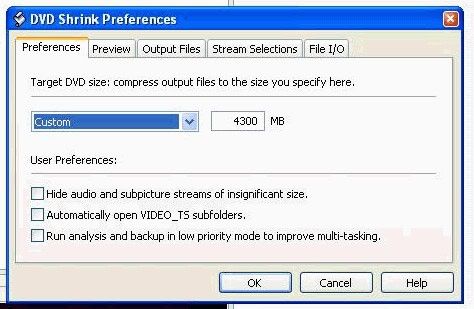
Quote:
Disc Manufacturer: -
- it can't recognise your media
Quote:
Sense Key: 0x03 (KEY_MEDIUM_ERROR)
- yup, it's not happy with that media
Quote:
Power calibration error
- Here's a v good start re Power Calibration errors - http://forums.afterdawn.com/thread_view.cfm/93406
also, quote from "http://www.nero.com/en/FAQs_Error_Messages.html#9 - "
"9. I get a 'Power calibration error' or 'Calibration area (almost) full' error message. Why?
Power Calibration is controlled by the recorder.
Before any write operation, all recorders must do a 15 step power test to determine the optimum power for writing to the CD; this is called "Optimum Power Calibration"(OPC). During the write, it continues to do this test to get the best write throughout the whole CD; this is called "Running Optimum Power Calibration" (ROPC).
This whole process is controlled by the recorder, though initiated by programs such as Nero. There is an area on the inner part of the CD for the test and test data info to be stored. You can use this area up to 999 times.
If you receive the "Power calibration error" or "Power calibration area is (amost) full" error message, the cause will be either poor media, poor power, or a defective recorder.
Please try the following solutions:
Update the firmware of your recorder. Please check the manufacturer's website for the latest version.
Try another brand of CD-R or CD-RW media.
Try different power connectors, and for recorders, do not share power with other devices. It needs its own power connector. If the error occurs with an external recorder, the power source in the chassis could be the cause. As a test, try to take the recorder out of the external chassis and connect it internal.
Try different configurations, such as taking the CD-ROM to the primary IDE bus as slave and have only the recorder connected to the secondary IDE bus as master.
Send the recorder in for service."
Main PC ~ Intel C2Q Q6600 (G0 Stepping)/Gigabyte GA-EP45-DS3/2GB Crucial Ballistix PC2-8500/Zalman CNPS9700/Antec 900/Corsair HX 620W
Network ~ DD-WRT ~ 2node WDS-WPA2/AES ~ Buffalo WHR-G54S. 3node WPA2/AES ~ WRT54GS v6 (inc. WEP BSSID), WRT54G v2, WRT54G2 v1. *** Forum Rules ***
This message has been edited since posting. Last time this message was edited on 16. June 2005 @ 09:05
|
|
A_Derer
Suspended due to non-functional email address
|
16. June 2005 @ 09:24 |
Link to this message
|
Whats the Newest version of Nero?
there's your dvd burner. there's version US06 out now, here - http://forum.rpc1.org/dl_firmware.php?category=4&manufactor=28 - be very sure you know what you're doing before attempting this
How do i upload or update this dun no the correct word lol
Disc Manufacturer: -
--------------------------------------------------------------------------------
- it can't recognise your media
Quote:
--------------------------------------------------------------------------------
Sense Key: 0x03 (KEY_MEDIUM_ERROR)
--------------------------------------------------------------------------------
- yup, it's not happy with that media
How do i fix this?!
Hello
|
Moderator
|
16. June 2005 @ 09:32 |
Link to this message
|
|
sorry i flew thru on auto-pilot compiling answers as i do quite a few of these each day. hang on and i'll tell ya
Main PC ~ Intel C2Q Q6600 (G0 Stepping)/Gigabyte GA-EP45-DS3/2GB Crucial Ballistix PC2-8500/Zalman CNPS9700/Antec 900/Corsair HX 620W
Network ~ DD-WRT ~ 2node WDS-WPA2/AES ~ Buffalo WHR-G54S. 3node WPA2/AES ~ WRT54GS v6 (inc. WEP BSSID), WRT54G v2, WRT54G2 v1. *** Forum Rules ***
|
Moderator
|
16. June 2005 @ 09:44 |
Link to this message
|
Main PC ~ Intel C2Q Q6600 (G0 Stepping)/Gigabyte GA-EP45-DS3/2GB Crucial Ballistix PC2-8500/Zalman CNPS9700/Antec 900/Corsair HX 620W
Network ~ DD-WRT ~ 2node WDS-WPA2/AES ~ Buffalo WHR-G54S. 3node WPA2/AES ~ WRT54GS v6 (inc. WEP BSSID), WRT54G v2, WRT54G2 v1. *** Forum Rules ***
This message has been edited since posting. Last time this message was edited on 16. June 2005 @ 09:45
|
|
A_Derer
Suspended due to non-functional email address
|
16. June 2005 @ 09:56 |
Link to this message
|
|
Should i delete all the old software b4 downloading all this?
Hello
|
Moderator
|
16. June 2005 @ 09:59 |
Link to this message
|
you mean Nero ?. very good question, yes you probably should. hang on i'll lookup the proper way to do it. In the meantime find your serial number(s) for Nero and write it down otherwise you won't be able to use the upgrade
Main PC ~ Intel C2Q Q6600 (G0 Stepping)/Gigabyte GA-EP45-DS3/2GB Crucial Ballistix PC2-8500/Zalman CNPS9700/Antec 900/Corsair HX 620W
Network ~ DD-WRT ~ 2node WDS-WPA2/AES ~ Buffalo WHR-G54S. 3node WPA2/AES ~ WRT54GS v6 (inc. WEP BSSID), WRT54G v2, WRT54G2 v1. *** Forum Rules ***
|
Moderator
|
16. June 2005 @ 10:06 |
Link to this message
|
Main PC ~ Intel C2Q Q6600 (G0 Stepping)/Gigabyte GA-EP45-DS3/2GB Crucial Ballistix PC2-8500/Zalman CNPS9700/Antec 900/Corsair HX 620W
Network ~ DD-WRT ~ 2node WDS-WPA2/AES ~ Buffalo WHR-G54S. 3node WPA2/AES ~ WRT54GS v6 (inc. WEP BSSID), WRT54G v2, WRT54G2 v1. *** Forum Rules ***
This message has been edited since posting. Last time this message was edited on 16. June 2005 @ 10:06
|
|
A_Derer
Suspended due to non-functional email address
|
16. June 2005 @ 10:42 |
Link to this message
|
|
thx for that il dload it and report back
Hello
|
|
Advertisement
|
|
|
|
A_Derer
Suspended due to non-functional email address
|
16. June 2005 @ 11:06 |
Link to this message
|
|
Ok it worked
but oh god i dun no how to install all th firm flash stuff so complicated is there an eays guide?
Hello
|
|


