|
Dvd burner problem
|
|
Moderator

|
16. June 2005 @ 11:23 |
 Link to this message

|
right, normally in this case i'd say fix all other problems, see how you get on, then do firmware at a later date when you suss out how to do it. However all the fixes i suggested won't fix the media recognition until the firmware issue is resolved.
I've read a bit more about the sfdnwin.exe way of flashing (the smart gui looking way of doing it) that i posted earlier. It looks like that's not the safest way of doing it. Read this one instead -
http://forum.rpc1.org/viewtopic.php?p=37412#37412
snippet from there - 'Hook the drive up as Primary Slave, Secondary Master, or Secondary Slave. Remove another device if you have to.'
We can verify this stuff an easier way -
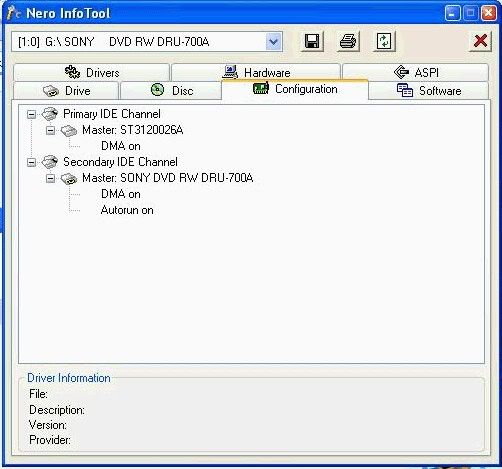
(some of these firmware updaters are very specific about how your devices are hooked up so we can verify this, this way). Note down how your drives are hooked up, similar to how the piccy shows..
ie in my example-
The Primary IDE Channel has Master hard drive (ST3120026A)
The Secondary IDE Channel has Master SONY blah blah dvd drive
yours may be different, so write 'em down and we can start seeing if we can get your firmware done.

Main PC ~ Intel C2Q Q6600 (G0 Stepping)/Gigabyte GA-EP45-DS3/2GB Crucial Ballistix PC2-8500/Zalman CNPS9700/Antec 900/Corsair HX 620W
Network ~ DD-WRT ~ 2node WDS-WPA2/AES ~ Buffalo WHR-G54S. 3node WPA2/AES ~ WRT54GS v6 (inc. WEP BSSID), WRT54G v2, WRT54G2 v1. *** Forum Rules *** |
|
Advertisement
|
|
|
|
|
A_Derer
Suspended due to non-functional email address
|
16. June 2005 @ 11:29 |
Link to this message

|
|
Hook the drive up as Primary Slave, Secondary Master, or Secondary Slave. Remove another device if you have to.
What are they :embaressed: r they the chords at t back of the Burner coz there all hooked up
Hello
|
Moderator
|
16. June 2005 @ 11:34 |
Link to this message
|
|
LOL!
yes, that's correct.
sorry if you think i'm patronising, my way is to chunder on and describe everything as it's quicker to lay the answers down and discuss 'em if i've flown thru it all :)
Main PC ~ Intel C2Q Q6600 (G0 Stepping)/Gigabyte GA-EP45-DS3/2GB Crucial Ballistix PC2-8500/Zalman CNPS9700/Antec 900/Corsair HX 620W
Network ~ DD-WRT ~ 2node WDS-WPA2/AES ~ Buffalo WHR-G54S. 3node WPA2/AES ~ WRT54GS v6 (inc. WEP BSSID), WRT54G v2, WRT54G2 v1. *** Forum Rules ***
|
|
A_Derer
Suspended due to non-functional email address

|
16. June 2005 @ 11:38 |
Link to this message
|
|
Create a boot disk or a boot CD. Or download one from >NIL's PioneerDVD Page
How do i create a Boot Cd :embaressedX10000:
Hello
|
Moderator
|
16. June 2005 @ 11:43 |
Link to this message
|
|
naw, nuthin to be embarressed about. i had a quick look at that, it should just be a bootable cd image, that you usually download and input to a burning prog in order to splat out its contents to let it do its thing to make a bootable cd..
Main PC ~ Intel C2Q Q6600 (G0 Stepping)/Gigabyte GA-EP45-DS3/2GB Crucial Ballistix PC2-8500/Zalman CNPS9700/Antec 900/Corsair HX 620W
Network ~ DD-WRT ~ 2node WDS-WPA2/AES ~ Buffalo WHR-G54S. 3node WPA2/AES ~ WRT54GS v6 (inc. WEP BSSID), WRT54G v2, WRT54G2 v1. *** Forum Rules ***
|
|
A_Derer
Suspended due to non-functional email address
|
16. June 2005 @ 11:44 |
Link to this message
|
|
How do i create one? as it saying
Hello
|
Moderator
|
16. June 2005 @ 11:48 |
Link to this message
|
if you click on that link you just mentioned, you end up here - http://pioneerdvd.rpc1.org/index.html#BOOTISO
there's 2 ways of doing it - look for little blue icon (bless him) in centre of page - you then have 2 ways - boot floppy or boot cd
Main PC ~ Intel C2Q Q6600 (G0 Stepping)/Gigabyte GA-EP45-DS3/2GB Crucial Ballistix PC2-8500/Zalman CNPS9700/Antec 900/Corsair HX 620W
Network ~ DD-WRT ~ 2node WDS-WPA2/AES ~ Buffalo WHR-G54S. 3node WPA2/AES ~ WRT54GS v6 (inc. WEP BSSID), WRT54G v2, WRT54G2 v1. *** Forum Rules ***
|
|
A_Derer
Suspended due to non-functional email address
|
16. June 2005 @ 11:56 |
Link to this message
|
|
Ok im downaloding something called DVD Region Killer v2.7.0.2
Hello
|
|
A_Derer
Suspended due to non-functional email address
|
16. June 2005 @ 12:07 |
Link to this message
|
|
i downloaded it am i meant to put a blank cd in the Cd drive thing?
Hello
|
Moderator
|
16. June 2005 @ 12:13 |
Link to this message

|
|
naw, not region killer, below that :)
- the choice of the two options, ie floppy or cd images - "The Firmware Flashing Bootdisk (Floppy image or CD ISO image)" - next to the little blue man
Main PC ~ Intel C2Q Q6600 (G0 Stepping)/Gigabyte GA-EP45-DS3/2GB Crucial Ballistix PC2-8500/Zalman CNPS9700/Antec 900/Corsair HX 620W
Network ~ DD-WRT ~ 2node WDS-WPA2/AES ~ Buffalo WHR-G54S. 3node WPA2/AES ~ WRT54GS v6 (inc. WEP BSSID), WRT54G v2, WRT54G2 v1. *** Forum Rules ***
This message has been edited since posting. Last time this message was edited on 16. June 2005 @ 12:14
|
|
A_Derer
Suspended due to non-functional email address
|
16. June 2005 @ 12:28 |
Link to this message
|
Hey i downlaoded that and and when i clicked it it came up with DVD Decrypter is it meant to do that? i cant decrypt anything i only have a blank cd in there
Hello
|
Moderator
|
16. June 2005 @ 12:34 |
Link to this message
|
Main PC ~ Intel C2Q Q6600 (G0 Stepping)/Gigabyte GA-EP45-DS3/2GB Crucial Ballistix PC2-8500/Zalman CNPS9700/Antec 900/Corsair HX 620W
Network ~ DD-WRT ~ 2node WDS-WPA2/AES ~ Buffalo WHR-G54S. 3node WPA2/AES ~ WRT54GS v6 (inc. WEP BSSID), WRT54G v2, WRT54G2 v1. *** Forum Rules ***
|
|
A_Derer
Suspended due to non-functional email address
|
16. June 2005 @ 12:37 |
Link to this message
|
heres what happens
I download http://pioneerdvd.rpc1.org/boot_iso.zip coz i dont have a floppy drive on this laptop
It downloads i click the thing to open it Bootdisk then it comes up with Decrypter... :confused: should i take the blank cd out?
Hello
|
Moderator
|
16. June 2005 @ 12:41 |
Link to this message
|
ok i see what's happened - computers - PAH!
the .zip file extension has somehow been associatd with decrypter
let's fix it - download winzip - "http://www.winzip.com/downwz.htm "
- go thru the motions and .zip files will be associated correctly
Main PC ~ Intel C2Q Q6600 (G0 Stepping)/Gigabyte GA-EP45-DS3/2GB Crucial Ballistix PC2-8500/Zalman CNPS9700/Antec 900/Corsair HX 620W
Network ~ DD-WRT ~ 2node WDS-WPA2/AES ~ Buffalo WHR-G54S. 3node WPA2/AES ~ WRT54GS v6 (inc. WEP BSSID), WRT54G v2, WRT54G2 v1. *** Forum Rules ***
This message has been edited since posting. Last time this message was edited on 16. June 2005 @ 12:41
|
|
A_Derer
Suspended due to non-functional email address
|
16. June 2005 @ 12:47 |
Link to this message
|
even with cable internet the WinZIP downlaod goign slow il report back when it finnishes
Hello
|
|
A_Derer
Suspended due to non-functional email address
|
16. June 2005 @ 14:01 |
Link to this message
|
I downaldoed WinZIP and it still went to Decrypter hmm?
Hello
|
Moderator
|
17. June 2005 @ 00:02 |
Link to this message
|
that's ok this time, the contents of the zip file is a .ISO file (ie the image file we can 'just burn as it is'). Try and burn that with Decrypter and hopefully you should end up with the boot cd just like that. I haven't used Decrypter to burn anything before but it's fairly straightforward to use. - see http://www.afterdawn.com/guides/archive/burn_dvd_folder_dvd_decry... - but only follow from about half way down the page - start from hheader "Launch DVD Decrypter and select ISO Write"
(In hindsight we could have left Nero installed, done this cd image easier, then uninstalled Nero etc. Ah well!)
Main PC ~ Intel C2Q Q6600 (G0 Stepping)/Gigabyte GA-EP45-DS3/2GB Crucial Ballistix PC2-8500/Zalman CNPS9700/Antec 900/Corsair HX 620W
Network ~ DD-WRT ~ 2node WDS-WPA2/AES ~ Buffalo WHR-G54S. 3node WPA2/AES ~ WRT54GS v6 (inc. WEP BSSID), WRT54G v2, WRT54G2 v1. *** Forum Rules ***
This message has been edited since posting. Last time this message was edited on 17. June 2005 @ 00:09
|
|
A_Derer
Suspended due to non-functional email address
|
17. June 2005 @ 03:19 |
Link to this message
|
|
The green light for the arrow wont go grene it sstill grey it wont let me decrypt it :( any ideas? is the blank cd meant to be in the dvd drive or the C drive?
Hello
|
Moderator
|
17. June 2005 @ 03:24 |
Link to this message
|
|
as per those piccies, the source disk will be that ISO file , the destination will be your blank cd... set those and then the green arrow will allow you to continue...
Main PC ~ Intel C2Q Q6600 (G0 Stepping)/Gigabyte GA-EP45-DS3/2GB Crucial Ballistix PC2-8500/Zalman CNPS9700/Antec 900/Corsair HX 620W
Network ~ DD-WRT ~ 2node WDS-WPA2/AES ~ Buffalo WHR-G54S. 3node WPA2/AES ~ WRT54GS v6 (inc. WEP BSSID), WRT54G v2, WRT54G2 v1. *** Forum Rules ***
|
|
A_Derer
Suspended due to non-functional email address
|
17. June 2005 @ 06:22 |
Link to this message
|
|
Ok the source is the Iso file i have clicked File and i have clicked Write i have put the blank cd in the dvd drive and the cd drive still no grene light am i missing something?
Hello
|
|
A_Derer
Suspended due to non-functional email address
|
17. June 2005 @ 06:33 |
Link to this message
|
Here

Hello
This message has been edited since posting. Last time this message was edited on 17. June 2005 @ 06:34
|
|
A_Derer
Suspended due to non-functional email address
|
17. June 2005 @ 06:41 |
Link to this message
|
|
oh soryr dun no how to get the pic bigger lol
Hello
This message has been edited since posting. Last time this message was edited on 17. June 2005 @ 06:42
|
Moderator
|
17. June 2005 @ 06:43 |
Link to this message
|
|
lol i was gonna say i can blow up the piccy but it goes fuzzy. you sure you got the correct drive selected, to burn to...
Main PC ~ Intel C2Q Q6600 (G0 Stepping)/Gigabyte GA-EP45-DS3/2GB Crucial Ballistix PC2-8500/Zalman CNPS9700/Antec 900/Corsair HX 620W
Network ~ DD-WRT ~ 2node WDS-WPA2/AES ~ Buffalo WHR-G54S. 3node WPA2/AES ~ WRT54GS v6 (inc. WEP BSSID), WRT54G v2, WRT54G2 v1. *** Forum Rules ***
|
|
andmerr
Suspended permanently
|
17. June 2005 @ 06:46 |
Link to this message
|
|
see at the bottom where that test and verify squares are click the disc drive button aka green arrow /dvd disc to start the burn
|
|
Advertisement
|
|
|
|
A_Derer
Suspended due to non-functional email address
|
19. June 2005 @ 08:15 |
Link to this message
|
|
Yes im retty sure i have the Source file is the Iso the Destination is Blank disk Umm am i missing anything
Hello
|


