|
burning movie files from Computer to DVD
|
|
|
kosanke
Junior Member

|
1. August 2005 @ 15:53 |
Link to this message

|
|
Ok I FINALLY got me a DVD burner, but it's not dual layer, and I got a bunch of movie files i wish to burn, but I heard to burn them without a dual layer drive, I need to compress them, I have Nero, but I need help on the compressing part, i am confused there.
|
|
Advertisement
|
 |
|
|
Senior Member

|
1. August 2005 @ 16:47 |
Link to this message

|
|
You need DVD Shrink, to compress the files, so they fit on one disc.
Good luck!
As you can see, the words DVD Shrink are underlined. Click on it to go to the page to download it.
Enjoy.........
This message has been edited since posting. Last time this message was edited on 1. August 2005 @ 16:49
|
|
squizzle
AfterDawn Addict
|
1. August 2005 @ 16:48 |
Link to this message

|
|
check out the guides I have listed in my sig if you need help.
Convert PAL to NTSC or NTSC to PAL------>http://forums.afterdawn.com/thread_view.cfm/167922
ScubaPete's guides------>http://www.dvdplusvideo.com/tutorial007.html
Bbmayo's guides------>http://home.comcast.net/~bbmayo/index.html
My ever-growing movie collection------>http://www.intervocative.com/dvdcollection.aspx/squizzle
|
|
kosanke
Junior Member
|
1. August 2005 @ 16:52 |
Link to this message
|
ok, I have DVD Shrink, so i just use that, pick my file, compress itg, burn?
|
|
kosanke
Junior Member
|
1. August 2005 @ 17:17 |
Link to this message
|
|
ok, all my movies are on my F:\, or my external hard drive,
problem is this, I try to open them, and i get this message: "DVD Shrink encounters an error and cannot continue. Failed to open file "F:\Movies\Beavisandbutthead\VI(DEO_TS.IFO" The system cannot find the file specified."
|
Senior Member
|
1. August 2005 @ 17:36 |
Link to this message
|
|
|
|
squizzle
AfterDawn Addict
|
1. August 2005 @ 18:54 |
Link to this message
|
where did you get these files? Sounds like you only have VOB files or you have corrupted IFO files.
Convert PAL to NTSC or NTSC to PAL------>http://forums.afterdawn.com/thread_view.cfm/167922
ScubaPete's guides------>http://www.dvdplusvideo.com/tutorial007.html
Bbmayo's guides------>http://home.comcast.net/~bbmayo/index.html
My ever-growing movie collection------>http://www.intervocative.com/dvdcollection.aspx/squizzle
|
|
kosanke
Junior Member
|
1. August 2005 @ 19:10 |
Link to this message
|
|
I downloade them, I think it's becuase I have no VIDEO_TS directory, can anyone tell me how to make one?
|
|
squizzle
AfterDawn Addict
|
1. August 2005 @ 19:35 |
Link to this message
|
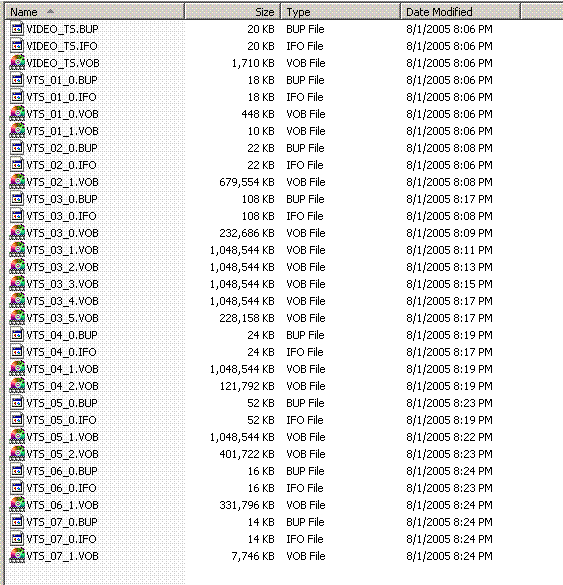
Here's a picture of how the structure should look. You'll have a different number of VOB files and they'll be numbered differently, but basically you should see IFO and BUP files with the VOB kinda like I have. If you don't see them then the DVD won't work and you'll need to make them. We can help with that too if need be.
Convert PAL to NTSC or NTSC to PAL------>http://forums.afterdawn.com/thread_view.cfm/167922
ScubaPete's guides------>http://www.dvdplusvideo.com/tutorial007.html
Bbmayo's guides------>http://home.comcast.net/~bbmayo/index.html
My ever-growing movie collection------>http://www.intervocative.com/dvdcollection.aspx/squizzle
|
|
kosanke
Junior Member
|
2. August 2005 @ 05:30 |
Link to this message
|
all i have are movies I downloaded, and they are just .AVI, .mpg, .asf
and on DVD Shrink, I click on "Open Files" and I try to select a folder which holds them movies, but I get that error message I posted earlier, can someone help me on JUST opening the files from my computer to DVD Shrink, i already know how to do the "Open Disc" I just want to burn movies I have on my computer to DVD, that's all, my DVD burner isn ot dual layer, so I guess I have to compress it first, but yeah, the message ocmes up when I try to "Open Files" option, please don't tell me how to do it with a DVD, I already got the movie on my computer, please, just tell me how to burn it to DVD, I am really confused....
Thanks.
|
|
kosanke
Junior Member
|
2. August 2005 @ 05:35 |
Link to this message
|
I do not know how you get all them VOB files and such, I just got one .asf file, which is just the movie, and I want to burn that to DVD
|
|
squizzle
AfterDawn Addict
|
2. August 2005 @ 05:46 |
Link to this message
|
your movies are not in DVD format. You will need to convert them. There are many programs available for this, WinAVI, AVI2DVD, DivXtoDVD (which is what I use).
Convert PAL to NTSC or NTSC to PAL------>http://forums.afterdawn.com/thread_view.cfm/167922
ScubaPete's guides------>http://www.dvdplusvideo.com/tutorial007.html
Bbmayo's guides------>http://home.comcast.net/~bbmayo/index.html
My ever-growing movie collection------>http://www.intervocative.com/dvdcollection.aspx/squizzle
|
|
kosanke
Junior Member
|
2. August 2005 @ 07:56 |
Link to this message
|

that's my VIDEO_TS directory, when I click OPEN FILES and select that folder, all I get is a 2 second clip of nothing, and it says "Demo Version, go to dvdsanta to buy full version" that's what it say when i play the 2 second clip

in the little black box it says that, something like "Buy full version of dvdsanta for only $29.99 @ dvdsanta.com" but it won't show when i take a screenshot
|
|
kosanke
Junior Member
|
2. August 2005 @ 07:58 |
Link to this message
|
that's my VIDEO_TS directory, when I click OPEN FILES and select that folder, all I get is a 2 second clip of nothing, and it says "Demo Version, go to dvdsanta to buy full version" that's what it say when i play the 2 second clip
in the little black box it says that, something like "Buy full version of dvdsanta for only $29.99 @ dvdsanta.com" but it won't show when i take a screenshot
|
|
kosanke
Junior Member
|
2. August 2005 @ 07:59 |
Link to this message
|
http://www.freewebs.com/marioman11/g.jpg
that's my VIDEO_TS directory, when I click OPEN FILES and select that folder, all I get is a 2 second clip of nothing, and it says "Demo Version, go to dvdsanta to buy full version" that's what it say when i play the 2 second clip
http://www.freewebs.com/marioman11/cd.jpg
in the little black box it says that, something like "Buy full version of dvdsanta for only $29.99 @ dvdsanta.com" but it won't show when i take a screenshot
now i couldnt shrink thep ics anymore without being unable to read um, but still to big for this, so go to the link.
|
|
squizzle
AfterDawn Addict
|
2. August 2005 @ 08:16 |
Link to this message
|
I went to the links but they both took me right back to this thread.
I've heard good and bad about DVD Santa. You can do a search for it here and get a free trial of it if you'd like, but it's gonna leave its logo on your movies.
I'd suggest going with DivXtoDVD, they offer a free trial. The best thing about that program is its simplicity and it will do MPEG, AVI, and wmv formats, probably some others too. Most other programs only do 1 format or so.
Convert PAL to NTSC or NTSC to PAL------>http://forums.afterdawn.com/thread_view.cfm/167922
ScubaPete's guides------>http://www.dvdplusvideo.com/tutorial007.html
Bbmayo's guides------>http://home.comcast.net/~bbmayo/index.html
My ever-growing movie collection------>http://www.intervocative.com/dvdcollection.aspx/squizzle
|
|
kosanke
Junior Member
|
2. August 2005 @ 10:16 |
Link to this message
|
|
ya, so i should uninstall DVDSanta?
|
|
kosanke
Junior Member
|
2. August 2005 @ 10:33 |
Link to this message
|
files in my VIDEO_TS folder are: Beavis and Butthead Do America, which is a .asf file, VIDEO_TS.IFO, VTS_01_0.IFO, VTS_01_0.VOB, VIDEO_TS.BUP, and VTS_01_0.BUP, soo how do I make my movie, Beavis and Butthead into a DVD? Because I mean, whenever I open that folder (VIDEO_TS) in DVD Shrink, all it brings up is a 2 second lcip of nothing but black and top left says "Demo Version" bottom rightsays "Get the full version for only $29.99 @ dvdsanta.com"
|
|
kosanke
Junior Member
|
2. August 2005 @ 11:51 |
Link to this message
|
so ya, can someone help me open the movie in DVD Shrink?
|
|
kosanke
Junior Member
|
2. August 2005 @ 12:08 |
Link to this message
|
Ok I got ya now, I used DivXtoDVD, problem is, I used trial version, and it put it's logo on it, is there a free converter i can use, that won't put a logo on it?
|
|
kosanke
Junior Member
|
2. August 2005 @ 18:49 |
Link to this message
|
okay, well i got a full version of a product and convert it, and now i should be all set to burn using DVD Shrink, thanks!
|
|
squizzle
AfterDawn Addict
|
2. August 2005 @ 19:16 |
Link to this message
|
|
if that doesn't work I have another idea for you, so let me know how it turns out.
Convert PAL to NTSC or NTSC to PAL------>http://forums.afterdawn.com/thread_view.cfm/167922
ScubaPete's guides------>http://www.dvdplusvideo.com/tutorial007.html
Bbmayo's guides------>http://home.comcast.net/~bbmayo/index.html
My ever-growing movie collection------>http://www.intervocative.com/dvdcollection.aspx/squizzle
|
|
kosanke
Junior Member
|
3. August 2005 @ 07:37 |
Link to this message
|
ok, i have the video ocnverted, now i just use DVD Shrink righT? and i can burn dvd andp lay it on my dvd player, which is capable of playing burnt dvds
|
|
squizzle
AfterDawn Addict
|
4. August 2005 @ 05:53 |
Link to this message
|
you should only have to use DVD Shrink if the files are too big to fit on a DVDR. More than 4.3GB, use Shrink. Otherwise just burn like you'd burn a normal DVD.
Convert PAL to NTSC or NTSC to PAL------>http://forums.afterdawn.com/thread_view.cfm/167922
ScubaPete's guides------>http://www.dvdplusvideo.com/tutorial007.html
Bbmayo's guides------>http://home.comcast.net/~bbmayo/index.html
My ever-growing movie collection------>http://www.intervocative.com/dvdcollection.aspx/squizzle
|
|
Advertisement
|
|
|
|
kosanke
Junior Member
|
4. August 2005 @ 13:21 |
Link to this message
|
|
burn liken ormal dvd, remember i am new at this
|


