User User name Password  
   
Saturday 7.3.2026 / 08:33
Search AfterDawn Forums:        In English   Suomeksi   Pĺ svenska
afterdawn.com > forums > dvd±r discussion > dvd±r for newbies > need help with nero recode
Show topics
 
Forums
Forums
Need help with nero recode
  Jump to:
 
Posted Message
Griffins
Junior Member
_
21. August 2005 @ 21:57 _ Link to this message    Send private message to this user   
Hello guys, I tried using nero recode for the first time and everything went well till the very end. It took about 19 mins to recode Gladiator but I cannot find my encoded movie!My HD space shrinked But I can't get my hands on it!
I always use dvd shrink but I have been having problems recently, for some reason dvd shrink won't preview my movies anymore when I want re-author them. I tried reinstalling dvd shrink a dozen times with no succes. So if anyone have any suggestions on where I can find my movie and fix dvd shrink I wlii be please hear them.
Thank you.
Advertisement
_
__
Member
_
21. August 2005 @ 22:13 _ Link to this message    Send private message to this user   
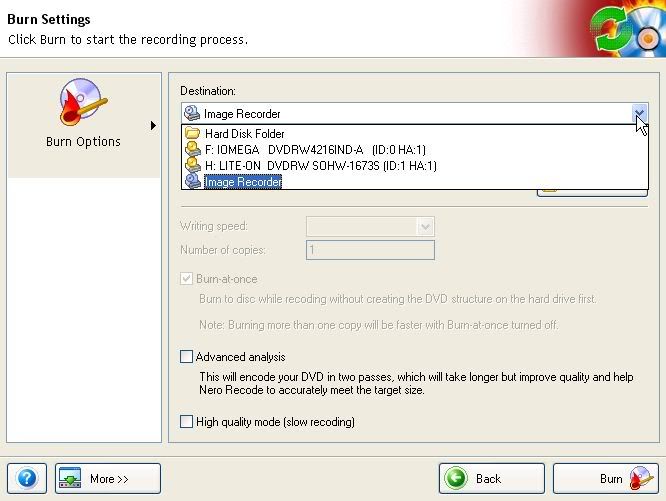
On the page where you can choose your burn settings, whether or not to use Advanced Analysis, Slow recoding, etc...do you remember what you chose under Destination:?

Here's a pic to show you what I'm referring to...


- Ideal way to deal with the MPAA~RIAA
Griffins
Junior Member
_
21. August 2005 @ 22:17 _ Link to this message    Send private message to this user   
Hello thugs121, I'm sure it was a hard drive folder
Griffins
Junior Member
_
21. August 2005 @ 22:19 _ Link to this message    Send private message to this user   
Sorry meant hard disk folder.
Member
_
21. August 2005 @ 22:19 _ Link to this message    Send private message to this user   
If you choose Hard Disk Folder, Recode would've created a VIDEO_TS and an empty AUDIO_TS folders to a hard drive/drives.

If you chose Image Recorder, then Recode would've created an image (.nrg) of the movie.

*I assuming you have 1 hard drive*


- Ideal way to deal with the MPAA~RIAA
Member
_
21. August 2005 @ 22:34 _ Link to this message    Send private message to this user   
Quote:
I always use dvd shrink but I have been having problems recently, for some reason dvd shrink won't preview my movies anymore when I want re-author them.
Do you have the latest DirectX version? I believe it is version 9.0c is the latest one available.

You could try using the built-renderer in Shrink to preview the movie. To do this: open up Shrink, select Edit, scroll down and choose Preferences..., select the tab labled: Preview, make sure Enable video and audio preview is check marked, then go to the drop-down menu labeled: Select DirectX video renderer, then choose: Built-in Software Renderer...

The quality/sound might not be up to par, but it's the best we could do for now ;)

Let me know if this works or not....


- Ideal way to deal with the MPAA~RIAA

This message has been edited since posting. Last time this message was edited on 21. August 2005 @ 22:36

Griffins
Junior Member
_
21. August 2005 @ 22:34 _ Link to this message    Send private message to this user   
Yes!thank you thug121 you were right, I found the compress movie on my Hard disk. I have never succeeded burning a file video folder since I began backing up movies.I always used Iso image with DVD Shrink, so do you have any advice for me?
thank you agian.
Member
_
21. August 2005 @ 22:53 _ Link to this message    Send private message to this user   
If you have either Nero Express and/or Nero Burning ROM, you can use either one.

Open up Nero Express and choose: DVD-Video Files,click "Add", then find where your VIDEO_TS is, then add all the files from that VIDEO_TS folder, then click finished, then if your movie is under 4.38 GBs (just a green bar), then you're good to burn then.....


- Ideal way to deal with the MPAA~RIAA
Griffins
Junior Member
_
21. August 2005 @ 23:39 _ Link to this message    Send private message to this user   
I love you thug life! I don't even know where to begin, First I followed the instructions you gave me about DVD Shrink and I finally got my screen preview working again! and my encoded Gladiator movie with Nero recode it's a thing of beauty. and that was the first time using Nero recode and burning succesfully a file video folder!
I finally got that off my mind, you don't even know! and you made all that happen! Thank you thugs121, I really hope you read this.

May God bless you.
Thank you.
Advertisement
_
__
 
_
Member
_
21. August 2005 @ 23:52 _ Link to this message    Send private message to this user   
No problem...you can probably just choose your dvd burner/writer under Destination:. Recode would encode your movie, then burn the movie straight to the blank dvd in your burner. Just remember to burn at 4x or lower...

good luck


- Ideal way to deal with the MPAA~RIAA
Related links
Download Nero from here.
How to burn DVDs with Nero? Read our guide from here.
Support AfterDawn and purchase your copy of Nero from here!
 
Related forum topics Posts Last post Forum room
My Nero 6 OEM not compatable with Windows 8.1 4 2. June 2014 Windows - Software discussion
nero 2014 3 24. May 2014 Nero discussion
need to download Nero 9 5 9. May 2014 Nero discussion
read errors on disc verify in nero 12 2 3. May 2014 Nero discussion
I lose sound when I join files on Nero 12 Platinum? 9 29. April 2014 Nero discussion
Nero 12 activation 3 15. January 2014 Nero discussion
Help with NERO burning BluRay 2 22. December 2013 Nero discussion
DVD-DL Media keeps failing with Nero Platinum 12 6 7. December 2013 Nero discussion
A better way to burn Blu Ray disks...than using Nero! 3 30. October 2013 Blu-ray
which version of Nero to get for windows 7 OS ?? 2 26. October 2013 Nero discussion

 
afterdawn.com > forums > dvd±r discussion > dvd±r for newbies > need help with nero recode
 

Digital video: AfterDawn.com | AfterDawn Forums
Music: MP3Lizard.com
Gaming: Blasteroids.com | Blasteroids Forums | Compare game prices
Software: Software downloads
Blogs: User profile pages
RSS feeds: AfterDawn.com News | Software updates | AfterDawn Forums
International: AfterDawn in Finnish | AfterDawn in Swedish | AfterDawn in Norwegian | download.fi
Navigate: Search | Site map
About us: About AfterDawn Ltd | Advertise on our sites | Rules, Restrictions, Legal disclaimer & Privacy policy
Contact us: Send feedback | Contact our media sales team
 
  © 1999-2026 by AfterDawn Ltd.

  IDG TechNetwork