|
Burn problem
|
|
|
JT23
Suspended due to non-functional email address

|
12. September 2006 @ 11:50 |
Link to this message

|
Usually I just use shrink to burn a dvd that I have just ripped, usually just hitting backup will do that for me. However, the last disc I backed up wouldn't work with shrink, so I had to use DVD Decrypter, and I remember having to change a setting in there that said to burn using DVD Decrypter. Now when I try backing up a disc using shrink I am automatically sent to decrypter to back up, but I would prefer to stay in shrink. I have looked all over to find the way to switch back so that shrink is the default, but can't find that option. Can anybody direct me to the proper location? Thanks
|
|
Advertisement

|
 |
|
|
|
rulisky
Senior Member
|
12. September 2006 @ 12:19 |
Link to this message

|
Shrink does not burn. You can set it to make the backup to your hard drive and burn it at a later time. Having done this you can burn a disk using Nero, Roxio, or any number of other burning applications.
You can set Shrink to make to the backup to a disk using Decrypter. There is a version of Shrink out there that has been modded to use ImgBurn in place of Decrypter.
But - Shrink does not burn by itself.
|
Member
|
12. September 2006 @ 12:24 |
Link to this message
|
hey jt23,
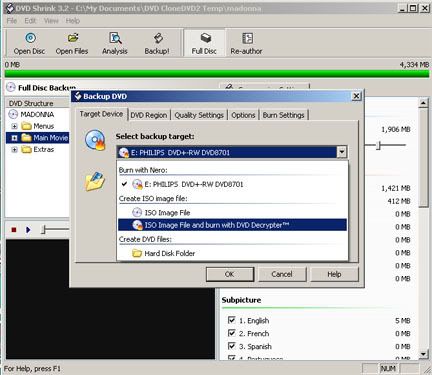
what program is actually burning your dvd after shrink has processed the files? dvddecrypter (and the more current imgburn) will burn an iso. a little more detail would help. maybe you are referring to this setting:
|
Senior Member
|
12. September 2006 @ 12:53 |
Link to this message

|
As stated...Shrink itself isn't able to burn to disk, it doesn't contain a burning engine. Shrink can be used to automatically start a third party application such as Nero, DVD Decrypter, or Imgburn which is then used to burn an image (ISO) or video files (VIDEO_TS/AUDIO_TS folders) to disk.
When you click on the backup tab, under Target device....you should have 4 options
If you have Nero installed (the demo version will work), from the drop down menu under the "Burn with Nero" section, make a slection like the one shown (only select the optical drive your using), to burn the movie straight to a blank DVD;
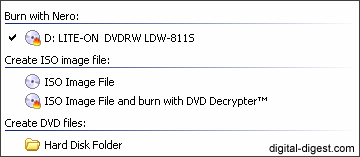
If you have DVD Decrypter installed.....
Burning an ISO image file using DVD decrypter:

If you have Imgburn installed and wish to use it to burn an ISO to disk, there are two ways to do this:
1) Trick shrink into using Imgburn instead of DVD Decrypter, here's a guide;
http://forum.digital-digest.com/showthread.php?t=55859
2) Install a different version of shrink which will have a burn with Imgburn in it's dropdown menu.
http://www.digital-digest.com/software/d...23&ssid=0&did=7
Last, you can choose hard disk folder
Shrink will create a VIDEO_TS folder on your HDD containing the video files it ripped which you can manually burn to disk using Nero or a favorite burning app of your choice.
This message has been edited since posting. Last time this message was edited on 12. September 2006 @ 12:59
|
|
JT23
Suspended due to non-functional email address
|
12. September 2006 @ 15:48 |
Link to this message
|
Ok surfgeo and johnl123, you have pointed out to me where I needed to go to change the burn back to Nero. That is what I was burning with before, but couldn't find the screen to change back. Thanks guys
|
Member
|
12. September 2006 @ 16:59 |
Link to this message
|
|
@jt23
cool. hope that works.
|
|
JT23
Suspended due to non-functional email address
|
12. September 2006 @ 17:08 |
Link to this message
|
|
yes, got me back to where I wanted to be..Thanks again
|
|
Advertisement
|
|
|
AfterDawn Addict
|
12. September 2006 @ 17:14 |
Link to this message
|
99% of all problems are between the computer and the chair.
|



