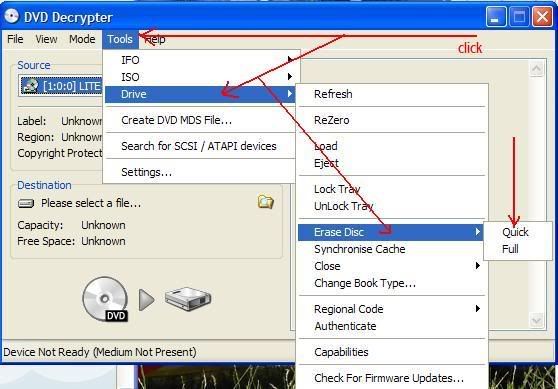
His/ her burning program will have an option to erase the media that is currently in the DVD drive. For example, in DeepBurner it's 'Recorder>Erase', and it's something similar for Nero. Insert the disc, open the burning program and choose 'erase media' in the settings.
DVD-RW are not what they are cacked up to be don't ever depend on them one day you'll put the disc in your pc and it will not work I will not buy another one I lost some good pictures on one. they are junk !!
To delete files from a DVD+RW, simply put the disc into the drive that originally recorded it, open up the list of files on the disc, and delete the ones you want eliminated.
The same can be done for DVD-RW, but deletion only wipes out the address, not the file; so you can no extra space on the disc. This is because DVD-RW is a video format disc while DVD+RW is designed for both video and for data.
Both types of discs are phase change material and need to be recorded, erased, and read in the same drive if possible. Different drives have different types of diodes that can create conflicting patterns that may make the disc illegible. The same is true for CD-RW, and conflicting packet-writing software further complicates the issues with these discs. Those complications and higher costs have prevented them from being popular.
hi,i have this problem to,but when i try to erase/format,it says this disc is not rewrightable and therefore cannot be erased,any way around that one?cheers
There can be several reasons for that: 1) the disc is not recognized by the drive (This would not be the case if you recorded on the drive); 2) the default burning strategy used to write the original information was a poor choice and the address system is illegible (This would be true if the drive did not recognize the disc but attempted to write to it just in case the default strategy might work.); 3) the disc was written again in a second or third drive that either fell under situation 1 or 2 or had a different laser beam pattern that interfered with the original and made the contrast ratio between dark and reflective ares too small; or 4) different packet-writing software was used in separate sessions for the disc and caused conflicts.
An initializer can restore the disc by overwriting the whole thing, but only factories have them; and all data are lost. If the data are important, they may be retrieved two ways: 1) trying different drives if you have multiple versions available (Different lenses, diodes, beam patterns, and error correction circuitry can pick things up that other systems cannot. I once had to use 7 different drives from 7 different manufacturers to recover data for a customer.); 2) try recovery software. Recovery software often ignores the address structure written at the beginning of a disc and just bullies its way into the files by creating its own temporary address system on the host. If none of that works, the disc is toast. These rewritable discs work best if used on the same drive and not moved to other drives. No manufacturers mention that, unfortunately.