User User name Password  
   
Monday 27.7.2026 / 12:45
Search AfterDawn Forums:        In English   Suomeksi   På svenska
afterdawn.com > forums > consoles > sony psp - mod and firmware discussion > (tutorial) how to replace the psp's lcd screen.
Show topics
 
Forums
Forums
(TUTORIAL) HOW TO REPLACE THE PSP'S LCD SCREEN.
  Jump to:
 
Posted Message
Newbie
_
9. April 2007 @ 11:40 _ Link to this message    Send private message to this user   
How To Replace PSP LCD SCREEN

THIS MAY VOID YOUR WARRANTY
IF U HAVE A BROKEN OR DAMAGED LCD OR BACKLIGHT THIS IS WHAT U WILL NEED TO DO TO FIX IT.


IF U ARE A COMPELETE IDIOT PLEASE DO NOT TRY THIS
DO NOT COME MOANING TO ME IF U FUCK UP UR PSP. I ACCEPT NO RESPONABLITY IF U DAMAGE UR PSP.

HERES WHAT YOU NEED
No.1
A Phillips Head Ph000 Screwdriver
No.2
A Small Flat Head Screwdriver
No.3
A Replacement LCD SCREEN (You can get one off ebay for as little as 10 euros)


STEPS

STEP.1
REMOVING THE FACEPLATE
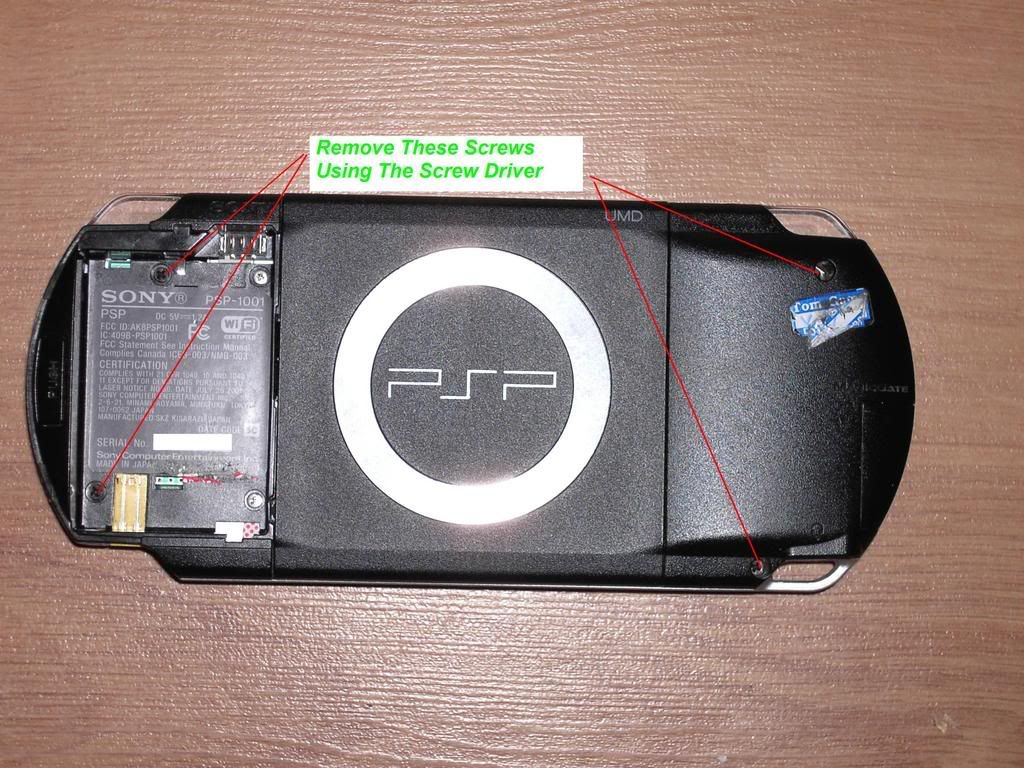
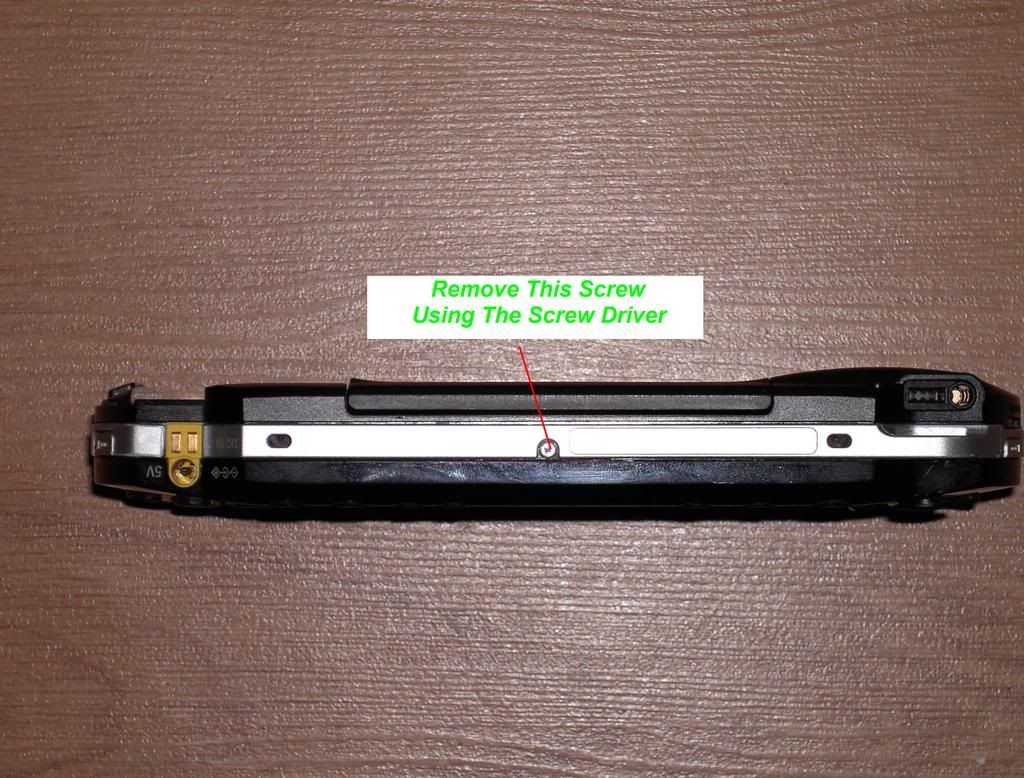
Remove the 5 screws holding the faceplate as shown in the pictures below.


GROUND urself before u take off the faceplate.

P.S. Try not to strip the screws. but if u have stripped a screw and can no longer use it. u can find replacments here http://powergamingparts.com/psp-screw-kit.html.
if u need help removing a stripped screw these topics http://www.psp-hacks.com/forums/viewtopic.php?id=70774 http://www.psp-hacks.com/forums/viewtopic.php?id=69967 They may have a couple of suggestions


STEP.2
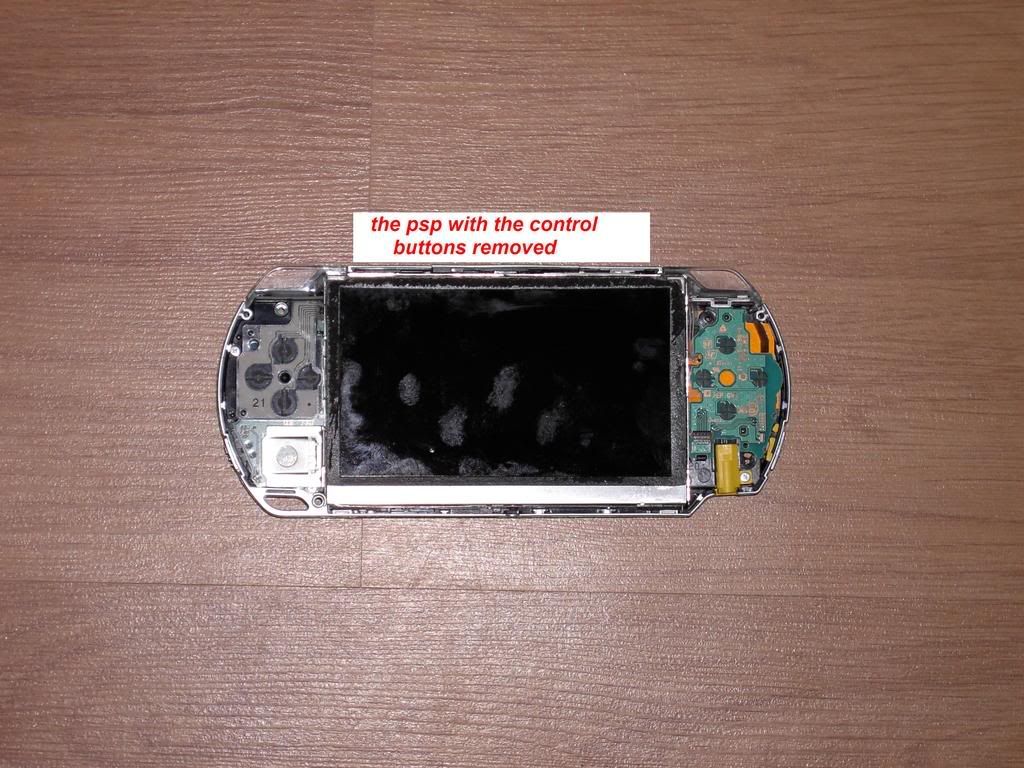
REMOVING THE CONTROL BUTTONS STRIP
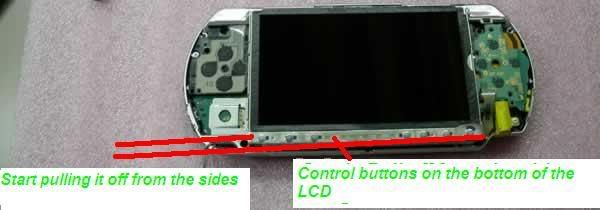
To remove the control buttons strip you must use a flat head screwdriver to pry the control buttons away from the LCD metal casing. The best way to get it off is to pry it off from the sides.


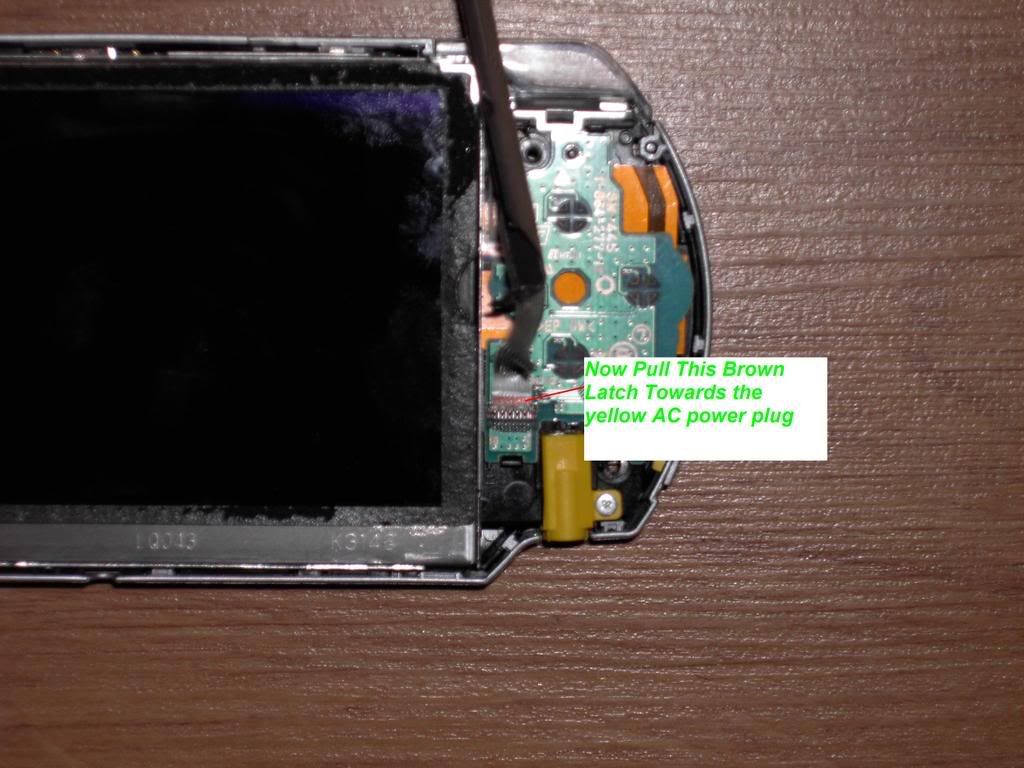
when u have pryed the button strip off you must then remove the cable connecting it to the psp.
you can do this by pulling the brown latch towards the yellow ac power connector as shown in the picture below.


after u have the latch pulled up the cable will then be free to pull out.


STEP.3
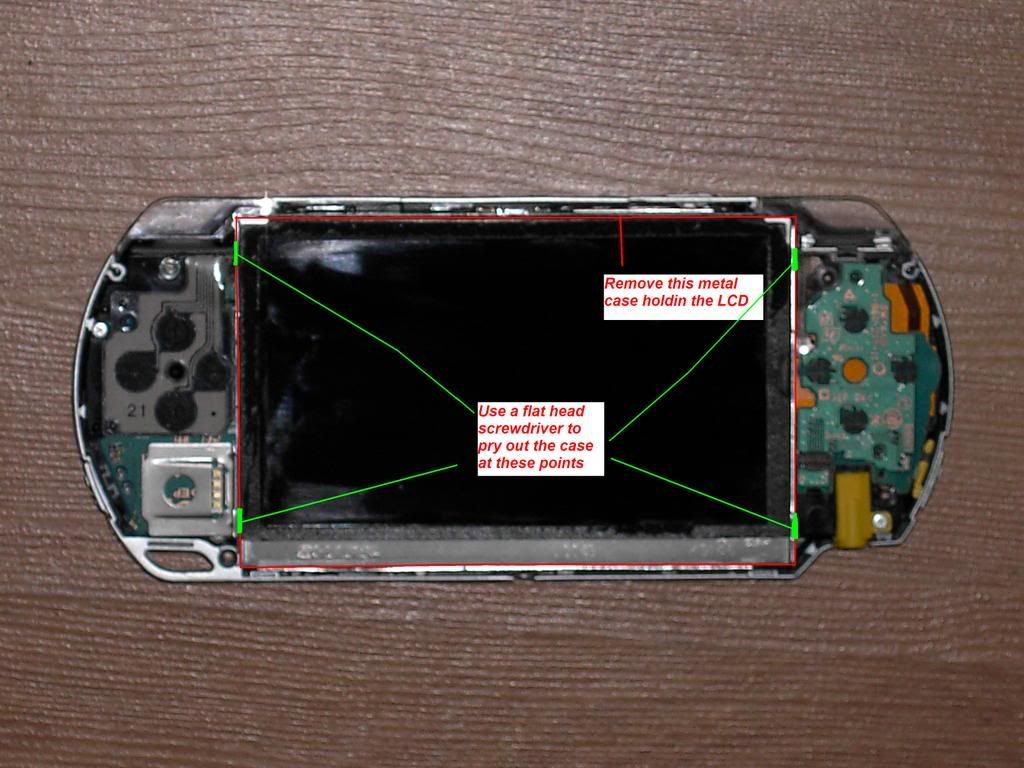
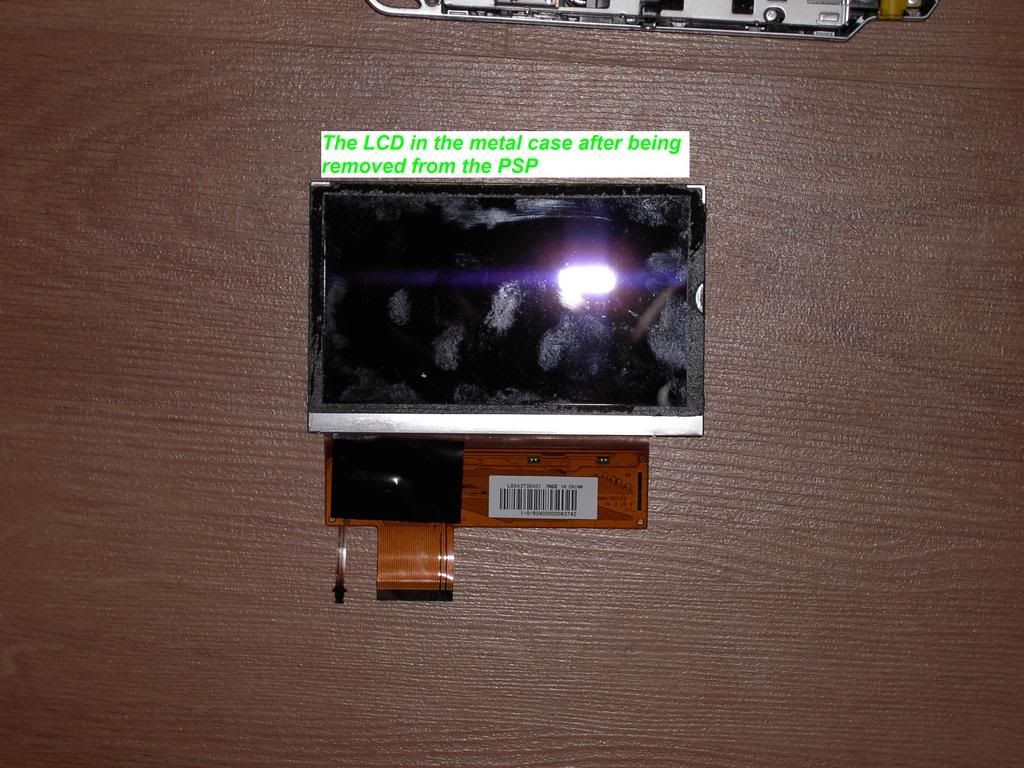
REMOVING THE METAL CASE HOLDING THE LCD.
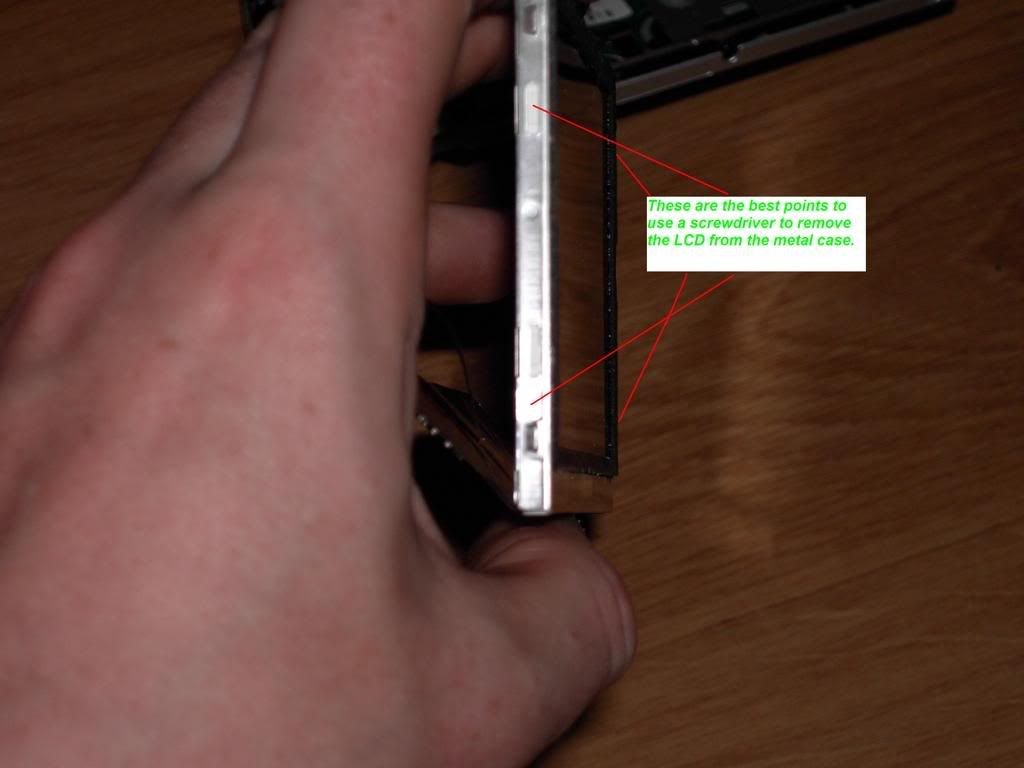
to remove the lcd case u must slide a flat head screwdriver down the side of the case at the points shown in the picture below then u can easy pry it up.


when u have pryed the case up please ly it face front down because it is still connected to the PSP through cables.
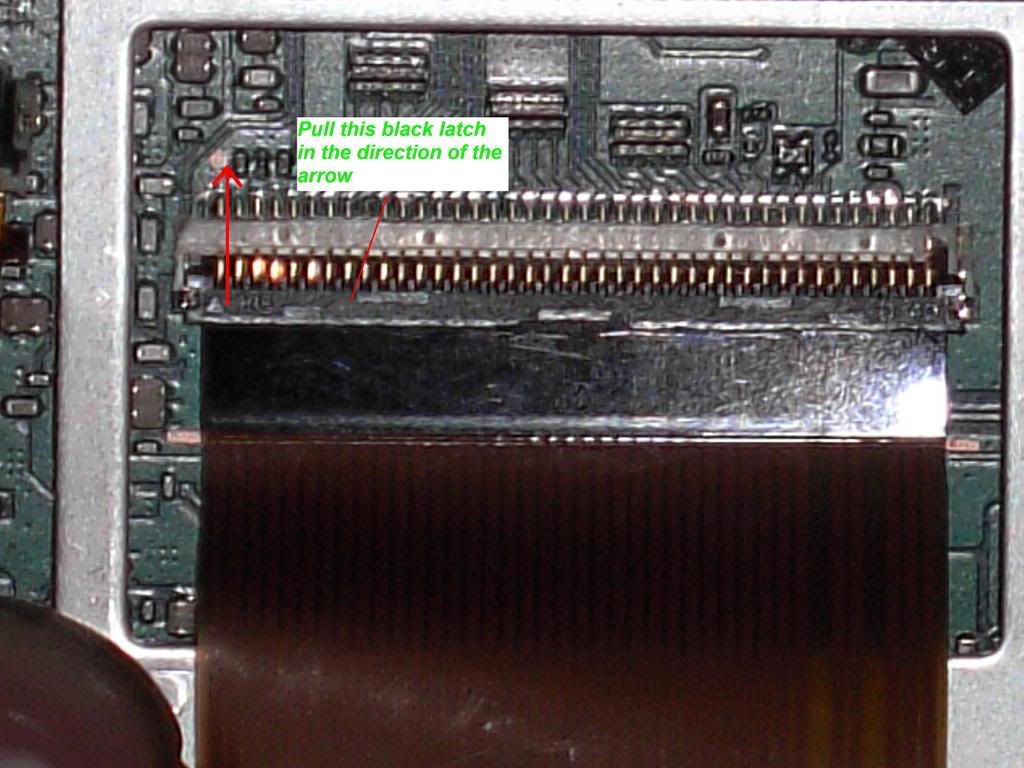
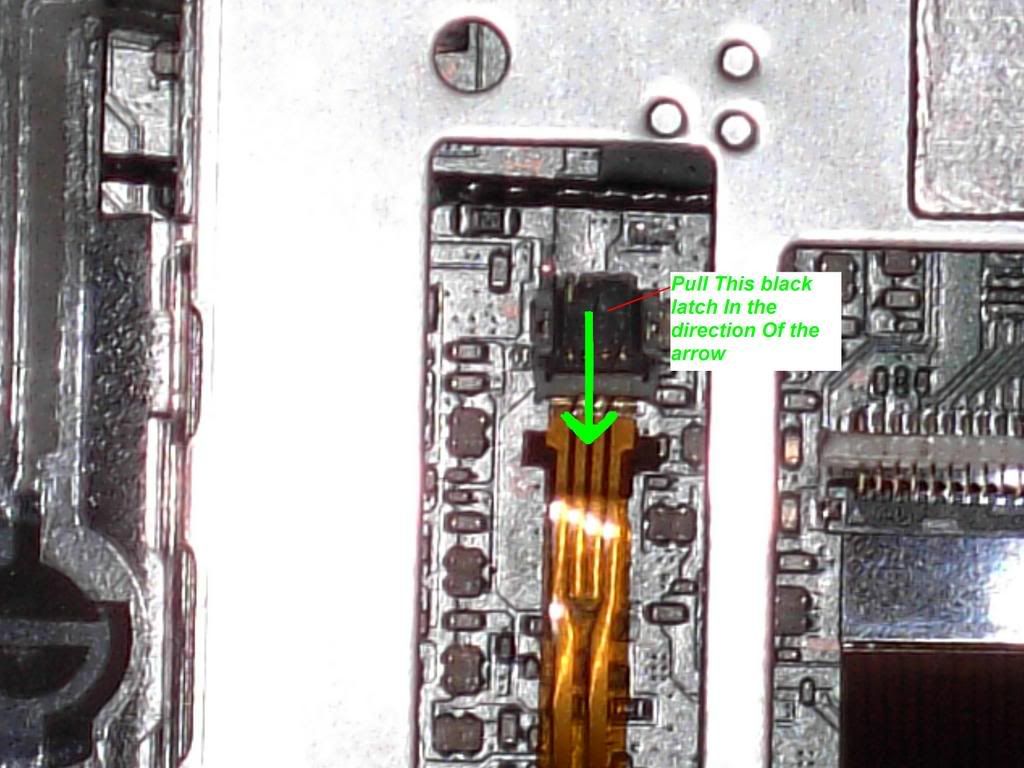
These cables can be easily removed by using your nail to pull up the black latches in the direction show in the pictures below. the big cable in the pictue below is for the LCD screen and the small cable in the other picture is for the LCD BACKLIGHT.


STEP.4
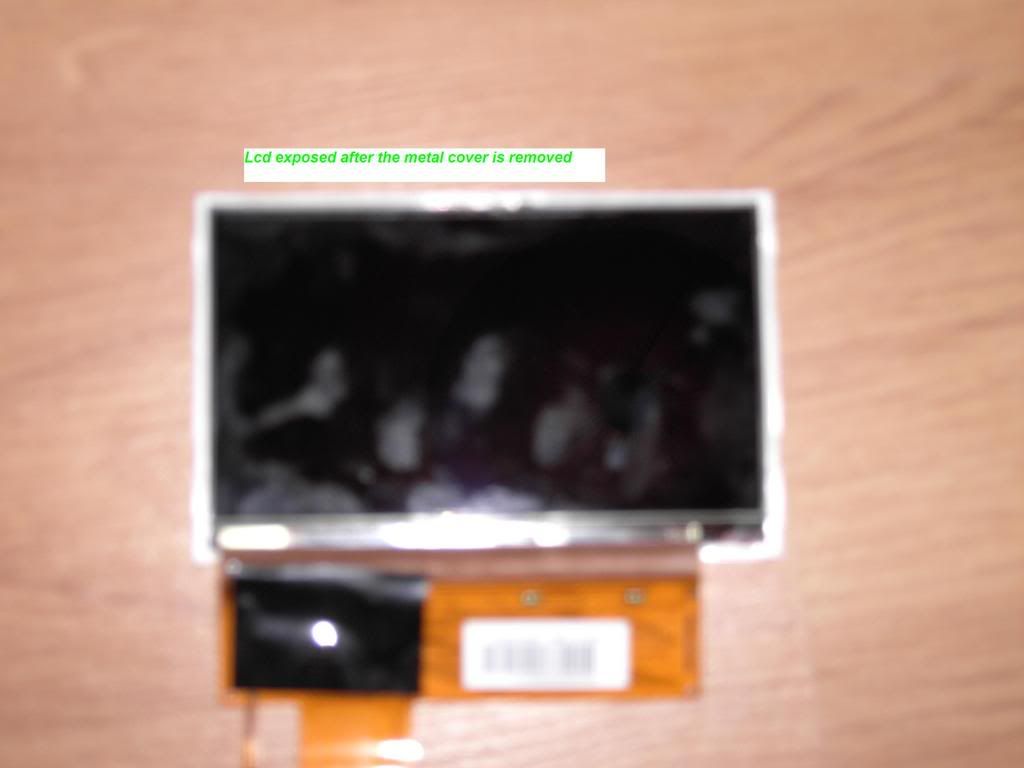
REMOVING THE METAL CASE AROUND THE BACKLIGHT AND LCD
to remove the metal case all you have to do is to pry it apart at the pionts shown in the picture below.


sometimes it may be stuck by adhesive so just keep pulling gently untill you have it completely away from the LCD and BACKLIGHT.


STEP.5
REMOVING THE LCD FROM THE BACKLIGHT(Skip this if you have bought a backlight and lcd. You only have to do this if you only have bought a new LCD)
Yo can do this eaily by inserting a small flathead screwdriver at the point shown in the picture below. and then prying up the LCD.


The is usally stuck to the LCD so go very slowly when prying them apart.


STEP.6
PUTTING EVERYTHING BACK TOGETHER.
6.1 Before you put the LCD and BACKLIGHT together you must remove the protective plastic on the back of the LCD.
6.2 Now just Click the LCD into the backlight. and Remove the protective plastic on the front of the LCD.
6.3 Now just Click the LCD and the Backlight Into the METAL CASE.
6.4 Now just put the cables in the slots and make sure you click the latches Back Down.
6.5 Now Just click the METAL CASE into the PSP.
6.5 Now put the Control Buttons Strip cable into its slot and click down the brown latch.
6.6 Then click the Control Buttons Strip onto the bottom of the LCD METAL CASE.
6.7 Then all you Have to do Is just screw your FACEPLATE back on.

NOW UR DONE

This message has been edited since posting. Last time this message was edited on 9. April 2007 @ 11:55

Advertisement
_
__
creative7
Newbie
_
12. April 2007 @ 02:34 _ Link to this message    Send private message to this user   
Hi AlanKeire,

great how-to. Unfortunately while removing the lcd-screen, the black clasp holding the wide lcd-cable snapped in half and thus the wide cable isn't held in place on the motherboard properly.

Does anyone have a tip?
fultonla
Suspended due to non-functional email address
_
12. April 2007 @ 02:57 _ Link to this message    Send private message to this user   
i saw that happen to a guy on psp hacking 101 on the mod chip episode. they just had some electrical tape on it unfotuneatly the screen would go on and off.
creative7
Newbie
_
12. April 2007 @ 03:46 _ Link to this message    Send private message to this user   
yeah fultonla, I don't think that tape would be very effective. I'll probably try crazy glue though only as a last resort.
Savage1
Newbie
_
3. May 2007 @ 16:35 _ Link to this message    Send private message to this user   
Thanks this made my Lcd replacement a breze.

www.laredocp4x4.com
Advertisement
_
__
 
_
Senior Member
_
4. May 2007 @ 07:09 _ Link to this message    Send private message to this user   
Very informative guide. Props
Related links
Visit our PSP forums located at our sister site, Blasteroids.com!
 
Related forum topics Posts Last post Forum room
psp games not reading 3 10. June 2014 Sony PSP - Games
PSP Custom Firmware Malfunction 4 10. June 2014 Sony PSP - General discussion
I cant see my psp games after changing the speed 333 5 9. June 2014 Sony PSP - Games
Whats better, a psp 1000 or a e1004? 5 19. January 2014 Sony PSP - Games
PSP won't turn on or charge 2 18. January 2014 Sony PSP - General discussion
Psp go games gone all in saved utility data does not work 4 7. January 2014 Sony PSP - Games
need help with my first generation psp!!! 3 20. December 2013 Sony PSP - General discussion
Second-generation PSP Vita will lose proprietary charging port 7 15. October 2013 News comments
help mod my PSP 5 8. October 2013 Sony PSP - Mod and firmware discussion
Help Needed Psp 2000 Backlight super dim 5 25. September 2013 Sony PSP - General discussion

 
afterdawn.com > forums > consoles > sony psp - mod and firmware discussion > (tutorial) how to replace the psp's lcd screen.
 

Digital video: AfterDawn.com | AfterDawn Forums
Music: MP3Lizard.com
Gaming: Blasteroids.com | Blasteroids Forums | Compare game prices
Software: Software downloads
Blogs: User profile pages
RSS feeds: AfterDawn.com News | Software updates | AfterDawn Forums
International: AfterDawn in Finnish | AfterDawn in Swedish | AfterDawn in Norwegian | download.fi
Navigate: Search | Site map
About us: About AfterDawn Ltd | Advertise on our sites | Rules, Restrictions, Legal disclaimer & Privacy policy
Contact us: Send feedback | Contact our media sales team
 
  © 1999-2026 by AfterDawn Ltd.

  IDG TechNetwork