There's nothing worse to me than being in the middle of a game and then all of a sudden your PS2 slim freezes up. Take out the disc, clean it, put it back in, whatever, it still won't un-freeze. Then you press the reset button hoping that will work...nope. Disc won't even read now.
It got so annoying to me that I quit trying to play my PS2 all together, until it dawned upon me that installing a fan would probably solve my problem.
So I installed one, and now my PS2 slim doesn't overheat or freeze up at all. I borrowed a few pictures from another site (digital camera is MIA), so that I could give you all an idea of what to do.
You'll need the following items:
A small phillips screwdriver
Knife
Soldering iron and solder
A small cpu fan 1 positive, 1 negative wire(4-5 bucks or get one off an old motherboard)
1 screw (preferable to find a fine thread screw, but if you don't have one then use a coarse thread screw large enough to fit in the plastic casing of the PS2 unit-see picture 6 for location)
CAUTION: Due to the heat involved in soldering, you must only hold the iron tip on the pad to be soldered for enough time to allow the solder to flow. If too much heat is applied to the contact it may damage the DC connector, lift a PCB trace or burn insulation back on the wire. If you burn the insulation off of the wire, trim and re-solder the connection. Removing too much insulation could result in the exposed copper wire touching other traces on the board. This is hazardous to the PS2.
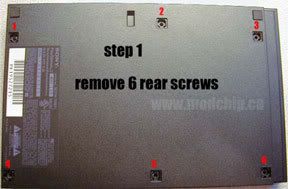
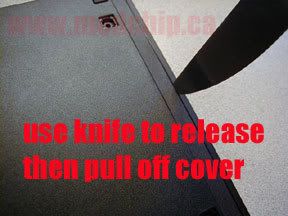
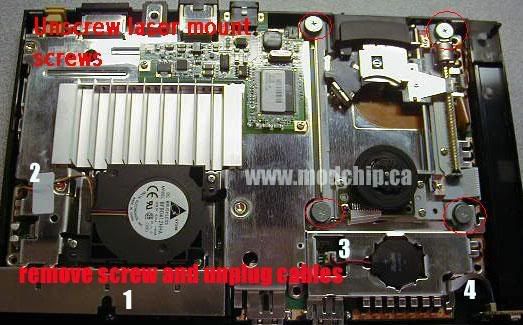
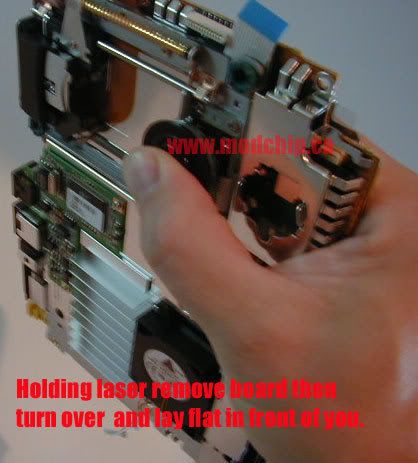
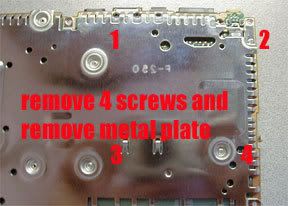
I'm sure there's another thread for PS2 slim disassembly, but for ease of viewing I'll reiterate for versions 10 and 11.
NOTE: Do not disconnect any cables, they do not need to be for this fix.
We'll be mounting the fan on the back of the unit located at the red circle. Run the wires through one of the vent holes on the bottom casing. Be sure to leave the wires long enough to reach from the mount point to the DC Connector.
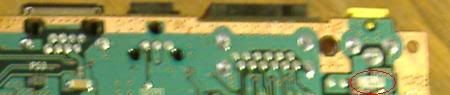
Solder the red wire to the point indicated by the red circle on the bottom of the board. Remember not to strip too much of the insulation off, and be careful not to bridge solder joints.
Replace the plate and plate screws, but use one of the screws to hold down the black wire, this is your ground connection.
Follow the steps above in reverse to put the PS2 back together. While putting the board back into the bottom casing, run the new fan wires along the very corner of the unit between the fan and the DC connector.
After the PS2 is put back together, you'll now use the 1 screw you SHOULD have left to mount the fan in the hole of the casing. (Refer to picture 6 for location). Position the fan at an angle, making sure that is blowing into the PS2 instead of sucking air out, roughly half of the fan blowing into the vents. Be sure not to screw it in too tightly, you'll want a little play in the movement of the fan.
If you have a stand for this PS2, use that to keep the fan in the proper position. If not, set something underneath the PS2 and position the unit so that the fan clears the edge.
Voila! Your PS2 slim will now be freeze up free! You will have to unplug the power to the PS2 when you're done playing a game, but it's a small price to pay for uninterrupted game play. It is suggested that you take off the cover every now and then to blow out the dust that will develop within the casing.