|
DVD Drives for Wii & Gamecube Backups
|
|
|
gilclose
Suspended due to non-functional email address

|
30. June 2008 @ 01:47 |
 Link to this message

|
Originally posted by sfsi02:
I posted this elsewhere on this site, but I did some testing of my own:
So I also jumped into this market and ordered many many many hp gdr 6162b and 8163b. I am not advertising, but I am here to confirm that the HP drives work perfectly. Moreover, the difference between the 8163b and the 8162b is pretty big. It takes about an extra hour to rawdump an 8163b, as you can see from my screenshots (again, that's my ebay name, but I am not advertising here, I just made those pics for my ad):
please advise ebay details
regards
gilberc
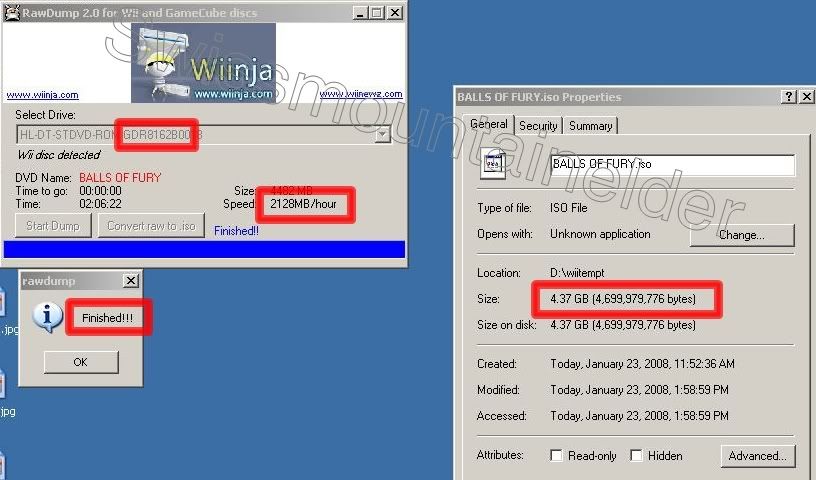


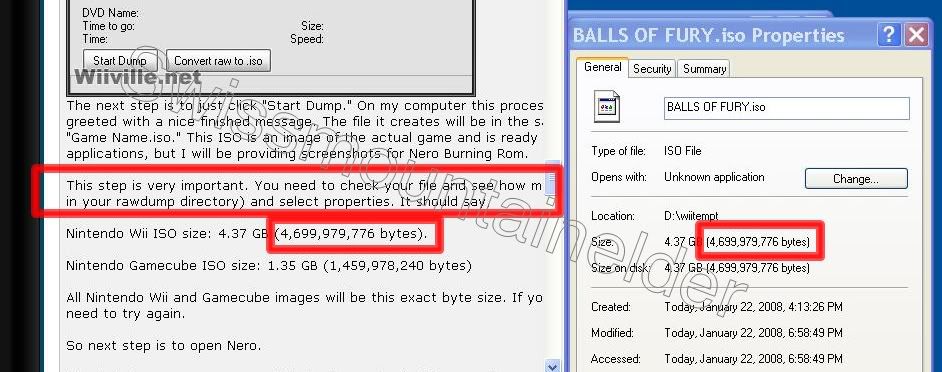

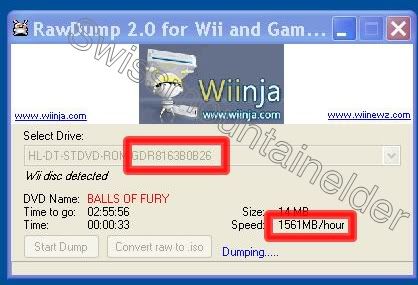
So if you look at the read rate during ripping, you notice that the 8162b is much faster than the 8163b, and moreover, the final completion time is was shorter for the 2. I tested these drives using both ide cable and then usb to ide with no additional drivers. All tests were done on xp pro. Hope this helps!
|
|
Advertisement
|
 |
|
|
|
gilclose
Suspended due to non-functional email address
|
30. June 2008 @ 01:57 |
Link to this message

|
Originally posted by sfsi02:
Originally posted by Novanium:
I made a thread about this, and was told to post here.
I am looking for a dvd drive that:
is external for laptop use
can backup wii games
can burn wii games/dvds
can burn dual/double layer wii games/dvds
can backup dual/double layer wii games
Would it be possible to find a drive that can do all of this? The most important thing is that its external (usb?) and can burn sl and dl dvd/wii games.
A guy mentioned an external dvd enclosure; how do they work?
No, the gdr series can only read games. You can order a cable for around $13 that is usb to ide on ebay. No need to spend the $80 the losers on ebay are asking for a gdr drive with a dvd enclosure. If you do not already have a burner, you need to purchase one separately from the gdr-816*b drive used to read the wii games. Again, ebay is perhaps the best place to buy the burner as well. For full disclosure: I sell the gdr drives on ebay; fixed price, priority mail, $51. I cannot tell you who I am on ebay, but if you search for "gdr wii" it will come up on top :D
cant find you on ebay please advise
thanks
gilberc
|
|
gilclose
Suspended due to non-functional email address
|
30. June 2008 @ 03:35 |
Link to this message
|
Originally posted by uou:
Yes, those are GDR-8160B, which has been reported to work by Wiible.
$25.38 is on the high side though, especially when you still need to add shipping on to that. Let us know how much shipping is if you decide to order.
Don't you guys know how to use eBay? You can get much better deals on these there and all you have to do is click the link I provided.
For example, why not get this 8163B here for about $13 including shipping and get a free powersupply with it, this was included in my search link in the first post:
http://cgi.ebay.com/ws/eBayISAPI.dll?ViewItem&item=130173597803
Of course, now that I posted it, you'll probably have to bid on it with others...
hi iam searching for a drive without to much luck
i am located in australia, if you have ideas as to where ican find one i would be appreciative of your efforts to reply
thanks
gilberc
|
|
peter1929
Newbie
|
30. June 2008 @ 06:21 |
Link to this message
|
will a LG GSA4160B dual layer burner work ?
|
Moderator
1 product review
|
30. June 2008 @ 07:42 |
Link to this message
|
|
gilclose, lets watch the post padding/multiposting please.
|
|
nick2281
Newbie
|
3. July 2008 @ 01:06 |
Link to this message

|
Hey guys, new here but just wanted to add another confirmation that my (COMPAQ) GDR-8160B firmware 0012 does not work. I think it's something like this one someone posted:
IDE/CDROMCOMPAQ_DVD-ROM_GDR8160B_____________0012_____
Anyone wanna buy it for $24 shipped priority?
|
Moderator
|
3. July 2008 @ 14:23 |
Link to this message
|
@nick2281
If you want to sell it post in aD's Marketplace - link
|
|
jbloggs
Junior Member
|
21. July 2008 @ 17:29 |
Link to this message
|
I'm sure the rip-off prices for these 'special' drives will now come to an end since it is now possible to backup games striaght from the wii to the PC via Wi-Fi using the newly released IOS249 and Wiihttpd and Homebrew channel. I have not done this myself but others have successfully. No more need for special drive, sd gecko or usb gecko.
|
|
brightspk
Suspended due to non-functional email address
|
22. July 2008 @ 17:56 |
Link to this message
|
I carn't recall who asked the question but you can use the
CRC32, MD4, MD5, SHA-1 and ED2K hashes of dumped discs, so you can immediately know if your dump is good or not
I still think these drives are a better option, dumping using the wii regardless of how is still putting strain on the drive.
I surpose its simply a matter of which is the cheapest to replace if you lost it ?
the wii drive or a rawdump / friidump drive - i'd imagine the rawdump/friidump drive...
a new wii drive would invalidate your warranty and you may want an engineer to install it for you if your not to good at it...
Just my point of view... ;-)
|
|
wii75
Suspended permanently
|
30. July 2008 @ 00:17 |
Link to this message
|
Sort fo off base, but I saw this link posted earlier for an install of the Wii Mod D2CPro and am curious what is the song playing? Can anyone tell me?
|
|
wii75
Suspended permanently
|
30. July 2008 @ 00:46 |
Link to this message
|
|
I figured it out...Lethal Bizzle-Police on my back
|
|
trevinem
Newbie
|
3. August 2008 @ 07:05 |
Link to this message
|
Guys maybe someone can help. I have a GDR-8082N0106 USB Drive. When I try to run Rawdump and press Start Dump it just displays NOT RESPONDING. Im using Vista...Can i change the firmware to 007? How can I do this?
|
|
brightspk
Suspended due to non-functional email address
|
3. August 2008 @ 14:05 |
Link to this message
|
GDR8082 0106 will work this is DELL firmware....
The trick is timing, when you start rawdump, place the disc in the drive
to dump, etc....
Vista does not recongnise the disc, so locks up...
I suggest press start dump, then put the disc in...
|
|
trevinem
Newbie
|
3. August 2008 @ 20:28 |
Link to this message
|
Thanks for your reply. I tried what you said and I did get a little further. Wii Disc detected did appear and Getting DVD name appeared at the bottom of Rawdump. unfortunately so did the message Error!! You might have a faulty Drive!!
I tried this on a laptop with Win2000 and Vista and the same message on both. I dont thing the drive is faulty though. Any suggestions?
|
|
laurent62
Account closed as per user's own request
|
11. August 2008 @ 07:45 |
Link to this message
|
I have a PHILIPS SPD6005T, does anybody know if it will work with this one too?
|
|
edthesped
Suspended due to non-functional email address
|
12. August 2008 @ 13:25 |
Link to this message
|
I found GDR-8082N 0C11'S for $15.00 at this place I assume these are decent for ripping games so I ordered one.
This message has been edited since posting. Last time this message was edited on 12. August 2008 @ 13:27
|
|
kowalczyk
Newbie
|
19. August 2008 @ 15:35 |
Link to this message
|
I just bought an 8162b. The OS I am running is Vista. I am running the drive via USB & IDE connection. When I powered the drive up, Windows searched for the drivers, and has set the drive as a generic USB device. It does not shop up in My Computer, and I cannot find drivers for this anywhere online. I did manage to find some sort of flash file for it, however that does not help because it only recognizes the drive in my laptop. I really want to get this thing running so any help is appreciated!
Broken down..
8162b drive
Vista OS
Connected via USB & IDE
Shawn
|
|
element72
Newbie
|
19. August 2008 @ 19:27 |
Link to this message
|
|
|
|
Cecy
Member
|
19. August 2008 @ 21:44 |
Link to this message
|
|
Yes that should work fine
|
|
kowalczyk
Newbie
|
19. August 2008 @ 21:55 |
Link to this message
|
|
Still havin lots of probs. Please help! Posted above..
Shawn
|
AfterDawn Addict
|
20. August 2008 @ 02:29 |
Link to this message
|
@kowalczyk
You need to establish a baseline on a known working system.
Take your external DVD drive to a Win XP system and see if it works. Windows XP should recognize the enclosure and the drive within it unless you have something really funky.
If it doesn't work there the enclosure or the drive are probably defective.
Can't speak to any problems with Vista but I highly suspect that is the issue.
|
|
kowalczyk
Newbie
|
20. August 2008 @ 08:40 |
Link to this message
|
|
I believe it was the drive and I sent it back.. I just purchased the one listed a couple posts above.. We will see how that works.. Tested the other on XP, and I got nothing.
Shawn
|
AfterDawn Addict
|
20. August 2008 @ 10:39 |
Link to this message
|
|
OK, I would suggest testing on XP first when you get the replacement.
Don't know about the 8163, it should work by all accounts. I have an 8162 and 8164 and they run with no problems.
|
|
kowalczyk
Newbie
|
20. August 2008 @ 11:23 |
Link to this message
|
Unfortunately I will not have access to XP when this one comes in (I was working on someone elses PC at the time). Hopefully this all works out and that will be the end of it. Really strange though that Windows recognized it as a USB Mass storage device, but did not show up in My Computer or device manager as a DVD-drive.
When I plug in my internal HD via IDE-USB, it recognizes it, and also states the make and model of the HD. Then it shows up in My Computer no problem...
Shawn
|
|
Advertisement
|
|
|
|
edthesped
Suspended due to non-functional email address
|
20. August 2008 @ 19:07 |
Link to this message
|
I received my GDR-8082N 0C11 and did my first rip, information is as follows...
USBSTOR\CDROM&VEN_HL-DT_ST&PROD_DVD_RNM_GDR8082N&REV_0B10\DEF10A737D82&0
Ripped Guitar Hero III and got the following...
Size: 4482 MB (4,699,979,776 bytes)
Speed: 1134MB/hour
Time: 03:56:57
I was hoping to get a little faster rip times but I guess I won't complain because at least I can rip..
edit: I'm going to try to hook it up the the computer via IDE, set to PIO mode and see if I get better results. I'll follow up.
edit 2: Drive gives an "unexpected handle" error in PIO mode. I guess I'm limited to ripping via USB.
This message has been edited since posting. Last time this message was edited on 20. August 2008 @ 20:58
|




