|
How to: Update Eurovox Max V with Kuro 18.04.08 (R.I.P 28/11/2008)
|
|
Please note that the forum rules have changed. Posting of new codes is no longer allowed. See this thread for more information.
|
|
Elvis64
Junior Member

|
9. August 2008 @ 09:15 |
 Link to this message

|
Originally posted by karljd:
Originally posted by Elvis64:
Hi all.
Still having problems with my Eurovox Max V.
I got my mate to reinstall the latest update, in case I was doing it incorrectly & it worked fine on his TV, Lucan/Dublin area, all stations appearing. But when I connect it to my TV, Leixlip,Co Kildare area, which has the Replay Lite working fine on it, it comes up No Signal on all stations. Can't understand it. Any ideas much appreciated.
what provider have you n@l or ch@rus?maybe your mate has different frequencies and a different symbol rate to you.
Both NTHell Dublin, Same freq.
|
|
Advertisement

|
|
|
|
AfterDawn Addict
|
9. August 2008 @ 09:17 |
Link to this message

|
have you the coaxil plugged into the rf in on the box?
|
|
Elvis64
Junior Member
|
9. August 2008 @ 09:24 |
Link to this message

|
Originally posted by karljd:
have you the coaxil plugged into the rf in on the box?
Yes coaxil in RF in & connected to Tv via Loop out.
|
AfterDawn Addict
|
9. August 2008 @ 09:49 |
Link to this message
|
Originally posted by Elvis64:
Originally posted by karljd:
have you the coaxil plugged into the rf in on the box?
Yes coaxil in RF in & connected to Tv via Loop out.
right we'll illiminate the obvious have you your scart plugged into the tv scart on the box?
|
|
Elvis64
Junior Member
|
9. August 2008 @ 09:57 |
Link to this message
|
Originally posted by karljd:
Originally posted by Elvis64:
Originally posted by karljd:
have you the coaxil plugged into the rf in on the box?
Yes coaxil in RF in & connected to Tv via Loop out.
right we'll illiminate the obvious have you your scart plugged into the tv scart on the box?
OK, Yes scart in tv
|
AfterDawn Addict
|
9. August 2008 @ 10:00 |
Link to this message
|
right is the connection to the box split,if you plug the replay lite in were you have the eurovox does it work ok?
|
|
Elvis64
Junior Member
|
9. August 2008 @ 10:14 |
Link to this message
|
Originally posted by karljd:
right is the connection to the box split,if you plug the replay lite in were you have the eurovox does it work ok?
Yes, Connection is split but Replay lite works fine from same connection. Also tried Eurovox using direct NTHell connection & the same, No Signal.
|
AfterDawn Addict
|
9. August 2008 @ 10:18 |
Link to this message
|
Originally posted by Elvis64:
Originally posted by karljd:
right is the connection to the box split,if you plug the replay lite in were you have the eurovox does it work ok?
Yes, Connection is split but Replay lite works fine from same connection. Also tried Eurovox using direct NTHell connection & the same, No Signal.
you could give this a go menu-preferences-language settings ok-then press 1968 and see if your emulation is set to enable.
|
|
Elvis64
Junior Member
|
9. August 2008 @ 10:28 |
Link to this message
|
Originally posted by karljd:
Originally posted by Elvis64:
Originally posted by karljd:
right is the connection to the box split,if you plug the replay lite in were you have the eurovox does it work ok?
Yes, Connection is split but Replay lite works fine from same connection. Also tried Eurovox using direct NTHell connection & the same, No Signal.
you could give this a go menu-preferences-language settings ok-then press 1968 and see if your emulation is set to enable.
Yes,Emulation set to enable. Thanks for your time & help with this, I'm really stumped. It was working fine after the April'08 update until about a month ago & what with hols etc I'm only trying to sort it now.
|
AfterDawn Addict
|
9. August 2008 @ 10:34 |
Link to this message
|
|
stumped meself mate as to how its working at your mates and not yours,we've tryed everything at this stage,and your replays working off the same feed,ok last thing to try got to menu config-tv settings-and see if your signal booster is turned on,if it is turn it off,or try it turned on.
|
AfterDawn Addict
2 product reviews
|
9. August 2008 @ 10:39 |
Link to this message
|
|
Hi Karl dont mean to but in but Have you actually tried powerscaning again at your own address, Didnt see a mention of you doing it at your home only that it was working at your mates?.
|
AfterDawn Addict
|
9. August 2008 @ 10:46 |
Link to this message
|
|
no proplem HiTeck just took it that thats why he brought it round to his mates,as you say nothing to lose,glad your here mate in any way going for a pint and didnt want to leave elvis all shook up lol
|
AfterDawn Addict
2 product reviews
|
9. August 2008 @ 10:48 |
Link to this message
|
|
Lol Karl. Enjoy your pint mate ;).
|
|
Elvis64
Junior Member
|
9. August 2008 @ 10:49 |
Link to this message
|
Originally posted by karljd:
stumped meself mate as to how its working at your mates and not yours,we've tryed everything at this stage,and your replays working off the same feed,ok last thing to try got to menu config-tv settings-and see if your signal booster is turned on,if it is turn it off,or try it turned on.
Tried it on & off & same difference. I have it on while on this forum & when I went back it had picked up Sky Prem Movies but when I changed channels it went back to No Signal. Don't know if this helps any. Also, I power scanned at my home a number of weeks ago & no difference.
|
|
Elvis64
Junior Member
|
9. August 2008 @ 10:54 |
Link to this message
|
Originally posted by karljd:
no proplem HiTeck just took it that thats why he brought it round to his mates,as you say nothing to lose,glad your here mate in any way going for a pint and didnt want to leave elvis all shook up lol
Good One Karljd. Have one for me. Thanks for the help.
|
AfterDawn Addict
2 product reviews
|
9. August 2008 @ 10:56 |
Link to this message
|
Elvis64 try this,
Menu> Config> Then ok on Clear data,
Type 0000 or 1004,
Ok on Erase all channels then ok again.
wait for it to clear all channel data then,
Press Menu along to instalation, Press ok type 0000.
Now press powerscan "the Yellow button",
a box will then load like this
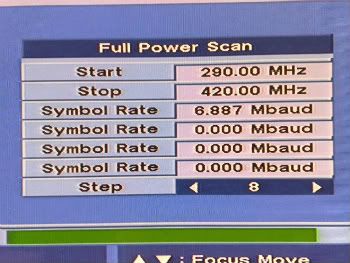
Enter the information as is above then click ok to scan and wait for the result,
May take a while to scan,
best of luck.
|
|
Elvis64
Junior Member
|
9. August 2008 @ 10:59 |
Link to this message
|
Originally posted by HiTeck:
Lol Karl. Enjoy your pint mate ;).
I have to go out myself but I'll check in later for any more much needed advice. Thanks for the help.
|
|
Elvis64
Junior Member
|
9. August 2008 @ 11:07 |
Link to this message
|
Originally posted by HiTeck:
Elvis64 try this,
Menu> Config> Then ok on Clear data,
Type 0000 or 1004,
Ok on Erase all channels then ok again.
wait for it to clear all channel data then,
Press Menu along to instalation, Press ok type 0000.
Now press powerscan "the Yellow button",
a box will then load like this
Enter the information as is above then click ok to scan and wait for the result,
May take a while to scan,
best of luck.
I'am trying this & will leave it running while I'm out. It shows a signal level & quality of 80-90+% which looks fine. I'll let you know how I get on. Thanks again.
|
AfterDawn Addict
2 product reviews
|
9. August 2008 @ 11:21 |
Link to this message
|
Karl I think you gave elvis the idea of a pint or too also mate.

|
|
Elvis64
Junior Member
|
9. August 2008 @ 12:54 |
Link to this message
|
Originally posted by HiTeck:
Karl I think you gave elvis the idea of a pint or too also mate.
Tried the powerscan but no luck. Came up with no channels.
|
AfterDawn Addict
|
9. August 2008 @ 14:38 |
Link to this message
|
|
ok back again sorry i went out bloody drowned,when you done the scan did it pick up any tps?are you sure your not mmds?
|
|
Elvis64
Junior Member
|
9. August 2008 @ 17:00 |
Link to this message
|
Originally posted by karljd:
ok back again sorry i went out bloody drowned,when you done the scan did it pick up any tps?are you sure your not mmds?
Sorry I was out. Picked up nothing on recan.Not sure if I'm mmds but same box worked fine upto a few weeks ago & replay lite box works fine using same connection.
|
AfterDawn Addict
2 product reviews
|
9. August 2008 @ 17:05 |
Link to this message
|
|
Try a re-scan as above using 6875 not 6887 as the symbol rate.
|
|
Elvis64
Junior Member
|
9. August 2008 @ 17:22 |
Link to this message
|
Originally posted by HiTeck:
Try a re-scan as above using 6875 not 6887 as the symbol rate.
Trying 6875 now. Will let you know. Thanks
|
|
Advertisement
|
|
|
|
Lisboa67
Member
|
10. August 2008 @ 14:10 |
Link to this message
|
Originally posted by HiTeck:
Regarding Remote control problems,
To check whether your remote is working point your remote into a digit@l camera lens or mobile ph0ne and press one of the buttons, through the screen on the cam/mob if the remote is working the led will flash repeatedly like this,
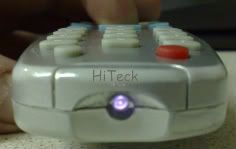
Sorry Mate, could again explain in better detail what to do, regards what button to press? Remote Control Button any button or Camera/Mobile Button, hold the button down or rapid pressing?? Sorry complete thicko here i am!
|


