|
How to: Update Eurovox Max V with Kuro 18.04.08 (R.I.P 28/11/2008)
|
|
Please note that the forum rules have changed. Posting of new codes is no longer allowed. See this thread for more information.
|
AfterDawn Addict
2 product reviews

|
10. August 2008 @ 15:21 |
 Link to this message

|
|
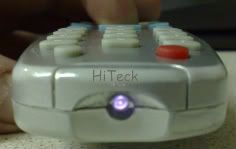
Press ANY button on your remote, Point it at a camera/mobile phone as if you're going to take a picture of the remote, Through the screen on a camera/mobile phone you will see the remote sensor flash.
if you see it flashing the remote is fine, if not the remote is at fault.
cant really explain better than that mate.
This message has been edited since posting. Last time this message was edited on 10. August 2008 @ 15:26
|
|
Advertisement
|
 |
|
|
AfterDawn Addict
|
10. August 2008 @ 15:25 |
Link to this message

|
Originally posted by Lisboa67:
Originally posted by HiTeck:
Regarding Remote control problems,
To check whether your remote is working point your remote into a digit@l camera lens or mobile ph0ne and press one of the buttons, through the screen on the cam/mob if the remote is working the led will flash repeatedly like this,
Sorry Mate, could again explain in better detail what to do, regards what button to press? Remote Control Button any button or
Camera/Mobile Button, hold the button down or rapid pressing?? Sorry complete thicko here i am!
What he means is: Using a camera phone, set phone to camera, instead of looking through the lens, point the phone at the box and point the remote control at the box via the lens, you should see the remote flicker!
Nice nick name by the way! its a wonder you didnt put 2/1 at the end of it!!!!
|
AfterDawn Addict
|
10. August 2008 @ 15:27 |
Link to this message
|
|
Evening HiTek sorry for butting in ! same answer! LOL
|
AfterDawn Addict
2 product reviews
|
10. August 2008 @ 15:33 |
Link to this message
|
|
Evening Des, I do it often mate, no worries.;)
|
|
Lisboa67
Member
|
10. August 2008 @ 18:47 |
Link to this message
|
Originally posted by HiTeck:
Press ANY button on your remote, Point it at a camera/mobile phone as if you're going to take a picture of the remote, Through the screen on a camera/mobile phone you will see the remote sensor flash.
if you see it flashing the remote is fine, if not the remote is at fault.
cant really explain better than that mate.
Thanks HiTec,
Done that and no response, tried it with my other remote and it worked, so would you say remote is knackered? As i said in earlier thread, my own remote was faulty a while back and i was just pressing a few buttons on the remote and i must of activated it again as it has been working ever since, so thought the same regards my pals that stopped working, so not sure if anyone else out there knows any more regards remotes or is this bin material now? cheers!
|
|
Lisboa67
Member
|
10. August 2008 @ 18:51 |
Link to this message
|
Originally posted by DesB:
Originally posted by Lisboa67:
Originally posted by HiTeck:
Regarding Remote control problems,
To check whether your remote is working point your remote into a digit@l camera lens or mobile ph0ne and press one of the buttons, through the screen on the cam/mob if the remote is working the led will flash repeatedly like this,
Sorry Mate, could again explain in better detail what to do, regards what button to press? Remote Control Button any button or
Camera/Mobile Button, hold the button down or rapid pressing?? Sorry complete thicko here i am!
What he means is: Using a camera phone, set phone to camera, instead of looking through the lens, point the phone at the box and point the remote control at the box via the lens, you should see the remote flicker!
Nice nick name by the way! its a wonder you didnt put 2/1 at the end of it!!!!
Ask any Rangers Fan about Lisbon 67 they will all tell you the score, no need to post it alongside my username, in fact any Football Fan will tell you the score in what happened in Lisbon in 67 so felt no need to put it on!
ps I'm Not a Strachan or Dermot Desmond Fan Hence gave up my season ticket this year, after having one since the late 80's when there were only 7,000 of us then.
This message has been edited since posting. Last time this message was edited on 10. August 2008 @ 18:54
|
AfterDawn Addict
2 product reviews
|
10. August 2008 @ 19:22 |
Link to this message

|
If your not getting anything from the remote and you are with others as you said it's probably had it providing your bats are ok and no buttons are stuck.
You can buy these remotes off fleabay if you look around.
This message has been edited since posting. Last time this message was edited on 10. August 2008 @ 19:47
|
|
Elvis64
Junior Member
|
11. August 2008 @ 04:52 |
Link to this message
|
Originally posted by HiTeck:
Try a re-scan as above using 6875 not 6887 as the symbol rate.
Tried the recan on 6875 & again on 6887 but no TP's picked up. Can't fathom this. Would it be possible that the replay lite, which is working fine, can operate off a low strength signal but the Eurovox MaxV can't.
|
Newbie
|
18. August 2008 @ 03:11 |
Link to this message
|
Originally posted by SG8:
Updating Eurovox Max V with Kuro 18.04.08 UPDATED (software now works with Chorus as well)
1. Hook up your Eurovox to your PC using a null modem cable. (9 pin female to 9 pin female). Null Modem Cable must be used, looks the same as a standard RS232 lead but it is wired differently.
2. Run the Kuro Unified Flash Loader (download it here: http://www.mediafire.com/?xynenwxvyjy )
2a (Optional step: Press the Upload button to save your channel set up favourites etc as they currently are) Save this to a folder on your PC for use later.
3. Click on the 'download' button at the top of the screen.
4. The program will say 'Version 2.10 detected' (or it may say some other version!) and restart your Eurovox, it will then go through the downloading process, when finished it
will display 'Downloading is successful' .
5 . Press the Menu button on your remote, and then go into 'Config' menu and select 'Clear Data'
6. It will then ask for your PIN (default is 0000)
7.Then select 'Factory Default'
8. It will then ask you to select the symbol rate (I use 6.887 as I am on NThell Dublin).not sure if this matters at this stage though.
9. Press OK when 'Reset to Factory Default Settings' comes up
10. It will then say 'Wait to Factory Settings' and will then start to do a Full Power Scan (using the Symbol rate you selected earlier or you can change the symbol rate here)
11. It will then search through for channels, Go and make a cup of tea while it works away, do not interrupt it until it finishes.
12. It wil then exit to allow you to view your programs, but the code being updated message will probably come up for a while,
13. Put the box onto Sky Sports and go make another cup of tea. It may only take a few mins but again do not interrupt it (even if you think it is not working!)
14. Sky Sports will come up and all your channels will be back and you won't have to manually enter your codes anymore.
15. If you did the optional step at 2a, then browse to where you saved your file (CDF file) and click download in the lower box on the Kuro program, and it will reload your favourites etc. as
you originally had them.
john powell
|
Newbie
|
18. August 2008 @ 03:19 |
Link to this message
|
Originally posted by SG8:
Updating Eurovox Max V with Kuro 18.04.08 UPDATED (software now works with Chorus as well)
1. Hook up your Eurovox to your PC using a null modem cable. (9 pin female to 9 pin female). Null Modem Cable must be used, looks the same as a standard RS232 lead but it is wired differently.
2. Run the Kuro Unified Flash Loader (download it here: http://www.mediafire.com/?xynenwxvyjy )
2a (Optional step: Press the Upload button to save your channel set up favourites etc as they currently are) Save this to a folder on your PC for use later.
3. Click on the 'download' button at the top of the screen.
4. The program will say 'Version 2.10 detected' (or it may say some other version!) and restart your Eurovox, it will then go through the downloading process, when finished it
will display 'Downloading is successful' .
5 . Press the Menu button on your remote, and then go into 'Config' menu and select 'Clear Data'
6. It will then ask for your PIN (default is 0000)
7.Then select 'Factory Default'
8. It will then ask you to select the symbol rate (I use 6.887 as I am on NThell Dublin).not sure if this matters at this stage though.
9. Press OK when 'Reset to Factory Default Settings' comes up
10. It will then say 'Wait to Factory Settings' and will then start to do a Full Power Scan (using the Symbol rate you selected earlier or you can change the symbol rate here)
11. It will then search through for channels, Go and make a cup of tea while it works away, do not interrupt it until it finishes.
12. It wil then exit to allow you to view your programs, but the code being updated message will probably come up for a while,
13. Put the box onto Sky Sports and go make another cup of tea. It may only take a few mins but again do not interrupt it (even if you think it is not working!)
14. Sky Sports will come up and all your channels will be back and you won't have to manually enter your codes anymore.
15. If you did the optional step at 2a, then browse to where you saved your file (CDF file) and click download in the lower box on the Kuro program, and it will reload your favourites etc. as
you originally had them.
i followed this procedure and when i click on the download button it pops up saying no available com port! and suggestions on wat to do next please thanks
john powell
|
AfterDawn Addict
|
18. August 2008 @ 15:24 |
Link to this message
|
Originally posted by poweller5:
Originally posted by SG8:
Updating Eurovox Max V with Kuro 18.04.08 UPDATED (software now works with Chorus as well)
1. Hook up your Eurovox to your PC using a null modem cable. (9 pin female to 9 pin female). Null Modem Cable must be used, looks the same as a standard RS232 lead but it is wired differently.
2. Run the Kuro Unified Flash Loader (download it here: http://www.mediafire.com/?xynenwxvyjy )
2a (Optional step: Press the Upload button to save your channel set up favourites etc as they currently are) Save this to a folder on your PC for use later.
3. Click on the 'download' button at the top of the screen.
4. The program will say 'Version 2.10 detected' (or it may say some other version!) and restart your Eurovox, it will then go through the downloading process, when finished it
will display 'Downloading is successful' .
5 . Press the Menu button on your remote, and then go into 'Config' menu and select 'Clear Data'
6. It will then ask for your PIN (default is 0000)
7.Then select 'Factory Default'
8. It will then ask you to select the symbol rate (I use 6.887 as I am on NThell Dublin).not sure if this matters at this stage though.
9. Press OK when 'Reset to Factory Default Settings' comes up
10. It will then say 'Wait to Factory Settings' and will then start to do a Full Power Scan (using the Symbol rate you selected earlier or you can change the symbol rate here)
11. It will then search through for channels, Go and make a cup of tea while it works away, do not interrupt it until it finishes.
12. It wil then exit to allow you to view your programs, but the code being updated message will probably come up for a while,
13. Put the box onto Sky Sports and go make another cup of tea. It may only take a few mins but again do not interrupt it (even if you think it is not working!)
14. Sky Sports will come up and all your channels will be back and you won't have to manually enter your codes anymore.
15. If you did the optional step at 2a, then browse to where you saved your file (CDF file) and click download in the lower box on the Kuro program, and it will reload your favourites etc. as
you originally had them.
i followed this procedure and when i click on the download button it pops up saying no available com port! and suggestions on wat to do next please thanks
yr this courtesy of celtic71 To see which port your USB adapter is connected to, connect your USB adapter and follow the following instructions:
1. Go to the Start Menu
2. Right click on "My Computer"
3. Select "Properties"
4. Click on the "Hardware" tab
5. Click on "Device Manager"
6. Click the + sign next to "Ports (COM & LPT)"
7. One of the listed ports should indicate which port your USB adapter is connected to (e.g. COM1, COM2, COM3, etc.)
8. Go back to your map software program that you use to transfer data and make sure it is looking at the correct port.
9. You should be able to transfer data once the correct port is selected
If you need drivers go here
http://www.gilsson.com/usb_drivers_download.htm
Follow my advice to step 7. Locate your USB Adapter (port *)
Right click on that port and select properties. Then select port settings, then select advanced. At the bottom of that tab will be a drop down box with the port selected (port * in your case). Use the drop down to select another port (eg 1, 2 or 3). If the port you want to use is already allocated to something else, you can use the same procedure to reassign that port after you have finished.
Save the selections in the usual way. The USB converter will be permanently assigned to the port you selected.
|
Newbie
|
18. August 2008 @ 16:11 |
Link to this message
|
Originally posted by karljd:
Originally posted by poweller5:
Originally posted by SG8:
Updating Eurovox Max V with Kuro 18.04.08 UPDATED (software now works with Chorus as well)
1. Hook up your Eurovox to your PC using a null modem cable. (9 pin female to 9 pin female). Null Modem Cable must be used, looks the same as a standard RS232 lead but it is wired differently.
2. Run the Kuro Unified Flash Loader (download it here: http://www.mediafire.com/?xynenwxvyjy )
2a (Optional step: Press the Upload button to save your channel set up favourites etc as they currently are) Save this to a folder on your PC for use later.
3. Click on the 'download' button at the top of the screen.
4. The program will say 'Version 2.10 detected' (or it may say some other version!) and restart your Eurovox, it will then go through the downloading process, when finished it
will display 'Downloading is successful' .
5 . Press the Menu button on your remote, and then go into 'Config' menu and select 'Clear Data'
6. It will then ask for your PIN (default is 0000)
7.Then select 'Factory Default'
8. It will then ask you to select the symbol rate (I use 6.887 as I am on NThell Dublin).not sure if this matters at this stage though.
9. Press OK when 'Reset to Factory Default Settings' comes up
10. It will then say 'Wait to Factory Settings' and will then start to do a Full Power Scan (using the Symbol rate you selected earlier or you can change the symbol rate here)
11. It will then search through for channels, Go and make a cup of tea while it works away, do not interrupt it until it finishes.
12. It wil then exit to allow you to view your programs, but the code being updated message will probably come up for a while,
13. Put the box onto Sky Sports and go make another cup of tea. It may only take a few mins but again do not interrupt it (even if you think it is not working!)
14. Sky Sports will come up and all your channels will be back and you won't have to manually enter your codes anymore.
15. If you did the optional step at 2a, then browse to where you saved your file (CDF file) and click download in the lower box on the Kuro program, and it will reload your favourites etc. as
you originally had them.
i followed this procedure and when i click on the download button it pops up saying no available com port! and suggestions on wat to do next please thanks
yr this courtesy of celtic71 To see which port your USB adapter is connected to, connect your USB adapter and follow the following instructions:
1. Go to the Start Menu
2. Right click on "My Computer"
3. Select "Properties"
4. Click on the "Hardware" tab
5. Click on "Device Manager"
6. Click the + sign next to "Ports (COM & LPT)"
7. One of the listed ports should indicate which port your USB adapter is connected to (e.g. COM1, COM2, COM3, etc.)
8. Go back to your map software program that you use to transfer data and make sure it is looking at the correct port.
9. You should be able to transfer data once the correct port is selected
If you need drivers go here
http://www.gilsson.com/usb_drivers_download.htm
Follow my advice to step 7. Locate your USB Adapter (port *)
Right click on that port and select properties. Then select port settings, then select advanced. At the bottom of that tab will be a drop down box with the port selected (port * in your case). Use the drop down to select another port (eg 1, 2 or 3). If the port you want to use is already allocated to something else, you can use the same procedure to reassign that port after you have finished.
Save the selections in the usual way. The USB converter will be permanently assigned to the port you selected.
thanks for all ur help i finally got it workin just 1 more question when my eurovox was working before i had about 160 channels now i only have 90 wats the story there i dont really mind once i have the sports and movies lol
john powell
|
AfterDawn Addict
|
18. August 2008 @ 16:21 |
Link to this message
|
whereabouts are you?and have you done a factory reset after loading the firmware?
This message has been edited since posting. Last time this message was edited on 18. August 2008 @ 16:22
|
|
caliber28
Newbie
|
23. August 2008 @ 05:25 |
Link to this message
|
|
Thanks very much guys, I have just downloaded the software, completed a full power scan, selected Sky Sports 1, waited a few minutes for the codes to be updated and hey presto! I have approximately 219 channels now. Special Thanks go out to SG8 for the step by step instructions. Thanks again, you rule!!
|
|
leanne79
Newbie
|
24. August 2008 @ 09:41 |
Link to this message
|
Guys,
Having massive problems with picture distortion on loads of channels, running on the update from 28/04 i think which i have read can cause problems with picture quality so was wondering if using the update from the 18/04 would solve this? Also i have upgraded to windows vista, are there any problems i would encounter trying to flash the box with firmware using vista that never occured with xp?
Cheers
|
AfterDawn Addict
2 product reviews
|
24. August 2008 @ 09:45 |
Link to this message
|
Try the 18-04 firmware, the 28th can cause problems.
If your using a USB adaptor Vista has some compatabilty problems but fine when using just the Null modem cable RS232.
|
|
leanne79
Newbie
|
24. August 2008 @ 09:51 |
Link to this message
|
ah the usb adaptor. Nope not using that so hopefully it should be as straight forward as last time then! cheersfor the quick reply!
|
AfterDawn Addict
2 product reviews
|
24. August 2008 @ 10:02 |
Link to this message
|
|
No probs. Good luck with it :)
|
Newbie
|
24. August 2008 @ 13:56 |
Link to this message
|
Originally posted by karljd:
whereabouts are you?and have you done a factory reset after loading the firmware?
i am in waterford ireland yep i done a factory reset . i am just wondering if i put the right firmware because i put the 18/4/08 and i see ther is another one 28/4/08 should i try this one ?
john powell
|
AfterDawn Addict
|
24. August 2008 @ 15:55 |
Link to this message
|
Originally posted by poweller5:
Originally posted by karljd:
whereabouts are you?and have you done a factory reset after loading the firmware?
i am in waterford ireland yep i done a factory reset . i am just wondering if i put the right firmware because i put the 18/4/08 and i see ther is another one 28/4/08 should i try this one ?
thats ok the later firmware is for weak signals
|
Newbie
|
24. August 2008 @ 17:00 |
Link to this message
|
Originally posted by caliber28:
Thanks very much guys, I have just downloaded the software, completed a full power scan, selected Sky Sports 1, waited a few minutes for the codes to be updated and hey presto! I have approximately 219 channels now. Special Thanks go out to SG8 for the step by step instructions. Thanks again, you rule!!
u got 219 channels were are you i can only get 83 channels any suggstions i can get more ?
john powell
|
|
zubali
Newbie
|
28. August 2008 @ 16:33 |
Link to this message
|
hi all
with the blue box after updating the box with the new firmware a lot of the channels become fuzzy and move around what does that mean?????????
what do u have to do to solve it?
|
|
zubali
Newbie
|
28. August 2008 @ 17:37 |
Link to this message
|
appreciate any help at all my house is going mad no zee or b4u .............
help pleaseeeeeeeee some channels are fuzzy and for some no channels have come up like itv2 and 3 or sly sports 2 have diappeared..???????? any idea
|
AfterDawn Addict
2 product reviews
|
28. August 2008 @ 17:54 |
Link to this message
|
Originally posted by zubali:
appreciate any help at all my house is going mad no zee or b4u .............
help pleaseeeeeeeee some channels are fuzzy and for some no channels have come up like itv2 and 3 or sly sports 2 have diappeared..???????? any idea
what box do you have? who is your provider? what do you mean channels are moving?
|
|
Advertisement
|
|
|
AfterDawn Addict
|
28. August 2008 @ 17:57 |
Link to this message
|
|
A TP has changed in some areas of the UK ;)
|


