|
Fat PS2 won't turn on after Flip Top install
|
|
|
Ryutso
Junior Member

|
20. April 2008 @ 18:37 |
 Link to this message

|
Just got my flip top today and tried to install it.
Specs:
8 screw, Fat PS2 (SCPH-30001)
V4-V7 Flip Top
I creased the Eject/Reset cable a couple times but that was in order to stow it away so I wouldn't think it has anything to do with it, but when I plug it all in (with the flip top installed) it won't even turn on.
I can provide pictures if necessary.
|
|
Advertisement

|
|
|
|
|
KMK
Member
|
21. April 2008 @ 00:34 |
Link to this message

|
|
When the switch is pressed in back...does the red light appear?
|
|
Ryutso
Junior Member
|
21. April 2008 @ 18:45 |
Link to this message
|
|
That's the problem. There IS no light. Not on the Reset/Eject buttons pr anywhere else.
|
|
KMK
Member
|
22. April 2008 @ 00:02 |
Link to this message

|
Alright try this...
1. Remove the top cover.
2. Lay the reset/eject button next to the ps2.
3. Turn on the power in back, see if you get a red light or any sign of power.
If you do, then you know something is getting pinched when you put the case on.
If you don't it sounds like something got shorted. Did you happen to touch the metal on the exposed ps2 a lot?
|
|
Ryutso
Junior Member
|
24. April 2008 @ 13:47 |
Link to this message
|
No sign of power and I don't think I touched the metal a lot but I did move the reading laser closer to the disc reader and then away from it by accident but I had to touch it to move it away.
Again I could provide pictures if it would help. Everything looks right.
|
AfterDawn Addict
23 product reviews
|
24. April 2008 @ 15:04 |
Link to this message
|
Can you provide a picture of the ribbon cable? Make sure the cable is in right, like this:

|
|
KMK
Member
|
24. April 2008 @ 16:33 |
Link to this message
|
|
Yeah, it could have just come unplugged.
|
|
Ryutso
Junior Member
|
24. April 2008 @ 21:26 |
Link to this message
|
Here is the current condition of my PS2 (No top) and ribbon cable (as much as I can see of it anyways)


And this is my disc reader:

This is a picture of what I moved accidentally when I said
Quote:
I did move the reading laser closer to the disc reader and then away from it by accident but I had to touch it to move it away.
The circled part is what I meant when I said "reading laser":

As always click to see a bigger view and sorry about the flash, my camera sucks a lot.
|
AfterDawn Addict
23 product reviews
|
24. April 2008 @ 21:57 |
Link to this message
|
Unfortunatly those pics don't help a lot. All I can see is that there is no physical damage to the PS2. I still think the ribbon cable is not in right. Did the ribbon cable to your reset/eject switch ever come out?
|
|
KMK
Member
|
24. April 2008 @ 23:43 |
Link to this message
|
Originally posted by core2kid:
Unfortunatly those pics don't help a lot. All I can see is that there is no physical damage to the PS2. I still think the ribbon cable is not in right. Did the ribbon cable to your reset/eject switch ever come out?
True that. We really can't see anything. My guess would be as good as corekids...either the eject ribbon came lose, the ribbon is damaged in some way, or you shorted somethin on the power supply. Just my two cents.
|
|
Ryutso
Junior Member
|
27. April 2008 @ 20:36 |
Link to this message
|
How would I get my PS2 to look like corekids, because I really can't see where the ribbon cable is connected.
|
AfterDawn Addict
23 product reviews
|
27. April 2008 @ 22:08 |
Link to this message
|
|
Take off the Top and the bottom plastic covers. Then remove the Power board at the bottom, it connects with 4 pins. Just unscrew it and pull it apart. Then yours should look like mine.
|
|
Ryutso
Junior Member
|
28. April 2008 @ 09:55 |
Link to this message
|
|
So based off the pictures I already posted, I just unscrew everything until the bottom falls off?
|
AfterDawn Addict
23 product reviews
|
28. April 2008 @ 15:48 |
Link to this message
|
|
To remove the bottom, look for screws by the controller ports and the fan.
|
|
Ryutso
Junior Member
|
28. April 2008 @ 17:17 |
Link to this message
|
Hallelujah! It works again!
That ribbon cable was the problem. It has come unplugged but hadn't come out so I didn't know. There was also another small cable unplugged which is the Orange cable going into the black plug on corekids picture.
Plugged that cable and the ribbon cable back in as firmly as I could and rescrewed everything back in and it works again!
I have leftover parts from my old fat PS2. Is this normal?
|
AfterDawn Addict
23 product reviews
|
28. April 2008 @ 17:21 |
Link to this message
|
Originally posted by Ryutso:
I have leftover parts from my old fat PS2. Is this normal?
Umm, no. What parts are leftover? Can you post a picture of all the parts or name them all?
|
|
Ryutso
Junior Member
|
28. April 2008 @ 17:36 |
Link to this message
|
-picture coming soon-
I have:
4 small black screws
1 small gold-plated screw
The white disc from the top of the original disc tray cover
The original disc tray cover
2 memory card doors (from the front of the old PS2)
The memory card door holder (inside top of the PS2
2 extra Eject/Reset button sets (came with the flip top)
|
|
KMK
Member
|
28. April 2008 @ 18:46 |
Link to this message
|
What the hell? None of that's in your ps2 right now?
|
AfterDawn Addict
23 product reviews
|
28. April 2008 @ 18:54 |
Link to this message
|
Originally posted by KMK:
What the hell? None of that's in your ps2 right now?
LMAO! And its working??? What the hell!
|
|
Ryutso
Junior Member
|
28. April 2008 @ 21:02 |
Link to this message
|

There picture.
And yeah. It's working.
|
AfterDawn Addict
23 product reviews
|
28. April 2008 @ 21:23 |
Link to this message
|
Yea you shouldn't need any of those after the flip top install. Post a picture of your PS2 and how it looks now.
|
|
Ryutso
Junior Member
|
28. April 2008 @ 22:07 |
Link to this message
|

Normal PS2 right?
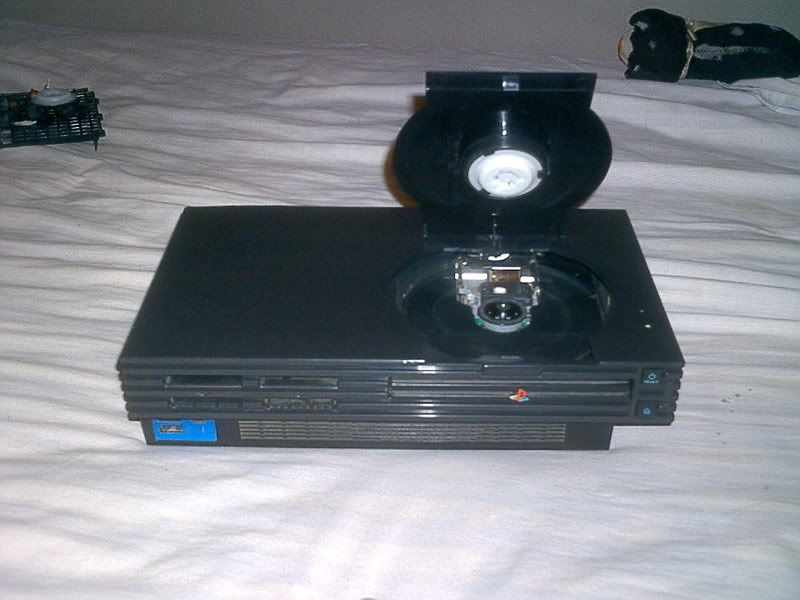
WRONG! Thanks for the help guys. Now just point me in the direction of a "PS2 ISO Burning Tutorial" and I'll be good.
|
AfterDawn Addict
23 product reviews
|
28. April 2008 @ 22:12 |
Link to this message
|
|
Actually you can put back the Memory card covers to make it look more normal. Lol.
|
|
Ryutso
Junior Member
|
28. April 2008 @ 22:27 |
Link to this message
|
|
I would if I could man. There was no place to mount the holder to the flip top, so I couldn't replace the memory card doors.
|
|
Advertisement
|
|
|
AfterDawn Addict
23 product reviews
|
29. April 2008 @ 11:51 |
Link to this message
|
|
Oh. Alright, then all those parts are fine to stay out. You could sell them on Ebay for something. I know switches go for around $10.
|


