User User name Password  
   
Thursday 6.8.2026 / 06:46
Search AfterDawn Forums:        In English   Suomeksi   På svenska
afterdawn.com > forums > consoles > xbox 360 - modding & hacking > fix xbox 360 rrod code 0020
Show topics
 
Forums
Forums
Fix Xbox 360 RROD code 0020
  Jump to:
 
Posted Message
Page:12Next >
Member
_
16. September 2008 @ 05:47 _ Link to this message    Send private message to this user   
hi everybody myxbox 360 has the secondary code 0020 im trying the towel trick atthe moment any help thanks.
Advertisement
_
__
|CL|
Member
_
16. September 2008 @ 06:39 _ Link to this message    Send private message to this user   
Member
_
16. September 2008 @ 09:16 _ Link to this message    Send private message to this user   
i can't find it on there
AfterDawn Addict

4 product reviews
_
16. September 2008 @ 09:29 _ Link to this message    Send private message to this user   
dont do the towel trick it is a waste of time and dosnt work. just do the x-clap fix. your code us unknown possibly overheating. the towel trick just frys your machine and is not good on it at all.

Member
_
16. September 2008 @ 10:55 _ Link to this message    Send private message to this user   
could you explain to me what the x-clampfix is and the stuff you need and i live in the u.k so could you tell me them name of shops i could get the tools from
Member
_
16. September 2008 @ 12:47 _ Link to this message    Send private message to this user   
I wouldn't do the towel trick. You could cause more damage to your 360. If you go on ebay and type in RROD kit you'll find what you need. There's people selling all the parts you need along with the guide. I just went to my local hardware store and bought the parts for about five bucks.
AfterDawn Addict

4 product reviews
_
16. September 2008 @ 18:30 _ Link to this message    Send private message to this user   
yea just google x-clamp fix.

Member
_
17. September 2008 @ 08:12 _ Link to this message    Send private message to this user   
what about the penny fix ?
AfterDawn Addict

4 product reviews
_
17. September 2008 @ 09:45 _ Link to this message    Send private message to this user   
i would recommend the x-clamp first.

Member
_
17. September 2008 @ 10:44 _ Link to this message    Send private message to this user   
is that the one with the washers?
Member
_
17. September 2008 @ 11:32 _ Link to this message    Send private message to this user   
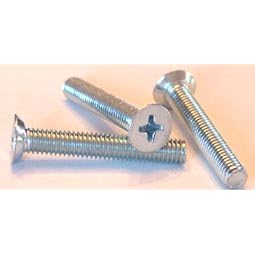
Yes. You remove the x clamps and use machine screws with metal and nylon washers.
Member
_
17. September 2008 @ 18:28 _ Link to this message    Send private message to this user   
well im currently opening my 360 and well i removed all the screws but on silver bit
the screws(on the 2 x's) are like totally in the xbox 360 i can't get them out(NOT THE RED CIRCLES I GOT THIS PIC OFF THE NET)
Member
_
17. September 2008 @ 18:40 _ Link to this message    Send private message to this user   
To remove those you need a size T8 torx driver.
Member
_
17. September 2008 @ 18:43 _ Link to this message    Send private message to this user   
the screws are like philips ones and there not small AND THE 360 I BROUGHT SECOND HAND SO I DON'T KNOW IF ITS BEEN ATEMPTED TO BE REPAIRED BEFORE

This message has been edited since posting. Last time this message was edited on 17. September 2008 @ 18:44

AfterDawn Addict
_
17. September 2008 @ 18:45 _ Link to this message    Send private message to this user   
they shouldnt be phillips, they should be star bolts that are called torx bolts.
Member
_
17. September 2008 @ 18:56 _ Link to this message    Send private message to this user   

There like this the top looks like the pic
AfterDawn Addict
_
17. September 2008 @ 18:59 _ Link to this message    Send private message to this user   
the system has been tampered with. the regular screws are all t8 or t10 torx screws.

ps2: v7 scph-39001 - independence exploit - hdloader 0.8c - maxtor 300gb hdd
(+[__]%) psp slim ta-085v1: 6.60 PRO B10
wii (powered by bootmii/priiloader): 4.1u - d2x v10beta53-alt (base 56) - configurable usb loader v70r51/devolution r188 - wd scorpio black 7200rpm 320gig w/ ams venus ds2 enclosure

got a whole lot more to list . . .
Member
_
17. September 2008 @ 19:02 _ Link to this message    Send private message to this user   
the screws are not sticking out at all how can i get them outand could someone post an image off what the screws actually look like

This message has been edited since posting. Last time this message was edited on 17. September 2008 @ 19:04

AfterDawn Addict
_
17. September 2008 @ 19:03 _ Link to this message    Send private message to this user   
if they're not screwed in from the bottom shielding, then it's on the motherboard already.

just lift out the motherboard.

ps2: v7 scph-39001 - independence exploit - hdloader 0.8c - maxtor 300gb hdd
(+[__]%) psp slim ta-085v1: 6.60 PRO B10
wii (powered by bootmii/priiloader): 4.1u - d2x v10beta53-alt (base 56) - configurable usb loader v70r51/devolution r188 - wd scorpio black 7200rpm 320gig w/ ams venus ds2 enclosure

got a whole lot more to list . . .
Member
_
17. September 2008 @ 19:13 _ Link to this message    Send private message to this user   
thanks did that any it came out
Member
_
17. September 2008 @ 19:16 _ Link to this message    Send private message to this user   
there no x-clamps or them little pink sponge things could i still do the penny fix
Member
_
17. September 2008 @ 19:20 _ Link to this message    Send private message to this user   
ok now there is'nt no x-clamps but on the side where the heatsinks are there is an metalx under there
Member
_
17. September 2008 @ 23:02 _ Link to this message    Send private message to this user   
I think that x is just attached to the heatsink so it can be attached to the x clamp. I haven't used the penny fix only the x clamp replacement.
Member
_
18. September 2008 @ 10:50 _ Link to this message    Send private message to this user   
I tried the penny fix and the code changed to 0002 and the light on my power brick is orange

This message has been edited since posting. Last time this message was edited on 18. September 2008 @ 11:07

Advertisement
_
__
 
_
Newbie
_
18. September 2008 @ 11:32 _ Link to this message    Send private message to this user   
Looks like its either a network interface prob on the mobo, or probably a bad power brick(adapter). Make sure nothing came loose while you were doing the penny mod.
 
Page:12Next >
Related links
Download Xbox 360 trailers from AfterDawn's gaming site
 
Related forum topics Posts Last post Forum room
Microsoft finally discontinues Xbox 360 1 22. April 2016 News comments
Motorola unveils new series of Moto 360 smartwatches 2 5. September 2015 News comments
Microsoft makes 'Forza Horizon 2: Presents Fast & Furious' free for Xbox One, Xbox 360 7 31. March 2015 News comments
Moto 360 coming soon in gold and with a new leather band? 1 1. November 2014 News comments
Buying 'Destiny' for PS3, Xbox 360? Bungie giving vouchers to upgrade to current gen for free 1 8. September 2014 News comments
Best Buy leaks Motorola Moto 360 price, specs, features 1 18. August 2014 News comments
Google shows off prototypes of Moto 360 and LG G Watch 4 4. June 2014 News comments
Xbox 360 FLASH MOD HELP 6 2. June 2014 Xbox 360 - Modding & Hacking
Dismantled my 360 to repair Disk Drive - Now Controllers won't sync (wired & wireless) 3 1. June 2014 Xbox 360 - Modding & Hacking
Have 60GB hard drive on original 360, can put bigger hard drive in 60GB casing? 8 10. May 2014 Xbox 360 - Modding & Hacking

 
afterdawn.com > forums > consoles > xbox 360 - modding & hacking > fix xbox 360 rrod code 0020
 

Digital video: AfterDawn.com | AfterDawn Forums
Music: MP3Lizard.com
Gaming: Blasteroids.com | Blasteroids Forums | Compare game prices
Software: Software downloads
Blogs: User profile pages
RSS feeds: AfterDawn.com News | Software updates | AfterDawn Forums
International: AfterDawn in Finnish | AfterDawn in Swedish | AfterDawn in Norwegian | download.fi
Navigate: Search | Site map
About us: About AfterDawn Ltd | Advertise on our sites | Rules, Restrictions, Legal disclaimer & Privacy policy
Contact us: Send feedback | Contact our media sales team
 
  © 1999-2026 by AfterDawn Ltd.

  IDG TechNetwork