User User name Password  
   
Monday 16.2.2026 / 06:45
Search AfterDawn Forums:        In English   Suomeksi   På svenska
afterdawn.com > forums > home theater > digital tv - uk & europe > downloading channel dump file broke eurovox pvr
Show topics
 
Forums
Forums
Downloading Channel Dump file broke EuroVox PVR
  Jump to:
 
Posted Message
MoBhosca
Suspended due to non-functional email address
_
10. November 2008 @ 09:54 _ Link to this message    Send private message to this user   
Hi,

I flashed & power scanned a EuroVox EX5000 PVR and all was ok.

Rather than manually organising the channels I downloaded a Channel Dump file to the box and something has gone horribly wrong.

I unplugged the null modem cable from my laptop and attached the TV cable to the RF In socket. When I power on the box it loads Channel 0001 but the screen is blank and black apart from the small channel info on-screen display at the bottom of the screen.

If I press the Menu button on the remote the screen either goes fully black and turns a rather fetching shade of luminous green.

I attached the box back to my laptop and unplugged the TV cable. Now when I run the UFL_ex5000_15-07-08.exe file the box is no longer detected.

Instead of getting the "Version 2.01 detected..." I get the Boot Mode message - "The receiver was not detected...".

After the following the instructions to force the firmware on to the box in Boot Mode I received an on-screen message stating the firmware was downloaded successfully. However when I attach the TV cable I get the same blank screen and no menu.

Because I can't load the menu I am unable to perform a hardware factory reset and the box is just a brick at the moment.

I've tried using Windows 98 and XP (using a USB adapter) but same problem on both. I've tried 15-07-08 as well as UFL_ex5000_08-07-08.exe but again same blank screen with both. I've flashed and power scanned many boxes before and never had a problem. I've got another EuroVox PVR at the moment that was set up with the same system that is working fine with all the channels tuned in and menus etc. but without attempting to use a Channel Dump file on it.

Does anyone have any idea how to get the menu back or is there some way of performing a physical hardware reset on the box?

Sorry for the long post but any help is much appreciated in getting this sorted.
Advertisement
_
__
AfterDawn Addict

2 product reviews
_
10. November 2008 @ 18:37 _ Link to this message    Send private message to this user   
Originally posted by MoBhosca:
I unplugged the null modem cable from my laptop and attached the TV cable to the RF In socket. When I power on the box it loads Channel 0001 but the screen is blank and black apart from the small channel info on-screen display at the bottom of the screen.


You say you connnected TV cable to the RF In socket<< do you mean Cable Feed to RF IN socket then a scart lead to your TV just to clarify? you shouldnt be pluging your TV cable to your RF in!!!
MoBhosca
Suspended due to non-functional email address
_
11. November 2008 @ 19:51 _ Link to this message    Send private message to this user   
Thanks for the reply.

Yeah sorry, like you say I meant Cable Feed to RF IN socket.

Either way getting connected to a TV/Monitor etc. is the least of my problems.

I can't get the onscreen menu to show up so I won't even be able to scan the channels back in.

I've setup a few boxes before so I'm not completely new to all this. The worst part is I had all the channels scanned in ready to go, I just got lazy and decided to use the channel dump file. I've used a CDF on other boxes (EuroVox Max) and never had an issue.

What I really need to know is if there is some way of performing a physical hardware reset (i.e if needs be to open the box up and mess around) or is there some other way of forcing a re-install of the firmware.

Cheers
AfterDawn Addict

2 product reviews
_
11. November 2008 @ 20:09 _ Link to this message    Send private message to this user   
Quote:
Either way getting connected to a TV/Monitor etc. is the least of my problems.


Yes but if you were pluging your TV connection into the RF in you would have had problems viewing the menu/anything which is why I asked/clarified to rule the obvious out.(reading between the lines so to speak).

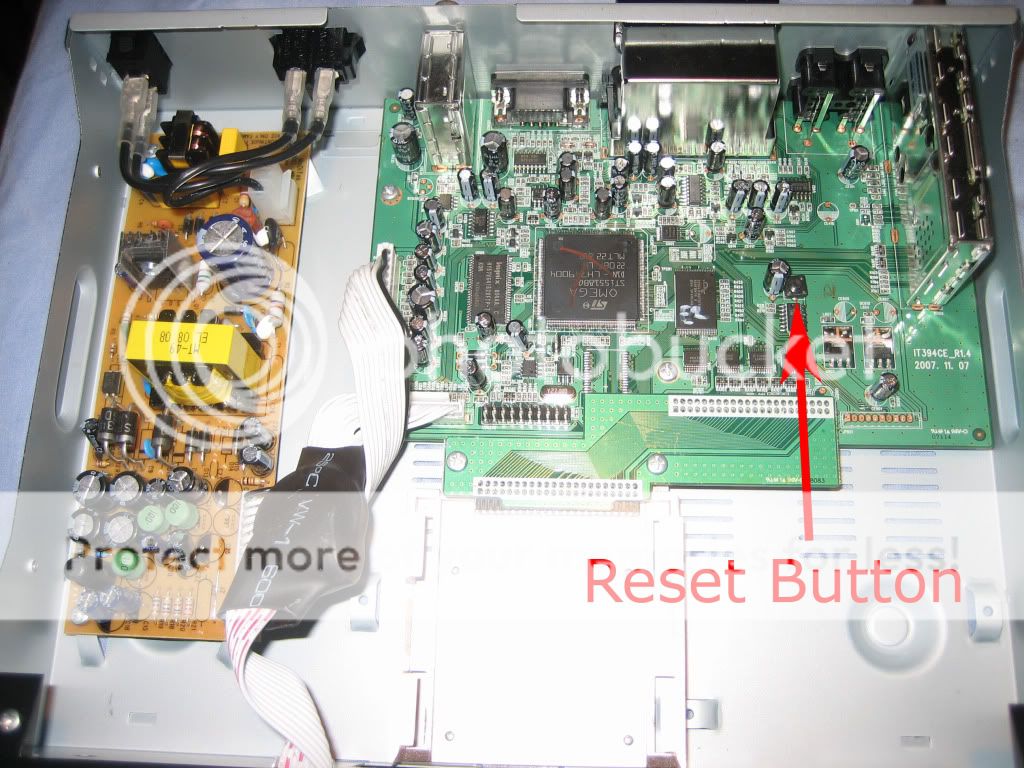
Try downloading a random CDF to your box to see if it overrides it, you may then get your menu back so that you can delete channel info and factory default, there is a reset button on the main board but do that as a last resort, try as I said above first.

BTW where did you get the CDF?

This is a EX5000PVR CDF http://www.4shared.com/file/66463287/a71...w_channels.html which you could try.

This message has been edited since posting. Last time this message was edited on 11. November 2008 @ 20:10

MoBhosca
Suspended due to non-functional email address
_
11. November 2008 @ 20:19 _ Link to this message    Send private message to this user   
I uploaded the CDF from the box then edited it myself and downloaded it back to the box. I may have been half asleep and pressed the upload/download in the wrong order but surely this wouldn't cause the menus to be erased, right?

Anyway thanks for the tip, I'll try it out tomorrow and let you know how it works out.
MoBhosca
Suspended due to non-functional email address
_
12. November 2008 @ 15:06 _ Link to this message    Send private message to this user   
Unfortunately downloading the CDF file to the box didn't work. The box is being detected correctly by a PC. I can force the firmware back to the box in boot mode but this doesn't work for the CDF (i.e. after locating the CDF when I click the lower 'Download' button the option for 'OK' is greyed out in the popup window)

Looks like I'm going to have to open the box up and try and manual reset. The box is a shiny black brick at the moment so I have nothing to lose.

Anything I should look out for when opening the box? Obviously have the power turned off when undoing the screws but does the unit need to be powered on to successfully perform the manual reset?
MoBhosca
Suspended due to non-functional email address
_
12. November 2008 @ 16:04 _ Link to this message    Send private message to this user   
Success!

For anyone that needs to perform a manual hardware reset here goes...

1. Unscrew the casing (voids the warranty by the way).
2. Locate the reset button on the motherboard.
3. Power on the box and keep the reset button pressed for a few seconds.
4. The box goes into Standby mode for a few moments then powers itself back on.
5. Run another Powerscan to get all the stations back. Otherwise run the UFL Eurovox to update the firmware.

I think this particular box I have has developed a problem accepting either the firmware download or the CDF. Luckily I got the UFL_ex5000_15-07-08.exe to work successfully the very first time I used the box. I might have a problem with future firmware updates but everything seems cushty at the moment. Think I'll arrange the channel favourites manually this time ;-)


Close up


AfterDawn Addict

2 product reviews
_
12. November 2008 @ 18:44 _ Link to this message    Send private message to this user   
Glad you got it sorted, BTW thanks for the pics ;) hehehehhe
s11unr
Suspended due to non-functional email address
_
6. January 2009 @ 12:19 _ Link to this message    Send private message to this user   
hi to all just got me box pvr 5000 and want to get all the channels how do i start to do with the box

s richardson
Advertisement
_
__
 
_
AfterDawn Addict

2 product reviews
_
6. January 2009 @ 13:33 _ Link to this message    Send private message to this user   
afterdawn.com > forums > home theater > digital tv - uk & europe > downloading channel dump file broke eurovox pvr
 

Digital video: AfterDawn.com | AfterDawn Forums
Music: MP3Lizard.com
Gaming: Blasteroids.com | Blasteroids Forums | Compare game prices
Software: Software downloads
Blogs: User profile pages
RSS feeds: AfterDawn.com News | Software updates | AfterDawn Forums
International: AfterDawn in Finnish | AfterDawn in Swedish | AfterDawn in Norwegian | download.fi
Navigate: Search | Site map
About us: About AfterDawn Ltd | Advertise on our sites | Rules, Restrictions, Legal disclaimer & Privacy policy
Contact us: Send feedback | Contact our media sales team
 
  © 1999-2026 by AfterDawn Ltd.

  IDG TechNetwork