|
**** HAVE YOU GOT WHAT IT TAKES ****
|
|
|
badloser
Newbie

|
1. December 2008 @ 05:08 |
 Link to this message

|
jusandjan try a different computer m8
|
|
Advertisement
|
 |
|
|
|
jusandjan
Junior Member
|
1. December 2008 @ 05:08 |
Link to this message
|
|
hi, Hiteck thanks for claifying that.
but I'm still at the point where i can;t update my box due to flash failing.
while i really do appreciate that users are helping and using their own time between doing there own things to which i am truly grateful, it just feels like i'm going in circles.
the has to be a reason why my flash keep failing. I'vre followed the doobt2oon instructionsm the is something else. Unless the cable i got is crap
|
AfterDawn Addict
2 product reviews
|
1. December 2008 @ 05:11 |
Link to this message

|
Where did you get the cable from and is it a Null modem cable, have you installed the driver for the USB adaptor?. What operating system are you using.
This message has been edited since posting. Last time this message was edited on 1. December 2008 @ 05:13
|
|
jusandjan
Junior Member
|
1. December 2008 @ 05:12 |
Link to this message
|
|
dont have another computer to try. unless anyone lives close to Wigan, I'll bring my box around otherise think i'm f**k
|
|
jusandjan
Junior Member
|
1. December 2008 @ 05:15 |
Link to this message
|
I got the USB converter from a friend who got it from came from maplin, but I'dont know about the RS-232 cable.
I'm using XP home version 2002 service pack 3.
the drivers i'm using are the ones on the mini disc that came with USB converter.
unless there a different cable I can get just in case the 2 i got dont work
|
|
jusandjan
Junior Member
|
1. December 2008 @ 05:21 |
Link to this message

|
|
I think the best thing to do, is go to maplin get myself new cables rather than ones I've been given.
with that in mind, can you please let me know exactly what i'm ask for in maplins
|
|
badloser
Newbie
|
1. December 2008 @ 05:21 |
Link to this message
|
just search ebay for starview serial cable ...there about £2 all in
|
AfterDawn Addict
2 product reviews
|
1. December 2008 @ 05:25 |
Link to this message
|
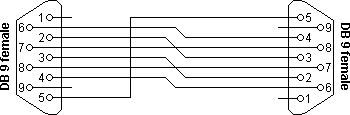
If the USB adaptor is from maplins it should be working fine as they are quite good quality and have been used many times by people on here, as for your cable a Null modem cable is wired pins 2-3, 3-2, 4-6, 5-5, 6-4, 7-8, 8-7. You can test yours with a multimeter if you have one,
This message has been edited since posting. Last time this message was edited on 1. December 2008 @ 05:29
|
|
jusandjan
Junior Member
|
1. December 2008 @ 05:28 |
Link to this message
|
|
the eletrical side of things is way over my head. sorry.
think i'll just go to maplin and get one looking on there site there a £10.00
|
AfterDawn Addict
2 product reviews
|
1. December 2008 @ 05:31 |
Link to this message
|
|
|
|
jusandjan
Junior Member
|
1. December 2008 @ 05:34 |
Link to this message
|
|
Thanks for all help HiTeck, I'll go and get that cable in few mins and try agian, and let you know the outcome. If it doesnt work then I really don't know what to do.
|
|
jusandjan
Junior Member
|
1. December 2008 @ 06:34 |
Link to this message
|
|
Well I got a cable, and still the flash failed. what next
|
AfterDawn Addict
2 product reviews
|
1. December 2008 @ 06:43 |
Link to this message
|
Reboot your PC then plug your USB adaptor in,
Go to start,
Right click my computer select properties,
Select Device manager,
Click on the + Ports ( COM & LTP )
Is your USB adaptor listed in there? if it is which port is listed under eg (com1) (com2) etc.
This message has been edited since posting. Last time this message was edited on 1. December 2008 @ 06:44
|
|
jusandjan
Junior Member
|
1. December 2008 @ 07:00 |
Link to this message
|
|
prolific USB-to-serial Comm Port (COM2)
|
AfterDawn Addict
2 product reviews
|
1. December 2008 @ 07:11 |
Link to this message
|
On the firmware loader set it to com 2 then try reflash again.
|
|
jusandjan
Junior Member
|
1. December 2008 @ 07:28 |
Link to this message
|
|
failed.
Hope do you post a pic so u can see yoursef?
|
AfterDawn Addict
2 product reviews
|
1. December 2008 @ 07:42 |
Link to this message
|

Go back to device manager/coms & ports then right click on com port 2 select properties,
1 Click on Port settings,
2 Bits per second press the pull down box and set that to maximum (forget the other numbers its an old pic) then OK, and try again.
|
|
jusandjan
Junior Member
|
1. December 2008 @ 07:47 |
Link to this message
|
|
still failed
|
AfterDawn Addict
2 product reviews
|
1. December 2008 @ 08:07 |
Link to this message
|
If you doing as posted above it should work, all I can suggest is try it on another PC preferably one with a 9 pin serial socket so you dont have to use the USB adaptor or try pluging your USB adaptor into another port go back into device manager to see where its looking then setting your firmware loader to the same port and try again.
This message has been edited since posting. Last time this message was edited on 1. December 2008 @ 08:08
|
|
jusandjan
Junior Member
|
1. December 2008 @ 08:14 |
Link to this message
|
|
how do set up using the serial connection on the back of PC then direct to SV3
|
|
jusandjan
Junior Member
|
1. December 2008 @ 08:18 |
Link to this message
|
|
How do you set up using the serial connection on the back on to PC direct to the SV3
|
|
jusandjan
Junior Member
|
1. December 2008 @ 08:24 |
Link to this message
|
|
i've had a look at the back the PC and i have 3 lots of pins. the 1st one is for monitor, the 2nd one is like 18 or 24 not counted and theres another one 9 pin.
I have pluf the serial cable SV3 to PC, but what next how do i assign the com port or is there something else i need to do
|
AfterDawn Addict
2 product reviews
|
1. December 2008 @ 08:33 |
Link to this message
|
|
Turn you PC off, Plug your Null modem cable into the serial socket at the back of your PC, boot your PC then go back into Device manager/+ on ports (com & LTP) it will say Serial port (COM?) which ever number port that is match that with the com number on the loader and try again.
|
Member
|
1. December 2008 @ 08:34 |
Link to this message
|
plug it in the 9 pin port on the motherboard.
plug it in the box.
leave the default settings on the software and go for the upload.
Using USB is often more trouble than it's worth being that the com assignments can take some figuring out.
If it is not working ten there could be the chance that the com ports are somehow disabled in the BIOS
|
|
Advertisement
|
|
|
|
jusandjan
Junior Member
|
1. December 2008 @ 08:45 |
Link to this message
|
|
ok guys, i've turn off PC and rebooted onto in devices and theres no ref to serial ports. what now? how do i get it on
|


