|
Step By step, How to update Starview 2 (The Box Genuine Only)
|
|
Junior Member

|
13. December 2008 @ 09:26 |
 Link to this message

|
Hi, I found some tutorials on this very confusing so I hope this may help :)
First Of all your going to need to download WinRar if you haven't already got it
**Beware, there is a fake version of winrar going around which gives your PC a nasty Trojan horse (I got it) Please only download winrar from the site below as i know its 100% safe.**
Download It From Here >> http://www.vnunet.com/vnunet/downloads/2128941/winrar
Now like all Starview Boxes you are going to need A null modem cable which looks like the picture Below.
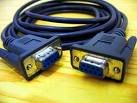
Right Now, Plug the cable into your PC, and then into the back of the Starview 2 box. (Keep the Box Off or on standby though, and it does not have to be connected to the TV when updating it)
Download the latest fix from 4shared, (The Link Below)
http://www.4shared.com/dir/3042613/f6e3421c/sharing.html
The latest Firmware is in "The Box" folder. Then go to "Firmware" you will now see another folder called "The Box UK Fix Ver 4.55 051208" click on that, and download the file inside it which should say "The Box 4.55" (Please save it to your Desktop as it will make it easier for me to help you when we open it with WinRar)
Now once that?s downloaded go to WinRar which you downloaded at the start, and start it up.
It should automatically take you to your desktop, but if not navigate to there (or wherever you saved the 4.55 fix)
Now simply click on The Fix file and It should open up...Inside you will see 3 files. The GTROM Loader (V4.03), a .bin File and Readme file. (See Screenshot Below)
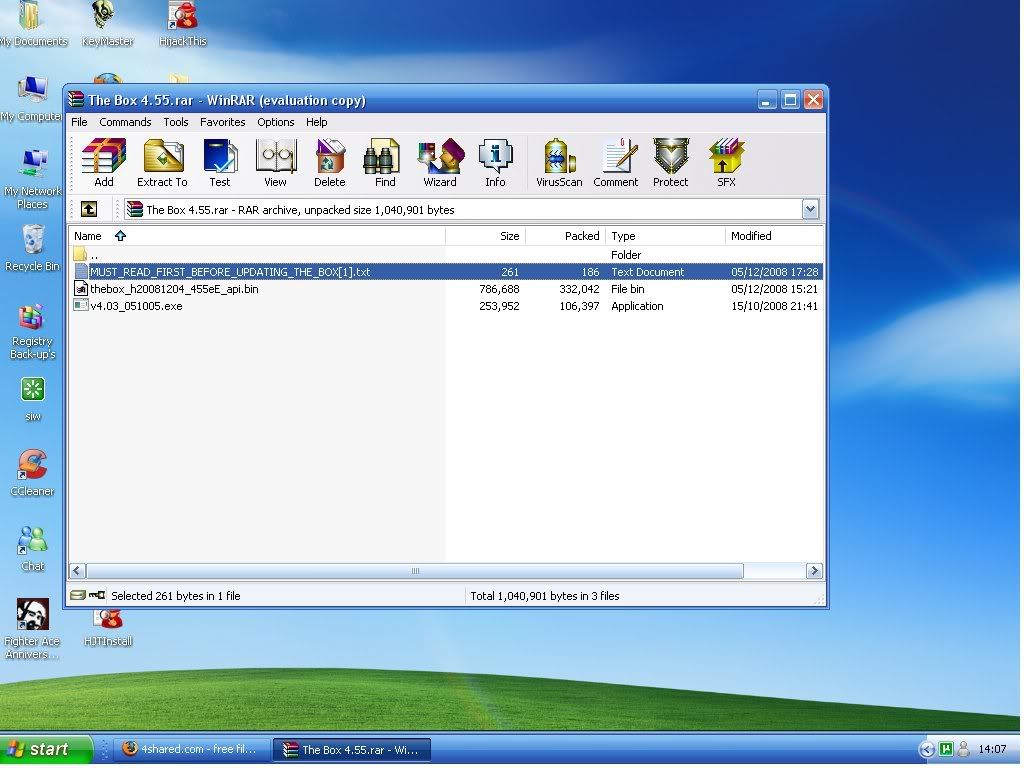
Open the GTROM Loader (V4.03)
Then Drag the .bin file from the Fix folder that your viewing through WinRar into the GTROM Loader and drop it the section that says Bin File (See Screenshot Below)
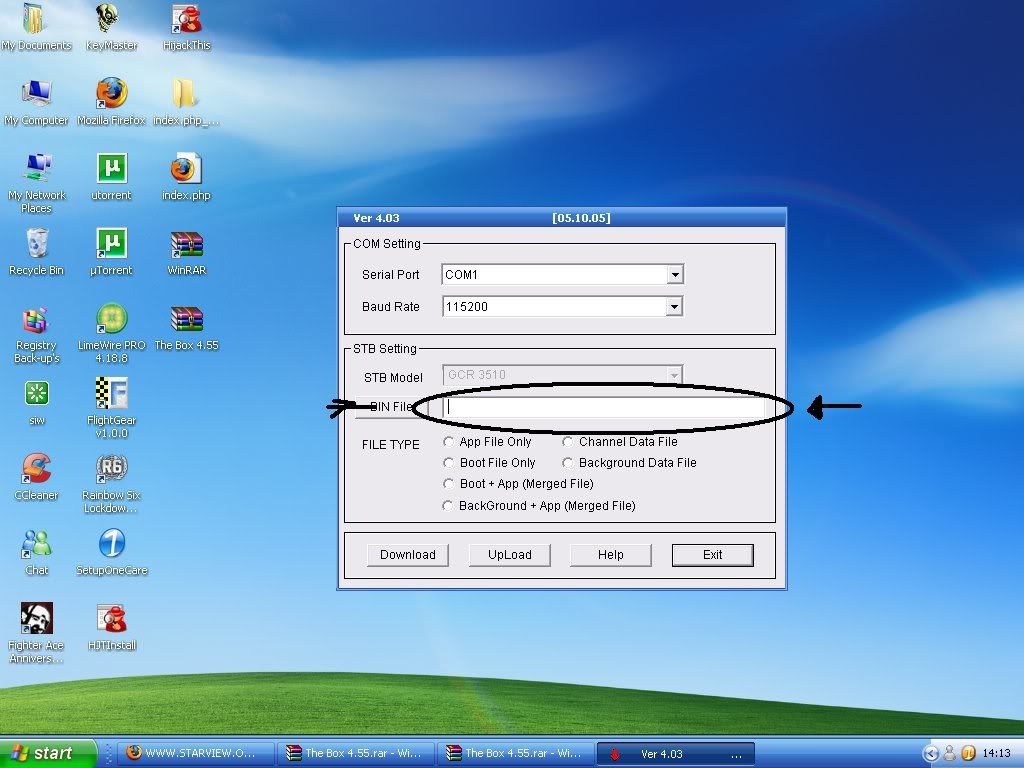
The simply start up your box and Press Download.
It will slowly work its way up to 100% but Do Not remove it until it says it is finished.
Then plug you box back into the TV and Make sure EMU is on in the Menu After Pressing 1570.
This was taken of my webiste at starview.org.uk
If you need anymore help Create a new thread and I will be able to assist you.
This message has been edited since posting. Last time this message was edited on 13. December 2008 @ 09:37
|
|
Advertisement
|
|
|
|
|
JayDoyle
Newbie

|
15. December 2008 @ 11:16 |
Link to this message

|
Hi there,
I have a Laptop with Vista on it and USB ports only. Will I have to get a USB to serial converter? Should I still be able to flash my box with that?
Thanks.
|
|
malci
Suspended due to non-functional email address
|
15. December 2008 @ 11:41 |
Link to this message
|
Originally posted by JayDoyle:
Hi there,
I have a Laptop with Vista on it and USB ports only. Will I have to get a USB to serial converter? Should I still be able to flash my box with that?
Thanks.
Yes you will need a USB Adaptor and a bit of patience, the art is in getting the Adaptor correctly assigned to a COMM port, so have a good look at this >>>>>>>>>
http://www.freewebs.com/starview-update/
|
|
JayDoyle
Newbie
|
15. December 2008 @ 11:46 |
Link to this message

|
Fair play, thanks for this. I have a Starview "the box." I'm not sure what version it is running. It has lost certain channels and some of the channels (a lot of the movies) will pixelate, then break up and I get the bad info or scrambled channel message, so you can't watch it. If I flash my box, will it fix this?
|
Senior Member
|
15. December 2008 @ 12:25 |
Link to this message
|
Originally posted by JayDoyle:
Fair play, thanks for this. I have a Starview "the box." I'm not sure what version it is running. It has lost certain channels and some of the channels (a lot of the movies) will pixelate, then break up and I get the bad info or scrambled channel message, so you can't watch it. If I flash my box, will it fix this?
It would be wise to check your cables first before resorting to a firmware upgrade. It might be just a simple thing as a faulty connection.
|
Junior Member
|
15. December 2008 @ 18:04 |
Link to this message
|
Originally posted by JayDoyle:
Fair play, thanks for this. I have a Starview "the box." I'm not sure what version it is running. It has lost certain channels and some of the channels (a lot of the movies) will pixelate, then break up and I get the bad info or scrambled channel message, so you can't watch it. http://forums.afterdawn.com/message_repl...te_id=4427920If I flash my box, will it fix this?
Sounds like signal strength to me, when this happens, press the "sig" button in the bottom left hand corner of the remote control, and tell me the percentages you see. Check that the cable feed cable is in correctly (at the box and at the installation port). If not you can try installing the latest firmware as I've posted above :)
|
|
JayDoyle
Newbie
|
16. December 2008 @ 04:31 |
Link to this message
|
I've checked the cables and some of the channels that were really bad are working again. I will check the signal strength percentages and let you know. The firmware version is 4.50e and it says that the update was issued in July 2007. Will the new firmware give me much more? Still missing Sky sports - vitally important for the Xmas!!!
|
|
malci
Suspended due to non-functional email address
|
16. December 2008 @ 07:05 |
Link to this message
|
Originally posted by JayDoyle:
I've checked the cables and some of the channels that were really bad are working again. I will check the signal strength percentages and let you know. The firmware version is 4.50e and it says that the update was issued in July 2007. Will the new firmware give me much more? Still missing Sky sports - vitally important for the Xmas!!!
Presume you are in Ireland with that firmware 4.50, so there is no point in you reflashing the box if that is so because the 4.55 is for the UK only. So you would be better off doing a Factory re-set and a fresh Installation (you will get your missing channels back), and don't forget to turn the Emu back On afterwards.
|
Junior Member
|
16. December 2008 @ 07:45 |
Link to this message
|
|
With regards to the Sky Sport channels, they are now on the BISC channels.
All you need to do, is Delete the Sky Sports Channels that dont work, and replace them with the Working BISC channels via Channel Editor in Menu :)
|
AfterDawn Addict
|
16. December 2008 @ 07:48 |
Link to this message
|
|
No "BICs" channels in Ireland?
|
|
hoplit
Suspended permanently
|
16. December 2008 @ 09:58 |
Link to this message
|
|
deleted.
This message has been edited since posting. Last time this message was edited on 16. December 2008 @ 09:59
|
Junior Member
|
16. December 2008 @ 11:16 |
Link to this message
|
Originally posted by sc0user:
No "BICs" channels in Ireland?
I forgot, Im turning into a robot, thats automatically typing the same replys over and over again, without thinking. *lol*
I'll get back to you as soon as I have a solutionfor Sky Sports.
|
|
goggon27
Newbie
|
17. December 2008 @ 16:04 |
Link to this message
|
Hello mate,
Can i start by saying you've done a fantastic job with the instructions, top draw. However i do have a problem, all was going well till hit the download button, Nothing has happend for a whole hour, I know you said it will slowly download but 0% after an hour doesn't sound rght to me.
PS. i'm using my laptop with vista and a usb converter.
|
|
malci
Suspended due to non-functional email address
|
17. December 2008 @ 16:46 |
Link to this message
|
Originally posted by goggon27:
Hello mate,
Can i start by saying you've done a fantastic job with the instructions, top draw. However i do have a problem, all was going well till hit the download button, Nothing has happend for a whole hour, I know you said it will slowly download but 0% after an hour doesn't sound rght to me.
PS. i'm using my laptop with vista and a usb converter.
Well PC is not communicating with the box, because of the Adaptor, it needs to be correctly assigned to the correct COMM port and presumably you have installed drivers for it, so go to this link and check it out for connection okay, because that is your problem >>>>>>>
http://www.freewebs.com/starview-update/
|
|
goggon27
Newbie
|
17. December 2008 @ 16:59 |
Link to this message
|
|
Just got he correct drivers and assigned it to com3 as instructed now when i click download i get a ailed box apear after 10 seconds. wish i was more tecncally minded lol
Cheers for you help mate
|
|
goggon27
Newbie
|
17. December 2008 @ 17:16 |
Link to this message
|
All sorted now. I have a PVR box so i needed to press OK and Exit when turning the box on then press download DUH :)
|
|
malci
Suspended due to non-functional email address
|
17. December 2008 @ 17:31 |
Link to this message
|
Originally posted by goggon27:
All sorted now. I have a PVR box so i needed to press OK and Exit when turning the box on then press download DUH :)
It happens, no harm done, glad you are now sorted, should really stick to the Box's own threads, to avoid confusion. Good Luck ;)
|
Junior Member
|
18. December 2008 @ 04:20 |
Link to this message
|
|
Yeah the box should take a maximum of ten minutes to download. Mines downloads in about 3 or 4.
|
|
larkinkay
Newbie
|
18. December 2008 @ 11:16 |
Link to this message
|
|
can someone give me the codes just till i get home and update
thanks Kay
|
|
malci
Suspended due to non-functional email address
|
18. December 2008 @ 11:21 |
Link to this message
|
|
|
Liamo83
Junior Member
|
18. December 2008 @ 11:23 |
Link to this message
|
I have been trying to update my box pvr to the latest firmware. When I try and flash it, nothing happens. The download bar remains at 0%. This is through com port 3.
I have followed instructions for a vista and xp computer to get into control panel- device manager- and ports but on both laptops there is no option for ports in the device manager.
These are quite new laptops- xp and vista basic.
Any ideas on how I can get into this port area??
|
|
malci
Suspended due to non-functional email address
|
18. December 2008 @ 11:42 |
Link to this message
|
Originally posted by Liamo83:
I have been trying to update my box pvr to the latest firmware. When I try and flash it, nothing happens. The download bar remains at 0%. This is through com port 3.
I have followed instructions for a vista and xp computer to get into control panel- device manager- and ports but on both laptops there is no option for ports in the device manager.
These are quite new laptops- xp and vista basic.
Any ideas on how I can get into this port area??
Have a look here at dooby's guide for assigning the correct COMM port, I know it is a different box, but the assigning part may be useful to you okay, good luck.
http://www.freewebs.com/boxsuper/
|
Junior Member
|
19. December 2008 @ 09:33 |
Link to this message
|
I have flashed the box pvr with no what seemed like no problems,but when I try to look at a subed channel it say's scrambled or corrupt, I turned on the auto update but now the channels are just blank screens, the freeview ones are fine, I am using the 08/12/08 v3105 firmware for it, I have followed starwiew pvr starters guide to the letter but having no luck. any advice would be apeciated.
|
|
Liamo83
Junior Member
|
19. December 2008 @ 10:34 |
Link to this message
|
|
Thanks malci, I got it flashed in the end last night...
Woke up this morning and all the channels are blank, tries re-flashing and resetting to factory settings. No joy!!
I think I am meant to look for a specific channel, Sly 2, Disney, to boost it but I cant get a progress bar on any of the channels...
Any ideas?
|
|
Advertisement
|
|
|
|
malci
Suspended due to non-functional email address
|
19. December 2008 @ 20:55 |
Link to this message
|
Originally posted by Liamo83:
Thanks malci, I got it flashed in the end last night...
Woke up this morning and all the channels are blank, tries re-flashing and resetting to factory settings. No joy!!
I think I am meant to look for a specific channel, Sly 2, Disney, to boost it but I cant get a progress bar on any of the channels...
Any ideas?
try sky 2, thatseems the most poular over there. But it is trial and error I'm afraid, and you do not need to keeo flashing the box okay, once done then that is it.
|


