|
ex1000sl
|
|
|
billywiz
Junior Member

|
12. January 2009 @ 12:28 |
 Link to this message

|
hi friends can anyone help, my friend has a new eurovox ex1000sl he has been having problems with it freezing on live events he has now got a warning sign saying it is an illegal box from virgin and just the blue light on the front,the remote is not working it just seems locked up.it will take the new downloaded updates but seems vrgin have locked it up any help appreciated
|
|
Advertisement

|
|
|
|
AfterDawn Addict
|
12. January 2009 @ 14:15 |
Link to this message

|
Originally posted by billywiz:
hi friends can anyone help, my friend has a new eurovox ex1000sl he has been having problems with it freezing on live events he has now got a warning sign saying it is an illegal box from virgin and just the blue light on the front,the remote is not working it just seems locked up.it will take the new downloaded updates but seems vrgin have locked it up any help appreciated
that has nothing to do with vurgin they havn't got the capacity to do that,if he means he got a channel with the warning message, thats been around for a while now,if its a new box tell him to ring his supplier and get a replacment box.
|
|
billywiz
Junior Member
|
12. January 2009 @ 23:06 |
Link to this message
|
|
thanks for replying but this is not the channel one.he was watching a film when it flashed up on screen saying it is an illegal box and to ring yirgin.it is now locked on this permanetly remote wont work cant get into any menus etc. is there a way of reseting box?he has put the update on again which it takes but still stuck on this screen which as i said is not the channel with the warning on.this may be the way they are going now.he did not get the box direct from supplier but through a third party.
|
AfterDawn Addict
|
13. January 2009 @ 04:15 |
Link to this message

|
ok not doubting you but if it where the case i would think the forum would be full of threads with the same problem by now,yuo could try and open the box and use the reset button(pic courtesy of HiTeck) 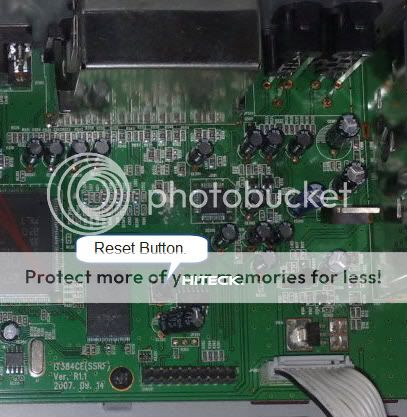
|
|
billywiz
Junior Member
|
13. January 2009 @ 11:09 |
Link to this message
|
|
thanks a lot karljd i will do that, i have never come across this before myself shocked to see it. may be the first one but he has had trouble from day one kept freezing and breaking up first now this, can everyone just be aware this is happening cheers
|
|
billywiz
Junior Member
|
15. January 2009 @ 11:08 |
Link to this message
|
|
tried the reset button seems to reset goes red then blue but the warning just comes back up on screen.how do i get into menu screen through remote or scan?
|
AfterDawn Addict
2 product reviews
|
15. January 2009 @ 11:28 |
Link to this message
|
|
Edit:
Does the buttons on the front of the box work, can you not change the channels with them? also do ANY of the buttons work on the remote.
This message has been edited since posting. Last time this message was edited on 15. January 2009 @ 12:09
|
|
billywiz
Junior Member
|
16. January 2009 @ 12:41 |
Link to this message
|
|
thee are no buttons on the front of ex100sl and no remote does not work either.
|
AfterDawn Addict
2 product reviews
|
16. January 2009 @ 18:47 |
Link to this message
|
|
Apologies got the boxes mixed up, have you replaced batteries in the remote?.
To check that he remote is working OK,
Press ANY button on your remote, Point it at a camera/mobile phone as if you're going to take a picture of the remote LED, through the screen on a camera/mobile phone you should see the remote sensor flash if it's working.
|
|
billywiz
Junior Member
|
16. January 2009 @ 19:17 |
Link to this message
|
|
yeah its not the remote is there a way of resetting the whole thing, this warning screen has never been seen by anyone in any of the forums i go on, it is not the one that pops up on one of the channels when searching it is a locked channel.
|
AfterDawn Addict
2 product reviews
|
16. January 2009 @ 19:25 |
Link to this message
|
|
Yes I have seen your posts on other forums ;) did you check the remote as I said above and did you get the LED flashing via the camera screen.
|
|
billywiz
Junior Member
|
16. January 2009 @ 19:36 |
Link to this message
|
|
sorry have done check on remote and its not working have put in new batteries and still not working do i need a new one or is there something i can do
|
AfterDawn Addict
2 product reviews
|
16. January 2009 @ 19:44 |
Link to this message
|
|
Have you compared it to another WORKING remote you have around the house to see if your testing it correctly.
|
|
billywiz
Junior Member
|
16. January 2009 @ 20:24 |
Link to this message
|
|
yes they all flash but this one does not, did not know that was how to test them thats good to know. seems to me now that the remote has just packed up will have to try and get a new one but you have been brill helping thanks.
|
|
Advertisement
|
|
|
AfterDawn Addict
2 product reviews
|
16. January 2009 @ 20:26 |
Link to this message
|
|
Ask your supplier of the box for a new one otherwise fleabay.
Your welcome and the best of luck.
|


