|
Flashing an Xbox 360 with a Phillips Drive
|
|
|
harvardja
Member

|
30. March 2009 @ 16:11 |
Link to this message

|
Hi. I'm just wondering, is there a firmware out there that will flash my 360's Phillips drive?
I've used the afterdawn search bar, but it's really not very good.
I also looked in the stickies, but didn't find how to flash a Phillips drive there either.
According to this site: http://www.biline.ca/360_mod.htm , I have a phillips drive. Here's a picture, if you don't feel like clicking link:
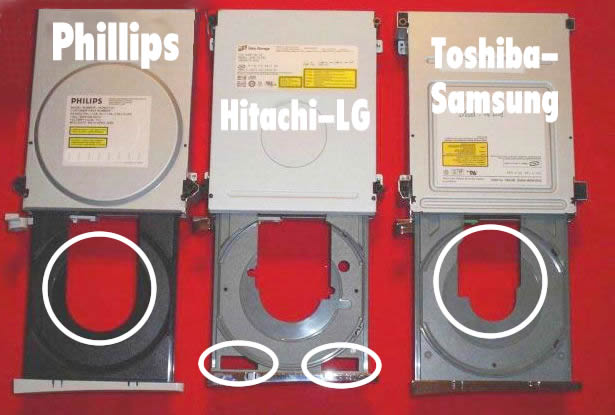
From some time spent, apparently it's only in newer 360s, so there is no firmware...but maybe afterdawners are pro enough to have one?
thanks so much for your help!
edit:
i found something called the "Commodore4Eva iXtreme BenQ v1.4" , for the "BenQ (LiteOn-Philips) VAD6038 Drive"
would this firmware work for my 360? (will it work on my philips drive?)
Hi!
This message has been edited since posting. Last time this message was edited on 30. March 2009 @ 16:22
|
|
Advertisement
|
 |
|
|
Senior Member
13 product reviews
|
30. March 2009 @ 20:44 |
Link to this message
|
Ok, is your system new, or is this one from the first release of 360's? Because that link that you gave, was from 2006, and the Phillips drive was way back then. So if you just recently purchased your 360, it's most likely a Liteon Drive. It could also be a benq drive.
If it is a newer system, take off the faceplate, and where the drive is, there is a hole on the bottom right of the drive. In there you can usually see a wire. If it's yellow, you got a Liteon, but if it's white, you got a benq!
|
AfterDawn Addict
2 product reviews

|
30. March 2009 @ 22:29 |
Link to this message

|
|
|
harvardja
Member
|
30. March 2009 @ 22:59 |
Link to this message
|
Originally posted by DavGerm4:
Ok, is your system new, or is this one from the first release of 360's? Because that link that you gave, was from 2006, and the Phillips drive was way back then. So if you just recently purchased your 360, it's most likely a Liteon Drive. It could also be a benq drive.
If it is a newer system, take off the faceplate, and where the drive is, there is a hole on the bottom right of the drive. In there you can usually see a wire. If it's yellow, you got a Liteon, but if it's white, you got a benq!
my xbox is brand new
i took off the faceplate, and the wire is white.
guaranteed it's a benq?
if i install the iXtreme firmware 1.51 will it work?
edit: in the jungleflasher guide, if i follow the steps on the pages related to BenQ VAD6038 (62430ca and 64930c) , will I have successfully flashed my drive?
Hi!
This message has been edited since posting. Last time this message was edited on 30. March 2009 @ 23:03
|
|
bre4dfish
Newbie
|
30. March 2009 @ 23:07 |
Link to this message
|
Originally posted by harvardja:
Originally posted by DavGerm4:
Ok, is your system new, or is this one from the first release of 360's? Because that link that you gave, was from 2006, and the Phillips drive was way back then. So if you just recently purchased your 360, it's most likely a Liteon Drive. It could also be a benq drive.
If it is a newer system, take off the faceplate, and where the drive is, there is a hole on the bottom right of the drive. In there you can usually see a wire. If it's yellow, you got a Liteon, but if it's white, you got a benq!
my xbox is brand new
i took off the faceplate, and the wire is white.
guaranteed it's a benq?
if i install the iXtreme firmware 1.51 will it work?
edit: in the jungleflasher guide, if i follow the steps on the pages related to BenQ VAD6038 (62430ca and 64930c) , will I have successfully flashed my drive?
Yes, if you follow them correctly, I did.
|
|
harvardja
Member
|
30. March 2009 @ 23:09 |
Link to this message
|
awesome!
okay, i feel stupid for asking this, but it says in the guide to connect the drive to the PC via SATA.
this means i have to take out the drive, open up my PC, and then connect it via a SATA cable right?
Hi!
This message has been edited since posting. Last time this message was edited on 30. March 2009 @ 23:09
|
Senior Member
13 product reviews
|
30. March 2009 @ 23:30 |
Link to this message

|
|
Yes that is right! Follow the guide just how it says.
|
|
harvardja
Member
|
31. March 2009 @ 02:07 |
Link to this message
|
|
:(
i'm getting a "no comports found during emuneration" error message when i try to run jungle
help please?
Hi!
|
Senior Member
13 product reviews
|
31. March 2009 @ 02:39 |
Link to this message
|
Well if oyur drive is a BenQ, then you won't need to worry about the com ports! Those are the Serial ports on your PC (if any), but you use the com ports for the LiteOn. So if you can continue, you don't need to worry about that!
|
|
harvardja
Member
|
31. March 2009 @ 02:46 |
Link to this message
|
i've hooked up my benq dvd drive to my pc motherboard via SATA cable
when i try to run jungle it says no comports found
i ignore it, set my drive to be half-open, go to the MTK Flash 32 tab, and choose the second I/O port (first one is my hard drive)
then i click Intro/DVD , and it gives the "MTK Vendor Intro Failed" error message.
blah :(
Hi!
This message has been edited since posting. Last time this message was edited on 31. March 2009 @ 02:47
|
Senior Member
13 product reviews
|
31. March 2009 @ 02:53 |
Link to this message
|
|
May need to try again with the half open tray trick.
Remember you need to eject the drive while it's powered on, then disconnect power from drive, and push halfway in, then plug power back in!
|
|
harvardja
Member
|
31. March 2009 @ 02:58 |
Link to this message
|
|
dang
still won't detect
p.s. i've installed portIO32, anything else i may be forgetting?
dangit, maybe i should restart my desktop?
also, does it matter what "half-way" is? i just close it until the hole in the middle is about 50%
Hi!
This message has been edited since posting. Last time this message was edited on 31. March 2009 @ 03:00
|
Senior Member
13 product reviews
|
31. March 2009 @ 03:00 |
Link to this message
|
|
Did you power off the PC, then plug in the drive to PC, and turn on?
|
|
harvardja
Member
|
31. March 2009 @ 03:23 |
Link to this message
|
i powered off my pc, with the xbox dvd drive off
then i powered on my pc, and THEN turned my xbox dvd on
didn't work
i powered off my pc, with the xbox drive on
then i powered on my pc, with the xbox drive still on
still didn't work
when i check device manager it doesn't detect anything either
Hi!
|
|
harvardja
Member
|
31. March 2009 @ 03:58 |
Link to this message
|
Hi!
This message has been edited since posting. Last time this message was edited on 31. March 2009 @ 04:14
|
Senior Member
|
31. March 2009 @ 06:52 |
Link to this message
|
Originally posted by harvardja:
OH MY GOD IM SO STUPID
i looked more carefully
the wire is yellow. so i have a liteon, not a benq.
i found a tutorial here:
http://www.se7ensins.com/forums/firmware...e-dg-16d2s.html
any good?
edit: oh god i can't understand that tutorial
can anyone give me a link on how to soft flash a lite-on drive?
you just might be. cuz the guide you were using for the benq has information for all drives.
|
|
|CL|
Member
|
31. March 2009 @ 07:06 |
Link to this message
|
Am I the only one that has seen white wires thinking it was a benq only to discover it was a lite-on?
And no, it wasn't bad lighting lol.
Anyway, I don't go by the wires anymore after my experiences. I saw white wires and automatically thought benq. They ended up being lite-ons. It was only 2 of them so far.
My current lite-on fresh back from MS (It's my step sons, I had MS fix it for him hehe) has yellow wires though.
If I get those systems back I will be taking pics of them because they threw me off. I saw white. I thought benq. I was wrong.
|
|
harvardja
Member
|
31. March 2009 @ 16:35 |
Link to this message
|
|
my mistake was cus of bad lighting.
anyways, i'm gonna use that sevensins guide.
but I don't know what these are:
R707
"power cycling" the drive
Hi!
|
AfterDawn Addict
2 product reviews
|
31. March 2009 @ 16:52 |
Link to this message
|
Originally posted by harvardja:
my mistake was cus of bad lighting.
anyways, i'm gonna use that sevensins guide.
but I don't know what these are:
R707
"power cycling" the drive
R707 is the spot that you need to probe on the board so you can get the info specific to your drive (Key, Inquiry, Identify, and Serial Data).
Power cycling simply means to disconnect the power and reconnect it.
Try this guide. Jungle Flasher Tutorial.
This message has been edited since posting. Last time this message was edited on 31. March 2009 @ 16:53
|
Senior Member
|
31. March 2009 @ 18:14 |
Link to this message
|
Originally posted by leerage:
Originally posted by harvardja:
my mistake was cus of bad lighting.
anyways, i'm gonna use that sevensins guide.
but I don't know what these are:
R707
"power cycling" the drive
R707 is the spot that you need to probe on the board so you can get the info specific to your drive (Key, Inquiry, Identify, and Serial Data).
Power cycling simply means to disconnect the power and reconnect it.
Try this guide. Jungle Flasher Tutorial.
its time to spoon feed or at least change nipples!!!! dude has been handed the JF guide at least twice and directed to use it at least 3 times..... wow...
this is where the mods tell me to calm down but damn this is getting silly.
|
|
harvardja
Member
|
1. April 2009 @ 02:09 |
Link to this message
|
Hey.
I wanted to use the Jungle Flasher guide.
But i can't, because:
1. I keep getting the "no comports found during enumeration" error message
2. the guide says that I need the "utilization of a R3232 to TTL serial hardware," and I don't know what either R323 or TTL serial hardware are
3. the sevensins guide looks like it doesn't need a probe/spear (don't know what that is either), but I haven't really started on it yet.
gonna start now, if anybody can give me suggestions, <3
edit: blah that sevensins guide doesn't work either. dosflash32 doesn't detect my lite-on drive when i connect it to my pc via SATA either.
is my chipset incompatible maybe? it's a dell.
should i buy a VIA card? it's an adapter that would connect the drive to my pc via pci right?
Hi!
This message has been edited since posting. Last time this message was edited on 1. April 2009 @ 02:23
|
|
harvardja
Member
|
1. April 2009 @ 06:20 |
Link to this message
|
|
BLAH I CANT GET MY COMPUTER TO RECOGNIZE THAT THE DRIVE IS CONNECTED TO IT :(
Hi!
|
Senior Member
|
1. April 2009 @ 06:48 |
Link to this message
|
|
BLAH... anyway if you have a virgin liteon you need some means of extracting the serial data. the items you mentioned are needed in one form or another. Have you actually read the guides all the way through?
|
|
harvardja
Member
|
1. April 2009 @ 09:54 |
Link to this message
|
yea.
well, there isn't that much to read anyways, seeing how i'm stuck at like, the first step.
i use the half-open tray trick, while connected to my pc via SATA cable.
jungleflasher can't detect the drive.
i get the "no comports found during enumeration" error 100% of the time
maybe i should buy a connectivity kit?
Hi!
|
|
Advertisement
|
|
|
AfterDawn Addict
2 product reviews
|
1. April 2009 @ 10:14 |
Link to this message
|
Quote:
i get the "no comports found during enumeration" error 100% of the time
Do you have a serial db-9 connection on your computer, if not that is why you are getting an error. You will need to get a connectivity kit with a usb connection or a rs232 to usb converter if using the lite version of the connectivity kit. Without rs232 or usb, it is impossible to extract your data.
What type of SATA chipset are you using?
This message has been edited since posting. Last time this message was edited on 1. April 2009 @ 10:15
|


