|
Homebrew Channel not working after update.
|
|
|
xr_rider
Suspended due to non-functional email address

|
20. June 2009 @ 14:56 |
 Link to this message

|
I opened the Homebrew channel to run an app and a notice an update is available so I figured I would update. Why not? Well now I can't use the Homebrew channel. When I go to enter it all I see is several Wii Channels blacked out for a split second then returns to the Wii Menu?
Never had a problem before. I can still use applications on the Wii Menu like Gecko and USB Loader.
I tried Uninstalling the Homebrew Channel and reinstalling with Bannerbomb but still not working.
Any suggestions?
Running Wii on 3.2U with cIOS36_rev9. I saw others suggestion installing programs but if I can't get into the Homebrew channel how could I install a program/WAD or other?
Please help
|
|
Advertisement

|
|
|
|
|
xr_rider
Suspended due to non-functional email address
|
20. June 2009 @ 15:00 |
Link to this message
|
More info:
After I tried to install the Homebrew a .txt message was on the SD card with the following info:
HackMii v0.2 installer starting up
PVR = 00087200
95 titles are installed
Found IOS 249: revision: 0x9*
Found IOS 38: revision: 0xe19.
Found IOS 16: revision: 0x101.
Found IOS 51: ES_GetTMDViewSize() failed: -106
Found IOS 10: revision: 0x300.
Found IOS 50: revision: 0x1319.
Found IOS 37: revision: 0xe19.
Found IOS 36: revision: 0x412.
Found IOS 35: revision: 0xc10.
Found IOS 34: revision: 0xc0f.
Found IOS 33: revision: 0xb10.
Found IOS 31: revision: 0xc10.
Found IOS 30: revision: 0x410.
Found IOS 28: revision: 0x50c.
Found IOS 22: revision: 0x309.
Found IOS 20: revision: 0x100.
Found IOS 17: revision: 0x205.
Found IOS 15: revision: 0x109.
Found IOS 14: revision: 0x106.
Found IOS 13: revision: 0xf.
Found IOS 12: revision: 0xb.
Found IOS 11: revision: 0x100.
Found IOS 21: revision: 0x20a.
Found IOS 2: revision: 0x121.
Found IOS 9: revision: 0x208.
Found IOS 4: revision: 0xff00.
Followed by many warnings of ECC failure at various ###?
Thanks
|
|
Fiilex
Junior Member
|
20. June 2009 @ 18:35 |
Link to this message

|
If you can still use USB loader, than download a copy of edited by ddp and then put it on your USB, and boot it with the Twilight hack save file edited by ddp and install the homebrew channel again through that. When you load the save move back a few steps and it should execute and install the WAD on your wii. Hope this helps.
This message has been edited since posting. Last time this message was edited on 21. June 2009 @ 13:36
|
|
xr_rider
Suspended due to non-functional email address
|
21. June 2009 @ 09:51 |
Link to this message
|
Great idea! Thanks. Tried it and worked! Homebrew up and running again.
|
|
ddp
Moderator
|
21. June 2009 @ 13:38 |
Link to this message
|
Fiilex, read this, post edited.
Case: Pirated material, such as serial numbers and direct links to pirated, copyrighted material (including direct links to torrent files and ed2k links). PROHIBITED
|
Junior Member
|
19. July 2009 @ 01:07 |
Link to this message
|
SO I have a quick question after reading this, I have a Japanese wii running firmware 3.1, I installed the homebrew channel via these instructions from another post.
Follow the steps below to install the HBC to your system.
Backup anything you have on the SD card to your PC (So you can restore it after installing the HBC). Then format the SD Card FAT32.
Download aad1f_v108.zip from HERE and extract it to the ROOT of the SD Card (If this version does not work try using another version).
Download the hackmii_installer_beta2 from HERE and extract it to your PC. Rename the installer.elf file to boot.elf and drag it to the ROOT of the SD card.
DO NOT HAVE THE SD CARD INSERTED INTO THE WII SYSTEM AT THIS TIME!
Go to WII SETTINGS>DATA MANAGEMENT>CHANNELS>SD CARD TAB
You will get a message saying "Nothing is inserted in the SD Card slot".
At this time insert the SD card into the Wii System.
You will get a message saying "Load Boot dol/elf?" Select YES.
This will start the Hackmii installer.
Press 1 to continue at the warning screen.
Select Continue again at the page that shows what can and can not be installed.
At the main menu go up to Install Homebrew Channel.
Select YES, Continue when it ask to install the Homebrew Channel.
After it says success select continue again.
Now go down to exit.
The Wii should reboot with HBC installed.
Now you can format the SD card again and restore your backup files you saved to the PC in the first step.
Now after that can I update to the newest firmware, or will I mess up what I have working here?
<a href="https://www.playfire.com/Yeaiflex"><img src="http://gamercards.playfire.com/_/psn/18892/0/7.png"></a><br><a href="https://www.playfire.com/">PSN Gamercards</a>
|
|
ddp
Moderator
|
19. July 2009 @ 12:34 |
Link to this message
|
|
MckinneR, edit your sig to conform to forum specs ASAP. yours is 255x150 pixels & 77,324 bytes.
2. An image-only signature should be less than 50kb in size, and be at most 500 pixels wide and 200 pixels tall.
|
Junior Member
|
20. July 2009 @ 02:18 |
Link to this message

|
Hey I do not want to sound stupid but I am not sure how to adjust the settings for the sig. If you could point me in the right directions as to how it should be done I would greatly appricate it. Thanks in advance, Also any idea on the issuse with updating after having the homebrew channel, and the USB loader?
<a href="https://www.playfire.com/Yeaiflex"><img src="http://gamercards.playfire.com/_/psn/18892/0/7.png"></a><br><a href="https://www.playfire.com/">PSN Gamercards</a>
|
|
ddp
Moderator
|
20. July 2009 @ 21:40 |
Link to this message
|
|
you made the sig not me so fix it or remove it, your choice.
|
|
nfg118822
Newbie
|
20. July 2009 @ 23:05 |
Link to this message
|
Im having a similar issue with the Homebrew Channel. I was trying to downgrade to 3.2 from 3.4 using this guide
http://www.homebrewchannel.zoomshare.com/8.html
I got to step 7 and installed Shop IOS51 and it installed successfully and said press any key to restart. I pressed any key but nothing happened so I restarted it manually. Now when I go into the Homebrew channel it just goes black and my remote disconnects and I have to manually turn off the wii. Ive tried uninstalling the homebrew channel and reinstalling it again but I always have the same result. Can anyone help? Is there a way to reset the wii so i can start from scratch again?
|
Member
|
21. July 2009 @ 00:48 |
Link to this message
|
if you did not make a nand backup before doing this stuff then there is no resetting your wii to a prior state.
was there any particular reason you wanted to downgrade?
I would recommend upgrading actually. All my games and homebrew work fine on system menu 4.0u.
Have you tried installing HBC via the hackmii installer?
If not try uninstalling the HBC you currently have installed that doesnt load up and then load up the hackmii installer via the banner bomb exploit. Install the HBC that comes with the hackmii installer and see if that works for you.
You can find a link to the hackmii installer on the first page of the New and Improved Wii Softmod Guide.
|
|
nfg118822
Newbie
|
21. July 2009 @ 18:49 |
Link to this message
|
Well im trying to run gamma loader v3 so I can play wii backups. I tried installing it but it didnt work and I read that downgrading to 3.2 might help so I was gonna try that.
Im not even sure if I installed gamma loader 3 and all the Cios and stuff needed because with every guide or youtube video showing how to do it the links to files they used dont work and i cant find the same ones to download.
|
Member
|
21. July 2009 @ 19:04 |
Link to this message
|
follow the New and Improved Wii softmod guide in this forum. all the links work and all the files are available. Follow the guide step by step.
When ur done, follow the How To load backups from the Disc Channel Guide. This guide also will link you to bootmii, how to install it, and how to backup your nand. The links and files in this guide also work just fine.
when ur done, report back and let us all know how it went.
|
|
nfg118822
Newbie
|
21. July 2009 @ 19:42 |
Link to this message
|
|
Thanks for the help. Im gonna give it a try and let you guys know.
|
|
nfg118822
Newbie
|
21. July 2009 @ 23:44 |
Link to this message
|
|
I got through the Softmod Guide fine and im still working on the Launch Backup Games Disk Channel Guide. I keep doing step 2, running AnyRegionChanger, but I keep getting network errors. I guess its because its downloading so many files and maybe alot of people are overloading the site. Ill try again tomorrow.
|
|
nfg118822
Newbie
|
22. July 2009 @ 19:13 |
Link to this message
|
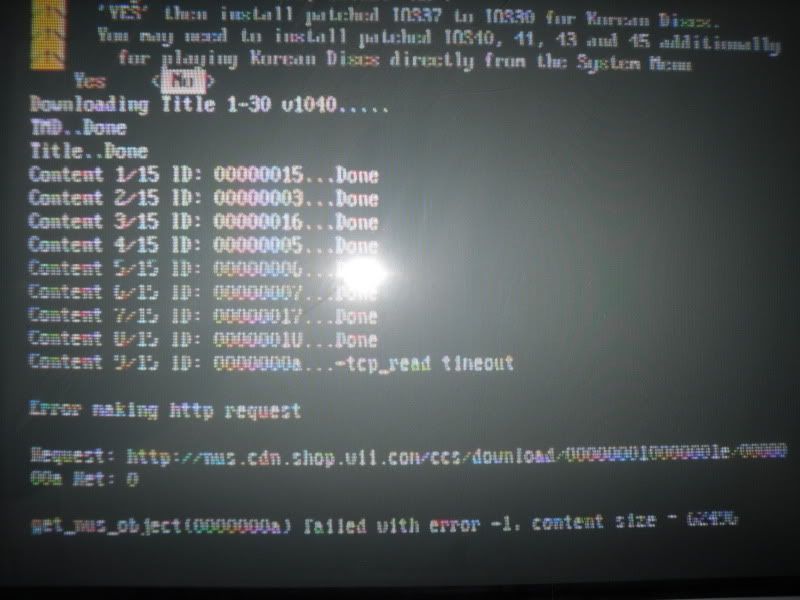
I have been fighting with the AnyRegionChanger 1.1 for the past 2 frigging hours!! Im trying to do doing larrylje's guide How to Launch Backup Games From Disc Channel On 4.0 Firmware. Im stuck on step 2 where its suppose to be downloading files and I keep getting network errors. Its at a different place everytime and ive been trying at it hoping it'll go through just once but it never does. Once I got to the last part where it im suppose to select ?YES? for Special System Menu Hacks but it didnt get through it.
Its not my wifi because the router is less than 15 feet away and my computer is 20 feet away with 100% signal strength and another computer is 2 rooms away still with 90% strength.
Is there any way I can pre-download these files to the sd card or is there another program i can use to downgrade from 4.1 to 3.2?
BTW here is a screen shot of the error
|
Junior Member
|
22. July 2009 @ 22:28 |
Link to this message
|
Just being curious, it seems that you are trying to play back-ups, why not use Waninkoko USB Loader 1.1 after loading the Homebrew channel?,
|
|
nfg118822
Newbie
|
22. July 2009 @ 22:38 |
Link to this message
|
Yes im trying to play backups and i havnt tried to usb loader because i havnt seen a guide for it. If you could point me toward one that would be great. And im still stuck on 4.1u if that matters.
EDIT actually now that you mentioned it I did find another larrylje guide for it. thanks for the suggestion.
http://forums.afterdawn.com/thread_view.cfm/780518
EDIT usb bootloader works awesomely! I even managed to get my Pal game to work on my NTSC system with a little bit of tweaking.
But I am wondering what is the advantage of NeoGamma vs USB Loader? I see alot of people supporting NeoGamma when it seems like more work to me, having to burn and buy disks when you can just reuse a hdd or flash drive for all your games.
This message has been edited since posting. Last time this message was edited on 23. July 2009 @ 00:07
|
|
Advertisement
|
|
|
Junior Member
|
23. July 2009 @ 06:08 |
Link to this message
|
|
Glad you got that to work, I have not tried what you are using, but congrats.
|


