User User name Password  
   
Wednesday 18.3.2026 / 10:29
Search AfterDawn Forums:        In English   Suomeksi   Pĺ svenska
afterdawn.com > forums > dvd±r discussion > dvd±r for newbies > dvd shrink and decrypter
Show topics
 
Forums
Forums
dvd shrink and decrypter
  Jump to:
 
Posted Message
aarong85
Newbie
_
5. June 2005 @ 03:39 _ Link to this message    Send private message to this user   
DVD Shrink and DVD Decrypter are the two programs i use (booth latest versions) my proble is every dvd i burn comes out perfect to about the last three sceens then they start to jump skip and fuck up is there something im doing wrong are there some settings i should play with. please help is needed.
Gringle
Suspended due to non-functional email address
_
5. June 2005 @ 04:39 _ Link to this message    Send private message to this user   
You may be burning to close to the edge, set your target size to 4.3 the other main reason could be your using crap media.
for target size see scubapetes guides.

http://www.dvdplusvideo.com/tutorial007.html

for disc information see http://www.dvdinfopro.com/


regards gringle


El gringle..
AfterDawn Addict
_
5. June 2005 @ 07:45 _ Link to this message    Send private message to this user   
Sounds like crap media to me. Perhaps, next time when you back up, try some high quality media such as FUJI/TY, Verbatim, Maxell, SONY and TDK.

WARNING: Do not "update/upgrade" your SAMSUNG BD-D5XXX series (Bluray Player), or else you cant enjoy any of your movie files.
How 2 downgrade Samsung BD-D5XXX Series Bluray player http://forum.samygo.tv/viewtopic.php?f=18&t=4244
Advertisement
_
__
 
_
Moderator
_
5. June 2005 @ 09:01 _ Link to this message    Send private message to this user   
i heard possible bad media calling me across the internet :)

in addition to the other guys' replies -
let's try something -

download Nero info-tool from here - http://www.snapfiles.com/get/neroinfo.html

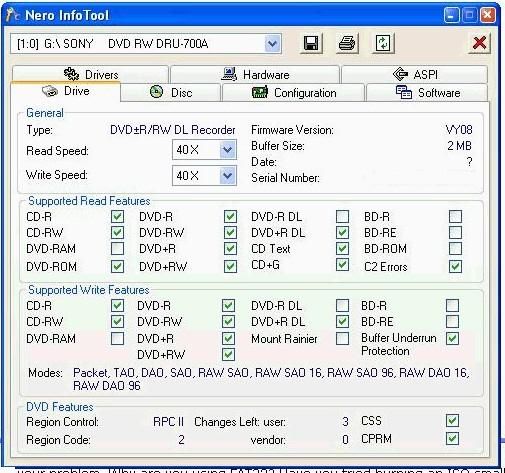
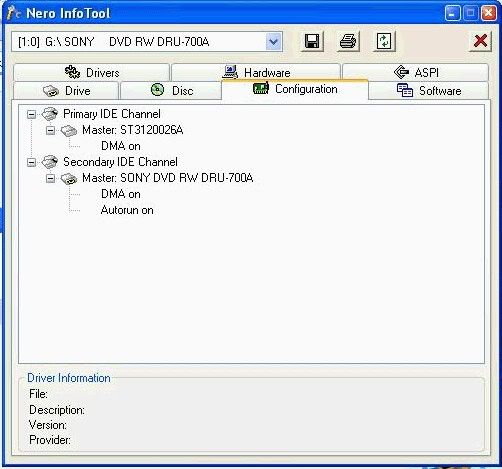
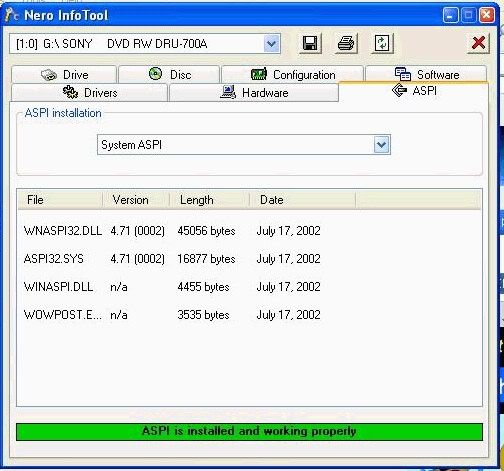
Run it, note down the following, and paste here. Here's what mine shows -

click on the drive tab, note down the firmware version


click on configuration tab, note down the DMA fields, ie on or off


it may be worth clicking on the aspi tab, and note down anything that might be missing


Main PC ~ Intel C2Q Q6600 (G0 Stepping)/Gigabyte GA-EP45-DS3/2GB Crucial Ballistix PC2-8500/Zalman CNPS9700/Antec 900/Corsair HX 620W
Network ~ DD-WRT ~ 2node WDS-WPA2/AES ~ Buffalo WHR-G54S. 3node WPA2/AES ~ WRT54GS v6 (inc. WEP BSSID), WRT54G v2, WRT54G2 v1. *** Forum Rules ***

This message has been edited since posting. Last time this message was edited on 6. June 2005 @ 10:39

Related links
Download DVD Decrypter from here.
Download DVD Shrink from here.
Read our DVD Shrink guide from here!
 
Related forum topics Posts Last post Forum room
Transfer DVD Shrink "recognition" ability. Old computer to New computer 11 31. May 2014 DVD Shrink forum
ImgBurn DVD Decrypter won't work with Shrink 3 29. May 2014 DVD Shrink forum
Nebraska Won't Go Into Shrink 8 22. March 2014 DVD Shrink forum
DVD Shrink 3 10. February 2014 Video - Software discussion
DVDLab Pro to DVD Shrink issue 3 8. February 2014 Video - Everything else
Getting the famous "dvd shrink encountered an error and cannot continue invalid dvd navigation structure" message 9 3. February 2014 DVD Shrink forum
DVD Shrink - what happened!! 6 20. January 2014 DVD Shrink forum
Is DVD Shrink 2013 a hoax? 11 25. November 2013 DVD Shrink forum
DVD Drive and DVD shrink 2 26. October 2013 Convert DVD to another format
shrink isnt working with my windows vista 8 23. September 2013 DVD Shrink forum

 
afterdawn.com > forums > dvd±r discussion > dvd±r for newbies > dvd shrink and decrypter
 

Digital video: AfterDawn.com | AfterDawn Forums
Music: MP3Lizard.com
Gaming: Blasteroids.com | Blasteroids Forums | Compare game prices
Software: Software downloads
Blogs: User profile pages
RSS feeds: AfterDawn.com News | Software updates | AfterDawn Forums
International: AfterDawn in Finnish | AfterDawn in Swedish | AfterDawn in Norwegian | download.fi
Navigate: Search | Site map
About us: About AfterDawn Ltd | Advertise on our sites | Rules, Restrictions, Legal disclaimer & Privacy policy
Contact us: Send feedback | Contact our media sales team
 
  © 1999-2026 by AfterDawn Ltd.

  IDG TechNetwork