|
Unable to Update Firmware
|
|
|
a01020304
Newbie

|
26. November 2008 @ 15:56 |
 Link to this message

|
I have a Starview Box, and was going to upgrade the firmware but having problems.
I have downloaded the software and bin file to my pc
I then connected usb cable to the R232 cable then connected it to pc/box
I found the correct port in the software and loaded the bin file.
I then click on download but the % stays at 0
It has been connected for a few hours now and still at 0%, I disconnected things and tried again and yet again stays at 0%
I get no errors or anything it says its downloading but nothing seems to happen.
have I done something wrong?
or do i need to do something else?
|
|
Advertisement

|
|
|
|
AfterDawn Addict
|
26. November 2008 @ 17:11 |
Link to this message
|
is it a usb adaptor and rs232 cable because the correct cable is a null modem cable,one works,one does not.
|
|
a01020304
Newbie
|
26. November 2008 @ 17:21 |
Link to this message

|
Its the female/female cable that came with the box and i bought the usb adaptor cable from maplin.
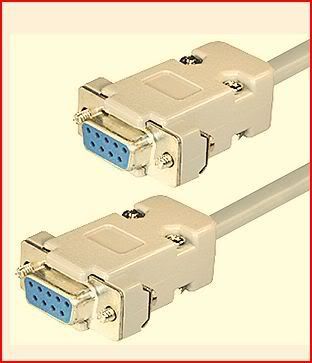

This message has been edited since posting. Last time this message was edited on 26. November 2008 @ 17:23
|
|
brazonder
Newbie
|
28. November 2008 @ 10:49 |
Link to this message
|
|
hi mate im having the same prob did you get a fix for the problem.
cheers
braz
|
Junior Member
|
28. November 2008 @ 10:52 |
Link to this message
|
|
have a read around there are fixes for all probs!!
|
|
tsingh
Newbie
|
28. November 2008 @ 10:54 |
Link to this message

|
hey guys were can i get the new Firmware update 4 starview box 1 or is it not out yet thanks
|
Member
|
28. November 2008 @ 10:55 |
Link to this message
|
|
I take it your running Vista.
|
|
malci
Suspended due to non-functional email address
|
28. November 2008 @ 11:06 |
Link to this message
|
|
|
a01020304
Newbie
|
28. November 2008 @ 11:18 |
Link to this message
|
Originally posted by brazonder:
hi mate im having the same prob did you get a fix for the problem.
cheers
i still could not get it to upgrade, it just stayed on 0%
I use vista but also tried it on xp and same 0%
|
AfterDawn Addict
2 product reviews
|
28. November 2008 @ 11:21 |
Link to this message
|
|
Did you read Malci's post????
|
|
a01020304
Newbie
|
28. November 2008 @ 11:43 |
Link to this message
|
Originally posted by HiTeck:
Did you read Malci's post????
the post was opened before yesterdays update. the point is i cant seem to install firmware or channel dumps, it stays at 0%, even if new firmware does come i still would not be able to install it.
the problem is that any update stays at 0%
|
|
maccaz1uk
Newbie
|
28. November 2008 @ 11:54 |
Link to this message
|
|
Same problem here guys , when you try to put the software onto the box the same way i have always done it, it just says flash failed, it doesnt get by 0% any clues
|
AfterDawn Addict
|
28. November 2008 @ 11:58 |
Link to this message
|
Originally posted by maccaz1uk:
Same problem here guys , when you try to put the software onto the box the same way i have always done it, it just says flash failed, it doesnt get by 0% any clues
If you are in the uk why are you trying to flash your b0x with firmware thats no use anymore??. Wait & see if theres an update.
|
|
a01020304
Newbie
|
28. November 2008 @ 12:11 |
Link to this message
|
Originally posted by noelyf:
Originally posted by maccaz1uk:
Same problem here guys , when you try to put the software onto the box the same way i have always done it, it just says flash failed, it doesnt get by 0% any clues
If you are in the uk why are you trying to flash your b0x with firmware thats no use anymore??. Wait & see if theres an update.
when I started this thread a few days ago it was before the episodes of yesterday. It has nothing to do with firmware since yesterday.
I was talking about I was trying to upload the firmware and channel dump (prior to yesterday) but never went beyond 0%, even the channel dump stayed at 0%
i was asking why it would not go beyond 0% was there a problem with what I was doing.
I am not asking for new firmware or anything since yesterday, i am asking for help why it will not go beyong 0%
This message has been edited since posting. Last time this message was edited on 28. November 2008 @ 12:12
|
AfterDawn Addict
|
28. November 2008 @ 12:17 |
Link to this message
|
|
The cable you are using might be an RS232 cable . I know it came with the b0x, but that doesnt mean its the right cable for flashing. You`ll need a NULL MODEM cable DB9F to DB9F.
|
|
a01020304
Newbie
|
28. November 2008 @ 12:33 |
Link to this message
|
Originally posted by noelyf:
The cable you are using might be an RS232 cable . I know it came with the b0x, but that doesnt mean its the right cable for flashing. You`ll need a NULL MODEM cable DB9F to DB9F.
how can you tell if it is a RS232 or a Null one? as no identification on the cable.
|
|
maccaz1uk
Newbie
|
28. November 2008 @ 12:40 |
Link to this message
|
|
Rs232 Has always worked in the past,, is this not the case anymore?
|
AfterDawn Addict
|
28. November 2008 @ 12:42 |
Link to this message
|
Originally posted by maccaz1uk:
Rs232 Has always worked in the past,, is this not the case anymore?
if its worked for you in the past it should do so again,turn the box off,then press download on the ufl,then turn the box on,and see if it moves for you.
|
AfterDawn Addict
|
28. November 2008 @ 12:49 |
Link to this message
|
|
Junior Member
|
28. November 2008 @ 13:00 |
Link to this message
|
|
Folks
if by some tragedy of the god no solution can be find to the current ahem "problems" everyone is encountering. If we have to go legal and get a Kosher box with a basic package.. will the "other box" be able to auto update then?
Sorry if im tlaking in riddle but those of you with a brain will know why.
|
|
malci
Suspended due to non-functional email address
|
28. November 2008 @ 18:22 |
Link to this message
|
Originally posted by PABLO68:
Folks
if by some tragedy of the god no solution can be find to the current ahem "problems" everyone is encountering. If we have to go legal and get a Kosher box with a basic package.. will the "other box" be able to auto update then?
Sorry if im tlaking in riddle but those of you with a brain will know why.
Reasonable question, but in a word NO.
|
|
a01020304
Newbie
|
28. November 2008 @ 19:16 |
Link to this message
|
|
Someone said earlier I may have a RS232 cable and not a null cable. I have opened it up and checked the pins from diagrams on the web and its is def a null cable i have
I have been trying contantly to do channel dumps to test thinsg work but it still stays at 0%
i would have thought if cable or software was not compatible it would come up as fail but it does not, it just sticks at 0%
any suggestions?
|
|
chrstphr
Junior Member
|
28. November 2008 @ 19:19 |
Link to this message
|
am i right in saying that you are connecting the usb adapter to the nul cable
|
|
a01020304
Newbie
|
28. November 2008 @ 19:47 |
Link to this message
|
Originally posted by chrstphr:
am i right in saying that you are connecting the usb adapter to the nul cable
Yes I am connecting the usb adaptor (my pc/laptop does not have the connection to do it direct) to the null cable (the cables i have are shown on my second post above)
I connected them to box/pc and clicked download but it sticks at 0%, i even left it today for 7 hours and came back and it was still at 0%
This message has been edited since posting. Last time this message was edited on 28. November 2008 @ 19:49
|
|
Advertisement
|
|
|
|
a01020304
Newbie
|
6. December 2008 @ 11:22 |
Link to this message
|
|
this is an update to my previous posts above.
I went to maplin and got a null cable just in case the one I had was wrong but am getting same problems, the % stays at 0
It just does not go beyond 0%, i left it for 5 hours but same.
do you think it is a problem with the box or something else?
(and before anyone says , yes I know the fix is not out yet, if i cant do a channel dump or load the old fix in what chance have i got doing the new one)
|


