|
Custom PC Built No Sound, Onboard Audio Refuses To Work
|
|
|
Sorrow1
Junior Member

|
15. February 2005 @ 18:27 |
Link to this message

|
|
I reseated memory in same slot it was in before, bios says im in (dual channel memory mode) again, bios still booting fast,finally got SB Audigy 2 working after about 6 hours of installing and uninstalling drivers for it, even if device manger shows driver is installed it doesnt necessarily mean you will get sound from card,apparently the drivers for the card are next to worthless, as i said before i never had problems with this card before i built this pc.
problems im still having include:
1)dial up sound still coming through mobo speaker
2)processor runnuing too hot for my liking, ive seen it as high as (140F),at idle it seems to be between(105F-115F),it is a prescott and i wish it wasnt.
3)Issues going into standby and shutting down,In standby mode procesor fan continues to run,Hibernation works fine though,sometimes when i try to shut it down it simply reboots.
This message has been edited since posting. Last time this message was edited on 17. February 2005 @ 00:57
|
|
Advertisement

|
|
|
|
|
Sorrow1
Junior Member

|
15. February 2005 @ 18:29 |
Link to this message

|
|
also heatsink fan appears to be blowing air towards processor, instead of pulling it away is this normal?
This message has been edited since posting. Last time this message was edited on 15. February 2005 @ 18:35
|
|
ddp
Moderator
|
16. February 2005 @ 07:03 |
Link to this message
|
|
air always blows at heatsink not away. temp is normal for prescott as i have the 2.4 celeron version & right now is about 52-53c compared to my old northwood 2.4 celeron at 34-39c
|
|
Sorrow1
Junior Member
|
16. February 2005 @ 13:57 |
Link to this message
|
|
Ok everything is working fine now except dial up through mobo speaker and the solution to that is broadband internet access, I cleaned processor and heatsink and reapplied that silver compound,also dropped processor on hardwood floor some pins were bent but it booted fine got idle temps down about 20 degrees. Thanks for the input,as it turns out nothing was wrong with the pc.I know you people are tired of reading my posts so this will be the final entry for me.
|
|
ddp
Moderator
|
16. February 2005 @ 16:23 |
Link to this message
|
|
did 1 with 57 posts so this is nothing & don't drop the cpu, butterfingers!!! teach & learn
|
|
ScubaBud
AfterDawn Addict
|
16. February 2005 @ 16:26 |
Link to this message
|
|
Sorrow1
He was actually being nice, just in case you didn't catch that. :)
|
|
Sorrow1
Junior Member
|
16. February 2005 @ 23:21 |
Link to this message
|
|
Ok one last post, If you build a PC and cant get SB Audigy to work, Its a driver Issue.
|
|
ScubaBud
AfterDawn Addict
|
17. February 2005 @ 01:48 |
Link to this message
|
|
Thanks Sorrow1 :)
Also for the record, since I've been building PC's, when has it ever been "Not an Issue with either sound or Video Card drivers? lol At least in the old days. :) Sometimes I used to wait to see what the big boys; Zeos, Micron, Gateway, Dell, were using together before I purchased the cards, letting them first work out their problems.
|
|
Sorrow1
Junior Member
|
19. February 2005 @ 07:15 |
Link to this message
|
|
This Is My first computer build,i was so worried about frying a componet that it took me 5 hours to assemble the thing. Also for the record that loud dial up sound is coming through a speaker on the modem card, any fix for that? or should i just break the damn thing off! Motherboard is not beeping after post either but it runs super fast so i will assume its no big deal.(Next time i will exhaust my options before freaking out and posting but i literally did not know WTF was going on,Assumed MOBO was fried.)At least i dont have to settle for that pre-configured crap from gateway anymore - what a rip off!
|
|
ddp
Moderator
|
19. February 2005 @ 10:03 |
Link to this message
|
|
put a piece of electrical tape over the modem speaker which is usually black & has a hole in the center for sound to come out. there is a command line that will lower or turn off modem speaker so check manual
|
|
ScubaBud
AfterDawn Addict
|
19. February 2005 @ 10:55 |
Link to this message
|
Quote:
Also for the record that loud dial up sound is coming through a speaker on the modem card, any fix for that? or should i just break the damn thing off!
Pipe it into your neighbor?s house! Just kidding :)
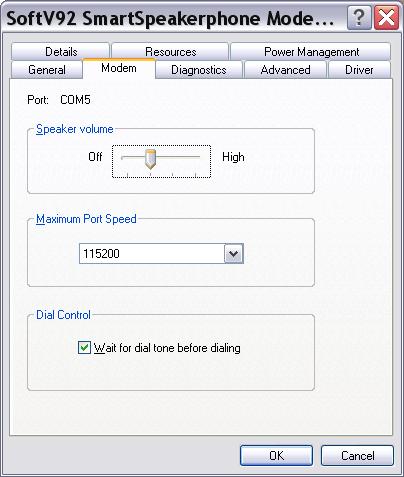
I would check properties of volume control under windows and see if under advanced it gives you a modem speaker slide bar and mute, then like ddp said, check under properties of your modem in device manager there also should be a setting for low, medium and high for the volume.
This message has been edited since posting. Last time this message was edited on 19. February 2005 @ 11:03
|
|
Sorrow1
Junior Member
|
19. February 2005 @ 20:17 |
Link to this message

|
|
Ok just one more Question the motherboard is not beeping after post but it boots fine and loads windows fast, when i remove a stick of memory it beeps after post at least initally it does,actually i get 2 beeps with only one stick of memory in, i havent tried multiple reboots with only one stick,i am not having memory problems,so the board is capable of beeping,when it was booting slow i removed a memory stick and it went back to fast boot, i put stick back in and it has booted fast ever since,so the corruption has been eradicated,(incomplete flashing of bios caused corruption) it didnt even beep the first time i fried it up - for the record it also booted fast on the inital booty,should i replace board? or not fix something thats not broken.
This message has been edited since posting. Last time this message was edited on 19. February 2005 @ 20:20
|
|
ScubaBud
AfterDawn Addict
|
20. February 2005 @ 01:38 |
Link to this message
|
|
Not every board beeps every time. Mine for example does not beep any more after Asus made a bios change. It only beeps when there is an error. It used to beep three times at startup and that was because I had devices in more then two USB ports, hence the change made by Asus.
Check your MB manufacturer and see what they have for beep?s, error's, etc. Don't fix what ?ain't? broke! (At least not yet since it's always an option down the road.)
|
|
Nightlite
Suspended due to non-functional email address
|
20. February 2005 @ 02:16 |
Link to this message
|
|
Sorrow,
I also just built a pc... with a motherboard from my son, his chip and memory... I had one thousand and one problems all different...He paid quite a bit for the memory last year and felt it was great... after spending money on a new mother board... that now needed a video card ( bought that) all that was the same was the processor and memory... bought new memory.. and then did a memory test... (memtest free program) with his memory and the new memory...errors errors errors... so I took out his memory.... try that...even though the ram is showing up there could be a problem with that. If that shows fine then you atleast know that is not a problem and it will save you money in the long run by deducting hardware problems..
Sony DRU-500A, dup-dvd, dvd-cloner, DVDDecryter, Nero 6, Dvdshrink, Dvd2One
|
|
Sorrow1
Junior Member
|
20. February 2005 @ 02:30 |
Link to this message
|
|
Ram shows up correct in bios, and works fine. I took ram out of dual channel mode(memory sticks are now in slots 1+2) and MOBO consistently beeps after every post now.(Intel boards should beep once after post),also the stand by mode with fans running is a windows xp issue, i uchecked the option for mouse to wake pc from standby and put pc in standby and fans stopped running.
This message has been edited since posting. Last time this message was edited on 20. February 2005 @ 02:36
|
|
jaydeeX3
Suspended due to non-functional email address
|
20. February 2005 @ 09:00 |
Link to this message
|
|
to check your RAM, get some memory tester software, and boot from that to check your memory for errors.....that will tell you right there if your memory is bad....
|
|
Nightlite
Suspended due to non-functional email address
|
21. February 2005 @ 16:10 |
Link to this message
|
|
We were sure our ram was good too... it showed in the bios.... and on MY PC..... but when doing the memtest.... it had error after error... Look on the internet for memtest... it is free... just takes time to run the program...
Sony DRU-500A, dup-dvd, dvd-cloner, DVDDecryter, Nero 6, Dvdshrink, Dvd2One
|
|
jaydeeX3
Suspended due to non-functional email address
|
22. February 2005 @ 09:37 |
Link to this message
|
|
it makes noe difference whether it shows up in your BIOS.....it can show up in there, but unitl you run a memtest on it, thats when youll know if your memory is bad.....
|
|
Sorrow1
Junior Member
|
26. February 2005 @ 07:07 |
Link to this message
|
|
I ran memtest memory is fine, CPU temp seems to max out at about 140F is that too high?
|
|
ddp
Moderator
|
26. February 2005 @ 07:40 |
Link to this message
|
|
kinda high as that is about 60c whereas my prescott 2.4 celeron is about 50-53c. how many fans in system??
|
|
jaydeeX3
Suspended due to non-functional email address
|
26. February 2005 @ 09:34 |
Link to this message
|
|
that is a little high...i would recommend getting a better heat sink fan for your CPU, and install a couple more fans to bring the temp down so your system will run cooler
|
|
ScubaBud
AfterDawn Addict
|
26. February 2005 @ 13:02 |
Link to this message
|
|
Sorrow1
If you say that the maximum temp is 140f/60c then you are fine. If the idle temp is there, then you are asking for it. It's rated at a max of 167f if I recall. I think Intel stated between 5c to 75c. I still think that anyone with a P4 Prescott should look into a better CPU cooler fan then the factory fan to get the temp down, even another 5c is equal to 41f which is a big difference.
|
|
Sorrow1
Junior Member
|
26. February 2005 @ 20:51 |
Link to this message
|
|
I've got 4 fans total they seem to help a little,I ran CPU at 100% for 25 minutes it wont go over 140F, it actually runs cool for a prescott i think. i dont care if the processor gets fried as long as it doesnt take my MOBO with it.
|
|
jaydeeX3
Suspended due to non-functional email address
|
28. February 2005 @ 04:57 |
Link to this message
|
|
well you can bet that more times than none, if the CPU fries it usually takes the mobo with it, as far as ive seen in my experience...
|
|
Advertisement
|
|
|
|
ddp
Moderator
|
28. February 2005 @ 09:42 |
Link to this message
|
|
intel has a circuit that when overheats, shuts down the cpu thereby protecting it. don't know if amd has or not
|


