|
Intel P4 vs AMD
|
|
|
brobear
Suspended permanently

|
14. April 2006 @ 23:18 |
 Link to this message

|
|
The processor can be OC(ed). Does the mobo support OC(ing)? What company manufactured your board and what is the model number? The chipset you mentioned is used by different manufacturers. The same info is needed for the graphics card, manufacturer and model.
|
|
Advertisement
|
 |
|
|
Senior Member
|
15. April 2006 @ 09:34 |
Link to this message

|
|
Where can i find all this out??
|
Newbie
|
15. April 2006 @ 13:11 |
Link to this message

|
altkon
|
|
aabbccdd
Suspended permanently
|
15. April 2006 @ 13:39 |
Link to this message
|
|
the page wont work?? you need "Abobe" so you can read the page
|
|
ScubaBud
AfterDawn Addict
|
15. April 2006 @ 13:46 |
Link to this message
|
Click on Start
Left click once on My Computer
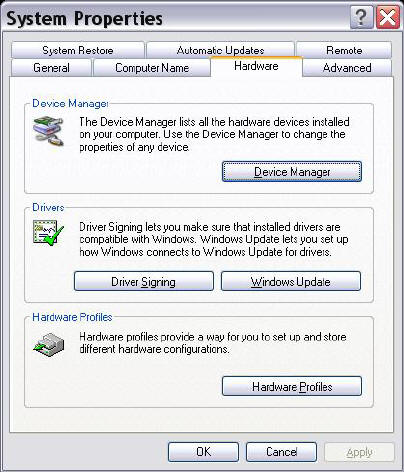
Right click once on My Computer and select properties.
Double click on Device Manager
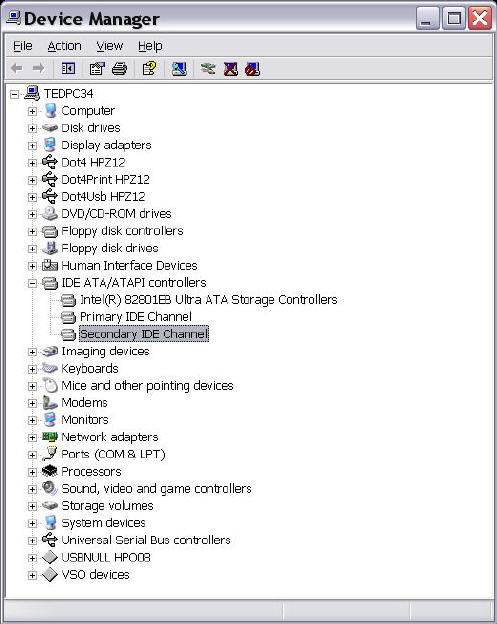
Double click on IDE ATA/ATAPI then Double Click on Secondary IDE Channel
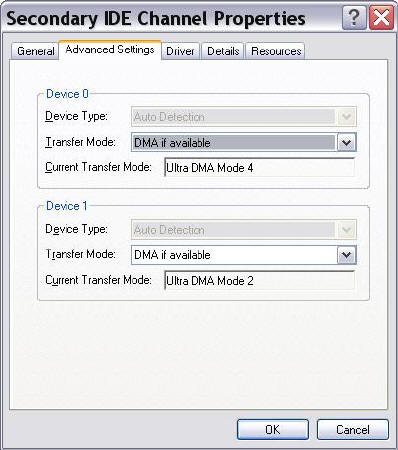
Make sure your settings are for DMA not PIO
This message has been edited since posting. Last time this message was edited on 15. April 2006 @ 13:47
|
|
brobear
Suspended permanently
|
15. April 2006 @ 13:48 |
Link to this message
|
|
This message has been edited since posting. Last time this message was edited on 15. April 2006 @ 15:29
|
|
brobear
Suspended permanently
|
15. April 2006 @ 14:20 |
Link to this message
|
|
Sniping_G
SiSoftware Sandra lists the components in a PC. Also, you should have the info on your build sheet. Obviously you didn't build this one. What's the origin of your system? Is it a custom build or factory PC? Many of the factory PCs have a locked BIOS that won't allow the system to be OC(ed). What name pops up on the screen when you boot up? I see Asus on this one and Dell on my Dell system. The Dell has a locked board.
|
Newbie
|
15. April 2006 @ 14:30 |
Link to this message
|
|
Scubabud ! !
I followed your guidance, and my settings are:
Device #0 Ultra DMA mode 4 and
Device #2 Ultra DMA mode 2.
I hit on OK button.And thats all I guess.!!!
Brobear ! !
I have the free Adobe Reader,nevertheless ...the link didnt work.
Since my settings are OK now...do I have to insist on entering
subject link ??? to check my settings again..
altkon
altkon
|
|
brobear
Suspended permanently
|
15. April 2006 @ 14:31 |
Link to this message
|
|
@altkon
Since Scubabud got you to the settings in Device Manager, I'll go ahead and let you know how to do the change from PIO to DMA if it's slipped into PIO. Uninstall the IDE Channel that has the PIO setting and reboot. (Uninstall is available among the optioins when you right click the mouse on an item in Device Manager). The system picks the IDE Channel back up on reboot. Then check again in Device Manager to see if the change took place.
This message has been edited since posting. Last time this message was edited on 15. April 2006 @ 14:35
|
Newbie
|
15. April 2006 @ 14:53 |
Link to this message
|
|
Scubabud !!
Please correct my above mentioned settings to read as follows:
Primary IDE channel
Device #0 Ultra DMA mode5
Device #1 Ultra Dma Mode4
Secondary IDE Channel
Device #0 Multi World DMA Mode2
Device #1 Not available.(When set to DMA mode if available)
For your info I have 2 Hard Disks C and D.
Sorry for confusion.
altkon
altkon
|
|
ScubaBud
AfterDawn Addict
|
15. April 2006 @ 15:02 |
Link to this message
|
|
altkon
Your settings seem fine...
Primary IDE channel are your HDD's
Device #0 Ultra DMA mode5
Device #1 Ultra Dma Mode4
Secondary IDE Channel is your Optical Drive in DMA mode2
Device #0 Multi World DMA Mode2
Device #1 Not available.(When set to DMA mode if available)
The above reads that there isn't any other device on your Secondary Channel other then your first Optical Drive.
|
Senior Member
|
15. April 2006 @ 18:43 |
Link to this message
|
|
well my computer was factory manufactured called "Cisnet" ans i got that program,so wha tinfo do you want and how do i get it from Sandra
|
|
brobear
Suspended permanently
|
16. April 2006 @ 01:12 |
Link to this message
|
|
That wouldn't be one of the Cisnet Nascar systems would it? I looked at one of the systems. It's the ATI chipset with X300 onboard graphics. I suspect it will be a locked OEM board, just from the nature of it being an economy to midline model. Sandra lists the board components. Select Mainboard Information in the Information Modules. Your board model should be listed in there. With that maybe someone familiar with the board can help you. As I mentioned though, I doubt what you have can be OC(ed).
|
AfterDawn Addict
4 product reviews
|
18. April 2006 @ 00:34 |
Link to this message
|
|
They do onboard X300s now? I though it was just the 200... Hmmm, guess using proper graphics cards has seen me living under a rock!
|
|
brobear
Suspended permanently
|
18. April 2006 @ 00:47 |
Link to this message
|
|
Seems some companies are building better onboard graphics using the ATI chipsets. You can check it out at the ATI site. It has to be cheaper to build a system with onboard graphics over the superior graphics cards. I'll just stick with the "proper graphics cards" as you say.
|
|
aabbccdd
Suspended permanently
|
18. April 2006 @ 00:48 |
Link to this message
|
|
upgraded somewhat guys per my sig .till i know for sure what i want/need CPU wise looking like the Opteron 175 demark is the way to go but maybe the FX-57 will see what prices do mid summer
|
AfterDawn Addict
4 product reviews
|
18. April 2006 @ 00:50 |
Link to this message
|
|
an 8ms 20.1" Screen? Yes please!
Where do you people get all this money!!!??
|
|
brobear
Suspended permanently
|
18. April 2006 @ 01:02 |
Link to this message
|
aabbccdd
I realize the FX-57 can be OC(ed), but an old $265 socket 478 P4 CPU with a mild OC to 3.6GHz is comparable and better on the Sandra multi-media benchmark in comparison to the $800 AMD FX-57 stock. The dual core FX-60 is only a couple of hundred more, about $1000. Considering that the dual core Opteron 175 sells for about 300 dollars less than the single core FX-57 ($506 at NewEgg, http://www.newegg.com/Product/Product.asp?Item=N82E16819103584 ) and the Opteron dual core can outperform the single cores hands down, the writing is on the wall. It's your decision and I wouldn't try to sway you. If you have the kind of money to spend on the FX-57 or 60, I'm looking for a new rich friend. LOL
This message has been edited since posting. Last time this message was edited on 18. April 2006 @ 01:08
|
AfterDawn Addict
4 product reviews
|
18. April 2006 @ 01:06 |
Link to this message
|
|
The FX-57 is a very short-sighted CPU. If you must have the very best performance for about 6 months, go with it, but eventually you'll see, one by one, all the dual cores come flying past it, first the FX-60, then a few others, and eventually the little old 3800 and 4200.
|
|
brobear
Suspended permanently
|
18. April 2006 @ 01:11 |
Link to this message
|
|
Stock benches show the FX-57 performing below the dual cores. I sure wouldn't go with an FX-60 when I can have the Opteron 175 at half the price. I don't see much need in building a single core system nowadays when the dual cores do so much better, with many at reasonable cost.
This message has been edited since posting. Last time this message was edited on 18. April 2006 @ 01:13
|
AfterDawn Addict
4 product reviews
|
18. April 2006 @ 01:28 |
Link to this message
|
|
Yep indeedy.
I know this will be the rough estimate to end all rough estimates, but how far would you think you can overclock an X2 4200+ using standard Kingston RAM?
|
|
brobear
Suspended permanently
|
18. April 2006 @ 03:33 |
Link to this message
|
|
;) Not as far as you could if you used quality C2 performance RAM. I know, kill the smart arse. LOL As far as how far also depends on the mobo and chipset. But particulars would have to come from someone better at OC(ing) than me. I'm a novice at it compared to Sophocles and some others here.
This message has been edited since posting. Last time this message was edited on 18. April 2006 @ 03:35
|
AfterDawn Addict
4 product reviews
|
18. April 2006 @ 03:56 |
Link to this message
|
|
yeah, appreciably.
I'm on a bit of a budget but after reasonable (lol reasonable, I'm after an X1900XT!) performance.
I've picked out Kingston CAS2.5 RAM (so presumably that can be dropped to 3 to get a bit of extra speed) to go with either:
Abit KN8 Ultra
or
Asus A8N-E
Both I believe use the nForce 4 ultra, I'm making sure I have plenty of cooling, so that won't be an issue.
|
AfterDawn Addict
|
18. April 2006 @ 04:49 |
Link to this message
|
sammorris,
Quote:
an 8ms 20.1" Screen? Yes please!
Where do you people get all this money!!!??
My Sceptre X20 Naga III was $400 (USD) and it's a 20.1 8ms 1680x1050. That's not much more than a good high quality 19" CRT. I just save my money and shop sales for a lot of computer goodies that I buy. I also build a fair amount of computers (mostly business computers) for professional people as well as having a regular job. Next project is an Opteron 175 Denmark by next month.
Happy Computering,
theonejrs
GigaByte 990FXA-UD5 - AMD FX-8320 @4.0GHz @1.312v - Corsair H-60 liquid CPU Cooler - 4x4 GB GSkill RipJaws DDR3/1866 Cas8, 8-9-9-24 - Corsair 400-R Case - OCZ FATAL1TY 550 watt Modular PSU - Intel 330 120GB SATA III SSD - WD Black 500GB SATA III - WD black 1 TB Sata III - WD Black 500GB SATA II - 2 Asus DRW-24B1ST DVD-Burner - Sony 420W 5.1 PL-II Suround Sound - GigaByte GTX550/1GB 970 Mhz Video - Asus VE247H 23.6" HDMI 1080p Monitor
 This message has been edited since posting. Last time this message was edited on 18. April 2006 @ 04:50
|
|
Advertisement
|
|
|
AfterDawn Addict
4 product reviews
|
18. April 2006 @ 06:05 |
Link to this message
|
|
I was actually mentioning the VP2030 that aabbccdd seems to have recently acquired. Great though that sceptre screen is, I'm a 4:3 man!
|


