User User name Password  
   
Tuesday 24.2.2026 / 07:23
Search AfterDawn Forums:        In English   Suomeksi   På svenska
afterdawn.com > forums > software specific discussion > nero discussion > copying large dvds
Show topics
 
Forums
Forums
copying large dvds
  Jump to:
 
Posted Message
joebeezee
Member
_
3. April 2006 @ 18:59 _ Link to this message    Send private message to this user   
yes i was trying to copy a dvd that is 8 GB but i have a 4.7 GB blank disc. is there anyway i could copy a 8 GB DVD. thank you.
Advertisement
_
__
Moderator
_
3. April 2006 @ 19:22 _ Link to this message    Send private message to this user   
If you have the full version of Nero you can use Recode to compress to fit on the disc. If it has copy protection on it you'll need to run something like AnyDVD in the background to remove the copy protection.
You can try it free for 21 days: http://slysoft.com
Here's a guide for recode:
http://forums.afterdawn.com/thread_view.cfm/316083

Or you can use DVD Shrink (free) to compress the movie and burn w/ Nero:
http://www.afterdawn.com/guides/archive/dvd9_to_dvdr_with_dvd_shr...
Any you can download it here:
http://www.afterdawn.com/software/video_software/dvd_rippers/dvd_...
Shrink will handle copy protection but not the new stuff - so AnyDVD running with it be a +.


Forum Rules
Do this before posting
Do not click this link...
joebeezee
Member
_
3. April 2006 @ 19:30 _ Link to this message    Send private message to this user   
can u do it if its a movie DVD and it has a menu and everything
Moderator
_
3. April 2006 @ 19:51 _ Link to this message    Send private message to this user   
Yes you can do a full back up if you want the menus & all.
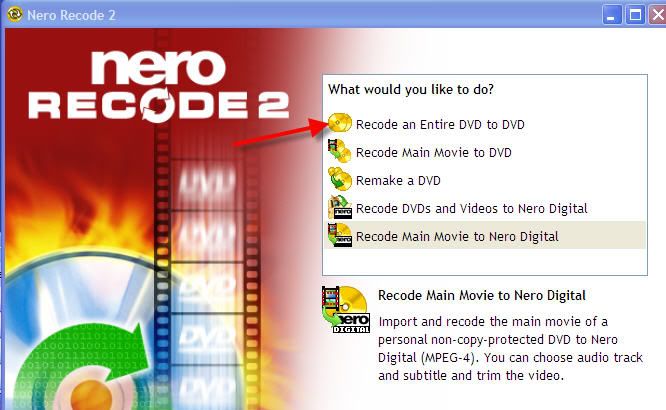
In recode you can pick this option:

But remember you'll need AnyDVD to remove the copy protection. Recode can not copy copy protected discs by itself.
Shrink will handle some or you can rip them to your hard drive 1st w/ dvdfab decrypter (free) then open the files in Recode.


Forum Rules
Do this before posting
Do not click this link...
Member
_
4. April 2006 @ 01:17 _ Link to this message    Send private message to this user   
DVDFab Decrypter also is a free alternative to buying AnyDVD as it will break newer encryptions. However, I agree with blinkie for recommending AnyDVD as it most excellent. I think AnyDVD is totally worth the cost as it is regularly updated and very simple to use (runs in the background).


----------------------------------------------------------------------------------------------------------
Computer: Intel Pentium D 3.0 Ghz dual core CPU, Philips DVD+-RW DVD8701, 1024MB RAM, ATI Radeon 256MB, Nero 6
Always use good quality blank media. Verbatim is always a good call. Don't be seduced by those 50-spindles you find in the $2.99 bin at your local car wash! :)
joebeezee
Member
_
4. April 2006 @ 10:53 _ Link to this message    Send private message to this user   
i donty understand how u use DVD Shrink then nero
Advertisement
_
__
 
_
Moderator
_
4. April 2006 @ 16:02 _ Link to this message    Send private message to this user   
Did you go thru the guide in the above link? If you have Nero installed shrink usually by default recognizes this.
Once you click back up just pick your drive and off you go. You won't even know Nero is being used.
I would also change the burn speed to lower than max - depending on your drive and the media start w/ 4x.


Forum Rules
Do this before posting
Do not click this link...
afterdawn.com > forums > software specific discussion > nero discussion > copying large dvds
 

Digital video: AfterDawn.com | AfterDawn Forums
Music: MP3Lizard.com
Gaming: Blasteroids.com | Blasteroids Forums | Compare game prices
Software: Software downloads
Blogs: User profile pages
RSS feeds: AfterDawn.com News | Software updates | AfterDawn Forums
International: AfterDawn in Finnish | AfterDawn in Swedish | AfterDawn in Norwegian | download.fi
Navigate: Search | Site map
About us: About AfterDawn Ltd | Advertise on our sites | Rules, Restrictions, Legal disclaimer & Privacy policy
Contact us: Send feedback | Contact our media sales team
 
  © 1999-2026 by AfterDawn Ltd.

  IDG TechNetwork