|
|
|
Nero Express 7 - "Error during encoding"
|
|
|
Logue
Newbie

|
4. April 2006 @ 13:48 |
Link to this message

|
|
I can't seem to burn a SVCD. I have burned quite a lot of videos before with Nero, but haven't used it in a while. I need to use it now to burn a video for a class, and I find it doesnt work.
I'm not sure what to do, so I'll just post the log.
If I need to include anything else, I'd be happy to.
Home
Home
5C8000108000000000**********
Windows XP 5.1
IA32
WinAspi: -
NT-SPTI used
Nero Version: 7.0.0.0 (Nero Express)
Recorder: <LITE-ON DVDRW LDW-811S> Version: HS0R - HA 1 TA 0 - 7.0.0.0
Adapter driver: <IDE> HA 1
Drive buffer : 2048kB
Bus Type : default (0) -> ATAPI, detected: ?
CD-ROM: <EU1333U GWC253M >Version: 1.0 - HA 1 TA 1 - 7.0.0.0
Adapter driver: <SCSI> HA 1
=== Scsi-Device-Map ===
DiskPeripheral : WDC WD800JB-00ETA0 atapi Port 0 ID 0 DMA: On
CdRomPeripheral : LITE-ON DVDRW LDW-811S atapi Port 1 ID 1 DMA: On
CdRomPeripheral : EU1333U GWC253M 1.0 dtscsi Port 3 ID 0 DMA: Off
=== CDRom-Device-Map ===
LITE-ON DVDRW LDW-811S D: CDRom0
EU1333U GWC253M H: CDRom1
=======================
AutoRun : 1
Excluded drive IDs:
WriteBufferSize: 83886080 (0) Byte
ShowDrvBufStat : 0
BUFE : 0
Physical memory : 1022MB (1047280kB)
Free physical memory: 451MB (462468kB)
Memory in use : 55 %
Uncached PFiles: 0x0
Use Inquiry : 1
Global Bus Type: default (0)
Check supported media : Disabled (0)
4.4.2006
Super Video CD
4:38:44 PM #1 Text 0 File VCDDoc.cpp, Line 1399
VideoCD document burn settings
------------------------------------------
Compilation type : SVCD
Menu : Enable
Picture in separate folder : TRUE
Folder name :PICTURES
Use CD-I : TRUE
CD-I configuration : CONTROLS=ALL
CURCOL=YELLOW
PSDCURCOL=RED
PSDCURSHAPE=ARROW
CENTRTRACK=2
AUTOPLAY=AUTO_ON
DUALCHAN=DUAL_ON
TIMECODE_X=64
TIMECODE_Y=100
LOTID_X=64
LOTID_Y=64
ALBUM=STANDARD
Encoding bitrate mode : User defined (kb/s)
4:38:44 PM #2 Phase 82 File dlgbrnst.cpp, Line 1724
Encoding video
4:38:44 PM #3 Text 0 File VCDCompilationImpl.cpp, Line 539
Using Nero Video Converter version 0.00
4:39:06 PM #4 Text 0 File AVIVCDFileItem.cpp, Line 963
Encoding E:\cop1_compress.avi to E:\Program Files\NER10.tmp
ScalingType: 1 Video: yes Audio: yes
File size: 6635520 bytes
Resolution: 320x240 29.9701 Hz
Frames: 1753
4:39:06 PM #5 Text 0 File AVIVCDFileItem.cpp, Line 976
Playing time: 58.480000 s
Requested rate: 300 KB/s
iVideoRate=2500501
iAudioRate=224
Estimated size: 8772 blocks
4:40:27 PM #6 Text 0 File AVIVCDFileItem.cpp, Line 1008
Encoding done
4:40:27 PM #7 AVIVCDFILEITEM 10 File AVIVCDFileItem.cpp, Line 1025
Error during encoding
4:40:27 PM #8 Text 0 File AVIVCDFileItem.cpp, Line 1072
Temporary file E:\Program Files\NER10.tmp deleted
4:40:27 PM #9 Text 0 File VCDDoc.cpp, Line 2878
SVCD options:
-----------------------------------------------------
Create standard compliant CD: YES
Encoding resolution: NTSC
Encoding bitrate mode: 0
Fit to size in min: 74
Video directory: MPEG2
ENTRIES.SVD file ID: ENTRYVCD
-----------------------------------------------------
Existing drivers:
File 'Drivers\InCDfs.SYS': Ver=5, 0, 0, 0, size=101504 bytes, created 8/30/2005 6:24:38 PM (InCD4 driver for win NT/2K/XP)
File 'Drivers\scsiport.sys': Ver=5.1.2600.2180 (xpsp_sp2_rtm.040803-2158), size=96256 bytes, created 8/4/2004 12:59:41 AM (Adapter driver for src)
Registry Keys:
HKLM\Software\Microsoft\Windows NT\CurrentVersion\WinLogon\AllocateCDROMs : 0 (Security Option)
This message has been edited since posting. Last time this message was edited on 4. April 2006 @ 17:03
|
|
Advertisement

|
 |
|
|
AfterDawn Addict
|
4. April 2006 @ 16:56 |
Link to this message
|
Quote:
Nero Version: 7.0.0.0
This first version of Nero was buggy, I would recommend you uninstall that version, run clean tool from here
http://ww2.nero.com/nero7/enu/Nero7_CleanTool.html
this will remove all traces and re install this version which is free of bugs
http://www.nero.com/nero7/enu/nero7-up.php
Quote:
Home
Home
5C8000108000000000xxxx xxxx
Also edit out your serial number before someone pirates it.
Thats all I can see at the moment, my firmware link is unavailable so I cant check that for you.
Burn at 4X and use good quality discs, memorex are a poor choice and so is anything made by CMC Mag.
This message has been edited since posting. Last time this message was edited on 4. April 2006 @ 16:56
|
|
Logue
Newbie
|
4. April 2006 @ 19:35 |
Link to this message

|
|
WTF?! I did what you said, uninstalled my previos version of Nero, and did that CleanTool thing. I then installed Nero Version 7.0.8.2. It did the exact same thing as before. Here's the second log.
I really don't know what to do, help would be greatly appreciated.
Home
Home
Windows XP 5.1
IA32
WinAspi: -
ahead WinASPI: File 'F:\Program Files\Nero 7\Core\Wnaspi32.dll': Ver=2.0.1.74, size=164112 bytes, created 11/2/2004 12:54:32 PM
NT-SPTI used
Nero Version: 7.0.8.2
Internal Version: 7, 0, 8, 2
(Nero Express)
Recorder: <LITE-ON DVDRW LDW-811S> Version: HS0R - HA 1 TA 0 - 7.0.8.2
Adapter driver: <IDE> HA 1
Drive buffer : 2048kB
Bus Type : default (0) -> ATAPI, detected: ?
CD-ROM: <EU1333U GWC253M >Version: 1.0 - HA 1 TA 1 - 7.0.8.2
Adapter driver: <SCSI> HA 1
=== Scsi-Device-Map ===
DiskPeripheral : WDC WD800JB-00ETA0 atapi Port 0 ID 0 DMA: On
CdRomPeripheral : LITE-ON DVDRW LDW-811S atapi Port 1 ID 1 DMA: On
CdRomPeripheral : EU1333U GWC253M 1.0 dtscsi Port 3 ID 0 DMA: Off
=== CDRom-Device-Map ===
LITE-ON DVDRW LDW-811S D: CDRom0
EU1333U GWC253M H: CDRom1
=======================
AutoRun : 1
Excluded drive IDs:
WriteBufferSize: 83886080 (0) Byte
BUFE : 0
Physical memory : 1022MB (1047280kB)
Free physical memory: 400MB (410356kB)
Memory in use : 60 %
Uncached PFiles: 0x0
Use Inquiry : 1
Global Bus Type: default (0)
Check supported media : Disabled (0)
4.4.2006
Super Video CD
10:27:47 PM #1 Text 0 File VCDDoc.cpp, Line 1403
VideoCD document burn settings
------------------------------------------
Compilation type : SVCD
Menu : Enable
Picture in separate folder : TRUE
Folder name :PICTURES
Use CD-I : TRUE
CD-I configuration : CONTROLS=ALL
CURCOL=YELLOW
PSDCURCOL=RED
PSDCURSHAPE=ARROW
CENTRTRACK=2
AUTOPLAY=AUTO_ON
DUALCHAN=DUAL_ON
TIMECODE_X=64
TIMECODE_Y=100
LOTID_X=64
LOTID_Y=64
ALBUM=STANDARD
Encoding bitrate mode : User defined (kb/s)
10:27:47 PM #2 Phase 82 File dlgbrnst.cpp, Line 1730
Encoding video
10:27:47 PM #3 Text 0 File VCDCompilationImpl.cpp, Line 547
Using Nero Video Converter version 0.00
10:28:09 PM #4 Text 0 File AVIVCDFileItem.cpp, Line 979
Encoding E:\cop1_compress.avi to F:\Program Files\Cache\NER4BB.tmp
ScalingType: 1 Video: yes Audio: yes
File size: 6635520 bytes
Resolution: 320x240 29.9701 Hz
Frames: 1753
10:28:09 PM #5 Text 0 File AVIVCDFileItem.cpp, Line 992
Playing time: 58.480000 s
Requested rate: 300 KB/s
iVideoRate=2500501
iAudioRate=224
Estimated size: 8772 blocks
10:29:29 PM #6 Text 0 File AVIVCDFileItem.cpp, Line 1024
Encoding done
10:29:29 PM #7 AVIVCDFILEITEM 10 File AVIVCDFileItem.cpp, Line 1041
Error during encoding
10:29:29 PM #8 Text 0 File AVIVCDFileItem.cpp, Line 1088
Temporary file F:\Program Files\Cache\NER4BB.tmp deleted
10:29:29 PM #9 Text 0 File VCDDoc.cpp, Line 2885
SVCD options:
-----------------------------------------------------
Create standard compliant CD: YES
Encoding resolution: NTSC
Encoding bitrate mode: 0
Fit to size in min: 74
Video directory: MPEG2
ENTRIES.SVD file ID: ENTRYVCD
-----------------------------------------------------
Existing drivers:
File 'Drivers\scsiport.sys': Ver=5.1.2600.2180 (xpsp_sp2_rtm.040803-2158), size=96256 bytes, created 8/4/2004 12:59:41 AM (Adapter driver for src)
Registry Keys:
HKLM\Software\Microsoft\Windows NT\CurrentVersion\WinLogon\AllocateCDROMs : 0 (Security Option)
This message has been edited since posting. Last time this message was edited on 4. April 2006 @ 19:37
|
AfterDawn Addict
|
4. April 2006 @ 19:51 |
Link to this message

|
Quote:
I can't seem to burn a SVCD
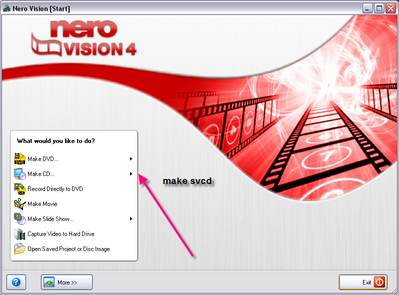
I may be wrong in this but I also have Nero Express and I do NOT have the feature to burn SVCD, as below
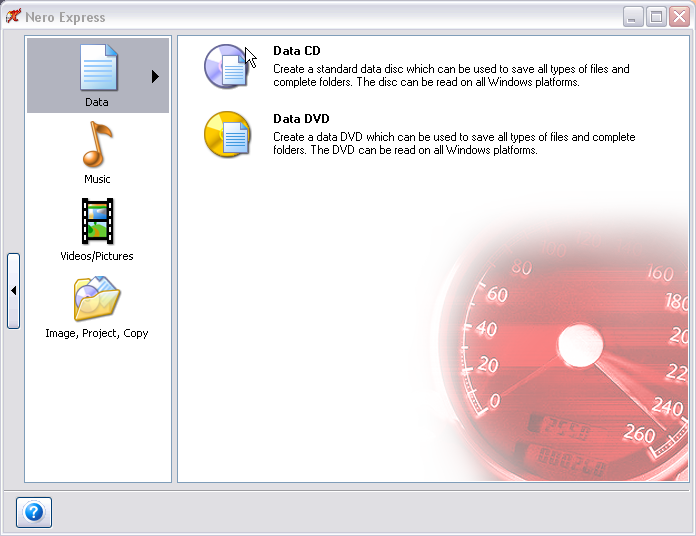
Have you tried using Nero Vision Express, which is different to Nero Express.
|
|
Logue
Newbie
|
5. April 2006 @ 05:48 |
Link to this message
|
I have not tried using Nero Vision. But Nero Express does let me choose to make SVCD, its under Video/Pictures, not Data.
I dunno how to make little pics like you, so i'll just post the link:

This message has been edited since posting. Last time this message was edited on 10. April 2006 @ 12:41
|
AfterDawn Addict
|
5. April 2006 @ 13:36 |
Link to this message
|
|
Thanks for that, pbviously my brain wasnt in gear, yes you can in fact use it.
With your image you place [img] in front and [img] behind URL but last [img] you place a / before img. so you will end up with /img(surrounded by brackets)
This message has been edited since posting. Last time this message was edited on 5. April 2006 @ 13:40
|
|
Advertisement
|
|
|
|
Logue
Newbie
|
10. April 2006 @ 12:41 |
Link to this message
|
|
Awesome, but any other idea's as why I can't burn?
|
|




