|
|
|
Copy DVD with Nero 7
|
|
|
nerophite
Newbie

|
12. April 2006 @ 17:23 |
Link to this message

|
|
Copy process failed, seems to be unable to read the original disc. I copied the same disc last month using Nero 6.6. Any solution to this problem? Here is the burn log:
Windows XP 5.1
IA32
WinAspi: -
ahead WinASPI: File 'C:\Program Files\Nero\Nero 7\Core\Wnaspi32.dll': Ver=2.0.1.74, size=164112 bytes, created 11/2/2004 12:54:32 PM
NT-SPTI used
Nero Version: 7.0.1.3
Internal Version: 7, 0, 1, 3
Recorder: <_NEC DVD+RW ND-2100AD> Version: 104E - HA 1 TA 1 - 7.0.1.3
Adapter driver: <IDE> HA 1
Drive buffer : 2048kB
Bus Type : default (0) -> ATAPI, detected: ?
CD-ROM: <HL-DT-ST DVD-ROM GDR8162B>Version: 0015 - HA 1 TA 0 - 7.0.1.3
Adapter driver: <IDE> HA 1
=== Scsi-Device-Map ===
CdRomPeripheral : HL-DT-ST DVD-ROM GDR8162B atapi Port 0 ID 0 DMA: On
CdRomPeripheral : _NEC DVD+RW ND-2100AD atapi Port 0 ID 1 DMA: On
DiskPeripheral : Maxtor 6Y120M0 atapi Port 1 ID 0 DMA: On
=== CDRom-Device-Map ===
HL-DT-ST DVD-ROM GDR8162B D: CDRom0
_NEC DVD+RW ND-2100AD E: CDRom1
=======================
AutoRun : 1
Excluded drive IDs:
WriteBufferSize: 74448896 (0) Byte
ShowDrvBufStat : 0
BUFE : 0
Physical memory : 510MB (523244kB)
Free physical memory: 237MB (242952kB)
Memory in use : 53 %
Uncached PFiles: 0x0
Use Inquiry : 1
Global Bus Type: default (0)
Check supported media : Disabled (0)
11.4.2006
DVD-Copy on the fly
5:05:29 PM #1 Text 0 File DlgWaitCD.cpp, Line 291
Write in overburning mode: NO (enabled: CD)
5:05:29 PM #2 Text 0 File DlgWaitCD.cpp, Line 458
>>> Protocol of DlgWaitCD activities: <<<
=========================================
Disc blank or invalid. Need valid original disc.
(Medium in drive: Unknown. Medium required by compilation: DVD.)
5:06:34 PM #3 Text 0 File DlgWaitCD.cpp, Line 291
Write in overburning mode: NO (enabled: CD)
5:06:34 PM #4 Text 0 File DlgWaitCD.cpp, Line 458
>>> Protocol of DlgWaitCD activities: <<<
=========================================
Disc blank or invalid. Need valid original disc.
(Medium in drive: Unknown. Medium required by compilation: DVD.)
5:06:34 PM #5 Phase 23 File dlgbrnst.cpp, Line 1725
Reading disc aborted
Existing drivers:
File 'Drivers\ADPU160M.SYS': Ver=v3.60a (Lab01_N(johnstra).010529-2218), size=101888 bytes, created 8/17/2001 1:07:32 PM
File 'Drivers\PXHELP20.SYS': Ver=2.03.18a, size=20576 bytes, created 6/13/2005 3:05:07 PM (Prassi/Veritas driver for win 2K)
Registry Keys:
HKLM\Software\Microsoft\Windows NT\CurrentVersion\WinLogon\AllocateCDROMs : 0 (Security Option)
|
|
Advertisement

|
 |
|
|
AfterDawn Addict
|
12. April 2006 @ 20:59 |
Link to this message

|
Quote:
DVD-Copy on the fly
I would NOT recommend this process, it's thwart with failures as you have found out. I would firstly Rip the DVD to hard drive and then burn or consequently if you have the Full version of Nero7, then I would use Nero Recode.
|
|
nerophite
Newbie
|
14. April 2006 @ 09:45 |
Link to this message
|
Thanks for your help. I found that a bone-headed operator (me) made a glaring blunder. I was trying to copy a cd to a dvd. Anyway, tried again cd to cd, still failed as you noted. Can you tell me how to rip my cd to the hard drive with Nero? For music ripping I have been using MusicMatch. Her is my latest error log:
Windows XP 5.1
IA32
WinAspi: -
ahead WinASPI: File 'C:\Program Files\Nero\Nero 7\Core\Wnaspi32.dll': Ver=2.0.1.74, size=164112 bytes, created 11/2/2004 12:54:32 PM
NT-SPTI used
Nero Version: 7.0.1.3
Internal Version: 7, 0, 1, 3
Recorder: <_NEC DVD+RW ND-2100AD> Version: 104E - HA 1 TA 1 - 7.0.1.3
Adapter driver: <IDE> HA 1
Drive buffer : 2048kB
Bus Type : default (0) -> ATAPI, detected: ?
CD-ROM: <HL-DT-ST DVD-ROM GDR8162B>Version: 0015 - HA 1 TA 0 - 7.0.1.3
Adapter driver: <IDE> HA 1
=== Scsi-Device-Map ===
CdRomPeripheral : HL-DT-ST DVD-ROM GDR8162B atapi Port 0 ID 0 DMA: On
CdRomPeripheral : _NEC DVD+RW ND-2100AD atapi Port 0 ID 1 DMA: On
DiskPeripheral : Maxtor 6Y120M0 atapi Port 1 ID 0 DMA: On
=== CDRom-Device-Map ===
HL-DT-ST DVD-ROM GDR8162B D: CDRom0
_NEC DVD+RW ND-2100AD E: CDRom1
=======================
AutoRun : 1
Excluded drive IDs:
WriteBufferSize: 74448896 (0) Byte
ShowDrvBufStat : 0
BUFE : 0
Physical memory : 510MB (523244kB)
Free physical memory: 180MB (184468kB)
Memory in use : 64 %
Uncached PFiles: 0x0
Use Inquiry : 1
Global Bus Type: default (0)
Check supported media : Disabled (0)
14.4.2006
CD Copy
10:35:08 AM #1 Text 0 File SCSIPassThrough.cpp, Line 36
SPTILockVolume - completed successfully for FCTL_LOCK_VOLUME
10:35:08 AM #2 Text 0 File Burncd.cpp, Line 3048
_NEC DVD+RW ND-2100AD
Buffer underrun protection activated
10:35:08 AM #3 Text 0 File ThreadedTransfer.cpp, Line 525
ReadBuffer-Pipe got 72704KB of Memory
10:35:08 AM #4 Text 0 File Reader.cpp, Line 124
Reader running
10:35:08 AM #5 Text 0 File Writer.cpp, Line 113
Writer E: _NEC DVD+RW ND-2100AD running
10:35:08 AM #6 Phase 48 File dlgbrnst.cpp, Line 1725
Analyzing disc
10:35:08 AM #7 CDCOPY -1 File CDCopy.cpp, Line 1915
The CD is copyrighted
10:35:10 AM #8 Text 0 File CDCopy.cpp, Line 2131
_Index0_ _______Index1_______ PostPause ___LastBlockOfTrack_
Track 1: 0 0 ( 0:02.00) 236738 236737 ( 52:38.37)
10:35:10 AM #9 Text 0 File CDCopy.cpp, Line 840
Copy options: copy on-the-fly: ON
read ISRC/MCN: OFF
use jitter correction: OFF
data options
ignore read error: ON write defekt blocks OFF
read raw data: OFF read r-w subchannel data: OFF
audio options
ignore read error: ON
read indexes: OFF read r-w subchannel data: OFF
source disc does not look like CD Extra
01. 0 - 236738 = 236738, data (TRM_DATA_MODE2_FORM1_NOSUB, block size 2048)
10:35:10 AM #10 Text 0 File Burncd.cpp, Line 3342
Turn on Disc-At-Once, using CD-R/RW media
10:35:11 AM #11 Text 0 File DlgWaitCD.cpp, Line 279
Last possible write address on media: 359845 ( 79:59.70)
Last address to be written: 236737 ( 52:38.37)
10:35:11 AM #12 Text 0 File DlgWaitCD.cpp, Line 291
Write in overburning mode: NO (enabled: CD)
10:35:11 AM #13 Text 0 File DlgWaitCD.cpp, Line 2578
Recorder: _NEC DVD+RW ND-2100AD
10:35:11 AM #14 Text 0 File DlgWaitCD.cpp, Line 458
>>> Protocol of DlgWaitCD activities: <<<
=========================================
10:35:11 AM #15 Text 0 File ThreadedTransferInterface.cpp, Line 847
Setup items (after recorder preparation)
0: TRM_DATA_MODE2_FORM1_NOSUB (1 - Data (mode 2))
2 indices, index0 (150) not provided
original disc pos #0 + 236738 (236738) = #236738/52:36.38
not relocatable, disc pos for caching/writing not required/not required, no patch infos
-> TRM_DATA_MODE2_2336, 2336, config 0, wanted index0 0 blocks, length 236738 blocks [E: _NEC DVD+RW ND-2100AD]
--------------------------------------------------------------
10:35:11 AM #16 Text 0 File ThreadedTransferInterface.cpp, Line 1059
Prepare recorder [E: _NEC DVD+RW ND-2100AD] for write in CUE-sheet-DAO
DAO infos:
==========
MCN: ""
TOCType: 0x20; Session Closed, disc fixated
Tracks 1 to 1:
1: TRM_DATA_MODE2_2336, 2336/0x00, FilePos 0 350400 553370368, ISRC ""
DAO layout:
===========
__Start_|____Track_|_Idx_|_CtrlAdr_|_RecDep__________
-150 | lead-in | 0 | 0x41 | 0x00
-150 | 1 | 0 | 0x41 | 0x00
0 | 1 | 1 | 0x41 | 0x00
236738 | lead-out | 1 | 0x41 | 0x00
10:35:11 AM #17 Text 0 File SCSIPassThrough.cpp, Line 36
SPTILockVolume - completed successfully for FCTL_LOCK_VOLUME
10:35:11 AM #18 Phase 36 File dlgbrnst.cpp, Line 1725
Burn process started at 32x (4,800 KB/s)
10:35:11 AM #19 SPTI -1189 File SCSIPassThrough.cpp, Line 323
E: CdRom1: SCSIStatus(x02) WinError(0) NeroError(-1189)
Sense Key: 0x05 (KEY_ILLEGAL_REQUEST)
Sense Code: 0x30
Sense Qual: 0x02
CDB Data: 0xAD 00 00 00 00 00 00 FF 40 00 00 00
Sense Area: 0x70 00 05 00 00 00 00 0A 00 00 00 00 30 02
Buffer x04842c00: Len x4000
10:35:11 AM #20 Text 0 File ThreadedTransferInterface.cpp, Line 2685
Verifying disc position of item 0 (not relocatable, no disc pos, no patch infos, orig at #0): write at #0
10:35:11 AM #21 Text 0 File MMC.cpp, Line 16934
StartDAO : CD-Text - Off
10:35:11 AM #22 Text 0 File MMC.cpp, Line 17165
CueData, Len=32
41 00 00 24 00 00 00 00
41 01 00 20 00 00 00 00
41 01 01 20 00 00 02 00
41 aa 01 24 00 34 26 26
10:35:50 AM #23 SPTI -1135 File SCSIPassThrough.cpp, Line 323
E: CdRom1: SCSIStatus(x02) WinError(0) NeroError(-1135)
Sense Key: 0x03 (KEY_MEDIUM_ERROR)
Sense Code: 0x0C
Sense Qual: 0x00
CDB Data: 0x2A 00 00 00 02 68 00 00 1C 00 00 00
Sense Area: 0x70 00 03 00 00 02 69 0A 00 00 00 00 0C
Buffer x03d30000: Len xff80
0x00 00 00 00 00 00 00 00 68 2A 42 55 53 24 56 49
0x33 21 4C 2E 71 5F 31 25 3C 38 41 2F 5C 21 62 45
0x59 23 0A 6C 48 31 65 60 53 4D 28 52 4F 39 3D 2C
10:35:50 AM #24 CDR -1135 File Writer.cpp, Line 302
Write error
E: _NEC DVD+RW ND-2100AD
10:35:50 AM #25 Text 0 File ThreadedTransfer.cpp, Line 228
all writers idle, stopping conversion
10:35:50 AM #26 Text 0 File ThreadedTransfer.cpp, Line 222
conversion idle, stopping reader
10:35:50 AM #27 Phase 38 File dlgbrnst.cpp, Line 1725
Burn process failed at 32x (4,800 KB/s)
Existing drivers:
File 'Drivers\ADPU160M.SYS': Ver=v3.60a (Lab01_N(johnstra).010529-2218), size=101888 bytes, created 8/17/2001 1:07:32 PM
File 'Drivers\PXHELP20.SYS': Ver=2.03.18a, size=20576 bytes, created 6/13/2005 3:05:07 PM (Prassi/Veritas driver for win 2K)
Registry Keys:
HKLM\Software\Microsoft\Windows NT\CurrentVersion\WinLogon\AllocateCDROMs : 0 (Security Option)
|
AfterDawn Addict
|
14. April 2006 @ 17:38 |
Link to this message
|
Open Nero StartSmart, select Copy CD as below
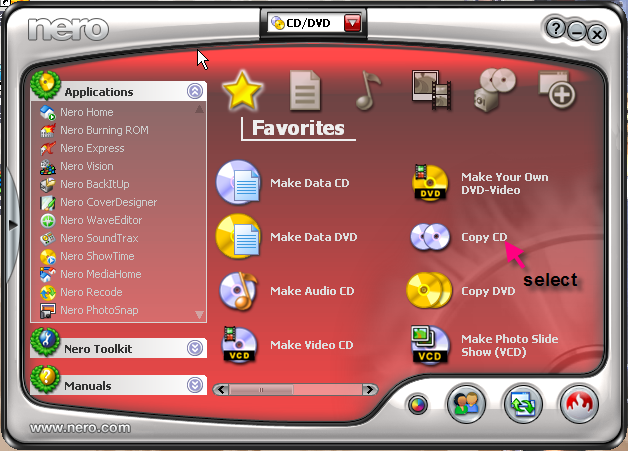

Adjust burn speed and no of copies to suit.
This message has been edited since posting. Last time this message was edited on 14. April 2006 @ 17:45
|
|
Advertisement
|
|
|
|
nerophite
Newbie
|
15. April 2006 @ 21:21 |
Link to this message
|
Thanks for your suggestion, but it does not seem to work. The only option available is to burn to a disc, not rip to hard drive. Destroyed a couple of cds trying again. Always stops burning at 7% complete. At this point, I'm sorry I bought version 7. Version 6.6, until the final update, did everything I needed. All I used Nero for was to burn music cds from mp3 files and make copies of music and photo cds and dvds. Now, version 7 won't copy and I am unable to upgrade it to the latest version, 7.0.8.2. The disc I bought is 7.0.1.3. I tried uninstalling and the using the clean tool but still get error messages advising to reinstall Nero, installation corrupted, not compatible with existing installation etc. I have a Dell machine which came with Sonic DVD which I hear has compatibility problems with Nero. However, 6.6 worked ok. I removed Sonic (as much as possible) and 7 does not work.
|
|




