|
|
|
I'm having problems with nero 7
|
|
|
roropick
Newbie

|
1. May 2006 @ 10:22 |
Link to this message

|
|
SOMEONE HELP PLEASE!!!!!I've had nero 7 for a while now. About a month ago I sent me pc to be cleaned and when I got it back I put the nero 7 back in and I can no longer burn ANYTHING. It does go through the whole burning to disc process but when it's all done I get a burn process failed error. Can anyone help me fix this or tell me an eaiser program to ues....I like nero 7 because you can burn cue/bin files without having to convert it.
|
|
Advertisement
|
 |
|
|
Moderator
|
1. May 2006 @ 12:10 |
Link to this message

|
@roropick
Welcome to ad!
To try and help sort this out for you your best bet is to post your last Nero log. They can be found at: Nero7: program files>Nero>Nero 7>Core>NeroHistory.txt
Just be sure to edit out your serial # - they usually begin w/ 1A,1C or 5C.
The logs are usually separated by something like this:
====***NeroAPI Burning History***====
Just copy and paste what's between these.
|
|
roropick
Newbie
|
1. May 2006 @ 16:44 |
 Link to this message
|
Binkie; I uninstalled the Nero 7 and the log is not there; there is no longer Nero folders in my pc...should I reinstall Nero again??
|
Moderator
|
1. May 2006 @ 16:58 |
Link to this message

|
If you still want to use it - I would. Run the clean tool 1st:
http://ww2.nero.com/nero7/enu/Nero7_CleanTool.html
Then install the latest version. (there's a link within the link above).
Nero may or may be the problem.
Try burning again let us know how it goes! If it fails than post the log and we'll go from there.
edit: fix link
This message has been edited since posting. Last time this message was edited on 1. May 2006 @ 16:58
|
|
roropick
Newbie
|
3. May 2006 @ 03:17 |
Link to this message
|
|
I hope this is what you needed, sorry it took so long to ans you....
Windows XP 5.1
IA32
WinAspi: -
ahead WinASPI: File 'C:\Program Files\Nero\Nero 7\Core\Wnaspi32.dll': Ver=2.0.1.74, size=164112 bytes, created 02/11/2004 12:54:32 PM
NT-SPTI used
Nero API version: 7.0.1.2
Using interface version: 7.0.0.0
Installed in: C:\Program Files\Nero\Nero 7\Core\
Application: ahead\NeroVision
Internal Version: 7, 0, 1, 2
Recorder: <HL-DT-ST DVDRAM GSA-4163B>Version: A103 - HA 1 TA 1 - 7.0.1.2
Adapter driver: <IDE> HA 1
Drive buffer : 2048kB
Bus Type : default (0) -> ATAPI, detected: ?
=== Scsi-Device-Map ===
DiskPeripheral : WDC WD400JB-00ENA0 atapi Port 0 ID 0 DMA: On
CdRomPeripheral : AOPEN CD-RW CRW4850 atapi Port 1 ID 0 DMA: On
CdRomPeripheral : HL-DT-ST DVDRAM GSA-4163B atapi Port 1 ID 1 DMA: On
CdRomPeripheral : JC2445O AOR343O 2.0B vaxscsi Port 2 ID 0 DMA: Off
|
AfterDawn Addict
|
3. May 2006 @ 03:42 |
Link to this message
|
What I can see from this is your burner firmware needs updating, from this link
http://lgodd.lge.com/fwdrv/DVD-WRITER/GSA4163A106.exe
The log you have posted is only less than half... much more is required, it normally ends like this.
Existing drivers:
File 'Drivers\PXHELP20.SYS': Ver=2.03.01a, size=20368 bytes, created 30/06/2005 08:47:33 AM (Prassi/Veritas driver for win 2K)
File 'Drivers\scsiport.sys': Ver=5.1.2600.1106 (xpsp1.020828-1920), size=90240 bytes, created 29/08/2002 02:00:00 PM (Adapter driver for src)
Registry Keys:
HKLM\Software\Microsoft\Windows NT\CurrentVersion\WinLogon\AllocateCDROMs : 0 (Security Option)
This message has been edited since posting. Last time this message was edited on 3. May 2006 @ 03:48
|
|
roropick
Newbie
|
3. May 2006 @ 03:48 |
Link to this message
|
sorry about that...
Windows XP 5.1
IA32
WinAspi: -
ahead WinASPI: File 'C:\Program Files\Nero\Nero 7\Core\Wnaspi32.dll': Ver=2.0.1.74, size=164112 bytes, created 02/11/2004 12:54:32 PM
NT-SPTI used
Nero API version: 7.0.1.2
Using interface version: 7.0.0.0
Installed in: C:\Program Files\Nero\Nero 7\Core\
Application: ahead\NeroVision
Internal Version: 7, 0, 1, 2
Recorder: <HL-DT-ST DVDRAM GSA-4163B>Version: A103 - HA 1 TA 1 - 7.0.1.2
Adapter driver: <IDE> HA 1
Drive buffer : 2048kB
Bus Type : default (0) -> ATAPI, detected: ?
=== Scsi-Device-Map ===
DiskPeripheral : WDC WD400JB-00ENA0 atapi Port 0 ID 0 DMA: On
CdRomPeripheral : AOPEN CD-RW CRW4850 atapi Port 1 ID 0 DMA: On
CdRomPeripheral : HL-DT-ST DVDRAM GSA-4163B atapi Port 1 ID 1 DMA: On
CdRomPeripheral : JC2445O AOR343O 2.0B vaxscsi Port 2 ID 0 DMA: Off
=== CDRom-Device-Map ===
AOPEN CD-RW CRW4850 D: CDRom0
HL-DT-ST DVDRAM GSA-4163B E: CDRom1
JC2445O AOR343O F: CDRom2
=======================
AutoRun : 1
Excluded drive IDs:
WriteBufferSize: 40894464 (0) Byte
ShowDrvBufStat : 0
BUFE : 0
Physical memory : 255MB (261616kB)
Free physical memory: 86MB (88248kB)
Memory in use : 66
Uncached PFiles: 0x0
Use Inquiry : 1
Global Bus Type: default (0)
Check supported media : Disabled (0)
3.5.2006
NeroAPI
2:13:42 AM #1 Phase 111 File APIProgress.cpp, Line 278
DVD-Video files sorted
2:13:43 AM #2 Text 0 File ThreadedTransfer.cpp, Line 525
ReadBuffer-Pipe got 39936KB of Memory
2:13:43 AM #3 Text 0 File Reader.cpp, Line 124
Reader running
2:13:43 AM #4 Text 0 File Writer.cpp, Line 113
Writer E: HL-DT-ST DVDRAM GSA-4163B running
2:13:43 AM #5 ISO9660GEN -11 File Geniso.cpp, Line 3312
First writeable address = 0 (0x00000000)
2:13:43 AM #6 ISO9660GEN -11 File Geniso.cpp, Line 3312
First writeable address = 0 (0x00000000)
2:13:43 AM #7 Text 0 File Burncd.cpp, Line 3302
Turn on Disc-At-Once, using DVD media
2:13:44 AM #8 Text 0 File DlgWaitCD.cpp, Line 279
Last possible write address on media: 2295103 (510:01.28, 4482MB)
Last address to be written: 1724719 (383:16.19, 3368MB)
2:13:44 AM #9 Text 0 File DlgWaitCD.cpp, Line 291
Write in overburning mode: NO (enabled: CD)
2:13:44 AM #10 Text 0 File DlgWaitCD.cpp, Line 2578
Recorder: HL-DT-ST DVDRAM GSA-4163B, Media type: DVD+R
Disc Manufacturer ID: RITEK, Media Type ID: R03, Product revision number: 2
Disc Application Code: 0, Extended Information Indicators: 3
2:13:44 AM #11 Text 0 File DlgWaitCD.cpp, Line 458
>>> Protocol of DlgWaitCD activities: <<<
=========================================
2:13:44 AM #12 Text 0 File ThreadedTransferInterface.cpp, Line 847
Setup items (after recorder preparation)
0: TRM_DATA_MODE1 ()
2 indices, index0 (150) not provided
original disc pos #0 + 1724720 (1724720) = #1724720/383:16.20
relocatable, disc pos for caching/writing not required/ required, no patch infos
-> TRM_DATA_MODE1, 2048, config 0, wanted index0 0 blocks, length 1724720 blocks [E: HL-DT-ST DVDRAM GSA-4163B]
--------------------------------------------------------------
2:13:44 AM #13 Text 0 File ThreadedTransferInterface.cpp, Line 1059
Prepare recorder [E: HL-DT-ST DVDRAM GSA-4163B] for write in CUE-sheet-DAO
DAO infos:
==========
MCN: ""
TOCType: 0x00; Session Closed, disc fixated
Tracks 1 to 1:
1: TRM_DATA_MODE1, 2048/0x00, FilePos 0 0 3532226560, ISRC ""
DAO layout:
===========
__Start_|____Track_|_Idx_|_CtrlAdr_|_RecDep__________
0 | lead-in | 0 | 0x41 | 0x00
0 | 1 | 0 | 0x41 | 0x00
0 | 1 | 1 | 0x41 | 0x00
1724720 | lead-out | 1 | 0x41 | 0x00
2:13:44 AM #14 Text 0 File SCSIPassThrough.cpp, Line 36
SPTILockVolume - completed successfully for FCTL_LOCK_VOLUME
2:13:44 AM #15 Phase 24 File APIProgress.cpp, Line 278
Caching of files started
2:13:44 AM #16 Text 0 File Burncd.cpp, Line 4132
Cache writing successful.
2:13:44 AM #17 Phase 25 File APIProgress.cpp, Line 278
Caching of files completed
2:13:44 AM #18 Phase 36 File APIProgress.cpp, Line 278
Burn process started at 8x (11,080 KB/s)
2:13:44 AM #19 Text 0 File ThreadedTransferInterface.cpp, Line 2685
Verifying disc position of item 0 (relocatable, disc pos, no patch infos, orig at #0): write at #0
2:13:45 AM #20 Text 0 File Cdrdrv.cpp, Line 8411
---- DVD Structure: Physical Format Information (00h) ----
Layer: 0, Address: 0 (0 h), AGID: 0; Length: 2050
Book Type: DVD+R (10), Part Version: 1.0x (1)
Disc Size: 120 mm, Maximum Rate: <not specified> (F h)
Number of Layers: 1, Track Path: Parallel Track Path (PTP), Layer Type: recordable
Linear Density: 0,267 um/bit, Track Density: 0,74 um/track
Starting Physical Sector Number of Data Area: 30000 h (DVD-ROM, DVD-R/-RW, DVD+R/+RW)
End Physical Sector Number of Data Area: 26053F h
End Sector Number in Layer 0: 0 h (LBN: FFFD0000 h, 4193920 MB)
Data in Burst Cutting Area (BCA) does not exist
Disc Application Code: 0 / 0 h
Extended Information indicators: 3 h
Disc Manufacturer ID: RITEK...
Media type ID: R03
Product revision number: 2
Number of Physical format information bytes in use in ADIP up to byte 63: 56
Media Specific [16..63]:
00 00 03 52 49 54 45 4B - 00 00 00 52 30 33 02 38 ...RITEK...R03.8
23 54 37 20 00 5D 6C 00 - B2 67 15 15 0B 0B 08 08 #T7..]l.²g......
01 19 1B 0C 0C 0C 0D 01 - 00 00 00 00 00 00 00 00 ................
2:13:45 AM #21 Text 0 File DVDR.cpp, Line 5400
Drive: HL-DT-ST DVDRAM GSA-4163B
Book Type request [LG]: DVD-ROM
Changing the Book Type was finished successfully, return code 0
2:13:45 AM #22 CDR -1207 File DVDR.cpp, Line 5330
Book Type automatically set to: DVD-ROM
2:13:45 AM #23 Text 0 File DVDPlusRW.cpp, Line 666
Start write address at LBA 0
DVD high compatibility mode: Yes
2:19:56 AM #24 Text 0 File WriterStatus.cpp, Line 116
<E: HL-DT-ST DVDRAM GSA-4163B> start writing Lead-Out at LBA 1724720 (1A5130h), length 0 blocks
2:19:56 AM #25 Text 0 File ThreadedTransfer.cpp, Line 228
all writers idle, stopping conversion
2:20:02 AM #26 SPTI -1194 File SCSIPassThrough.cpp, Line 323
E: CdRom1: SCSIStatus(x02) WinError(0) NeroError(-1194)
Sense Key: 0x03 (KEY_MEDIUM_ERROR)
Sense Code: 0x73
Sense Qual: 0x04
CDB Data: 0x00 00 00 00 00 00 00 00 00 00 00 00
Sense Area: 0x71 00 03 00 00 00 00 10 35 20 00 0E 73 04
2:20:02 AM #27 CDR -1194 File ThreadedTransferInterface.cpp, Line 1937
PMA update failure
E: HL-DT-ST DVDRAM GSA-4163B
2:20:02 AM #28 TRANSFER -24 File ThreadedTransferInterface.cpp, Line 1937
Could not perform end of Disc-at-once
2:20:02 AM #29 SPTI -1176 File SCSIPassThrough.cpp, Line 323
E: CdRom1: SCSIStatus(x02) WinError(0) NeroError(-1176)
Sense Key: 0x05 (KEY_ILLEGAL_REQUEST)
Sense Code: 0x72
Sense Qual: 0x03
CDB Data: 0x35 02 00 00 00 00 00 00 00 00 00 00
Sense Area: 0x71 00 05 00 00 00 00 10 35 35 31 0E 72 03
2:20:02 AM #30 Phase 127 File APIProgress.cpp, Line 278
Generating DVD high compatibility borders
2:20:02 AM #31 CDR -1176 File WriterStatus.cpp, Line 167
Session fixation error
E: HL-DT-ST DVDRAM GSA-4163B
2:20:03 AM #32 TRANSFER -24 File WriterStatus.cpp, Line 167
Could not perform end of Disc-at-once
2:20:03 AM #33 Phase 38 File APIProgress.cpp, Line 278
Burn process failed at 8x (11,080 KB/s)
Existing drivers:
Registry Keys:
HKLM\Software\Microsoft\Windows NT\CurrentVersion\WinLogon\AllocateCDROMs : 0 (Security Option)
====== *** NeroAPI, History File *** ======
|
AfterDawn Addict
|
3. May 2006 @ 03:53 |
Link to this message
|
First of all check out what I said above re firmware
Quote:
Physical memory : 255MB (261616kB)
Free physical memory: 86MB (88248kB)
Memory in use : 66
It is recommended to have a minimum of 512meg RAM to burn successfully I would recommend adding another 256meg, in the meantime dont multitask while burning
Quote:
Disc Manufacturer ID: RITEK, Media Type ID: R03, Product revision number: 2
These discs are good quality.
Quote:
Burn process started at 8x (11,080 KB/s)
Try slowing your burn to 4X
I would also recommend updating your Nero to 7.0.8.2 from here
ftp://ftp5.us.Nero.com/software/nero7/Nero-7.0.8.2_eng_no_yt.exe
Try these changes and see how you go, good luck.
|
|
roropick
Newbie
|
5. May 2006 @ 10:50 |
Link to this message
|
I updated everything and it still won't work!!!! is there another program that I can use to burn DVD's that would be just as easy as Nero?? Thanks for your help
|
Moderator
|
5. May 2006 @ 11:04 |
Link to this message
|
@roropick
My next suggestion would be to try different media. Ritek is decent and even though your drive recognizes them the errors in your log say it doesn't like them. Try Verbatim or made in Japan Fuji, Sony or Maxell.
Did you try a lower burn speed?
You can also post the last log if you like.
You can try DVD Decrypter to burn DVD's.(only burns iso's though). For your dvd backup's are you also using shrink by chance?
|
|
roropick
Newbie
|
5. May 2006 @ 11:11 |
Link to this message
|
No I'm not using shrink and I "THOUGHT" I changed the speed but I'm not sure if I am doing it right or not. Here is my last log....
Windows XP 5.1
IA32
WinAspi: -
ahead WinASPI: File 'C:\Program Files\Nero\Nero 7\Core\Wnaspi32.dll': Ver=2.0.1.74, size=164112 bytes, created 02/11/2004 12:54:32 PM
NT-SPTI used
Nero API version: 7.0.8.2
Using interface version: 7.0.0.0
Installed in: C:\Program Files\Nero\Nero 7\Core\
Application: ahead\NeroVision
Internal Version: 7, 0, 8, 2
Recorder: <HL-DT-ST DVDRAM GSA-4163B>Version: A103 - HA 1 TA 1 - 7.0.8.2
Adapter driver: <IDE> HA 1
Drive buffer : 2048kB
Bus Type : default (0) -> ATAPI, detected: ?
=== Scsi-Device-Map ===
DiskPeripheral : WDC WD400JB-00ENA0 atapi Port 0 ID 0 DMA: On
CdRomPeripheral : AOPEN CD-RW CRW4850 atapi Port 1 ID 0 DMA: On
CdRomPeripheral : HL-DT-ST DVDRAM GSA-4163B atapi Port 1 ID 1 DMA: On
CdRomPeripheral : JC2445O AOR343O 2.0B vaxscsi Port 2 ID 0 DMA: Off
=== CDRom-Device-Map ===
AOPEN CD-RW CRW4850 D: CDRom0
HL-DT-ST DVDRAM GSA-4163B E: CDRom1
JC2445O AOR343O F: CDRom2
=======================
AutoRun : 1
Excluded drive IDs:
WriteBufferSize: 40894464 (0) Byte
BUFE : 0
Physical memory : 255MB (261616kB)
Free physical memory: 101MB (104308kB)
Memory in use : 60
Uncached PFiles: 0x0
Use Inquiry : 1
Global Bus Type: default (0)
Check supported media : Disabled (0)
5.5.2006
NeroAPI
3:26:35 PM #1 Phase 111 File APIProgress.cpp, Line 278
DVD-Video files sorted
3:26:36 PM #2 Text 0 File ThreadedTransfer.cpp, Line 531
ReadBuffer-Pipe got 39936KB of Memory
3:26:36 PM #3 Text 0 File Reader.cpp, Line 124
Reader running
3:26:36 PM #4 Text 0 File Writer.cpp, Line 113
Writer E: HL-DT-ST DVDRAM GSA-4163B running
3:26:36 PM #5 ISO9660GEN -11 File Geniso.cpp, Line 3312
First writeable address = 0 (0x00000000)
3:26:36 PM #6 ISO9660GEN -11 File Geniso.cpp, Line 3312
First writeable address = 0 (0x00000000)
3:26:36 PM #7 Text 0 File Burncd.cpp, Line 3353
Turn on Disc-At-Once, using DVD media
3:26:37 PM #8 Text 0 File DlgWaitCD.cpp, Line 289
Last possible write address on media: 2295103 (510:01.28, 4482MB)
Last address to be written: 1724751 (383:16.51, 3368MB)
3:26:37 PM #9 Text 0 File DlgWaitCD.cpp, Line 301
Write in overburning mode: NO (enabled: CD)
3:26:37 PM #10 Text 0 File DlgWaitCD.cpp, Line 2715
Recorder: HL-DT-ST DVDRAM GSA-4163B, Media type: DVD+R
Disc Manufacturer ID: RITEK, Media Type ID: R03, Product revision number: 2
Disc Application Code: 0, Extended Information Indicators: 3
3:26:37 PM #11 Text 0 File DlgWaitCD.cpp, Line 473
>>> Protocol of DlgWaitCD activities: <<<
=========================================
3:26:37 PM #12 Text 0 File ThreadedTransferInterface.cpp, Line 847
Setup items (after recorder preparation)
0: TRM_DATA_MODE1 ()
2 indices, index0 (150) not provided
original disc pos #0 + 1724752 (1724752) = #1724752/383:16.52
relocatable, disc pos for caching/writing not required/ required, no patch infos
-> TRM_DATA_MODE1, 2048, config 0, wanted index0 0 blocks, length 1724752 blocks [E: HL-DT-ST DVDRAM GSA-4163B]
--------------------------------------------------------------
3:26:37 PM #13 Text 0 File ThreadedTransferInterface.cpp, Line 1059
Prepare recorder [E: HL-DT-ST DVDRAM GSA-4163B] for write in CUE-sheet-DAO
DAO infos:
==========
MCN: ""
TOCType: 0x00; Session Closed, disc fixated
Tracks 1 to 1:
1: TRM_DATA_MODE1, 2048/0x00, FilePos 0 0 3532292096, ISRC ""
DAO layout:
===========
__Start_|____Track_|_Idx_|_CtrlAdr_|_RecDep__________
0 | lead-in | 0 | 0x41 | 0x00
0 | 1 | 0 | 0x41 | 0x00
0 | 1 | 1 | 0x41 | 0x00
1724752 | lead-out | 1 | 0x41 | 0x00
3:26:37 PM #14 Text 0 File SCSIPassThrough.cpp, Line 39
SPTILockVolume - completed successfully for FCTL_LOCK_VOLUME
3:26:37 PM #15 Text 0 File SCSIPassThrough.cpp, Line 84
SPTIDismountVolume - completed successfully for FSCTL_DISMOUNT_VOLUME
3:26:37 PM #16 Phase 24 File APIProgress.cpp, Line 278
Caching of files started
3:26:37 PM #17 Text 0 File Burncd.cpp, Line 4187
Cache writing successful.
3:26:37 PM #18 Phase 25 File APIProgress.cpp, Line 278
Caching of files completed
3:26:37 PM #19 Phase 36 File APIProgress.cpp, Line 278
Burn process started at 8x (11,080 KB/s)
3:26:37 PM #20 Text 0 File ThreadedTransferInterface.cpp, Line 2707
Verifying disc position of item 0 (relocatable, disc pos, no patch infos, orig at #0): write at #0
3:26:37 PM #21 Text 0 File Cdrdrv.cpp, Line 8661
---- DVD Structure: Physical Format Information (00h) ----
Media Type: 0, Layer: 0, Address: 0 (0 h), AGID: 0; Length: 2050
Book Type: DVD+R (10), Part Version: 1.0x (1)
Disc Size: 120 mm, Maximum Rate: <not specified> (F h)
Number of Layers: 1, Track Path: Parallel Track Path (PTP), Layer Type: recordable
Linear Density: 0,267 um/bit, Track Density: 0,74 um/track
Starting Physical Sector Number of Data Area: 30000 h (DVD-ROM, DVD-R/-RW, DVD+R/+RW)
End Physical Sector Number of Data Area: 26053F h
End Sector Number in Layer 0: 0 h (LBN: FFFD0000 h, 4193920 MB)
Data in Burst Cutting Area (BCA) does not exist
Disc Application Code: 0 / 0 h
Extended Information indicators: 3 h
Disc Manufacturer ID: RITEK...
Media type ID: R03
Product revision number: 2
Number of Physical format information bytes in use in ADIP up to byte 63: 56
Media Specific [16..63]:
00 00 03 52 49 54 45 4B - 00 00 00 52 30 33 02 38 ...RITEK...R03.8
23 54 37 20 00 5D 6C 00 - B2 67 15 15 0B 0B 08 08 #T7..]l.²g......
01 19 1B 0C 0C 0C 0D 01 - 00 00 00 00 00 00 00 00 ................
3:26:37 PM #22 Text 0 File DVDR.cpp, Line 5719
Drive: HL-DT-ST DVDRAM GSA-4163B
Book Type request [LG]: DVD-ROM
Changing the Book Type was finished successfully, return code 0
3:26:37 PM #23 CDR -1207 File DVDR.cpp, Line 5649
Book Type automatically set to: DVD-ROM
3:26:37 PM #24 Text 0 File DVDPlusRW.cpp, Line 666
Start write address at LBA 0
DVD high compatibility mode: Yes
3:32:45 PM #25 Text 0 File WriterStatus.cpp, Line 116
<E: HL-DT-ST DVDRAM GSA-4163B> start writing Lead-Out at LBA 1724752 (1A5150h), length 0 blocks
3:32:45 PM #26 Text 0 File ThreadedTransfer.cpp, Line 228
all writers idle, stopping conversion
3:32:56 PM #27 SPTI -1194 File SCSIPassThrough.cpp, Line 290
E: CdRom1: SCSIStatus(x02) WinError(0) NeroError(-1194)
Sense Key: 0x03 (KEY_MEDIUM_ERROR)
Sense Code: 0x73
Sense Qual: 0x04
CDB Data: 0x00 00 00 00 00 00 00 00 00 00 00 00
Sense Area: 0x71 00 03 00 00 00 00 10 35 20 00 0E 73 04
3:33:00 PM #28 CDR -1194 File ThreadedTransferInterface.cpp, Line 1937
PMA update failure
E: HL-DT-ST DVDRAM GSA-4163B
3:33:00 PM #29 TRANSFER -24 File ThreadedTransferInterface.cpp, Line 1937
Could not perform end of Disc-at-once
3:33:09 PM #30 SPTI -1093 File SCSIPassThrough.cpp, Line 290
E: CdRom1: SCSIStatus(x02) WinError(0) NeroError(-1093)
Sense Key: 0x03 (KEY_MEDIUM_ERROR)
Sense Code: 0x02
Sense Qual: 0x00
CDB Data: 0x00 00 00 00 00 00 00 00 00 00 00 00
Sense Area: 0x71 00 03 00 00 00 00 10 30 10 00 0E 02
3:33:09 PM #31 Phase 127 File APIProgress.cpp, Line 278
Generating DVD high compatibility borders
3:33:09 PM #32 CDR -1093 File WriterStatus.cpp, Line 167
No seek complete
E: HL-DT-ST DVDRAM GSA-4163B
3:33:09 PM #33 TRANSFER -24 File WriterStatus.cpp, Line 167
Could not perform end of Disc-at-once
3:33:09 PM #34 Phase 38 File APIProgress.cpp, Line 278
Burn process failed at 8x (11,080 KB/s)
Existing drivers:
Registry Keys:
HKLM\Software\Microsoft\Windows NT\CurrentVersion\WinLogon\AllocateCDROMs : 0 (Security Option)
====== *** NeroAPI, History File *** ======
Sorry for bugging you all so much
|
Moderator
|
5. May 2006 @ 11:29 |
Link to this message
|
|
Nah your not bugging us! That's what the forum is here for to try and get your burning again!
Okay we have a new error thrown in this log - No seek complete
But they all kinda point to the same things.
So even though your drive fully recognizes the Ritek - still try the firmware update. This log doesn't show that it was updated to A106 - you still have A103.
Then try the 4x speed - the last screen in Nero will give you your burn options - set it to 4x.
You also may want to try a lens cleaner on the drive - no seek error can be due to a dirty lens sometimes.
If all that fails switch the brand of discs's to the ones in my above post.
If you need any help with any of the updates or option in Nero just post back.
Keep us posted!
editted to add- even though you put the pc in the shop to be cleaned you may want to check your drive's connections and make sure they are secure.
This message has been edited since posting. Last time this message was edited on 5. May 2006 @ 11:32
|
|
rick5446
Suspended due to non-functional email address
|
5. May 2006 @ 16:02 |
Link to this message
|
binkie7..Hello again..Do U know if their is a conflict with Force or Adaptec ASPI & Patin Coufin..I'm still having problems burning.NOW WITH BOTH Copy to DVD & Nero..
|
Moderator
|
5. May 2006 @ 17:50 |
Link to this message
|
|
Hey rick5446
Not like this helps but I remember something and now can't find it. Of course I can't remember what it said :) I don't think there's a conflict. But you may have a conflict somewhere.
You can always post your log again. Or go back to the point where burning was a non issue and check what's been added since then to rule out the drive or conflicts.
|
|
CBRETON
Junior Member
|
6. May 2006 @ 10:01 |
Link to this message
|
|
Pretty sure if you check firmware release notes for 105 or 106 for your LG burner you will see it takes care of compatibility problems with Ritek brand. Just went through this experience myself. Do as Gwendolin suggests and it should fix your problem.
Caper
|
|
roropick
Newbie
|
6. May 2006 @ 12:57 |
Link to this message
|
OK Binkie I'm at the end of the Nero where you change speeds and I don't have 4x I just have 2x(3224kb/),2x(2770kb/),1x(1385 kb/) and of course max. So which one do I use.
|
Moderator
|
6. May 2006 @ 15:14 |
Link to this message
|
|
@roropick
Pick the 2.4x for now. Are you reading and writing from the same drive?
|
|
roropick
Newbie
|
6. May 2006 @ 15:35 |
Link to this message
|
|
I'm assuming that I am, lol I'm not that computer smart...even tho I put the burner in myself. om so I'm guessing that the 2x(3324kb) is the 2.4 am I right or am I wrong?
|
Moderator
|
6. May 2006 @ 15:42 |
Link to this message
|
Yep that would be 2.4x. Usually if your using 1 drive to read and write from Nero will only list the supported speeds of the source disc and max so that may be way you aren't getting the other options.
|
|
roropick
Newbie
|
17. May 2006 @ 06:47 |
Link to this message
|
It's me again Binkie.....ok this is where it stands, My Nero is no good it will not burn anything anymore so I took it out, I tried using dvd santa that burned 1 dvd and now it won't burn anymore and I had to use the 4x for it to work. I've only had my burner for less than a year, would it be better if I returned it to where I bought it and get a new one? or is there something else I can do?
|
Moderator
|
17. May 2006 @ 10:03 |
Link to this message
|
|
Hi roropick
Hmmm b/4 you replace the burner let's try and rule as much as possible. So here's some ?'s for you:
Did you ever do the firmware update to A106?
How about trying another brand of dvd's? If you did which one(s)?
What are you tryng to burn - like convert/burn avi's, back up dvd etc.? Maybe another software we can suggest.
When you put the pc in the shop to be cleaned - what exactly was done or to be done?
Before this you were able to burn fine right?
|
|
roropick
Newbie
|
17. May 2006 @ 12:18 |
Link to this message
|
I did do the firmware update to the A106(I was told that when I first asked for help); I didn't change the dvd's yet I'm using Maxell dvd + r(where I live it's too far to get to a store that sells another type of dvd's). I know this is gonna sound silly but I don't know what other type of files I use other than cue/bin(I use anything and everything). I'm just trying to burn movies. When I took the pc in all they were supposed to do was clean the virus and sptware out but then I had some capacitors that were bad(6 of them) so I got them changed as well then after he changed those my sound wouldn't work so he put in a new sound system(at no cost to me lol. Yes I was able to burn before I took it in the shop, oh yeah I also reformatted it too. I really like using Nero because I can burn cue/bin files without having to convert it, but if I have to use another program(if you know of another one) I will. Thanks for trying to help.
|
Moderator
|
17. May 2006 @ 16:39 |
Link to this message
|
The last log you have doesn't show the new firmware - still showed the old one so check which version you have in XP sp2 look in device manager - right click on the dvd drive:
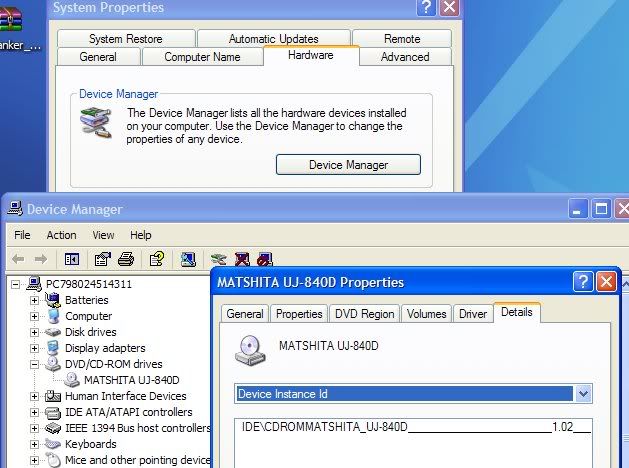
Dang the reformat would had given you a 'clean' system - not cause problems :) So if you feel compfortable I would check the connections - power and ide cable and make sure they are secure. The last error you received no seek complete can sometimes mean this also.
Now if you have an iso or a video_ts folder for the movies try CloneDVD. Free 21 day trial and I think it uses it's own aspi not xp's spti.
http://slysoft.com
Another recommend but nothing to do w/ burning & just my 2 cents :) use Firefox instead of IE as your browser - My virus/spyware problems are non existant except when my kid downloads a suspect file on her pc from some p2p:)
http://mozilla.org
Keep us posted!
editted to add: the connections to check would be for the dvd drive - ide cable (ribbon) check from the back of the drive to the motherboard
power cord check connection on the back of the dvd drive - should be on it's own power connector
This message has been edited since posting. Last time this message was edited on 17. May 2006 @ 16:44
|
|
roropick
Newbie
|
17. May 2006 @ 17:25 |
Link to this message
|
|
Binkie, I went into the device manager and this is what it says...
Device Instance Id..... then at the bottom of that it says.....
IDE\CDROMHL-DT-ST_DVDRAM_GSA-4163B__________A106_____\304B35364D333032333620312020202020202020....NOW IF THAT MEANS ANYTHING TO YOU LOL. I also checked the plugs and everything is in tight(I put it in myself lol believe that lol) and I can burn an audio dvd/cd so now i know it's not the burner. I'm gonna try and burn another dvd tonight so I'll let you know what the outcome is. Again thank you very much.
|
|
Advertisement
|
|
|
Moderator
|
17. May 2006 @ 17:42 |
Link to this message
|
|
Yep you got the latest firmware!!
Hey one more thing to check when the drive was put in do you have jumper on the CD-RW drive to master and the jumper on the dvd writer to slave?
You may even want to swap them - set the dvd writer to master on jumper and ide cable (ribbon) & the cd writer slave on the ide & jumper.
Are you also using a 80 wire cable (blue, grey and black connectors)
|
|





