|
Standard and Expert modes
|
|
|
djtroy34
Newbie

|
13. May 2006 @ 04:00 |
 Link to this message

|
|
Does anybody else have a problem with Nero 7 version 7.01.3 when you switch between Standard mode and Expert mode? My nero will stop responding for about 20 - 30 seconds and then after that it will respond again.
|
|
Advertisement

|
|
|
|
|
Saltgrass
Senior Member
|
13. May 2006 @ 11:13 |
Link to this message

|
|
Could you elaborate, please, on which utility you are using and where the control for that is?
Nero 7 v7.10.1.0
P4 2.4GHz 1 Gig RAM
NEC ND3550A DVD Burner
|
|
djtroy34
Newbie
|
13. May 2006 @ 23:32 |
Link to this message

|
|
Elaborate on what? There is no utility...It's an option to toggle between Standard and Expert modes when you first open Nero. Bottom right hand corner...button has picture of 2 faces.
This message has been edited since posting. Last time this message was edited on 13. May 2006 @ 23:32
|
AfterDawn Addict
|
13. May 2006 @ 23:51 |
Link to this message
|
Quote:
Elaborate on what?
There is Nero Burning Rom, NeroVision, Nero Express, Nero Recode and Nero Backitup, so which one are you referring to. This is what Saltgrass wanted to know, we do not read minds.
|
|
venkman27
Newbie
|
14. May 2006 @ 23:48 |
Link to this message
|
1) No, I haven't experienced this behavior of Nero so far.
2) If that 20 second brake is the only problem you're experiencing using Nero ("after that it will respond again"), you're lucky.
Kneel down and praise the LORD!
AthlonXP 2200+ / ASUS A7V / 896 MB RAM / LG GSA-4163B / Nero 7 v7.2.0.3b
AthonTB 1.3 / Abit KT7A / 512 MB RAM / LG GSA-4040B / Nero 7 v7.0.1.2
|
|
djtroy34
Newbie
|
15. May 2006 @ 10:18 |
Link to this message
|
I know you not mind readers, didn't say you were Gwen. Please don't assume. Like I said, when you first open Nero (smart start) you can chose what you want to open, but on that same page( bottom right) you can choose too change the colors, configure, switch between standard and expert mode or see the Nero product center. Not sure how much more I can be clear as to what I'm asking.
|
AfterDawn Addict
|
15. May 2006 @ 13:35 |
Link to this message
|
|
Well to start with you didnt mention StartSmart, which you now have. I have never used thiss function so I cannot assist you with this one. I doubt that many here have used that function except probably alkohol.
I am also unfamilar with the Version of Nero you say you have.
This message has been edited since posting. Last time this message was edited on 15. May 2006 @ 13:36
|
Moderator
|
15. May 2006 @ 17:18 |
Link to this message
|
The difference between expert and standard is what tasks will be displayed when using Nero's icon's in smart start.
All tasks will be listed in 'expert' mode while only the 'frequent' ones will be listed (nero determined) under the the icons.
Here's a pic from 6 - 7 should be somewhat similar (tasks listed are probably somewhat different):
Standard Mode:

Expert Mode:
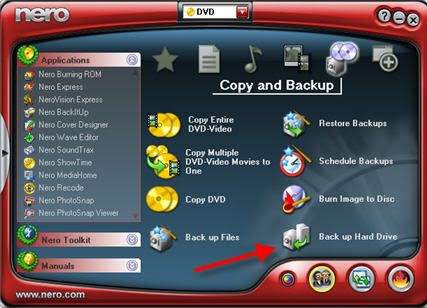
For the lag it's maybe 10 secs w/ this version (6.6.0.18)- to add or remove the task.
editted to add: actually no real lag - just counted :) 2 secs to change modes.
Do you have alot of apps/processes running? May slow it down.
This message has been edited since posting. Last time this message was edited on 15. May 2006 @ 17:32
|
|
djtroy34
Newbie
|
16. May 2006 @ 07:19 |
Link to this message
|
Gwen, I thought that you had to start Nero at the smart start...guess not from what I understand you're saying. Mine always did and still does. Binkie...exactly what I meant. The only thing running in the background is McAfee Virus Scan. I guess I wont be changing from standard to expert mode that often so I guess it's another quirk from Nero I'll have to get used to.
|
Senior Member
|
16. May 2006 @ 08:13 |
Link to this message
|
hi :)
it does'nt matter how you load Nero they all take you to the main window
i also load from the "Start Smart" icon. if not multi tasking it's pretty quick (i've got 42 processes running)
if i'm on line it takes quite a while, sometimes not at all (teach me to multi) lol
as the lovely "qwendolin" has said there is no need to use the expert mode unless you wish to back up your HardDrive etc.
and as the delightfull "binkie7" has shown the expert mode has a few more modes to play with (which most wouldn't use anyway) that's all
 gif by ireland
we cant help if you wont help yourself |
|
Advertisement
|
|
|
Moderator
|
16. May 2006 @ 09:14 |
Link to this message
|
|
Nero just has a few ways to get to the same app or task. There's also a favorites where they can be added.
You can either use the icons as shortcuts for tasks or just pick the app under applications and choice the task from there.
Just comes down to a users preference.
|




