|
|
|
Nero Burning Error
|
|
|
Nik5330
Newbie

|
25. May 2006 @ 07:20 |
 Link to this message

|
Hi
I have this error on my nec DVDRW, ijust wanna say that i can burn CDs on it with no problem but i can't burn any DVDs on it. It gives me this error:
Quote:
Windows XP 5.1
IA32
WinAspi: -
ahead WinASPI: File 'C:\Program Files\Nero\Nero 7\Core\Wnaspi32.dll': Ver=2.0.1.74, size=164112 bytes, created 02/11/2004 12:54:32
NT-SPTI used
Nero Version: 7.0.8.2
Internal Version: 7, 0, 8, 2
Recorder: <_NEC DVD_RW ND-3550A> Version: 1.05 - HA 1 TA 0 - 7.0.8.2
Adapter driver: <IDE> HA 1
Drive buffer : 2048kB
Bus Type : default (0) -> ATAPI, detected: ?
CD-ROM: <JLMS XJ-HD166S >Version: DQS5 - HA 1 TA 1 - 7.0.8.2
Adapter driver: <IDE> HA 1
=== Scsi-Device-Map ===
DiskPeripheral : WDC WD400BB-60DGA0 atapi Port 0 ID 0 DMA: On
CdRomPeripheral : _NEC DVD_RW ND-3550A atapi Port 3 ID 0 DMA: On
CdRomPeripheral : JLMS XJ-HD166S atapi Port 3 ID 1 DMA: On
=== CDRom-Device-Map ===
_NEC DVD_RW ND-3550A D: CDRom0
JLMS XJ-HD166S E: CDRom1
=======================
AutoRun : 1
Excluded drive IDs:
WriteBufferSize: 39845888 (0) Byte
BUFE : 0
Physical memory : 247MB (253420kB)
Free physical memory: 52MB (54220kB)
Memory in use : 78 %
Uncached PFiles: 0x0
Use Inquiry : 1
Global Bus Type: default (0)
Check supported media : Disabled (0)
13.4.2006
ISO compilation
11:56:06 #1 Text 0 File Isodoc.cpp, Line 6423
Iso document burn settings
------------------------------------------
Determine maximum speed : FALSE
Simulate : FALSE
Write : TRUE
Finalize CD : FALSE
Multisession : TRUE
Multisession type: : Start multisession
Burning mode : DAO
Mode : 1
ISO Level : 1 (Max. of 11 = 8 + 3 char)
Character set : ISO 9660
Joliet : TRUE
Allow pathdepth more than 8 directories : TRUE
Allow more than 255 characters in path : TRUE
Write ISO9660 ;1 file extensions : TRUE
11:56:06 #2 Text 0 File ThreadedTransfer.cpp, Line 531
ReadBuffer-Pipe got 38912KB of Memory
11:56:06 #3 Text 0 File Reader.cpp, Line 124
Reader running
11:56:06 #4 Text 0 File Writer.cpp, Line 113
Writer D: _NEC DVD_RW ND-3550A running
11:56:06 #5 ISO9660GEN -11 File Geniso.cpp, Line 3312
First writeable address = 0 (0x00000000)
11:56:07 #6 Text 0 File Burncd.cpp, Line 3353
Turn on Disc-At-Once, using DVD media
11:56:07 #7 Text 0 File DlgWaitCD.cpp, Line 289
Last possible write address on media: 2298495 (510:46.45, 4489MB)
Last address to be written: 2264703 (503:16.03, 4423MB)
11:56:07 #8 Text 0 File DlgWaitCD.cpp, Line 301
Write in overburning mode: NO (enabled: CD)
11:56:07 #9 Text 0 File DlgWaitCD.cpp, Line 2715
Recorder: _NEC DVD_RW ND-3550A, Media type: DVD-R
Disc Manufacturer: TYG02 -
Disc Application Code: 64, Disc Physical Code: 193
11:56:07 #10 Text 0 File DlgWaitCD.cpp, Line 473
>>> Protocol of DlgWaitCD activities: <<<
=========================================
11:56:07 #11 Text 0 File ThreadedTransferInterface.cpp, Line 847
Setup items (after recorder preparation)
0: TRM_DATA_MODE1 ()
2 indices, index0 (150) not provided
original disc pos #0 + 2264704 (2264704) = #2264704/503:16.4
relocatable, disc pos for caching/writing not required/ required, no patch infos
-> TRM_DATA_MODE1, 2048, config 0, wanted index0 0 blocks, length 2264704 blocks [D: _NEC DVD_RW ND-3550A]
--------------------------------------------------------------
11:56:07 #12 Text 0 File ThreadedTransferInterface.cpp, Line 1059
Prepare recorder [D: _NEC DVD_RW ND-3550A] for write in CUE-sheet-DAO
DAO infos:
==========
MCN: ""
TOCType: 0x00; Session Closed, disc not fixated
Tracks 1 to 1:
1: TRM_DATA_MODE1, 2048/0x00, FilePos 0 0 4638113792, ISRC ""
DAO layout:
===========
__Start_|____Track_|_Idx_|_CtrlAdr_|_RecDep__________
0 | lead-in | 0 | 0x41 | 0x00
0 | 1 | 0 | 0x41 | 0x00
0 | 1 | 1 | 0x41 | 0x00
2264704 | lead-out | 1 | 0x41 | 0x00
11:56:07 #13 Text 0 File SCSIPassThrough.cpp, Line 39
SPTILockVolume - completed successfully for FCTL_LOCK_VOLUME
11:56:07 #14 Text 0 File SCSIPassThrough.cpp, Line 84
SPTIDismountVolume - completed successfully for FSCTL_DISMOUNT_VOLUME
11:56:07 #15 Phase 24 File dlgbrnst.cpp, Line 1730
Caching of files started
11:56:07 #16 Text 0 File Burncd.cpp, Line 4187
Cache writing successful.
11:56:07 #17 Phase 25 File dlgbrnst.cpp, Line 1730
Caching of files completed
11:56:07 #18 Phase 36 File dlgbrnst.cpp, Line 1730
Burn process started at 8x (11,080 KB/s)
11:56:07 #19 Text 0 File ThreadedTransferInterface.cpp, Line 2707
Verifying disc position of item 0 (relocatable, disc pos, no patch infos, orig at #0): write at #0
11:56:07 #20 Text 0 File DVDR.cpp, Line 2760
Recording mode: Sequential Recording Mode for Multisession
11:56:07 #21 Text 0 File DVDR.cpp, Line 2916
Start write address at LBA 0
DVD high compatibility mode: Yes
11:56:07 #22 Text 0 File Cdrdrv.cpp, Line 8661
---- DVD Structure: Physical Format Information (00h) ----
Media Type: 0, Layer: 0, Address: 0 (0 h), AGID: 0; Length: 2050
Book Type: DVD-R (2), Part Version: 2.0x (5), Extended Part Version: 0.0 (0)
Disc Size: 120 mm, Maximum Rate: <not specified> (F h)
Number of Layers: 1, Track Path: Parallel Track Path (PTP), Layer Type: recordable
Linear Density: 0,267 um/bit, Track Density: 0,74 um/track
Starting Physical Sector Number of Data Area: 30000 h (DVD-ROM, DVD-R/-RW, DVD+R/+RW)
End Physical Sector Number of Data Area: 26127F h
End Sector Number in Layer 0: 0 h (LBN: FFFD0000 h, 4193920 MB)
Data in Burst Cutting Area (BCA) does not exist
Start sector number of the current Border-Out: 2FE10 h
Start sector number of the next Border-In: 2FFA0 h
Media Specific [16..63]:
00 00 00 00 00 00 00 00 - 00 00 00 00 00 00 00 00 ................
00 02 FE 10 00 02 FF A0 - 00 00 00 00 00 00 00 00 ................
00 00 00 00 00 00 00 00 - 00 00 00 00 00 00 00 00 ................
11:56:35 #23 SPTI -1106 File SCSIPassThrough.cpp, Line 290
D: CdRom0: SCSIStatus(x02) WinError(0) NeroError(-1106)
Sense Key: 0x03 (KEY_MEDIUM_ERROR)
Sense Code: 0x73
Sense Qual: 0x03
CDB Data: 0x2A 00 00 00 00 00 00 00 20 00 00 00
Sense Area: 0x70 00 03 00 00 00 00 0A 00 00 00 00 73 03
Buffer x06f90000: Len x10000
0x00 00 00 00 00 00 00 00 00 00 00 00 00 00 00 00
0x00 00 00 00 00 00 00 00 00 00 00 00 00 00 00 00
0x00 00 00 00 00 00 00 00 00 00 00 00 00 00 00 00
11:56:35 #24 CDR -1106 File Writer.cpp, Line 302
Power calibration error
D: _NEC DVD_RW ND-3550A
11:56:35 #25 Text 0 File ThreadedTransfer.cpp, Line 228
all writers idle, stopping conversion
11:56:35 #26 Text 0 File ThreadedTransfer.cpp, Line 222
conversion idle, stopping reader
11:56:35 #27 Text 0 File DVDR.cpp, Line 3156
EndDAO: Last written address was -1
11:56:36 #28 Phase 133 File dlgbrnst.cpp, Line 1730
Writing short lead-out
11:56:36 #29 SPTI -1023 File SCSIPassThrough.cpp, Line 290
D: CdRom0: SCSIStatus(x02) WinError(0) NeroError(-1023)
Sense Key: 0x05 (KEY_ILLEGAL_REQUEST)
Sense Code: 0x2C
Sense Qual: 0x00
CDB Data: 0x5B 01 02 00 00 03 00 00 00 00 00 00
Sense Area: 0x70 00 05 00 00 00 00 0A 00 00 00 00 2C
11:56:36 #30 CDR -1023 File WriterStatus.cpp, Line 167
Command sequence error
D: _NEC DVD_RW ND-3550A
11:56:36 #31 TRANSFER -24 File WriterStatus.cpp, Line 167
Could not perform end of Disc-at-once
11:56:36 #32 Phase 38 File dlgbrnst.cpp, Line 1730
Burn process failed at 8x (11,080 KB/s)
Existing drivers:
File 'Drivers\ADPU160M.SYS': Ver=v3.60a (Lab01_N(johnstra).010529-2218), size=101888 bytes, created 17/08/2001 18:07:32
File 'Drivers\PXHELP20.SYS': Ver=2.02.62a, size=20016 bytes, created 28/10/2003 12:02:00 (Prassi/Veritas driver for win 2K)
Registry Keys:
HKLM\Software\Microsoft\Windows NT\CurrentVersion\WinLogon\AllocateCDROMs : 0 (Security Option)
Please help me
thanks in advance
|
|
Advertisement

|
|
|
|
AfterDawn Addict
|
25. May 2006 @ 07:39 |
Link to this message

|
Try updating your fw on your burner to current 1.06. Download the file and flash your drive, you are getting a power callibration error which could be due to the old fw.
http://support.necsam.com/Optical/downloads/FlashFirmware/
Quote:
Power Calibration error solutionsTry another brand of DVD-/+R or DVD-/+RW media. This is the most common cause of OPC errors.
Update the firmware of your recorder. Check the manufacturer's website for the latest version.
Check your power connectors, loose connections do occur. Don't share power with other devices.
It needs its own power connector. If the error occurs with an external recorder, Check the USB cable
and connections.
Try different configurations, such as taking the DVD-ROM to the primary IDE bus as slave and have only the recorder connected to the secondary IDE bus as master.
Clean or have your DVD burner serviced. There are cleaning kits available. Sometimes just a gentle appplication of canned air can remove dust blocking the laser.
Replace the DVD burner.
http://www.dvdplusvideo.com/dvdguide001.html
Your media is good so try the fw flash and see if it cures the problem
|
|
Saltgrass
Senior Member
|
25. May 2006 @ 07:50 |
Link to this message
|
|
I updated my firmware on that drive but I used a modified one to make sure I still had bit setting capability. If you use the one from NEC, you won't.
Where do you have the drive physically connected, and what other devices do you show on the normal IDE Secondary channel.
Nero 7 v7.10.1.0
P4 2.4GHz 1 Gig RAM
NEC ND3550A DVD Burner
|
Senior Member
|
25. May 2006 @ 07:56 |
Link to this message
|
Hi,
Quote:
Recorder: <_NEC DVD_RW ND-3550A> Version: 1.05 - HA 1 TA 0 - 7.0.8.2
Your firmware needs to be updated.
http://forum.rpc1.org/dl_result.php?kaj=1&isces use that link, find your burner almost at theend of the page and update to v1.06.
Quote:
Physical memory : 247MB (253420kB)
Free physical memory: 52MB (54220kB)
Memory in use : 78 %
I suggest you upgrade your memory to 512mb which is the minimum recommended for burning dvds. With only 256mb of ram you will virtually shut everything else off while burning.
Quote:
11:56:07 #7 Text 0 File DlgWaitCD.cpp, Line 289
Last possible write address on media: 2298495 (510:46.45, 4489MB)
Last address to be written: 2264703 (503:16.03, 4423MB)
You are burning close to the edge of the disk, try running through nero recode2, setting target output to 4300mb and then burn to dvd.
Alternate option is to use dvd shrink and same target output of 4300mb.
Quote:
11:56:35 #24 CDR -1106 File Writer.cpp, Line 302
Power calibration error
D: _NEC DVD_RW ND-3550A
11:56:35 #25 Text 0 File ThreadedTransfer.cpp, Line 228
all writers idle, stopping conversion
11:56:35 #26 Text 0 File ThreadedTransfer.cpp, Line 222
conversion idle, stopping reader
2 things: first the power calibration might be resolved once you update your firmware. The media you're using seems to be coded as genuine taiyo yuden so that is good. 2nd, with only 256mb of ram the conversion and reader are swapping due to low resources (i.e. memory consumption). With the flow of information moving at a steady pace and lack of minimum recommended memory the whole process will idle causing the conversion process and burner to stop due to overflow. This is not a buffer issue just due to low amount of memory.
Quote:
Burn process started at 8x (11,080 KB/s)
Suggest slowing down to 4x due to small memory.
oops arniebear beat me to it.
This message has been edited since posting. Last time this message was edited on 25. May 2006 @ 07:57
|
|
Nik5330
Newbie
|
25. May 2006 @ 12:06 |
Link to this message
|
Quote:
I updated my firmware on that drive but I used a modified one to make sure I still had bit setting capability. If you use the one from NEC, you won't.
Where do you have the drive physically connected, and what other devices do you show on the normal IDE Secondary channel.
saltgrass: isn't it risky to install unofficial firmware, and what control are u talking about.
I read this on NEC Website:
Quote:
If the firmware upgrade is not performed correctly or if the power supply is interrupted during the upgrade, the drive may be rendered unusable. If you wish to upgrade the firmware, you do so at your sole and exclusive risk. NEC takes no responsibility for any errors or problems with any firmware upgrade. This software is provided "as is" with no warranty whatsoever. NEC will not supply any technical service or support regarding this firmware or any upgrade.
Seems to me that firmware update could harm the Burner if done incorrectly.
Quote:
The above NEC firmware upgrades should not be used with external USB / FireWire drives or with OEM drives from HP, DELL, Medion, Fujitsu, Siemens, Gateway, or any other OEM manufacturer. If you wish to update the firmware on an OEM drive, please contact the dealer or manufacturer.
ALso as i understand this might not solve the problem.
so i'm a bit confused could you explain in few words for me (i'm a bit of a n00b).
This message has been edited since posting. Last time this message was edited on 25. May 2006 @ 12:07
|
AfterDawn Addict
|
25. May 2006 @ 12:27 |
Link to this message
|
|
NEC drives do not have bitsetting/booktyping capability except for +R DL media, which I believe the 3540 has. Booktyping/Bitsetting is used when you want to use +R media, but have be able to be compatible with older players which may not recognize that format. Booktyping/Bitsetting will fool a player into thinking it is a -R disk and it will play. There are modified fw available that will give this drive that capability but not from the mfr. I have an older NEC a 1300a which I have flashed three times with NEC fw from there site with no problems. Updating your fw allows the player to recognize newer media and write speeds. Flashing is always a risk, but for the most part if you do not do it the drive eventually will not burn various media. No it may not solve your problem, but then it might. It is up to you. If you have an OEM drive from Dell, or HP computer then you have to check their site for newest fw, otherwise you can use the NEC, or modified/hacked if that is what you want.
|
|
Saltgrass
Senior Member
|
25. May 2006 @ 12:31 |
Link to this message

|
The firmware controls how the drive reacts with other type programs. If it is out of date, there may have been some changes that it doesn't recognize. It is like you plug a new device into your computer, but because you haven't updated the BIOS firmware, the computer doesn't know what to do with it. I don't think it will solve the problem either, but it might help a little. You can wait to try other things first before you try to reflash the firmware, but it really isn't a problem for most folks. I think I have reflashed mine about 6 times for different reasons. ;-)
You did not answer my question about where you have the drive physically connected. I don't know what Port 3 is, but normally the Secondary IDE is Port 1 position 0 and you show Port 3 Position 0.
You are getting a power calibration error. Look at this to see if it might make any sense.
http://ww2.nero.com/nero7/enu/faq_search.php?search=power%20calib...
Nero 7 v7.10.1.0
P4 2.4GHz 1 Gig RAM
NEC ND3550A DVD Burner
This message has been edited since posting. Last time this message was edited on 25. May 2006 @ 12:32
|
|
Nik5330
Newbie
|
26. May 2006 @ 02:17 |
Link to this message
|
Quote:
f you have an OEM drive from Dell, or HP computer then you have to check their site for newest fw, otherwise you can use the NEC, or modified/hacked if that is what you want.
Interesting i DO have and HP computer... so i'll check there site, i'm not sure if this will help with my problem though.
Quote:
You did not answer my question about where you have the drive physically connected. I don't know what Port 3 is, but normally the Secondary IDE is Port 1 position 0 and you show Port 3 Position 0.
Sorry i'm a n00b in this so i don't know what this means.
|
|
Saltgrass
Senior Member
|
26. May 2006 @ 03:32 |
Link to this message
|
|
Do you have the drive set as master on the secondary IDE channel?
If you are not aware of the internal workings of the computer, don't worry about it, the manufacturer set it up the way they wanted, so it should not be a problem.
Nero 7 v7.10.1.0
P4 2.4GHz 1 Gig RAM
NEC ND3550A DVD Burner
|
|
Nik5330
Newbie
|
27. May 2006 @ 00:01 |
Link to this message
|
|
I have it as master
|
|
guyrus
Suspended due to non-functional email address
|
27. May 2006 @ 02:05 |
Link to this message
|
am interested in seeing how many processors you have running to get a 52mb drop when attempting the burn.
can you post an image of: ctrl+alt+del for all of us to see
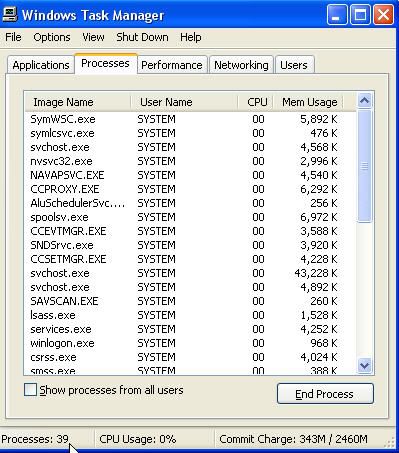
|
|
Nik5330
Newbie
|
27. May 2006 @ 06:24 |
Link to this message
|
|
I have a 256MB memory thats why maybe there too little free memory. I know they recommend 512 but this is my computer...
BTW i managed to burn b4 with no problems
|
|
AUGBOY
Junior Member
|
27. May 2006 @ 06:47 |
Link to this message
|
i keep getting illegal disk error and my firmware is updated. I use the same disk I have been using and when i try to burn video files with Nero 6.6.1.4 it says illegal disk error.
Windows XP 5.1
IA32
WinAspi: File 'Wnaspi32.dll': Ver=4.71 (0002), size=45056 bytes, created 11/21/2005 1:48:21 AM
ahead WinASPI: File 'C:\Program Files\Ahead\Nero\Wnaspi32.dll': Ver=2.0.1.74, size=164112 bytes, created 11/2/2004 12:54:32 PM
NT-SPTI used
Nero Version: 6.6.1.4
Internal Version: 6, 6, 1, 4d
(Nero Express)
Recorder: <LITE-ON DVDRW SOHW-1673S>Version: JS0D - HA 1 TA 0 - 6.6.1.4
Adapter driver: <IDE> HA 1
Drive buffer : 2048kB
Bus Type : default (0) -> ATAPI, detected: ?
CD-ROM: <HL-DT-ST CD-RW GCE-8481B >Version: 1.01 - HA 1 TA 1 - 6.6.1.4
Adapter driver: <IDE> HA 1
=== Scsi-Device-Map ===
DiskPeripheral : WDC WD800AB-00CBA1 atapi Port 0 ID 0 DMA: On
CdRomPeripheral : LITE-ON DVDRW SOHW-1673S atapi Port 1 ID 0 DMA: On
CdRomPeripheral : HL-DT-ST CD-RW GCE-8481B atapi Port 1 ID 1 DMA: On
=== CDRom-Device-Map ===
LITE-ON DVDRW SOHW-1673S D: CDRom0
HL-DT-ST CD-RW GCE-8481B E: CDRom1
=======================
AutoRun : 1
Excluded drive IDs:
WriteBufferSize: 83886080 (0) Byte
ShowDrvBufStat : 0
BUFE : 0
Physical memory : 991MB (1015284kB)
Free physical memory: 426MB (436668kB)
Memory in use : 56 %
Uncached PFiles: 0x0
Use Inquiry : 1
Global Bus Type: default (0)
Check supported media : Disabled (0)
26.5.2006
UDF/ISO compilation
1:34:37 AM #1 Phase 112 File dlgbrnst.cpp, Line 1685
DVD-Video files reallocation started
1:34:37 AM #2 Phase 114 File dlgbrnst.cpp, Line 1685
DVD-Video files reallocation completed (no file modified)
1:34:37 AM #3 Text 0 File Isodoc.cpp, Line 6475
UDF document burn settings
------------------------------------------
Determine maximum speed : FALSE
Simulate : FALSE
Write : TRUE
Finalize CD : TRUE
Multisession : FALSE
Burning mode : DAO
Mode : 1
UDF Mode : UDF/ISO bridge
UDF Options : automatic
UDF Revision : 1.02
UDF Partition Type : physical
ISO Level : 1 (Max. of 11 = 8 + 3 char)
Character set : ISO 9660
Joliet : FALSE
Allow pathdepth more than 8 directories : FALSE
Allow more than 255 characters in path : FALSE
Write ISO9660 ;1 file extensions : TRUE
1:34:37 AM #4 Phase 111 File dlgbrnst.cpp, Line 1685
DVD-Video files sorted
1:34:37 AM #5 Text 0 File ThreadedTransfer.cpp, Line 531
ReadBuffer-Pipe got 81920KB of Memory
1:34:37 AM #6 Text 0 File Reader.cpp, Line 124
Reader running
1:34:37 AM #7 Text 0 File Writer.cpp, Line 122
Writer LITE-ON DVDRW SOHW-1673S running
1:34:37 AM #8 ISO9660GEN -11 File geniso.cpp, Line 3312
First writeable address = 0 (0x00000000)
1:34:38 AM #9 ISO9660GEN -11 File geniso.cpp, Line 3312
First writeable address = 0 (0x00000000)
1:34:38 AM #10 Text 0 File Burncd.cpp, Line 3305
Turn on Disc-At-Once, using DVD media
1:34:38 AM #11 Text 0 File DlgWaitCD.cpp, Line 281
Last possible write address on media: 2298495 (510:46.45, 4489MB)
Last address to be written: 2286127 (508:01.52, 4465MB)
1:34:38 AM #12 Text 0 File DlgWaitCD.cpp, Line 293
Write in overburning mode: NO (enabled: CD DVD)
1:34:38 AM #13 Text 0 File DlgWaitCD.cpp, Line 2612
Recorder: LITE-ON DVDRW SOHW-1673S, Media type: DVD-R
Disc Manufacturer: RITEKF - 1
Disc Application Code: 64, Disc Physical Code: 193
1:34:38 AM #14 Text 0 File DlgWaitCD.cpp, Line 459
>>> Protocol of DlgWaitCD activities: <<<
=========================================
1:34:38 AM #15 Text 0 File ThreadedTransferInterface.cpp, Line 847
Setup items (after recorder preparation)
0: TRM_DATA_MODE1 ()
2 indices, index0 (150) not provided
original disc pos #0 + 2286128 (2286128) = #2286128/508:1.53
relocatable, disc pos for caching/writing not required/ required, no patch infos
-> TRM_DATA_MODE1, 2048, config 0, wanted index0 0 blocks, length 2286128 blocks [LITE-ON DVDRW SOHW-1673S]
--------------------------------------------------------------
1:34:38 AM #16 Text 0 File ThreadedTransferInterface.cpp, Line 1059
Prepare recorder [LITE-ON DVDRW SOHW-1673S] for write in CUE-sheet-DAO
DAO infos:
==========
MCN: ""
TOCType: 0x00; Session Closed, disc fixated
Tracks 1 to 1:
1: TRM_DATA_MODE1, 2048/0x00, FilePos 0 0 4681990144, ISRC ""
DAO layout:
===========
__Start_|____Track_|_Idx_|_CtrlAdr_|_RecDep__________
0 | lead-in | 0 | 0x41 | 0x00
0 | 1 | 0 | 0x41 | 0x00
0 | 1 | 1 | 0x41 | 0x00
2286128 | lead-out | 1 | 0x41 | 0x00
1:34:38 AM #17 Text 0 File SCSIPassThrough.cpp, Line 38
SPTILockVolume - completed successfully for FCTL_LOCK_VOLUME
1:34:38 AM #18 Text 0 File SCSIPassThrough.cpp, Line 83
SPTIDismountVolume - completed successfully for FSCTL_DISMOUNT_VOLUME
1:34:38 AM #19 Phase 24 File dlgbrnst.cpp, Line 1685
Caching of files started
1:34:38 AM #20 Text 0 File Burncd.cpp, Line 4145
Cache writing successful.
1:34:38 AM #21 Phase 25 File dlgbrnst.cpp, Line 1685
Caching of files completed
1:34:38 AM #22 Phase 36 File dlgbrnst.cpp, Line 1685
Burn process started at 6x (8,310 KB/s)
1:34:38 AM #23 Text 0 File ThreadedTransferInterface.cpp, Line 2685
Verifying disc position of item 0 (relocatable, disc pos, no patch infos, orig at #0): write at #0
1:34:38 AM #24 Text 0 File DVDR.cpp, Line 2707
Recording mode: Sequential Recording Mode
1:34:38 AM #25 Text 0 File DVDR.cpp, Line 2863
Start write address at LBA 0
DVD high compatibility mode: Yes
1:34:38 AM #26 Text 0 File Cdrdrv.cpp, Line 8647
---- DVD Structure: Physical Format Information (00h) ----
Media Type: 0, Layer: 0, Address: 0 (0 h), AGID: 0; Length: 2050
Book Type: DVD-R (2), Part Version: 2.0x (5), Extended Part Version: 2.1 (33)
Disc Size: 120 mm, Maximum Rate: <not specified> (F h)
Number of Layers: 1, Track Path: Parallel Track Path (PTP), Layer Type: recordable
Linear Density: 0,267 um/bit, Track Density: 0,74 um/track
Starting Physical Sector Number of Data Area: 30000 h (DVD-ROM, DVD-R/-RW, DVD+R/+RW)
End Physical Sector Number of Data Area: 26127F h
End Sector Number in Layer 0: 0 h (LBN: FFFD0000 h, 4193920 MB)
Data in Burst Cutting Area (BCA) does not exist
Start sector number of the current Border-Out: 0 h
Start sector number of the next Border-In: 0 h
Media Specific [16..63]:
00 60 00 10 20 30 40 50 - 00 00 00 21 00 00 00 00 .`...0@P...!....
00 00 00 00 00 00 00 00 - 00 00 00 00 00 00 00 00 ................
00 00 00 00 00 00 00 00 - 00 00 00 00 00 00 00 00 ................
1:35:41 AM #27 Text 0 File Cdrdrv.cpp, Line 1200
01:35:41.437 - D: LITE-ON DVDRW SOHW-1673S : Queue again later
1:38:29 AM #28 SPTI -1046 File SCSIPassThrough.cpp, Line 289
D: CdRom0: SCSIStatus(x02) WinError(0) NeroError(-1046)
Sense Key: 0x02 (KEY_NOT_READY)
Sense Code: 0x30
Sense Qual: 0x05
CDB Data: 0x2A 00 00 00 0C 60 00 00 20 00 00 00
Sense Area: 0x70 00 02 00 00 00 00 0A 00 00 00 00 30 05
Buffer x03700000: Len x10000
0x00 00 01 BA 44 01 4C 20 04 01 01 89 C3 F8 00 00
0x01 E0 07 EC 81 00 00 CC 2C 05 8D F0 A0 07 50 10
0x80 23 80 47 00 52 5B 7D 6F 30 F6 F8 A7 F8 10 C0
1:38:29 AM #29 CDR -1046 File Writer.cpp, Line 311
Illegal disc
D: LITE-ON DVDRW SOHW-1673S
1:38:29 AM #30 Text 0 File ThreadedTransfer.cpp, Line 228
all writers idle, stopping conversion
1:38:29 AM #31 Text 0 File ThreadedTransfer.cpp, Line 222
conversion idle, stopping reader
1:38:29 AM #32 Text 0 File DVDR.cpp, Line 3103
EndDAO: Last written address was 3167
1:38:29 AM #33 Phase 38 File dlgbrnst.cpp, Line 1685
Burn process failed at 6x (8,310 KB/s)
Existing drivers:
File 'Drivers\ASPI32.SYS': Ver=4.71 (0002) built by: WinDDK, size=16512 bytes, created 11/21/2005 1:48:21 AM
File 'WNASPINT.DLL': Ver=V1.18, size=57344 bytes, created 8/25/2005 1:00:00 AM
File 'Drivers\PXHELP20.SYS': Ver=2.03.28a, size=20640 bytes, created 3/11/2005 6:28:13 PM (Prassi/Veritas driver for win 2K)
Registry Keys:
HKLM\Software\Microsoft\Windows NT\CurrentVersion\WinLogon\AllocateCDROMs : 0 (Security Option)
|
Moderator
|
27. May 2006 @ 11:41 |
Link to this message
|
|
|
guyrus
Suspended due to non-functional email address
|
27. May 2006 @ 13:17 |
Link to this message
|
|
@ Nik5330: have you defragged lately?
|
|
Nik5330
Newbie
|
28. May 2006 @ 08:32 |
Link to this message
|
Quote:
@ Nik5330: have you defragged lately?
Yes as a matter of fact i have defragmented just a few days ago hoping this will help but with no use.
|
|
Advertisement
|
|
|
|
guyrus
Suspended due to non-functional email address
|
28. May 2006 @ 11:31 |
Link to this message
|
|
how many proccessors did you have running
|
|





