User User name Password  
   
Thursday 26.2.2026 / 04:17
Search AfterDawn Forums:        In English   Suomeksi   På svenska
afterdawn.com > forums > software specific discussion > nero discussion > pal--ntsc with vobblanker problem
Show topics
 
Forums
Forums
PAL--NTSC with VobBlanker Problem
  Jump to:
 
Posted Message
Member
_
14. June 2006 @ 16:26 _ Link to this message    Send private message to this user   
Hello- I have all my titles in PAL, 4 in all.

I begin the conversion process, and it works fine for the first title. However, all I get for the 2nd title is a 'waiting' status that doesn't change.

What's up?

Kegan
Advertisement
_
__
Member
_
14. June 2006 @ 17:07 _ Link to this message    Send private message to this user   
Should I just ignore it? I did, and my movie itself was processed.

I went into Nero to burn it and got a whole bunch of error messages about 'DVD playability/compliance'.

Please advise; I'm using a DVD+RW so I can always go back and try suggestions.
Member
_
15. June 2006 @ 13:44 _ Link to this message    Send private message to this user   
DVD will naturally not play...please advise. Kegan
Moderator
_
15. June 2006 @ 16:52 _ Link to this message    Send private message to this user   
In vobblanker are you changing all the vts files only?
In Nero sounds like you picked the data disc option.
Which app in Nero are you using and what option?


Forum Rules
Do this before posting
Do not click this link...
Member
_
16. June 2006 @ 22:40 _ Link to this message    Send private message to this user   
All my files in VobBlanker are VTS, and I changed them all to NTSC-Video.

In Nero StartSmart, there is no DVD disc option. I chose 'Data Disc' and 'Burn DVD-Video files'. Thanks, Kegan
Moderator
_
17. June 2006 @ 11:57 _ Link to this message    Send private message to this user   
Hi kzm007
Don't know which app in Nero you are using but use the dvd-video option to make the it dvd compliant and playable on standalones.
In burning rom it's the 3nd option on the left side (dvd-video).
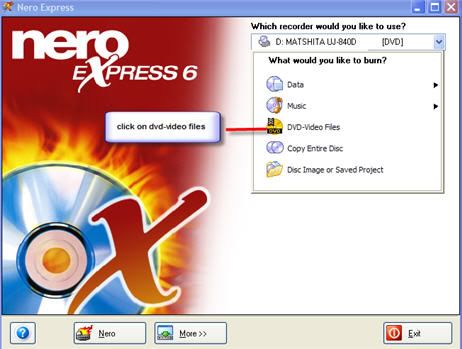
If using express it's the dvd-video files option.
Member
_
17. June 2006 @ 20:04 _ Link to this message    Send private message to this user   
Hello- When I processed with VobBlanker, all went well. However, Nero Express said my DVD-files weren't compliant. Any idea how to fix this? Thanks, Kegan
Moderator
_
18. June 2006 @ 10:25 _ Link to this message    Send private message to this user   
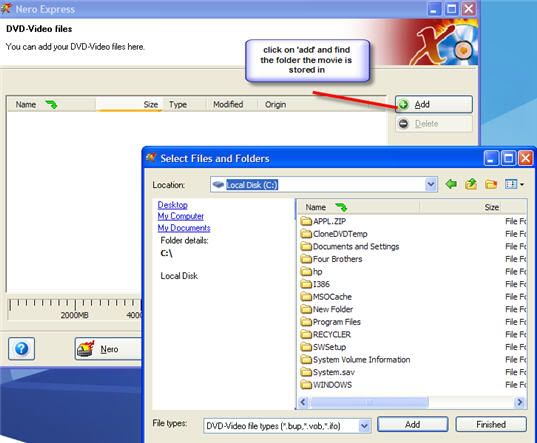
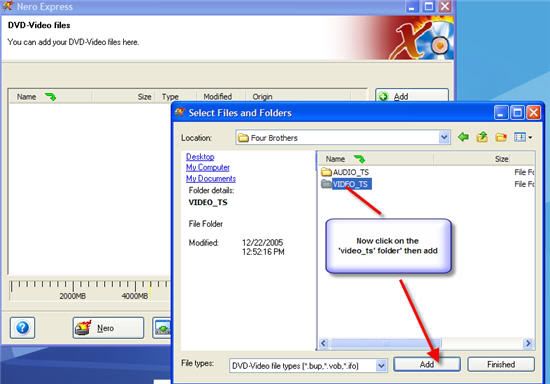
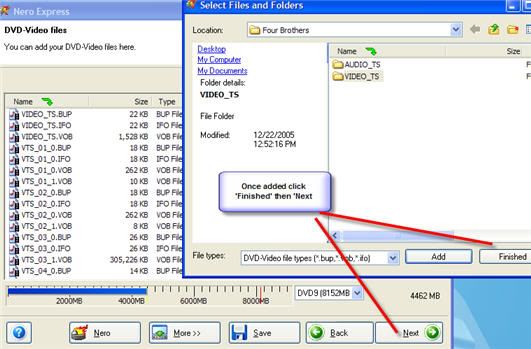
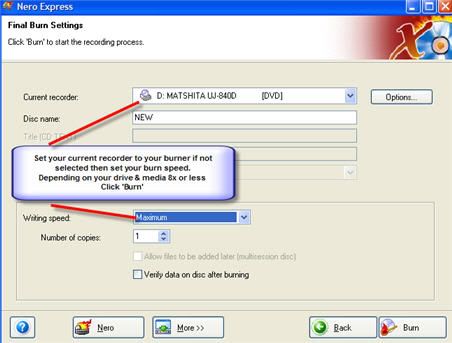
Here's a guide for Nero express that should work for you.
edit to add: This is for Nero 6 but Nero 7 is very similar.


Forum Rules
Do this before posting
Do not click this link...

This message has been edited since posting. Last time this message was edited on 18. June 2006 @ 10:31

Member
_
18. June 2006 @ 22:55 _ Link to this message    Send private message to this user   
I did all that...Nero tells me different things; onve it said that the DVD failed a compliance test and today I got an error about DVD allocation files.

VobBlanker said I had an error with one of my VTS-titles, told me to run a scan, which I did. It didn't seem to change anything

On a seperate note, what Nero program allows me to convert from PAL to NTSC, which is what I want to do? Thanks.
Moderator
_
19. June 2006 @ 07:24 _ Link to this message    Send private message to this user   
Somethings up with one of those files. Usually running the scan takes care of it for me.
You may want to try re-ripping those files.

In Nero use Vision to convert to NTSC. Takes a bit.
You receive a pop up saying something like 'mostly in PAL format do you wish to keep this format'. Click no and it will convert to NTSC.


Forum Rules
Do this before posting
Do not click this link...
Advertisement
_
__
 
_
Member
_
19. June 2006 @ 15:22 _ Link to this message    Send private message to this user   
I'll try it Tuesday. I really wish it wasn't so complicated LOL. But thanks, you've been really great with all the help. Kegan
afterdawn.com > forums > software specific discussion > nero discussion > pal--ntsc with vobblanker problem
 

Digital video: AfterDawn.com | AfterDawn Forums
Music: MP3Lizard.com
Gaming: Blasteroids.com | Blasteroids Forums | Compare game prices
Software: Software downloads
Blogs: User profile pages
RSS feeds: AfterDawn.com News | Software updates | AfterDawn Forums
International: AfterDawn in Finnish | AfterDawn in Swedish | AfterDawn in Norwegian | download.fi
Navigate: Search | Site map
About us: About AfterDawn Ltd | Advertise on our sites | Rules, Restrictions, Legal disclaimer & Privacy policy
Contact us: Send feedback | Contact our media sales team
 
  © 1999-2026 by AfterDawn Ltd.

  IDG TechNetwork