|
dnt know how to burn avi to dvd+r
|
|
AfterDawn Addict

|
3. March 2007 @ 01:41 |
 Link to this message

|
This may help
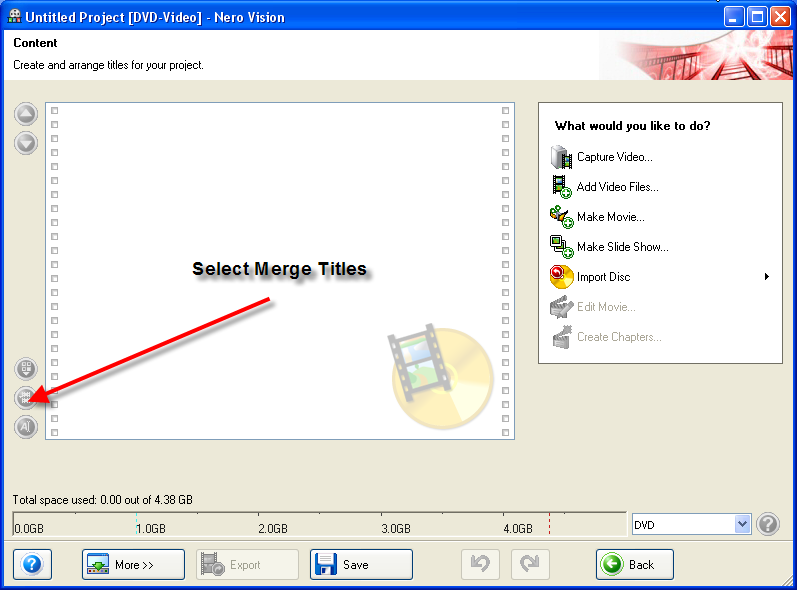
|
|
Advertisement
|
|
|
|
|
gregg9212
Newbie
|
3. March 2007 @ 02:21 |
Link to this message

|
|
Sorry still got a problem. That option is in light grey and I can't access it. What have I done wrong. Gregg
|
|
gregg9212
Newbie
|
3. March 2007 @ 03:43 |
Link to this message

|
I think they are VOB files if that makes any difference. Gregg
|
|
tharius
Junior Member
|
3. March 2007 @ 05:49 |
Link to this message
|
I went through the whole process and pressing all the next buttons trying to burn my AVI file to my DVD device it says I dont have enopugh space for the recording process error can anyone help where do i have to free up space???
|
|
sincykid
Newbie
|
3. March 2007 @ 17:08 |
Link to this message
|
greg i had this prob. when you add your VOB files it says certian VOB files can be linked together yata yata yata and u select yes and it still seperates them...WELL what i learned was u have to highlight and add all the VOB files at once when you add them then it will work.
bam
|
|
sincykid
Newbie

|
3. March 2007 @ 17:17 |
Link to this message
|
|
tharius on the last screen before u actually hit BURN look up in that toolbox in the right click BURN AT ONCE whis way your computer burns files right onto disc and doesnt back them up on your hardrive as well.
bam
|
|
tharius
Junior Member
|
4. March 2007 @ 05:09 |
Link to this message
|
Thankyou for the help now which part of Nero are you using Nero vision or Burning Rom?
|
|
sincykid
Newbie
|
4. March 2007 @ 08:40 |
Link to this message
|
vision...im currently burning napoleon dynamite, school for scoundrels, and the benchwarmers on a maxwell 4.7 16x at 8x. put aeon flux,elektra,and ultrviolet on 1 last night. i use win AVI convert the files first then add the vobs.
bam
|
AfterDawn Addict
|
4. March 2007 @ 11:50 |
Link to this message
|
If your files are in AVI format...then using NeroVision..There is NO NEED to convert to VOB using Win AVI, just let NeroVision convert
|
|
sincykid
Newbie
|
4. March 2007 @ 14:34 |
Link to this message
|
actually...it is helpful to use winavi especially if you A) use burn at once because if it fails during the encoding its a waste of disc and B) once you have the VOB files you can put multiple movies on 1 disc if you try to let Nero do it for you it will fail when creating disc structure. stay off the post if you dont know what your talking about. atleast dont hand out bad advice.
bam
|
AfterDawn Addict
|
4. March 2007 @ 14:45 |
Link to this message
|
Quote:
stay off the post if you dont know what your talking about. atleast dont hand out bad advice.
--------------------------------------------------------------------------------
I will let the mods sort this comment out.
Quote:
tharius on the last screen before u actually hit BURN look up in that toolbox in the right click BURN AT ONCE
And THIS is GOOD advice???
This message has been edited since posting. Last time this message was edited on 4. March 2007 @ 14:48
|
Moderator
|
4. March 2007 @ 17:39 |
Link to this message
|
|
sincykid,
You got a week suspension for your extreme lack of manners. What I find most interesting is that your advice, which you obviously think so highly of, is actually, in my opinion, piss poor. Writing to the hard drive makes alot of sense. Burn At Once can be very taxing on a system and if the person you're giving advice to has a low-end system you're setting them up for failure. It also avoids a wasted disc if the process fails as well as giving a person the ability to test the results in whatever media player they so choose before commiting it to disc.
In any forum I visit I personally pass on any advice given by rude, arrogant people. The folks who think they know everything generally don't know squat.

My killer sig came courtesy of bb "El Jefe" mayo.
The Forum Rules You Agreed To! http://forums.afterdawn.com/thread_view.cfm/2487
"And there we saw the giants, and we were in our own sight as grasshoppers, and so we were in their sight" - Numbers 13:33 |
AfterDawn Addict
|
4. March 2007 @ 18:52 |
Link to this message
|
|
@Nephilim, Thanks for granting the "vacation", he/she already posted that he/she was a "bootlegger" in a previous thread. I cannot fathom why someone would give that type of advice (unless they themselves were clueless), Cheers.
|
|
tharius
Junior Member
|
5. March 2007 @ 06:47 |
Link to this message
|
Ok guys I didnt think my questions were going to open up a hornets nest...lol but love the fact that there is integrity left out there so I have these movies on my computer converted them using ConvertXtoDVD and are in Video_TS file folders, cant run through Shrink cause Im getting errors dont know what next to do try and Decrypt it or just attempt to burn..if so what part of Nero to use I have about 978Mb left on my C: drive which is not much I also have an external harddrive with about 149 Gb on it can this help at all? should I bother trying to decrypt and if so how?
|
Member
|
6. March 2007 @ 07:49 |
Link to this message
|
@Tharius
if you already have the files on your HD in VIDEO_TS folders, open Nero Express, choose Vides/Pictures, then choose DVD Video files.
Add the contents of the VIDEO_TS folder and then burn them, you're all set. You should also think about freeing up some room on Your HD. Move your videos, music and pictures and stuff to your larger external drive. Give your OS and programs some room to breath. Hope that helps.
|
|
MellyAnn
Newbie
|
6. March 2007 @ 10:00 |
Link to this message
|
I followed all of the steps you said to burn my AVI files onto a DVD-R, and it works, but the video is running more slowly than the audio. It does this as soon as I upload it into Nero Vision. Any clue why this is happening?
|
|
tharius
Junior Member
|
6. March 2007 @ 19:22 |
Link to this message
|
|
@sillycybe cant tell you how much I appreciate the help short precise and effective which says it all ur it SillyCybe later:)
|
|
tharius
Junior Member
|
6. March 2007 @ 21:42 |
Link to this message
|
Video rellocation error I am getting when trying to burn the Departed I burned Casino Royale with no problems but when i begin the burn process with Nero it gives me the Video relocation error do you wish to continue message what can i do?????
|
|
Kool_Kev
Newbie
|
11. March 2007 @ 16:04 |
Link to this message
|
I'm in the proccess of downloading Nero 7 after reading all these posts. I am soo happy I found this site cause I've now wasted 5 DVDs trying to make an AVI into a playable DVD for my home player. All of your input is much appreciated!!! I'm glad there's people like you folks to help a guy out!! Good Work!
|
AfterDawn Addict
|
11. March 2007 @ 16:18 |
Link to this message
|
|
@Kool_Kev,
You will find some excellent guides in my sig, both by Addicts..alkohol and bbmayo...just click on the links....welcome to AD
|
|
crbroom
Newbie
|
13. March 2007 @ 18:07 |
Link to this message
|
|
Everything here seems great...even though I've just begun to burn dvd's. now I have a problem...I'm burning english-subtitled anime and I've burnt about 5 dvd's, changing the way I burn them each time and when they are all done...I pop them in a dvd player...and they work no problem..but the subtitles are to low on the tv and I can't see them....now is this a burning problem or something else?
|
Moderator
|
13. March 2007 @ 20:54 |
Link to this message
|
|
It's not a burning problem.
If your TV has the option for different aspect ratios you might try the others.
My killer sig came courtesy of bb "El Jefe" mayo.
The Forum Rules You Agreed To! http://forums.afterdawn.com/thread_view.cfm/2487
"And there we saw the giants, and we were in our own sight as grasshoppers, and so we were in their sight" - Numbers 13:33
|
|
crbroom
Newbie
|
14. March 2007 @ 03:30 |
Link to this message
|
|
ok, thanks, I'll see what I can come up with.
|
|
Bobby88
Suspended due to non-functional email address
|
22. March 2007 @ 14:08 |
Link to this message
|
|
Thank you so much for the quick guide. I am burning a movie right now. Hope it works!! Tired of wasting DVD's.
-Bobby
|
|
Advertisement
|
|
|
|
quilpie
Suspended due to non-functional email address
|
23. March 2007 @ 19:13 |
Link to this message
|
I have been attempting to convert an AVI(axxo torrent) movie to DVD using Nero 6.6015 & Nero Vision Express 3.1014...the file plays ok & the footage is fine when you play it as an AVI file on the computer.
I start Nero Vision Express, then make DVD then DVD video then add video files..I select my AVI file
(I then get the message "Due to patent/licence restrictions mpeg4 decoding is not available"...with a suggestion to upgrade)
I close that window then get this message
"Your project currently exceeds the capacity of a normal DVD, but still fits onto a DVD-9 disc. You need a DVD-9 media to record your project on.
Do you want to have the project quality reduced automatically so that your project will fit into the available space?
If you click No, the project size will be expanded to DVD-9."
I have tried both reducing the project to fit on a normal DVD & not reducing it & burning to the hard drive....I get distortion either way.
In video options the aspect ratio, quality setting & sample format are all set to automatic. The encoding mode is fast encoding 1 pass.
When you hold the mouse over the file in the window it says:
Video mode PAL
Aspect ratio 16:9
Quality: standard play 5073 kb/s
resolution: 704 x 576 (D1)
sample format : Progressive
I click next , next , next etc to get through the title settings, till the preview screen comes up ...the image is obviously squashed & on a slant in the window & it this the same when you play it ..I have tried burning it to both the hard disk & to a normal dvd after Nero shrunk it but the image is distorted when I play it back on a DVD player.
Am I doing something wrong or do I need to upgrade Nero or buy/use another program...any advice would be appreciated...thanks in anticipation
Tull
|



