|
Help with burning an ISO
|
|
|
RedStyle
Newbie

|
21. June 2006 @ 18:32 |
Link to this message

|
|
Ok, I have this ISO of a DVD-based game.
Now, all the instructions of DVD-Decrypter are for games with original disc, and not for just an ISO.
How do I go about burning the ISO or somehow getting an MDS file out of it?
Should I be using a different program other than DVD-Decrypter?
|
|
Advertisement

|
|
|
|
|
s2god
Member
|
21. June 2006 @ 19:15 |
 Link to this message
|
|
No, stay with dvd-decrypter its the best. Just go to open it, go to mode>iso>write. in the upper left hand part of that screen you will see where it says "source". that is the image, or .iso file. so find it on your computer, and select it. then just make sure ur destination drive is your dvd burner, put a blank in, and hit start. sit back and w8 till its done then go crazy. the only setting you mgith want to change is the booktype but you dotn really have to
|
|
RedStyle
Newbie
|
21. June 2006 @ 19:47 |
Link to this message

|
|
For some reason, it says
"Device Not Ready (ID CRC or ECC Error)"
...any suggestions on that?
|
|
lvlarc_uk
Junior Member
|
21. June 2006 @ 19:56 |
Link to this message
|
|
Do a print screen, and pop it up on here.
|
|
RedStyle
Newbie
|
21. June 2006 @ 20:13 |
Link to this message
|
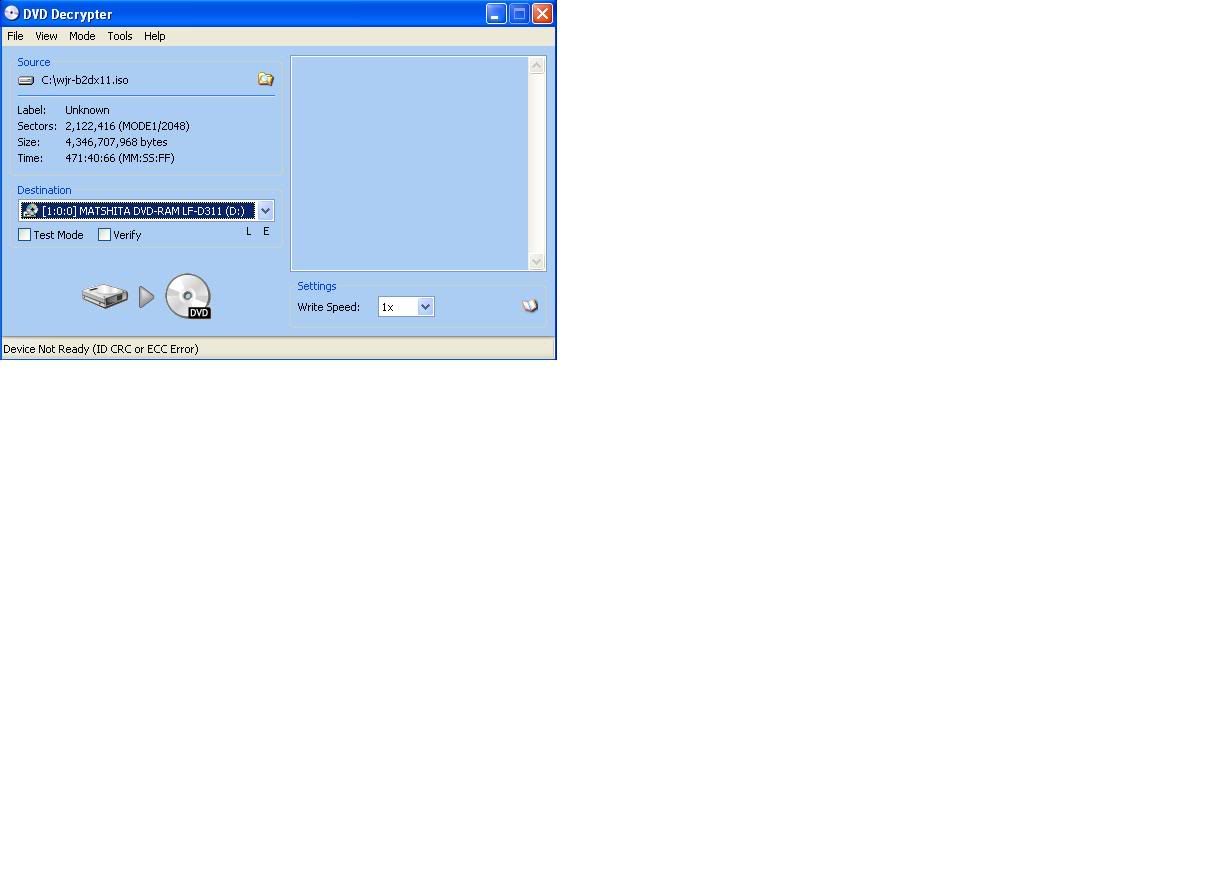
Here you go.
|
|
s2god
Member
|
22. June 2006 @ 06:45 |
Link to this message
|
|
Make sure its on .iso write, not read. That error has to do with a read error. It may be a bad file if you downloaded it, and if you created the image from an original disc, then try re-making the image again. That error means it can read something.
This message has been edited since posting. Last time this message was edited on 22. June 2006 @ 07:49
|
|
noobers
Suspended due to non-functional email address
|
22. June 2006 @ 08:20 |
Link to this message

|
|
it means his drive is not detected or there is no media in it. :/
AMD Athlon 64 3000+ @ 2.6ghz
NEC DVD RW 3540A
1024MB Corsair
80GB WD s-ata/2x 40gb ata
MSI 6600gt 128mb AGP
600w Ultra PSU
PS2 v7 Swap Magic 3.6 40gb HDD/Taiyo Yuden 8x DVD-R
Gamecube Qoob Pro/Icedcube case
|
AfterDawn Addict
|
22. June 2006 @ 09:27 |
Link to this message
|
|
for some reason it is not being able to read the blank DVD
Could just be crappy media
could be that your DVD burner is going bad or the laser leeds cleaning/alignment.
My old Sony started doing that after about 2yrs of burning. It would read some discs just fine, and others it gave me that same problem of never finding the media and lighting up the decrypt button.
|
|
lvlarc_uk
Junior Member
|
22. June 2006 @ 09:28 |
Link to this message
|
Yeh not recognising drive for some reason.....try going into device manager, right click on the dvd drive and see if it says this device is working properly. Have you got 2 DVD Drives? You could try checking if DMA is available, properties of IDE Channels. If that don't work try updating drivers or DVD Drive, or reinstalling it.

This message has been edited since posting. Last time this message was edited on 22. June 2006 @ 09:30
|
|
RedStyle
Newbie
|
23. June 2006 @ 02:09 |
Link to this message
|
|
Hello, sorry for the late reply.
Ok, here's what I got...
I used my friend's computer to make a backup copy and it worked perfectly, so it's not the disc, it's the drive itself.
Now, how would I go about uninstalling and reinstalling this?
Also, where can I find the latest WinXP drivers for my DVD drive?
|
AfterDawn Addict
|
23. June 2006 @ 02:32 |
Link to this message
|
|
Just adding to what steimy was saying, all optical drives have a certain livespan, so that COULD be a problem.
Also, have you tried updating your firmware??
|
AfterDawn Addict
|
23. June 2006 @ 04:01 |
Link to this message
|
yes, i would try them from basic to more advanced.
1. clean the laser with a cleaning disc, it may be hard to find on ethat fits right. Mine i git for Xbox and it works
2. look into updated firmware
http://forum.rpc1.org/portal.php
3. check your computer to see if there is any error with the drive
a.Start->control Panel->System
b.Hardware->Device Manager->CD/DVD-Rom Drives (click on the + )
c.highlight the DVD drive and highlight it, then right click on it for all of your options like going into properties, updating drivers and so on.
Usually if it is not working correctly it will have a yellow "!" sign over the device.
4. if neither of those works you can uninstall it and then try to reinstall it. Go into your control panel and use the add/remove hardware feature.
Other than that i would say replace it. A nice BenQ DW1655 only runs about $50 at Newegg.com and is a great burner.
|
|
Advertisement
|
|
|
Member
|
23. June 2006 @ 09:02 |
Link to this message
|
This is just a suggestion. I use DVD Decrypter in the iso read/write modes as well, but sometimes I end up using Alcohol 120%. It's a very easy to use program and you might have some luck with that. It's worth a shot if you don't know what to do next.
|


