User User name Password  
   
Thursday 26.2.2026 / 13:19
Search AfterDawn Forums:        In English   Suomeksi   På svenska
afterdawn.com > forums > software specific discussion > nero discussion > nerovision video capture problems
Show topics
 
Forums
Forums
Nerovision video capture problems
  Jump to:
 
Posted Message
Sara82
Junior Member
_
22. June 2006 @ 22:05 _ Link to this message    Send private message to this user   
Hi I am new to trying to capture video from a camcorder and am having some problems. I am attaching a canon v40 hi8 with the kind of wires that have red, yellow and white heads. I open nerovision and it says that my capture device is a Medion BDA analog capture and below that is a black screen which is where the video should be. Beneath that it says channel 4 and beneath that it says that no signal is detected and that recording is disabled. I have also tried to capture using windows movie maker and receive unspecified errors and using powercinema I can only record a black screen. Any help would be appreciated as I dont know where to start and know nothing about video cards and things like that.
Thanks for your time.
Advertisement
_
__
AfterDawn Addict
_
22. June 2006 @ 22:33 _ Link to this message    Send private message to this user   
If you are using NeroVision you will get a screen like this


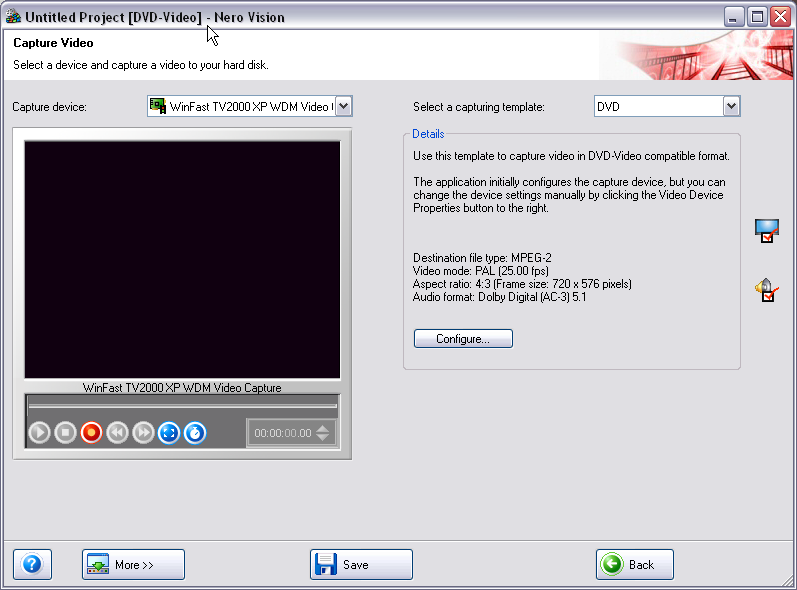
Once you click on Capture Video you will get this screen


Have your Video camera running and you will see the bottom circle in red, hit record and it should start Recording to your disc.


guide by ScubaPete http://www.dvdplusvideo.com/tutorial007.html Nero guide by alkohol http://www.dvdplusvideo.com/Guides/alkohol_guide3.html

New RipIt4Me + DVD Shrink + ImgBurn guid <==== Rip any DVDs http://forums.afterdawn.com/thread_view.cfm/422740 Guides by bbmayo..... http://webpages.charter.net/bacitup/
Sara82
Junior Member
_
22. June 2006 @ 22:43 _ Link to this message    Send private message to this user   
Thank you for the quick reply. I do have my camera on play but the circle is not red in Nero. I did notice from your screenshot that the little audio icon on the right is usually greyed out for me. Could it be the audio causing the problems? But I suppose even if it was the audio the video would still show up wouldn't it? Thanks again for your time
AfterDawn Addict
_
22. June 2006 @ 22:49 _ Link to this message    Send private message to this user   
You will see at the bottom of the 2nd screen shot it says
Recording Disabled: No signal detected

Does yours show this.

When the signal is detected it will show the Record light in Red and the 2 buttons on the right in Blue.


guide by ScubaPete http://www.dvdplusvideo.com/tutorial007.html Nero guide by alkohol http://www.dvdplusvideo.com/Guides/alkohol_guide3.html

New RipIt4Me + DVD Shrink + ImgBurn guid <==== Rip any DVDs http://forums.afterdawn.com/thread_view.cfm/422740 Guides by bbmayo..... http://webpages.charter.net/bacitup/

This message has been edited since posting. Last time this message was edited on 22. June 2006 @ 22:53

Advertisement
_
__
 
_
Sara82
Junior Member
_
22. June 2006 @ 23:08 _ Link to this message    Send private message to this user   
Thanks for replying again. I do get the message about there being no signal and recording being disabled, and all the buttons are greyed out. The only icon which isn't greyed out is the tv icon on the right hand side. I dont know if its relavent but I can receive tv channels on my computer, and when I messed with the configuration I managed to get tv channels on the nerovision screen. Thanks again
afterdawn.com > forums > software specific discussion > nero discussion > nerovision video capture problems
 

Digital video: AfterDawn.com | AfterDawn Forums
Music: MP3Lizard.com
Gaming: Blasteroids.com | Blasteroids Forums | Compare game prices
Software: Software downloads
Blogs: User profile pages
RSS feeds: AfterDawn.com News | Software updates | AfterDawn Forums
International: AfterDawn in Finnish | AfterDawn in Swedish | AfterDawn in Norwegian | download.fi
Navigate: Search | Site map
About us: About AfterDawn Ltd | Advertise on our sites | Rules, Restrictions, Legal disclaimer & Privacy policy
Contact us: Send feedback | Contact our media sales team
 
  © 1999-2026 by AfterDawn Ltd.

  IDG TechNetwork