I was hoping someone could help me out. I have downloaded Nero 7 Demo and it wiped out my previous Nero on installation, which is not the issue. The issue is that, unlike previous Nero, new demo version won't allow me to burn ANYTHING in DVD-R because it keeps trying to use a temp folder on a part of my partitioned drive ("C" drive) that doesn't have enough space to accomodate the temp files needed in the recording process.
I have the program installed in a section of my drive ("F" drive) that has more than enough space (Gigs of space) to hold the temp files, but for some reason the program refuses to put the temp files anywhere but "C" during the attempted recording.
How do I fix this? My previous Nero used my "F" drive for the temp files but I installed it so many years ago I can't remember how I allocated it to do so. I have unistalled and re-installed three times now and am at wit's end. Nowhere can I find the option that lets me assign where these temp files should be stored during conversion, and I can find no similar information on either Nero's site, nor here. I am hoping someone can please help me. It is probably something so incredibly easy that a child can figure it out, but I, it would seem, can't.
Hi MightPez
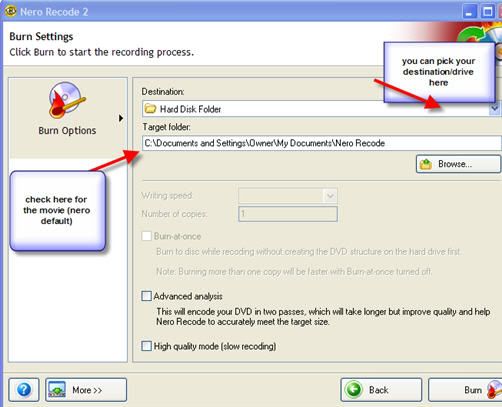
In most Nero apps you can change the destination of the temp folder on the last screen.
Here's a pic of recode but the other apps are similar - either saying 'temporary' or 'target' folder (ignore the burner bit - reusing pic).
In Vision you would go to more>configure>folders. Pick your drive & directories there.
I knew it was something simple. You would not believe how frustrated I was becoming. I tried everything I could think of and then some and STILL couldn't stumble accross the correct setting feature.