|
Cant burn dvds at max speed.
|
|
Senior Member

|
13. July 2006 @ 11:10 |
 Link to this message

|
Hello all,
i have just bought some 16x fujifilm dvds, and i cannot burn them @ 16x, not ever 8x only 4x. I have burned dvds before at 8x with no problems but now i cant.
From what i read on these forums, updating the firmware usually helps but i cant seem to find the firmware for my dvd. If anybody could post a link it would be greatly apprechiated.
-Socom
|
|
Advertisement

|
|
|
|
Moderator
|
13. July 2006 @ 11:52 |
Link to this message
|
|
Senior Member
|
13. July 2006 @ 12:01 |
Link to this message
|
|
actually no i dont have an hp pc. I built my pc and got this drive a while ago from BestBuy. Can i still use that firmware you sent me a link to?
Thanks
-Socom
|
Moderator
|
13. July 2006 @ 12:27 |
Link to this message

|
|
Well now I'm confused everything I find on this drive points to hp.
When you bought the drive what was the brand & model #.
|
Senior Member
|
13. July 2006 @ 12:56 |
Link to this message
|
|
i cant remember or find the box of it i remember it was in some Dynex box even though it was an lg burner, maybe extra from HP computers so they sell it like that? Is there any other info i can provide without having the box?
Once again thanks for help so far.
|
Moderator
|
13. July 2006 @ 13:14 |
Link to this message

|
|
Senior Member
|
13. July 2006 @ 13:26 |
Link to this message
|
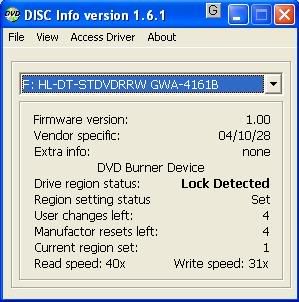
Here is a screen shot
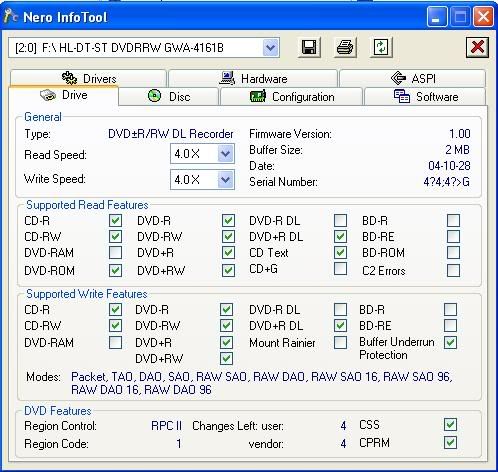
|
Moderator
|
13. July 2006 @ 13:41 |
Link to this message
|
|
Senior Member
|
13. July 2006 @ 15:05 |
Link to this message
|
Well i have swapped it with a dvd drive in another computer, and now the max speed is 8x. So im wondering if this drive can burn at 16x at all? Does it too need a firmware upgrade?
Here is a screen shot of it.
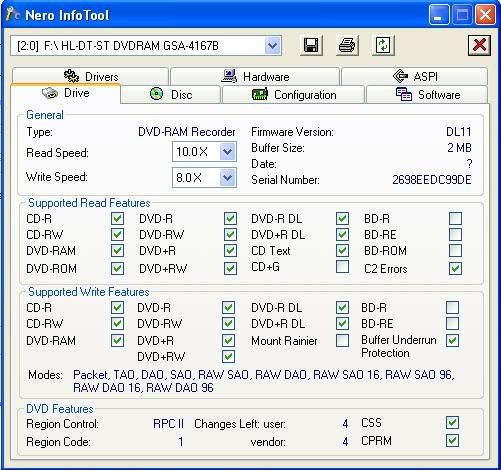
Thanks
- Socom
|
Moderator
|
13. July 2006 @ 15:29 |
Link to this message
|
|
This is weird SOCOMII
In this other pc the drive shows as a totally different one. I just checked the specs on this new one listed and they are different from the previous one.
Biggest difference is the ram writing support and different firmware version.
This is the same drive?
editted to add: check the make & model in device manager too.
This message has been edited since posting. Last time this message was edited on 13. July 2006 @ 15:31
|
Senior Member
|
13. July 2006 @ 15:34 |
Link to this message
|
|
no what i meant is that i put another dvd drive into the same computer, and now i can burn 8x but not 16x. Also which of the two drives would you recommend i use (which on is better)
Thanks
- Socom
|
Moderator
|
13. July 2006 @ 15:47 |
Link to this message
|
Sorry about that - I totally misread that one :0)
Either one is probably ok - both LG drives - the 2nd is a little newer I think & I can find an actually firmware update for it.
The latest firmware for the 2nd drive is DL13. You can find it here:
http://us.lgservice.com/
or here:
http://forum.rpc1.org/dl_firmware.php?download_id=2126
Updte the firmware on this one and check the burn speeds. The Fuji media code for 16x (depending on how actaully manufactured it) may be included in the newer firmware.
Personally though I would burn at 8x. That's what I usually use on 8x & 16x media.
|
Senior Member
|
13. July 2006 @ 16:11 |
Link to this message
|
|
YES upgraded firmware and now i can burn @ 16x. Thank you very much
binkie7 for all of your help.
-Socom
|
Moderator
|
13. July 2006 @ 16:26 |
Link to this message
|
|
No problem Socom
Glad you could read thru my incorrect grammar too :) (need to start proof reading my posts)
Happy burning!
|
Senior Member
|
13. July 2006 @ 18:02 |
Link to this message
|
|
binkie7,
just to let you know i flashed with that hp firmware too and it still only burns @ 4x . O well that other burner works fine, so thanks.
|
Moderator
|
13. July 2006 @ 18:32 |
Link to this message
|
|
Dang! Might just be the discs (fuji) not having the media code supported in the firmware.
Next time you buy some new ones like verbatim check the burn speed with that drive. Those I would hope would have the higher speeds listed.
|
Senior Member
|
13. July 2006 @ 18:37 |
Link to this message
|
|
yup im going to bestbuy tomorrow to see if i can exchange them for some other dvds. Unforchunatley there is no verbatim in Canadian bestbuys so i will have to get some other brand.
|
Moderator
|
13. July 2006 @ 18:48 |
Link to this message
|
That sucks. Look for the made Japan only Fuji (unless the ones you're using are mij) or Sony.
You can also check who actually manufactured the disc in Nero Info Tool also. Just put a blank in and check the 'disc' tab - will list the manufacturer and supported burn speeds.
|
Senior Member
|
13. July 2006 @ 19:12 |
Link to this message
|
|
Moderator
|
13. July 2006 @ 19:37 |
Link to this message
|
They were probably made by Ritek or Prodisc - decent.
The maxells +R 8x you link to - look again for made in Japan - those should be made by Maxell themselves and they are good. The others (mit) would probably be made by Ritek or Ricoh - decent again.
Best Buy will probably give you your $ back.
I need to find you a CA site to buy Taiyo or Verbatim! Cut the quess work out.
editted to add: How about futureshop for Verbs - 100 for 29.99 right now.
http://www.futureshop.ca/search/searchresult.asp?logon=&langid=EN...
This message has been edited since posting. Last time this message was edited on 13. July 2006 @ 19:47
|
Senior Member
|
13. July 2006 @ 20:05 |
Link to this message
|
wow that looks like a great price, do you think it will work on my burner to burn at 16x, i have read on that one page you linked to that many people have problems with 16x media.
Quote:
All LG OEM products are built to spec. so that Windows XP should be able to assign the appropriate generic driver. It obviously fails badly at this, since people get burn rates of 4x instead of the 16x the drive is capable of.
|
Moderator
|
13. July 2006 @ 20:19 |
Link to this message
|
|
Maybe - but the speed thing is mainly due to firmware than the windows driver which just handles the drive itself. So this poster is confusing too different things. Yes windows will assignthe appropriate driver but windows is not supplying the firmware (make sense?) The manufacturer of the drive updates that.
The firmware updates the media codes with the correct write strategy and assoc. speeds.
Still may what to try them - good media.
editted to add: the hp fimrware update was very recent so it should help on these.
This message has been edited since posting. Last time this message was edited on 13. July 2006 @ 20:20
|
Senior Member
|
14. July 2006 @ 05:54 |
Link to this message
|
|
I understand what you are saying, i will probably get the maxell for now i think, because i have had them before and they should work + future shop is a long way from my house, but will get good quality media from an online store, i was thinkning of trying TY or something like that, but not sure where to get them in canada.
- Socom
|
Moderator
|
14. July 2006 @ 14:30 |
Link to this message
|
|
If i come across a good online site in Canada I'll let you know.
Might want to check the media forum and see if anything there about buying Taiyo's onlune in Canada.
Taiyo is my fav - use them most of the time.
|
|
Advertisement
|
|
|
Senior Member
|
14. July 2006 @ 17:59 |
Link to this message
|
|
Ok, I bought the maxell dvds, when i get low on them i will look around to buy some TY, im guessing they dont sell them in any stores, just online?
-Socom
|



