|
Can't make DVD from vieo camera
|
|
|
allatpen
Newbie

|
13. July 2006 @ 23:16 |
 Link to this message

|
Hi.
First time on here. This question has probably been asked many times before but here goes anyhow:
Made a video with my Sony digital video camera. I wonloaded it using Imagemixer which came with the camera.
It's now saved on my pc as a Windows Media File. I'd like to make a dvd to play on a standard dvd player. However, when I attempt to add this file to Nero for burning I get:
"No Compatible File Found"
How can I do what I want?
Many thanks.
Allan
|
|
Advertisement
|
 |
|
|
Member
1 product review
|
14. July 2006 @ 01:43 |
Link to this message

|
i would guess you are trying to use Nero burning rom what you need to do is follow alkohols guide at top of Nero page to convert to dvd
|
AfterDawn Addict
|
14. July 2006 @ 01:59 |
Link to this message
|
The guide produced by alkohol is for converting AVI files to DVD using NeroVision.
|
Member
1 product review
|
14. July 2006 @ 02:04 |
Link to this message
|
|
sorry i thought it would convert the wmf just the same
|
AfterDawn Addict
|
14. July 2006 @ 02:19 |
Link to this message
|
After you have connected your video camera to your computer, open NeroVision, Select Capture Video

This screen will appear, here you configure

Once configured, click next and you will get this screen, with the record button in RED
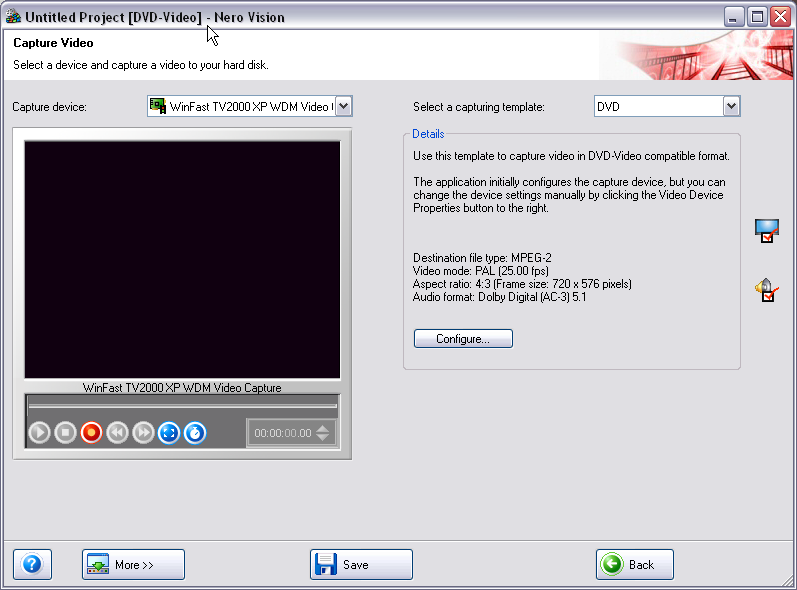
Click record and then just follow through to burn stage.
After making this guide I re read your post, now I see you have already d/l to HD....maybe you could try alkohols guide, you might use this next time
@tommy6, My sincere apologies, I didnt read thread correctly.
This message has been edited since posting. Last time this message was edited on 14. July 2006 @ 02:23
|
|
allatpen
Newbie
|
15. July 2006 @ 06:24 |
Link to this message
|
I've gone to the top of the Nero page, using your link, and I can't find ANYTHING that relates to what you're talking about.
And who or what is alkohol?
Incidentally, I haven't a clue which version of Nero I have. Do these writers deliberately make it difficult to find this out? Whenever I try to open the help function I get an internet link, which is gobbledygook to me.
Thanks again.
Allan
|
AfterDawn Addict
|
15. July 2006 @ 14:14 |
Link to this message
|
This message has been edited since posting. Last time this message was edited on 15. July 2006 @ 14:15
|
|
allatpen
Newbie
|
15. July 2006 @ 15:29 |
Link to this message
|
Thanks for the info.
I managed to find the version I have,, it's 6.6.
You're right, that doesan't work in my case, I don't seem to have Nero Vision.
So how CAN I burn my camera vid to DVD?
Allan
|
|
Saltgrass
Senior Member
|
15. July 2006 @ 16:10 |
Link to this message
|
Nero 7 v7.10.1.0
P4 2.4GHz 1 Gig RAM
NEC ND3550A DVD Burner
|
AfterDawn Addict
|
15. July 2006 @ 16:32 |
Link to this message
|
|
|
Advertisement
|
|
|
|
Rasdock
Newbie
|
26. July 2006 @ 23:06 |
Link to this message
|
I'm glad to see this recent thread about capturing with Nero, because I'm having a bit of an issue with it, and I hope someone can help. I have a really old videotape that's in pretty bad shape, and I want to transfer it to DVD in order to preserve it. The results won't be pretty, but I want to at least give it a try. I've actually been able to use Nero just fine to record it, with full sound and everything, but the problem is that it will not record completely through. See, Nero needs to sense a video feed to continue recording, and there are small jumps in the video that Nero sees as the recording ending. These are tiny gaps that are hardly noticed in playback, but it still stops the recording process. If there was only a way to tell Nero to keep recording until I tell it to stop, it would be fine, but I haven't found anything like that. Is there something like that I'm overlooking? I also have ATI's Multimedia Center with its recording capabilities, but everything comes out jerky there. Nero would be absolutely perfect if not for this issue.
|



