|
xbox compatible option missing in Burning ROM
|
|
|
stevemit
Newbie

|
22. July 2006 @ 05:44 |
 Link to this message

|
|
I just download the latest version, and I'm looking for the xbox compatible option on the UDF tab, but it's not there. I have un-installed, re-installed, still not there. Thinking it was a software conflict I uninstalled Movie factory 5, cleaned the registry, etc...no luck. Any ideas what's going on? Thanks in advance.
steve
|
|
Advertisement

|
|
|
|
|
DegenX
Member
|
22. July 2006 @ 12:11 |
Link to this message

|
This message has been edited since posting. Last time this message was edited on 22. July 2006 @ 12:17
|
Moderator
|
22. July 2006 @ 13:22 |
Link to this message
|
|
@stevemit
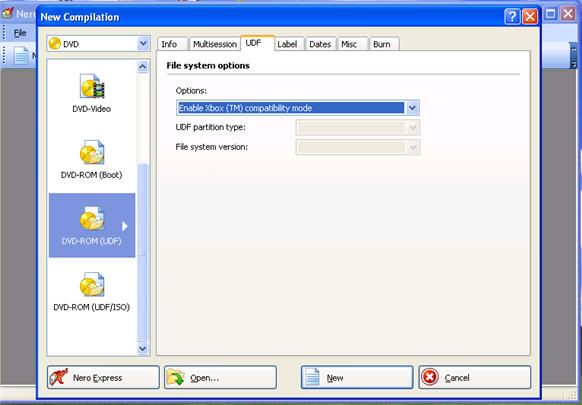
That option is in a different place w/ 7. Still the same tab but no longer a check box. It's under options as 'enable xbox compatibilty mode'
|
|
stevemit
Newbie
|
22. July 2006 @ 14:14 |
Link to this message
|
|
ok, uninstalled, ran the clean tools, re-installed. under the UDF tab/options I see a drop-down:
"automatic settings (recommended)
"manual settings (advanced users)
thats it.
clicking manual i get drop-down options for
partition: -physical/virtual/sparable
UDF file system: (can choose 1.0-2.6)
that's it.
|
Moderator
|
22. July 2006 @ 14:43 |
Link to this message

|
Okay that weird - which version of Nero are you using?
Here's what I see w/ 7.2.3.2b - cd and dvd options show the same thing.
|
|
stevemit
Newbie
|
22. July 2006 @ 14:53 |
Link to this message
|
|
i had the latest version (7.2.3.2) and that option was not there. So I installed 7.2.0.2. Still not there. The only 2 options are automatic & manual settings.
|
Moderator
|
22. July 2006 @ 15:09 |
Link to this message
|
|
Is this a demo by chance?
|
|
stevemit
Newbie
|
22. July 2006 @ 15:12 |
Link to this message
|
|
nope. purchased online.
|
Moderator
|
22. July 2006 @ 15:18 |
Link to this message
|
|
AfterDawn Addict
|
22. July 2006 @ 15:47 |
Link to this message
|
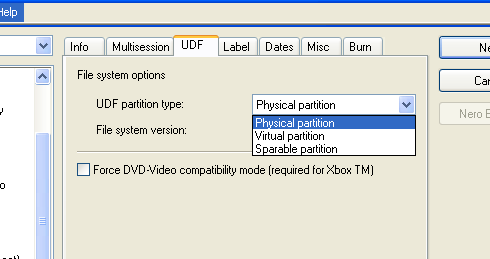
Try uninstalling and running the clean tools again, from what you are saying this screen sounds more like Nero 6 than 7.
|
|
stevemit
Newbie
|
22. July 2006 @ 16:25 |
Link to this message
|
just downloaded this version (7.2.3.2) and this is the UDF tab:

|
Moderator
|
23. July 2006 @ 12:40 |
Link to this message
|
|
@stevemit
Still at a loss on this - I have that option in that version.
The only thing I can add is I downloaded it from Nero's site (you did too) but I only installed the following apps for Nero:
Burning Rom, Express, Vision, BackItUp, WaveEditor, ShowTime, Recode & ImageDrive. Disabled Scout too.
That shouldn't make a diff though - the option should still be there.
If you get it solved - let us know.
|
|
stevemit
Newbie
|
23. July 2006 @ 12:59 |
Link to this message
|
thanks I will. I contact Nero support late Friday night and expect to hear back from Monday morning. Think I'll charge THEM $1.29 a minute for all the time I have spent on this.
|
Moderator
|
23. July 2006 @ 13:19 |
Link to this message
|
|
LOL
Your aggravation over 1 option should be worth more than $1.29 a min imo:)
Let us know what they say - besides my curiosity it may also help someone else out w/ the same problem.
|
|
stevemit
Newbie
|
24. July 2006 @ 08:38 |
Link to this message
|
|
Had not heard from them so I called them back...and was on hold...when I figured it out!
To enable this option you click "no multisession" on the multisession tab.
Yee haw.
|
|
Advertisement
|
|
|
Moderator
|
24. July 2006 @ 17:35 |
Link to this message
|
|
Hey stevemit
Takes for posting that tip back!
Yep checked mine - default was no multisession - checked a multisession option and the xbox option was gone :)
|




