I hav downloaded Devhook0.44 to my kids Psp copied an game across to the iso on the psp menu. i then go to the games menu where it shows me devhook0.44 launcher, i selectr with x button get a very nice beep then the screen goes black with the words can't load/start devhook in the top left corner. How do i play these firkin games, this things sending me bonkers. Help please
make sure you have the settings correct
my settings were
- UMD select (i chose the iso file)
- UMD mount ( i chose ISO ANYUMD)
- UMD verion ( i chose 2.xx ->2.00)
- Firmware ( i chose 2.5)
- CPU clock ( 2.22)
- BOOT select ( i chose reboot xmb)
if you havent installed a firmware emulation check my sig, itll help.
Where and how can i find the settings to change. All this is double dutch to me. My kids thought it was a good idea to buy them and dump them in my lap to sort. Thanks for this help.
I cant get it to load it keeps coming up with that black screen saying 'Cant load/start devhook' any ideas on that?? Sorry about pasting message twice, new to this site.
Now unzip and install PSPBREW
Also unzip the firmware files
Open up PSPBREW and load up the 2.0 FW EBOOT
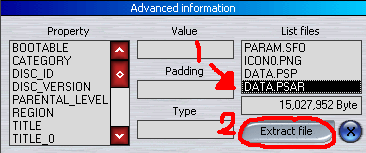
At the bottom of PSPBREW you will see a list at the bottom of this is DATA.PSAR
Select that and click extract
Heres a pic, by PSPMeep
Extract the file onto the root directory of your PSP
i.e
x://DATA.PSAR
Now go onto your PSP and back to your Memory stick, and select the white one Devicehook Firmware Installer
It will detect the date and ask you to extract it, hit extract
Now do the same for the 2.5 eboot ? extract it ? overwrite the old 2.0 one ? and install with devicehook firmware installer.
You can now delete the DATA.PSAR file from your memory stick. And your done.
not that thick, ive seen worse. You need to install firmware to emulate your psp. I makes the psp think its 2.6 but it stays 1.5. read my last post to install it, then select 2.5 as your firmware in dev hook and viola.
I got to this bit then its all gone wrong again;
Now go onto your PSP and back to your Memory stick, and select the white one Devicehook Firmware Installer
It will detect the date and ask you to extract it, hit extract
Now do the same for the 2.5 eboot ? extract it ? overwrite the old 2.0 one ? and install with devicehook firmware installer.
You can now delete the DATA.PSAR file from your memory stick. And your done.
When it gets to the memory stick bit it comes up with devicehook and a picture of UMD disc above it, then its back to lovely beep and black screen, same message.
getting there slowly and hopefully surely.
Just downloaded that last one. trying virtua tennis, but tried loads others. Keep your eyes out on ebay cause thats where these buggars wil b ending up if they dont work soon.
Just off to bed now before these things send me even more crackers. Thanks for all your help and catch up with you on here soon. If you get any ideas just post them on this thread for me, ill keep it open, cheers again iPirate.